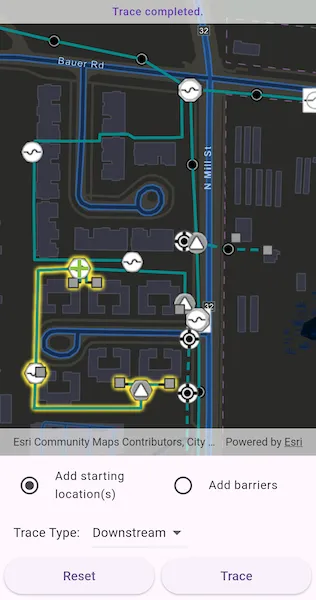
Discover connected features in a utility network using connected, subnetwork, upstream, and downstream traces.
Use case
You can use a trace to visualize and validate the network topology of a utility network for quality assurance. Subnetwork traces are used for validating whether subnetworks, such as circuits or zones, are defined or edited appropriately.
How to use the sample
Tap on one or more features while ‘Add starting locations’ or ‘Add barriers’ is selected. When a junction feature is identified, you may be prompted to select a terminal. When an edge feature is identified, the distance from the tapped location to the beginning of the edge feature will be computed. Select the type of trace using the drop down menu. Tap ‘Trace’ to initiate a trace on the network. Tap ‘Reset’ to clear the trace parameters and start over.
How it works
- Create an
ArcGISMapViewand listen foronTapevent. - Create an
ArcGISMapwith the given portal item, and set the map to the ArcGISMapView. - Get the only
UtilityNetworkfrom the map. - Get and load the
ServiceGeodatabaseassociated with the utility network. - Get the
FeatureLayer(s) created from theServiceGeodatabase’s tables. - Add a
GraphicsOverlaywith symbology that distinguishes starting locations from barriers. - Identify features on the map and add a
Graphicthat represents its purpose (starting location or barrier) at the tapped location. - Create a
UtilityElementfor the identified feature. - Determine the type of this element using its
UtilityNetworkSource.SourceTypeproperty. - If the element is a junction with more than one terminal, display a terminal picker. Then set the junction’s
UtilityTerminalproperty with the selected terminal. - If an edge, set its
fractionAlongEdgeproperty usingGeometryEngine.fractionAlong. - Add this
UtilityElementto a collection of starting locations or barriers. - Create
UtilityTraceParameterswith the selected trace type along with the collected starting locations and barriers (if applicable). - Set the
UtilityTraceParameters.TraceConfigurationwith the tier’sUtilityTier.getDefaultTraceConfiguration()result. - Run a
UtilityNetwork.trace()with the specified parameters. - For every
FeatureLayerin the map, select the features returned withgetFeaturesForElementsfrom the elements matching theirUtilityNetworkSource.FeatureTablewith the layer’sFeatureTable.
Relevant API
- GeometryEngine.fractionAlong
- ServiceGeodatabase
- UtilityAssetType
- UtilityDomainNetwork
- UtilityElement
- UtilityElementTraceResult
- UtilityNetwork
- UtilityNetworkDefinition
- UtilityNetworkSource
- UtilityTerminal
- UtilityTier
- UtilityTraceConfiguration
- UtilityTraceParameters
- UtilityTraceResult
- UtilityTraceType
- UtilityTraversability
About the data
The Naperville electrical network feature service contains a utility network used to run the subnetwork-based trace shown in this sample. Authentication is required and handled within the sample code.
Additional information
Using utility network on ArcGIS Enterprise 10.8 requires an ArcGIS Enterprise member account licensed with the Utility Network user type extension. Please refer to the utility network services documentation.
Tags
condition barriers, downstream trace, network analysis, subnetwork trace, toolkit, trace configuration, traversability, upstream trace, utility network, validate consistency
Sample code
//// Copyright 2025 Esri//// Licensed under the Apache License, Version 2.0 (the "License");// you may not use this file except in compliance with the License.// You may obtain a copy of the License at//// https://www.apache.org/licenses/LICENSE-2.0//// Unless required by applicable law or agreed to in writing, software// distributed under the License is distributed on an "AS IS" BASIS,// WITHOUT WARRANTIES OR CONDITIONS OF ANY KIND, either express or implied.// See the License for the specific language governing permissions and// limitations under the License.//
import 'package:arcgis_maps/arcgis_maps.dart';import 'package:arcgis_maps_sdk_flutter_samples/common/common.dart';import 'package:arcgis_maps_sdk_flutter_samples/common/token_challenger_handler.dart';import 'package:flutter/material.dart';
class TraceUtilityNetwork extends StatefulWidget { const TraceUtilityNetwork({super.key});
@override State<TraceUtilityNetwork> createState() => _TraceUtilityNetworkState();}
class _TraceUtilityNetworkState extends State<TraceUtilityNetwork> with SampleStateSupport { // Create a controller for the map view. final _mapViewController = ArcGISMapView.createController();
// A flag for when the map view is ready and controls can be used. var _ready = false;
// The message to display to the user. var _message = 'Loading Utility Network...';
// The utility network used for tracing. late UtilityNetwork _utilityNetwork;
// The medium voltage tier used for the electric distribution domain network. UtilityTier? _mediumVoltageTier;
// Create lists for starting locations and barriers. final _startingLocations = <UtilityElement>[]; final _barriers = <UtilityElement>[];
// Graphics overlay for the starting locations and barrier graphics. late GraphicsOverlay _graphicsOverlay;
// Symbols for starting points and barriers. final _startingPointSymbol = SimpleMarkerSymbol( style: SimpleMarkerSymbolStyle.cross, color: Colors.lightGreen, size: 20, ); final _barrierPointSymbol = SimpleMarkerSymbol( style: SimpleMarkerSymbolStyle.x, color: Colors.red, size: 20, );
// The unique value renderer for the electrical distribution layer. late UniqueValueRenderer _electricalDistributionUvr;
// UI state variables. var _isAddingStartingLocations = true; var _selectedTraceType = UtilityTraceType.connected; final _traceTypes = [ UtilityTraceType.connected, UtilityTraceType.subnetwork, UtilityTraceType.upstream, UtilityTraceType.downstream, ];
@override void initState() { super.initState();
// Set up authentication for the sample server. // Note: Never hardcode login information in a production application. // This is done solely for the sake of the sample. ArcGISEnvironment .authenticationManager .arcGISAuthenticationChallengeHandler = TokenChallengeHandler( 'viewer01', 'I68VGU^nMurF', );
_initElectricalDistributionRenderer(); }
@override void dispose() { // Remove the TokenChallengeHandler and erase any credentials that were generated. ArcGISEnvironment .authenticationManager .arcGISAuthenticationChallengeHandler = null; ArcGISEnvironment.authenticationManager.arcGISCredentialStore.removeAll(); super.dispose(); }
@override Widget build(BuildContext context) { return Scaffold( body: SafeArea( top: false, left: false, right: false, child: Stack( children: [ Column( children: [ Expanded( child: ArcGISMapView( controllerProvider: () => _mapViewController, onMapViewReady: _onMapViewReady, onTap: _onTap, ), ), // Control panel. Container( padding: const EdgeInsets.fromLTRB(10, 5, 10, 5), child: Column( children: [ // Add starting locations or barriers radio buttons. Row( children: [ Expanded( child: ListTile( leading: Icon( _isAddingStartingLocations ? Icons.radio_button_checked : Icons.radio_button_unchecked, color: _ready ? null : Colors.grey, ), title: const Text('Add starting location(s)'), dense: true, onTap: _ready ? () => setState( () => _isAddingStartingLocations = true, ) : null, ), ), Expanded( child: ListTile( leading: Icon( !_isAddingStartingLocations ? Icons.radio_button_checked : Icons.radio_button_unchecked, color: _ready ? null : Colors.grey, ), title: const Text('Add barriers'), dense: true, onTap: _ready ? () => setState( () => _isAddingStartingLocations = false, ) : null, ), ), ], ), // Trace type dropdown. Row( children: [ const SizedBox(width: 10), const Text('Trace Type: '), const SizedBox(width: 10), DropdownButton( value: _selectedTraceType, onChanged: (value) => setState( () => _selectedTraceType = value ?? UtilityTraceType.connected, ), items: _traceTypes.map((type) { return DropdownMenuItem( value: type, child: Text( _getTraceTypeName(type), style: Theme.of(context).textTheme.bodyMedium, ), ); }).toList(), ), const SizedBox(width: 10), ], ), // Action Reset and Trace buttons. Row( children: [ Expanded( child: ElevatedButton( onPressed: _ready ? _onReset : null, child: const Text('Reset'), ), ), const SizedBox(width: 8), Expanded( child: ElevatedButton( onPressed: _ready && _startingLocations.isNotEmpty ? _onTrace : null, child: const Text('Trace'), ), ), ], ), const SizedBox(height: 4), ], ), ), ], ), // Loading indicator. LoadingIndicator(visible: !_ready), // Display a banner with instructions at the top. MapBanner(text: _message), ], ), ), ); }
Future<void> _onMapViewReady() async { final portalItem = PortalItem.withPortalAndItemId( portal: Portal( Uri.parse('https://sampleserver7.arcgisonline.com/portal/'), connection: PortalConnection.authenticated, ), itemId: 'be0e4637620a453584118107931f718b', ); // Create a map with a dark vector basemap. final map = ArcGISMap.withItem(portalItem); await map.load();
// Set initial viewpoint in the utility network area. map.initialViewpoint = Viewpoint.fromTargetExtent( Envelope.fromPoints( ArcGISPoint( x: -9813547.35557238, y: 5129980.36635111, spatialReference: SpatialReference.webMercator, ), ArcGISPoint( x: -9813185.0602376, y: 5130215.41254146, spatialReference: SpatialReference.webMercator, ), ), ); // Set the map on the controller. _mapViewController.arcGISMap = map;
// Get the utility network. _utilityNetwork = map.utilityNetworks.first; await _utilityNetwork.load(); // Get the service geodatabase. final serviceGeodatabase = _utilityNetwork.serviceGeodatabase; await serviceGeodatabase?.load();
// Set selection color. _mapViewController.selectionProperties = SelectionProperties( color: Colors.yellow, );
// Get the utility tier used for traces. final electricDistribution = _utilityNetwork.definition!.getDomainNetwork( 'ElectricDistribution', ); _mediumVoltageTier = electricDistribution?.getTier('Medium Voltage Radial');
// Create graphics overlay. _graphicsOverlay = GraphicsOverlay(); _mapViewController.graphicsOverlays.add(_graphicsOverlay);
// Find the electric distribution line with the layer ID 3 and reset its renderer. final table = serviceGeodatabase?.getTable(layerId: 3); if (table != null && table.layer is FeatureLayer) { final layer = table.layer! as FeatureLayer; layer.renderer = _electricalDistributionUvr; }
setState(() { _ready = true; _message = 'Tap on the network lines or points to add a utility element.'; }); }
// Create renderer for line feature layer with different symbols for voltage levels. void _initElectricalDistributionRenderer() { final lowVoltageValue = UniqueValue( description: 'Low voltage', label: 'Low voltage', symbol: SimpleLineSymbol( style: SimpleLineSymbolStyle.dash, color: const Color(0xFF008C8C), // DarkCyan width: 3, ), values: [3], );
final mediumVoltageValue = UniqueValue( description: 'Medium voltage', label: 'Medium voltage', symbol: SimpleLineSymbol( color: const Color(0xFF008C8C), // DarkCyan width: 3, ), values: [5], );
_electricalDistributionUvr = UniqueValueRenderer( fieldNames: ['ASSETGROUP'], uniqueValues: [mediumVoltageValue, lowVoltageValue], ); }
// Callback when the map view is tapped. Future<void> _onTap(Offset localPosition) async { if (!_ready) return;
// Identify the feature to be used. final identifyResults = await _mapViewController.identifyLayers( screenPoint: localPosition, tolerance: 10, ); // Check if there are features identified. if (identifyResults.isEmpty) { _updateHintMessage('No utility element(s) identified.'); } else { final point = _mapViewController.screenToLocation(screen: localPosition); final result = identifyResults.first; if (result.geoElements.isNotEmpty) { final feature = result.geoElements.first as ArcGISFeature; addUtilityElement(feature, point!); } } }
// Identify the utility element associated with the selected feature. void addUtilityElement(ArcGISFeature feature, ArcGISPoint point) { // Get the network source of the identified feature. final networkSource = _utilityNetwork.definition?.networkSources.firstWhere( (source) { return source.featureTable.tableName == feature.featureTable?.tableName; }, ); if (networkSource == null) { _updateHintMessage( 'Selected feature does not contain a Utility Network Source.', ); return; } // Create UtilityElement by its source type. if (networkSource.sourceType == UtilityNetworkSourceType.junction) { // If the source type is a junction. _createJunctionElement(feature, networkSource).ignore(); } else if (networkSource.sourceType == UtilityNetworkSourceType.edge) { // If the source type is an edge. _createEdgeJunctionElement(feature, point); } }
// Add the identified utility element to the starting locations or barriers array. Future<void> _createJunctionElement( ArcGISFeature feature, UtilityNetworkSource source, ) async { // Find the code matching the asset group name in the feature's attributes. final assetGroupCode = feature.attributes['assetgroup'] as int; // Find the network source's UtilityAssetGroup with the matching code. final assetGroup = source.assetGroups.firstWhere( (group) => group.code == assetGroupCode, ); // Find the UtilityAssetType. final assetType = assetGroup.assetTypes.firstWhere( (type) => type.code == feature.attributes['assettype'] as int, ); // Get the list of terminals for the feature. final terminals = assetType.terminalConfiguration?.terminals; if (terminals == null || terminals.isEmpty) { setState(() => _message = 'Error retrieving terminal configuration'); return; } // If there is only one terminal, use it to create a utility element. if (terminals.length == 1) { final element = _utilityNetwork.createElement( arcGISFeature: feature, terminal: terminals.first, ); _addUtilityElement(feature, element, feature.geometry! as ArcGISPoint); // If there is more than one terminal, ask the user to select one. } else { final selectedTerminal = await _showTerminalSelect(terminals); if (selectedTerminal != null) { final element = _utilityNetwork.createElement( arcGISFeature: feature, terminal: selectedTerminal, ); _addUtilityElement(feature, element, feature.geometry! as ArcGISPoint); } } }
// Show a dialog to select a UtilityTerminal. Future<UtilityTerminal?> _showTerminalSelect( List<UtilityTerminal> terminals, ) { return showDialog<UtilityTerminal>( context: context, barrierDismissible: false, builder: (context) { var selectedTerminal = terminals.first;
return StatefulBuilder( builder: (context, setState) { return AlertDialog( title: const Text('Select Terminal'), content: Column( mainAxisSize: MainAxisSize.min, children: [ const Text('Select the terminal for this junction.'), const SizedBox(height: 16), DropdownButton( value: selectedTerminal, onChanged: (value) { setState(() { selectedTerminal = value!; }); }, items: terminals.map((terminal) { return DropdownMenuItem( value: terminal, child: Text(terminal.name), ); }).toList(), ), ], ), actions: [ TextButton( onPressed: () => Navigator.of(context).pop(), child: const Text('Cancel'), ), TextButton( onPressed: () => Navigator.of(context).pop(selectedTerminal), child: const Text('OK'), ), ], ); }, ); }, ); }
// Add the identified utility element to the starting locations or barriers array. void _createEdgeJunctionElement(ArcGISFeature feature, ArcGISPoint point) { // Create a utility element with the identified feature. final element = _utilityNetwork.createElement(arcGISFeature: feature); if (feature.geometry?.geometryType == GeometryType.polyline) { final line = GeometryEngine.removeZ(feature.geometry!) as Polyline; // Compute how far tapped location is along the edge feature. element.fractionAlongEdge = GeometryEngine.fractionAlong( line: line, point: point, tolerance: -1, ); _addUtilityElement(feature, element, point); // Update the hint text. _updateHintMessage( 'Fraction along the edge: ${element.fractionAlongEdge}', ); } }
// Add an element to either the starting locations or barriers array. void _addUtilityElement( ArcGISFeature feature, UtilityElement element, ArcGISPoint mapPoint, ) { final graphicPoint = GeometryEngine.nearestCoordinate( geometry: feature.geometry!, point: mapPoint, )?.coordinate; final graphic = Graphic(geometry: graphicPoint);
if (_isAddingStartingLocations) { // Add the element to the starting locations. _startingLocations.add(element); graphic.symbol = _startingPointSymbol; } else { // Add the element to the barriers. _barriers.add(element); graphic.symbol = _barrierPointSymbol; } _graphicsOverlay.graphics.add(graphic);
_updateHintMessage('Terminal: ${element.terminal?.name}'); }
// Clear up the previous trace result. void _onReset() { setState(() { _message = 'Tap on the network lines or points to add a utility element.'; _selectedTraceType = UtilityTraceType.connected; });
// Clear collections of starting locations and barriers. _startingLocations.clear(); _barriers.clear();
// Clear the map of any locations, barriers, and trace results. _graphicsOverlay.graphics.clear(); // Clear the selections on the feature layers. _mapViewController.arcGISMap?.operationalLayers.forEach((layer) { if (layer is FeatureLayer) { layer.clearSelection(); } }); }
// Trace the utility network and show the network tracing result. Future<void> _onTrace() async { if (_startingLocations.isEmpty) return;
try { setState(() { _ready = false; _message = 'Running ${_getTraceTypeName(_selectedTraceType).toLowerCase()} trace...'; });
// Clear previous selection from the layers. for (final layer in _mapViewController.arcGISMap!.operationalLayers) { if (layer is FeatureLayer) { layer.clearSelection(); } }
// Build trace parameters. final parameters = UtilityTraceParameters( _selectedTraceType, startingLocations: _startingLocations, );
// Add barriers. parameters.barriers.addAll(_barriers);
// Set the trace configuration using the tier from the utility domain network. if (_mediumVoltageTier != null) { parameters.traceConfiguration = _mediumVoltageTier! .getDefaultTraceConfiguration(); }
// Get the trace result from the utility network. final traceResults = await _utilityNetwork.trace(parameters);
if (traceResults.isNotEmpty) { final elementTraceResult = traceResults.first as UtilityElementTraceResult?;
// Check if there are any elements in the result. if (elementTraceResult?.elements.isNotEmpty ?? false) { for (final layer in _mapViewController.arcGISMap!.operationalLayers) { if (layer is FeatureLayer) { final elements = elementTraceResult!.elements .where( (element) => element.networkSource.featureTable == layer.featureTable, ) .toList();
if (elements.isNotEmpty) { final features = await _utilityNetwork.getFeaturesForElements( elements, ); layer.selectFeatures(features); } } } } }
_updateHintMessage('Trace completed.'); } on Exception catch (e) { _updateHintMessage('Trace failed: $e'); } finally { setState(() => _ready = true); } }
// Update the hint message. void _updateHintMessage(String message) { setState(() => _message = message); }
// Get the trace type name. String _getTraceTypeName(UtilityTraceType traceType) { switch (traceType) { case UtilityTraceType.connected: return 'Connected'; case UtilityTraceType.subnetwork: return 'Subnetwork'; case UtilityTraceType.upstream: return 'Upstream'; case UtilityTraceType.downstream: return 'Downstream'; default: return traceType.toString(); } }}