Use the Geometry Editor to edit geometries using utility network connectivity rules.
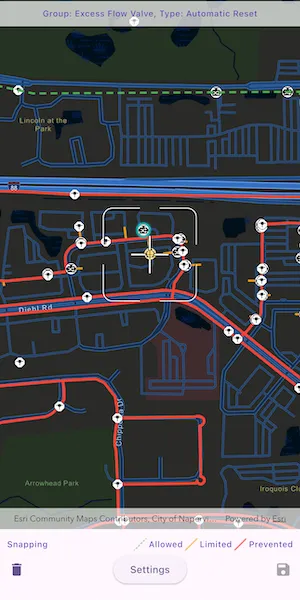
Use case
A field worker can create new features in a utility network by editing and snapping the vertices of a geometry to existing features on a map. In a gas utility network, gas pipeline features can be represented with the polyline geometry type. Utility networks use geometric coincident-based connectivity to provide pathways for resources. Rule-based snapping uses utility network connectivity rules when editing features based on their asset type and asset group to help maintain network connectivity.
How to use the sample
To edit a geometry, tap a point geometry to be edited in the map to select it. Then edit the geometry by tapping the button to start the geometry editor.
Snap sources can be enabled and disabled. Snapping will not occur when SnapRuleBehavior.rulesPreventSnapping even when the source is enabled.
To interactively snap a vertex to a feature or graphic, ensure that snapping is enabled for the relevant snap source, then move the reticle or drag a vertex to nearby an existing feature or graphic. If the existing feature or graphic has valid utility network connectivity rules for the asset type that is being created or edited, the edit position will be adjusted to coincide with (or snap to) edges and vertices of its geometry. Release the touch pointer to place the vertex at the snapped location.
To discard changes and stop the geometry editor, tap the discard button.
To save your edits, tap the save button.
How it works
-
Create a map with
LoadSettings.featureTilingModeset toenabledWithFullResolutionWhenSupported. -
Create a
Geodatabaseusing the mobile geodatabase file location. -
Display
Geodatabase.featureTableson the map using subtype feature layers. -
Create a
GeometryEditorand connect it to the map view. -
When editing a feature:
a. Call
SnapRules.createFromAssetType()to get the snap rules associated with a givenUtilityAssetType.b. Use
syncSourceSettingsUsingRules(SnapRules, SnapSourceEnablingBehavior.setFromRules)to populate theSnapSettings.sourceSettingswithSnapSourceSettingsenabling the sources with rules. -
Start the geometry editor with an existing geometry or
GeometryType.point.
Relevant API
- ArcGISMapView
- FeatureLayer
- Geometry
- GeometryEditor
- GeometryEditorStyle
- GraphicsOverlay
- SnapRuleBehavior
- SnapRules
- SnapSettings
- SnapSource
- SnapSourceEnablingBehavior
- SnapSourceSettings
- UtilityNetwork
About the data
The Naperville gas network mobile geodatabase contains a utility network with a set of connectivity rules that can be used to perform geometry edits with rules based snapping.
Tags
edit, feature, geometry editor, graphics, layers, map, snapping, utility network
Sample code
// Copyright 2025 Esri//// Licensed under the Apache License, Version 2.0 (the "License");// you may not use this file except in compliance with the License.// You may obtain a copy of the License at////   https://www.apache.org/licenses/LICENSE-2.0//// Unless required by applicable law or agreed to in writing, software// distributed under the License is distributed on an "AS IS" BASIS,// WITHOUT WARRANTIES OR CONDITIONS OF ANY KIND, either express or implied.// See the License for the specific language governing permissions and// limitations under the License.//
import 'dart:async';import 'dart:io';import 'dart:typed_data';
import 'package:arcgis_maps/arcgis_maps.dart';import 'package:arcgis_maps_sdk_flutter_samples/common/common.dart';import 'package:flutter/material.dart';import 'package:flutter/scheduler.dart';import 'package:go_router/go_router.dart';
class SnapGeometryEditsWithUtilityNetworkRules extends StatefulWidget {  const SnapGeometryEditsWithUtilityNetworkRules({super.key});
  @override  State<SnapGeometryEditsWithUtilityNetworkRules> createState() =>      _SnapGeometryEditsWithUtilityNetworkRulesState();}
class _SnapGeometryEditsWithUtilityNetworkRulesState    extends State<SnapGeometryEditsWithUtilityNetworkRules>    with SampleStateSupport {  // Create a controller for the map view.  final _mapViewController = ArcGISMapView.createController();  // The geodatabase containing the utility network data.  Geodatabase? _geodatabase;  // The utility network from the geodatabase.  late UtilityNetwork _utilityNetwork;  // A flag for when the map view is ready and controls can be used.  var _ready = false;
  // The currently selected feature and element, if any.  ArcGISFeature? _selectedFeature;  UtilityElement? _selectedElement;  // The Snap Sources of the selected item.  var _snapSources = <SnapSourceItem>[];
  // A flag for whether there are outstanding edits.  var _canUndo = false;  StreamSubscription<bool>? _canUndoSubscription;
  // A flag for when the settings bottom sheet is visible.  var _settingsVisible = false;
  @override  void dispose() {    // Release resources.    _canUndoSubscription?.cancel().ignore();    _geodatabase?.close();
    super.dispose();  }
  @override  Widget build(BuildContext context) {    return Scaffold(      body: Stack(        children: [          SafeArea(            top: false,            left: false,            right: false,            child: Column(              children: [                Expanded(                  // Add a map view to the widget tree and set a controller.                  child: ArcGISMapView(                    controllerProvider: () => _mapViewController,                    onMapViewReady: onMapViewReady,                    onTap: _selectedElement != null ? null : onTap,                  ),                ),                // A legend to explain the representation of the snapping rules.                Padding(                  padding: const EdgeInsets.fromLTRB(10, 10, 10, 0),                  child: Row(                    children: [                      Text(                        'Snapping',                        style: Theme.of(context).textTheme.labelMedium,                      ),                      const Spacer(),                      const SnapSourceSwatch(                        snapRuleBehavior: SnapRuleBehavior.none,                      ),                      Text(                        'Allowed',                        style: Theme.of(context).textTheme.labelMedium,                      ),                      const SnapSourceSwatch(                        snapRuleBehavior: SnapRuleBehavior.rulesLimitSnapping,                      ),                      Text(                        'Limited',                        style: Theme.of(context).textTheme.labelMedium,                      ),                      const SnapSourceSwatch(                        snapRuleBehavior: SnapRuleBehavior.rulesPreventSnapping,                      ),                      Text(                        'Prevented',                        style: Theme.of(context).textTheme.labelMedium,                      ),                    ],                  ),                ),                Row(                  children: [                    // A button to discard edits.                    IconButton(                      icon: const Icon(Icons.delete),                      onPressed: _selectedElement == null ? null : discardEdits,                    ),                    const Spacer(),                    // A button to show the Settings bottom sheet.                    ElevatedButton(                      onPressed: _snapSources.isEmpty                          ? null                          : () => setState(() => _settingsVisible = true),                      child: const Text('Settings'),                    ),                    const Spacer(),                    // A button to save edits.                    IconButton(                      icon: const Icon(Icons.save),                      onPressed: _canUndo ? saveEdits : null,                    ),                  ],                ),              ],            ),          ),          // Display a progress indicator and prevent interaction until state is ready.          LoadingIndicator(visible: !_ready),          // Display a banner with instructions at the top.          MapBanner(            text: _selectedElement == null                ? 'Tap a point feature to edit'                : 'Group: ${_selectedElement!.assetGroup.name}, Type: ${_selectedElement!.assetType.name}',          ),        ],      ),      // The Settings bottom sheet.      bottomSheet: _settingsVisible ? buildSettings(context) : null,    );  }
  // The build method for the Settings bottom sheet.  Widget buildSettings(BuildContext context) {    return BottomSheetSettings(      onCloseIconPressed: () => setState(() => _settingsVisible = false),      // A widget for each snap source to control its enabled state.      settingsWidgets: (context) => [        Row(          children: [            Text(              'Snap Sources',              style: Theme.of(context).textTheme.titleMedium,            ),          ],        ),        ..._snapSources.map(          (source) => SnapSourceWidget(snapSourceItem: source),        ),      ],    );  }
  Future<void> onMapViewReady() async {    // Download the Naperville utility network geodatabase.    final listPaths = GoRouter.of(context).state.extra! as List<String>;    final geodatabaseFile = File(listPaths.first);
    // Configure the map, centered on Naperville, IL.    final map = ArcGISMap.withBasemapStyle(BasemapStyle.arcGISStreetsNight);    map.initialViewpoint = Viewpoint.fromCenter(      ArcGISPoint(        x: -9811055.1560284,        y: 5131792.195025,        spatialReference: SpatialReference.webMercator,      ),      scale: 10000,    );    map.loadSettings.featureTilingMode =        FeatureTilingMode.enabledWithFullResolutionWhenSupported;    _mapViewController.arcGISMap = map;
    // Add a GraphicsOverlay to be used as a snap source.    final graphicsOverlay = GraphicsOverlay()      ..id = 'Graphics'      ..renderer = SimpleRenderer(        symbol: SimpleLineSymbol(          style: SimpleLineSymbolStyle.dash,          color: Colors.grey,          width: 3,        ),      );    final geometry = Geometry.fromJsonString(      '{"paths":[[[-9811826.6810284462,5132074.7700250093],[-9811786.4643617794,5132440.9533583419],[-9811384.2976951133,5132354.1700250087],[-9810372.5310284477,5132360.5200250093],[-9810353.4810284469,5132066.3033583425]]],"spatialReference":{"wkid":102100,"latestWkid":3857}}',    );    graphicsOverlay.graphics.add(Graphic(geometry: geometry));    _mapViewController.graphicsOverlays.add(graphicsOverlay);
    // Load the geodatabase from the downloaded file.    final geodatabase = Geodatabase.withFileUri(geodatabaseFile.uri);    await geodatabase.load();    if (geodatabase.utilityNetworks.isEmpty) {      throw Exception('No utility networks found in geodatabase');    }    _utilityNetwork = geodatabase.utilityNetworks.first;    await _utilityNetwork.load();
    // Create feature layers from the geodatabase tables.    final pipeLayer = SubtypeFeatureLayer.withFeatureTable(      geodatabase.getGeodatabaseFeatureTable(tableName: 'PipelineLine')!,    );    final deviceLayer = SubtypeFeatureLayer.withFeatureTable(      geodatabase.getGeodatabaseFeatureTable(tableName: 'PipelineDevice')!,    );    final junctionLayer = SubtypeFeatureLayer.withFeatureTable(      geodatabase.getGeodatabaseFeatureTable(tableName: 'PipelineJunction')!,    );    _geodatabase = geodatabase;
    // Add the layers to the map and load them.    map.operationalLayers.addAll([pipeLayer, deviceLayer, junctionLayer]);    await Future.wait(map.operationalLayers.map((layer) => layer.load()));
    // Hide unwanted pipe sublayers.    for (final sublayer in pipeLayer.subtypeSublayers) {      switch (sublayer.name) {        case 'Distribution Pipe':        case 'Service Pipe':          sublayer.isVisible = true;        default:          sublayer.isVisible = false;      }    }
    // Hide unwanted device sublayers.    for (final sublayer in deviceLayer.subtypeSublayers) {      switch (sublayer.name) {        case 'Excess Flow Valve':        case 'Controllable Tee':          sublayer.isVisible = true;        default:          sublayer.isVisible = false;      }    }
    // Create and configure the geometry editor.    final geometryEditor = GeometryEditor()      ..snapSettings.isEnabled = true      ..snapSettings.isFeatureSnappingEnabled = true;    final tool = ReticleVertexTool()..style.vertexTextSymbol = null;    geometryEditor.tool = tool;    // Track when the Geometry Editor has unsaved edits.    _canUndoSubscription = geometryEditor.onCanUndoChanged.listen((canUndo) {      setState(() => _canUndo = canUndo);    });    _mapViewController.geometryEditor = geometryEditor;
    // Set the ready state variable to true to enable the sample UI.    setState(() => _ready = true);  }
  Future<void> onTap(Offset localPosition) async {    // Identify the tapped feature.    final identifyLayersResults = await _mapViewController.identifyLayers(      screenPoint: localPosition,      tolerance: 12,    );    if (!mounted) return;
    // Look through the sublayer results for a point feature to edit.    final pointFeatures = identifyLayersResults        .expand((result) => result.sublayerResults)        .expand((result) => result.geoElements)        .whereType<ArcGISFeature>()        .where((feature) => feature.geometry is ArcGISPoint);    if (pointFeatures.isEmpty) return;
    // Select the first point feature found.    final feature = pointFeatures.first;    await selectFeature(feature);  }
  // Clear any existing selection.  void clearSelection() {    if (_selectedFeature == null) return;
    final featureLayer = _selectedFeature!.featureTable?.layer as FeatureLayer?;    if (featureLayer == null) return;
    featureLayer.clearSelection();    featureLayer.resetFeaturesVisible();
    for (final snapSource in _snapSources) {      snapSource.dispose();    }
    setState(() {      _snapSources = [];      _selectedFeature = null;      _selectedElement = null;    });  }
  // Select a feature and start editing its geometry.  Future<void> selectFeature(ArcGISFeature feature) async {    if (!_ready) return;
    clearSelection();
    final featureLayer = feature.featureTable?.layer as FeatureLayer?;    if (featureLayer == null) return;
    // Select this feature in its layer and hide it.    featureLayer.selectFeature(feature);    featureLayer.setFeatureVisible(feature: feature, visible: false);
    // Start editing this feature in the Geometry Editor.    final geometryEditor = _mapViewController.geometryEditor!;    final utilityElement = _utilityNetwork.createElement(      arcGISFeature: feature,    );    final geometry = feature.geometry!;    geometryEditor.startWithGeometry(geometry);    geometryEditor.selectVertex(partIndex: 0, vertexIndex: 0);
    // Use the feature's symbol for the editor's symbols.    final symbol = (feature.featureTable as GeodatabaseFeatureTable?)        ?.layerInfo        ?.drawingInfo        ?.renderer        ?.symbolForFeature(feature: feature);    geometryEditor.tool.style      ..vertexSymbol = symbol      ..feedbackVertexSymbol = symbol      ..selectedVertexSymbol = symbol;
    // Center the map on the feature.    _mapViewController.setViewpointCenter(geometry.extent.center).ignore();
    // Mark this feature as selected.    setState(() {      _selectedFeature = feature;      _selectedElement = utilityElement;    });
    // Get the snapping rules for this asset type.    final snapRules = await SnapRules.createFromAssetType(      utilityNetwork: _utilityNetwork,      assetType: _selectedElement!.assetType,    );
    // Configure the Geometry Editor's snapping settings to use these rules.    geometryEditor.snapSettings.syncSourceSettingsUsingRules(      snapRules,      snapSourceEnablingBehavior: SnapSourceEnablingBehavior.setFromRules,    );    // Additionally, enable snapping to the graphics overlay.    geometryEditor.snapSettings.sourceSettings        .where((settings) => settings.source is GraphicsOverlay)        .forEach((settings) => settings.isEnabled = true);
    // Find the snap sources that we want to control.    final snapSources = <SnapSourceItem>[];    for (final sourceSetting in geometryEditor.snapSettings.sourceSettings) {      if (sourceSetting.source is GraphicsOverlay) {        // Add the graphics overlay snap source.        snapSources.add(SnapSourceItem(sourceSetting));      } else if (sourceSetting.source is SubtypeFeatureLayer) {        // Add particular pipe sublayers as snap sources.        final layer = sourceSetting.source as SubtypeFeatureLayer;        if (layer.featureTable?.tableName == 'PipelineLine') {          for (final sublayer in sourceSetting.childSourceSettings) {            if (sublayer.source is SubtypeSublayer) {              final subtypeSublayer = sublayer.source as SubtypeSublayer;              if (subtypeSublayer.name == 'Distribution Pipe') {                snapSources.add(SnapSourceItem(sublayer));              } else if (subtypeSublayer.name == 'Service Pipe') {                snapSources.add(SnapSourceItem(sublayer));              }            }          }        }      }    }    setState(() => _snapSources = snapSources);  }
  // Stop the Geometry Editor and discard any changes made to the selected feature.  void discardEdits() {    if (!_ready) return;
    _mapViewController.geometryEditor!.stop();
    clearSelection();  }
  // Stop the Geometry Editor and save changes made to the selected feature.  void saveEdits() {    if (!_ready) return;
    final geometry = _mapViewController.geometryEditor!.stop()!;    _selectedFeature!.geometry = geometry;    _selectedFeature!.featureTable!.updateFeature(_selectedFeature!).ignore();
    clearSelection();  }}
// A Snap Source that can be displayed and controlled.class SnapSourceItem {  // Create a Snap Source item from the given settings, applying a renderer based on the snapping rules.  SnapSourceItem(this._snapSourceSettings) {    // The renderer to apply based on the snapping rules behavior.    final guideRenderer = ruleRenderers[_snapSourceSettings.ruleBehavior];
    // Determine the name of the source and store its original renderer.    if (_snapSourceSettings.source is GraphicsOverlay) {      final overlay = _snapSourceSettings.source as GraphicsOverlay;      name = overlay.id;      _originalRenderer = overlay.renderer;      overlay.renderer = guideRenderer;    } else if (_snapSourceSettings.source is SubtypeSublayer) {      final sublayer = _snapSourceSettings.source as SubtypeSublayer;      name = sublayer.name;      _originalRenderer = sublayer.renderer;      sublayer.renderer = guideRenderer;    }
    // Listen for changes to the enabled state and update the settings.    isEnabled.addListener(      () => _snapSourceSettings.isEnabled = isEnabled.value,    );  }
  // Restore the original settings and dispose.  void dispose() {    if (_snapSourceSettings.source is GraphicsOverlay) {      final overlay = _snapSourceSettings.source as GraphicsOverlay;      overlay.renderer = _originalRenderer;    } else if (_snapSourceSettings.source is SubtypeSublayer) {      final sublayer = _snapSourceSettings.source as SubtypeSublayer;      sublayer.renderer = _originalRenderer;    }
    _snapSourceSettings.isEnabled = true;
    isEnabled.dispose();  }
  // The Snap Source Settings being controlled.  final SnapSourceSettings _snapSourceSettings;  // The original renderer of the source, to be restored later.  late final Renderer? _originalRenderer;
  // The name of the source.  late final String name;  // The enabled state of the snap source.  final isEnabled = ValueNotifier<bool>(true);
  // Renderers to apply based on the snapping rules behavior.  static final ruleRenderers = {    SnapRuleBehavior.rulesPreventSnapping: SimpleRenderer(      symbol: SimpleLineSymbol(color: Colors.red, width: 4),    ),    SnapRuleBehavior.rulesLimitSnapping: SimpleRenderer(      symbol: SimpleLineSymbol(color: Colors.orange, width: 3),    ),    SnapRuleBehavior.none: SimpleRenderer(      symbol: SimpleLineSymbol(        style: SimpleLineSymbolStyle.dash,        color: Colors.green,        width: 3,      ),    ),  };}
// A widget to display and control a SnapSourceItem.class SnapSourceWidget extends StatelessWidget {  const SnapSourceWidget({required this.snapSourceItem, super.key});
  // The SnapSourceItem being controlled.  final SnapSourceItem snapSourceItem;
  @override  Widget build(BuildContext context) {    // Listen to changes in the enabled state of the snap source.    return ValueListenableBuilder(      valueListenable: snapSourceItem.isEnabled,      builder: (context, value, child) {        return SwitchListTile(          title: Text(snapSourceItem.name),          value: value,          // Toggle the enabled state of the snap source.          onChanged: (value) => snapSourceItem.isEnabled.value = value,        );      },    );  }}
// A widget to load and display a swatch for a given SnapRuleBehavior.class SnapSourceSwatch extends StatefulWidget {  const SnapSourceSwatch({required this.snapRuleBehavior, super.key});
  // The SnapRuleBehavior to display a swatch for.  final SnapRuleBehavior snapRuleBehavior;
  @override  State<SnapSourceSwatch> createState() => _SnapSourceSwatchState();}
class _SnapSourceSwatchState extends State<SnapSourceSwatch> {  // The width and height of the swatch image, in device-independent pixels.  static const _dimension = 8.0;
  // A Completer that completes when the swatch image is ready.  final _swatchCompleter = Completer<Uint8List>();
  @override  void initState() {    super.initState();
    SchedulerBinding.instance.addPostFrameCallback((_) {      // Get the device pixel ratio after the first frame to ensure it is accurate.      final devicePixelRatio = MediaQuery.devicePixelRatioOf(context);
      // Create a swatch image using the renderer for the given SnapRuleBehavior.      final renderer = SnapSourceItem.ruleRenderers[widget.snapRuleBehavior]!;      renderer.symbol!          .createSwatch(            screenScale: devicePixelRatio,            width: _dimension,            height: _dimension,          )          .then((image) {            // Signal that the swatch image is ready.            _swatchCompleter.complete(image.getEncodedBuffer());          })          .ignore();    });  }
  @override  Widget build(BuildContext context) {    // Use a FutureBuilder to display the swatch image when it is ready.    return FutureBuilder(      future: _swatchCompleter.future,      builder: (context, snapshot) {        if (snapshot.hasData) {          // The swatch image is ready -- display it.          return Image.memory(snapshot.data!);        }
        // Until the image is ready, reserve space to avoid layout changes.        return const SizedBox(width: _dimension, height: _dimension);      },    );  }}