
One of the difficulties with displaying a round earth in two dimensions is that, unlike a 3D representation that provides a continuous surface, a 2D representation must have a start and an end. While the earth must be divided along a line of longitude to “flatten” it for display in two dimensions (usually at 180º east/west longitude), a map in your ArcGIS Maps SDK for Java app can still wraparound the edges to provide a continuous display when panning east or west.
Enable or disable wraparound
By default, a map view
- The map’s spatial reference
A spatial reference is a set of parameters, typically defined by a WKID, that define the coordinate system and spatial properties for geographic data. Applications use a spatial reference to correctly display the position of geographic data in a map or scene. covers the world. It’s common for the full extentAn extent is a bounding rectangle with points that delineate an area for a map or scene. of a wraparound map to cover the world, but it is not required. - The map’s spatial reference
A spatial reference is a set of parameters, typically defined by a WKID, that define the coordinate system and spatial properties for geographic data. Applications use a spatial reference to correctly display the position of geographic data in a map or scene. supports panning horizontally over the antimeridian, indicated by atruevalue for theSpatialReference.isPannable()property. Pannable spatial references include WGS 84 (WKID=4326) and Web Mercator (WKID=102113, 102100, or 3857). All tiled layersA layer is a reference to a collection of geographic data that is used to access and display data. The data for layers are typically provided by the basemap layer service and data services. in the map must also use one of these spatial references. Dynamic layersA dynamic layer is a layer from a map published through a map service whose appearance, such as labeling, layer order, and symbology, can be changed by the client. , however, can be in any spatial reference because they are capable of reprojecting their data. - Dynamic layers in the map are based on services from ArcGIS Server 10.0 or higher. Earlier versions of the REST API do not support well-known text (WKT) values for spatial reference, which is required for making dynamic map services
A dynamic map service is a map that is redrawn by the server each time the user zooms or pans. support wraparound.
If any of these requirements are not met, attempting to enable wraparound will fail silently (without alerting you through an error message).
The following example toggles the current wraparound mode for the map view. Wraparound behavior is disabled if it is currently enabled. If it is disabled, an attempt is made to enable wraparound if it is supported.
// Toggle the wraparound setting for the map view.if (mapView.getWrapAroundMode() == WrapAroundMode.ENABLE_WHEN_SUPPORTED) {    //Disable wraparound if currently enabled.    mapView.setWrapAroundMode(WrapAroundMode.DISABLED);
} else {    // If it's disabled, attempt  to enable wraparound mode.    mapView.setWrapAroundMode(WrapAroundMode.ENABLE_WHEN_SUPPORTED);
    // Check if wraparound is now enabled.    if (!mapView.isWrapAroundEnabled()) {        // If wraparound is not now enabled, it is not supported.        new Alert(Alert.AlertType.ERROR, "Unable to enable wrap around");    }}
Coordinates in wraparound mode
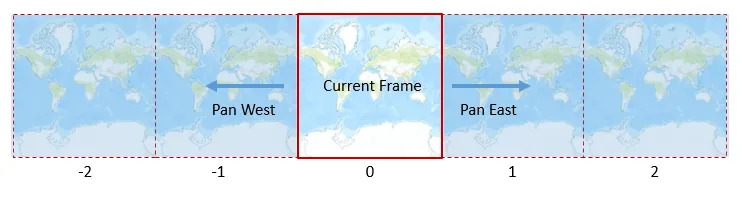
To better understand map navigation with wraparound, visualize a map as being composed of frames. The initial full extent of a wraparound-enabled map is frame 0. Assuming the map is in the WGS 84 coordinate systemx,y) or 3D (x,y,z) space. The meaning of the x,y,z coordinates are determined by a coordinate system.
Adjacent to this frame to the east is frame 1, which extends hypothetically between +180º and +540º longitude. If you pan the map eastwards until you pass 180º, you will be viewing frame 1. Similarly, adjacent to frame 0 to the west is frame -1, which extends hypothetically between -180º and -540º longitude. The series of frames continues infinitely in both directions.
Longitude values (X coordinates) returned from a map may be real: in the range of -180º and +180º (within frame 0 in other words) or they may be hypothetical: less than -180º or greater than +180º (outside of frame 0). Here are some geometries that may contain hypothetical coordinatesx,y) or 3D (x,y,z) space. The meaning of the x,y,z coordinates are determined by a coordinate system.
- The map’s bounding geometry or center point, returned as properties of the
Viewpoint - Point locations on the map, converted from screen coordinates to map coordinates
- Geometries drawn on the display by the user (using
GeometryEditor, for example)
Normalize geometries
The process of converting a geometry
You can normalize geometries using GeometryEngine.normalizeCentralMeridian().
// If wraparound is enabled, normalize the geometry (in case all or part is outside of frame 0).if (mapView.isWrapAroundEnabled()) { extent = GeometryEngine.normalizeCentralMeridian(mapView.getVisibleArea());}