Learn how to find a route and directions with the route service
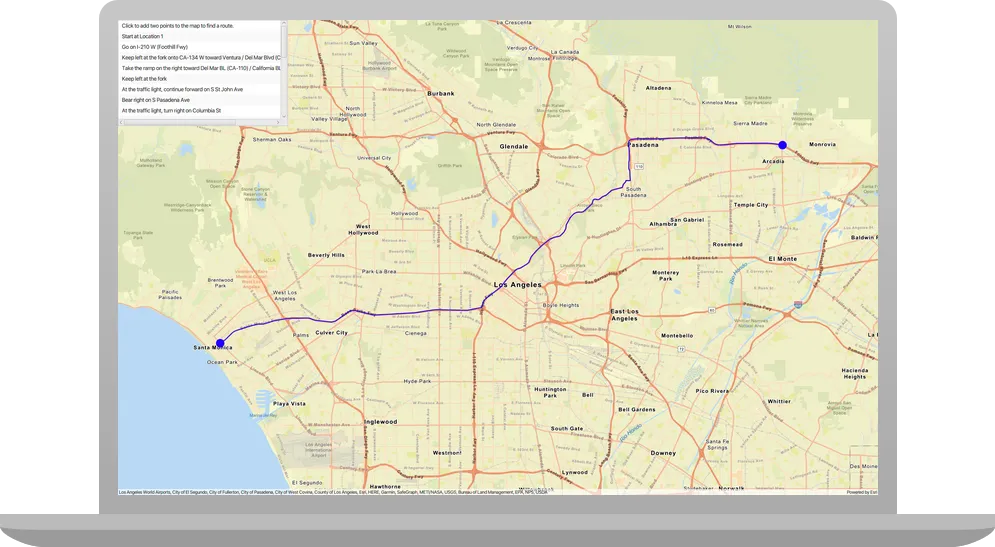
Routing is the process of finding the path from an origin
In this tutorial, you define an origin and destination by clicking on the map. These values are used to get a route and directions from the route service. The directions are also displayed on the map.
Prerequisites
Before starting this tutorial:
-
You need an ArcGIS Location Platform or ArcGIS Online account.
-
Confirm that your system meets the minimum system requirements.
-
An IDE for Java.
Steps
Get an access token
You need an access token
-
Go to the Create an API key tutorial to obtain an access token
An access token is an authorization string that provides access to secure ArcGIS content, data, and services. Its capabilities are determined by the privileges it supports. It is obtained by implementing API key authentication, User authentication, or App authentication. using your ArcGIS Location PlatformAn ArcGIS Location Platform account, formerly known as an ArcGIS Developer account, is an identity associated with an ArcGIS Location Platform subscription. or ArcGIS OnlineAn ArcGIS Online account, also known as an ArcGIS Organization account, is an identity associated with an ArcGIS Online subscription. It can be used to access ArcGIS tools and develop applications with ArcGIS location services for an organization. account. -
Ensure that the following privileges
Privileges are a set of permissions assigned to ArcGIS accounts, developer credentials, and applications that grant access to secure resources and functionality in ArcGIS. are enabled: Location services > Basemaps > Basemap styles service and Location services > Routing. -
Copy the access token as it will be used in the next step.
To learn more about other ways to get an access token, go to Types of authentication.
Open a Java project with Gradle
-
To start this tutorial, complete the Display a map tutorial, or download and unzip the Display a map solution into a new folder.
-
Open the build.gradle file as a project in IntelliJ IDEA.
-
In IntelliJ IDEA’s Project tool window, open src/main/java/com.example.app and double-click App.
-
In the
start()method, set the API key property on theArcGISRuntimeEnvironmentwith your access tokenAn access token is an authorization string that provides access to secure ArcGIS content, data, and services. Its capabilities are determined by the privileges it supports. It is obtained by implementing API key authentication, User authentication, or App authentication. . Replace YOUR_ACCESS_TOKEN with your copied access token. Be sure to surround your access token with double quotes as it is a string.App.javaArcGISRuntimeEnvironment.setApiKey("YOUR_ACCESS_TOKEN");
Add import statements and variable declarations
Add import statements and variable declarations to reference the packages and classes required for this tutorial.
-
In IntelliJ IDEA’s Project tool window, open src/main/java/com.example.app and double-click App.
-
Add the following imports above the existing imports:
App.javaimport com.esri.arcgisruntime.concurrent.ListenableFuture;import com.esri.arcgisruntime.geometry.Geometry;import com.esri.arcgisruntime.mapping.view.Graphic;import com.esri.arcgisruntime.mapping.view.GraphicsOverlay;import com.esri.arcgisruntime.symbology.SimpleLineSymbol;import com.esri.arcgisruntime.symbology.SimpleMarkerSymbol;import com.esri.arcgisruntime.tasks.networkanalysis.Route;import com.esri.arcgisruntime.tasks.networkanalysis.RouteParameters;import com.esri.arcgisruntime.tasks.networkanalysis.RouteResult;import com.esri.arcgisruntime.tasks.networkanalysis.RouteTask;import com.esri.arcgisruntime.tasks.networkanalysis.Stop;import javafx.collections.FXCollections;import javafx.collections.ListChangeListener;import javafx.collections.ObservableList;import javafx.geometry.Point2D;import javafx.geometry.Pos;import javafx.scene.paint.Color;import javafx.scene.control.Alert;import javafx.scene.control.ListView;import javafx.scene.input.MouseButton;import java.util.List;import com.esri.arcgisruntime.ArcGISRuntimeEnvironment;import com.esri.arcgisruntime.mapping.ArcGISMap;import com.esri.arcgisruntime.mapping.view.MapView;import com.esri.arcgisruntime.mapping.BasemapStyle;import com.esri.arcgisruntime.mapping.Viewpoint;import javafx.application.Application;import javafx.scene.Scene;import javafx.scene.layout.StackPane;import javafx.stage.Stage; -
Within the
Appclass, add the following member variables to easily reference them from other parts of the application:Member variables ensure that objects are not deallocated while asynchronous methods are executing. If an object is deallocated while one of its asynchronous methods is executing, the completion callback closure will never be called.
App.javaprivate MapView mapView;private Graphic routeGraphic;private RouteTask routeTask;private RouteParameters routeParameters;private final ObservableList<Stop> routeStops = FXCollections.observableArrayList();private final ListView<String> directionsList = new ListView<>();
Update the map
A streets basemap layerARCGIS_STREETS basemap style, and change the position of the map to center on Los Angeles.
-
Update the
BasemapStylefromARCGIS_TOPOGRAPHICtoARCGIS_STREETS. -
Update the latitude and longitude coordinates to center on Los Angeles.
App.java81 collapsed lines// Copyright 2020 Esri// Licensed under the Apache License, Version 2.0 (the "License");// you may not use this file except in compliance with the License.// You may obtain a copy of the License at//// http://www.apache.org/licenses/LICENSE-2.0//// Unless required by applicable law or agreed to in writing, software// distributed under the License is distributed on an "AS IS" BASIS,// WITHOUT WARRANTIES OR CONDITIONS OF ANY KIND, either express or implied.// See the License for the specific language governing permissions and// limitations under the License.package com.example.app;import com.esri.arcgisruntime.concurrent.ListenableFuture;import com.esri.arcgisruntime.geometry.Geometry;import com.esri.arcgisruntime.mapping.view.Graphic;import com.esri.arcgisruntime.mapping.view.GraphicsOverlay;import com.esri.arcgisruntime.symbology.SimpleLineSymbol;import com.esri.arcgisruntime.symbology.SimpleMarkerSymbol;import com.esri.arcgisruntime.tasks.networkanalysis.Route;import com.esri.arcgisruntime.tasks.networkanalysis.RouteParameters;import com.esri.arcgisruntime.tasks.networkanalysis.RouteResult;import com.esri.arcgisruntime.tasks.networkanalysis.RouteTask;import com.esri.arcgisruntime.tasks.networkanalysis.Stop;import javafx.collections.FXCollections;import javafx.collections.ListChangeListener;import javafx.collections.ObservableList;import javafx.geometry.Point2D;import javafx.geometry.Pos;import javafx.scene.paint.Color;import javafx.scene.control.Alert;import javafx.scene.control.ListView;import javafx.scene.input.MouseButton;import java.util.List;import com.esri.arcgisruntime.ArcGISRuntimeEnvironment;import com.esri.arcgisruntime.mapping.ArcGISMap;import com.esri.arcgisruntime.mapping.view.MapView;import com.esri.arcgisruntime.mapping.BasemapStyle;import com.esri.arcgisruntime.mapping.Viewpoint;import javafx.application.Application;import javafx.scene.Scene;import javafx.scene.layout.StackPane;import javafx.stage.Stage;public class App extends Application {private MapView mapView;private Graphic routeGraphic;private RouteTask routeTask;private RouteParameters routeParameters;private final ObservableList<Stop> routeStops = FXCollections.observableArrayList();private final ListView<String> directionsList = new ListView<>();public static void main(String[] args) {Application.launch(args);}@Overridepublic void start(Stage stage) {// set the title and size of the stage and show itstage.setTitle("Find a route and directions tutorial");stage.setWidth(800);stage.setHeight(700);stage.show();// create a JavaFX scene with a stack pane as the root node// and add it to the sceneStackPane stackPane = new StackPane();Scene scene = new Scene(stackPane);stage.setScene(scene);ArcGISRuntimeEnvironment.setApiKey("YOUR_ACCESS_TOKEN");// create a MapView to display the map and add it to the stack panemapView = new MapView();stackPane.getChildren().add(mapView);ArcGISMap map = new ArcGISMap(BasemapStyle.ARCGIS_STREETS);// set the map on the map viewmapView.setMap(map);mapView.setViewpoint(new Viewpoint(34.05398, -118.24532, 144447.638572));14 collapsed lines}/*** Stops and releases all resources used in application.*/@Overridepublic void stop() {if (mapView != null) {mapView.dispose();}}}
Add a UI to display driving directions
To display the turn-by-turn directions from the route, a UI element is required.
-
In the
start()method, set the maximum size of thedirectionsList(a JavaFXListViewwhich will display a vertical list of directions), and then add it to thestackPane.App.java85 collapsed lines// Copyright 2020 Esri// Licensed under the Apache License, Version 2.0 (the "License");// you may not use this file except in compliance with the License.// You may obtain a copy of the License at//// http://www.apache.org/licenses/LICENSE-2.0//// Unless required by applicable law or agreed to in writing, software// distributed under the License is distributed on an "AS IS" BASIS,// WITHOUT WARRANTIES OR CONDITIONS OF ANY KIND, either express or implied.// See the License for the specific language governing permissions and// limitations under the License.package com.example.app;import com.esri.arcgisruntime.concurrent.ListenableFuture;import com.esri.arcgisruntime.geometry.Geometry;import com.esri.arcgisruntime.mapping.view.Graphic;import com.esri.arcgisruntime.mapping.view.GraphicsOverlay;import com.esri.arcgisruntime.symbology.SimpleLineSymbol;import com.esri.arcgisruntime.symbology.SimpleMarkerSymbol;import com.esri.arcgisruntime.tasks.networkanalysis.Route;import com.esri.arcgisruntime.tasks.networkanalysis.RouteParameters;import com.esri.arcgisruntime.tasks.networkanalysis.RouteResult;import com.esri.arcgisruntime.tasks.networkanalysis.RouteTask;import com.esri.arcgisruntime.tasks.networkanalysis.Stop;import javafx.collections.FXCollections;import javafx.collections.ListChangeListener;import javafx.collections.ObservableList;import javafx.geometry.Point2D;import javafx.geometry.Pos;import javafx.scene.paint.Color;import javafx.scene.control.Alert;import javafx.scene.control.ListView;import javafx.scene.input.MouseButton;import java.util.List;import com.esri.arcgisruntime.ArcGISRuntimeEnvironment;import com.esri.arcgisruntime.mapping.ArcGISMap;import com.esri.arcgisruntime.mapping.view.MapView;import com.esri.arcgisruntime.mapping.BasemapStyle;import com.esri.arcgisruntime.mapping.Viewpoint;import javafx.application.Application;import javafx.scene.Scene;import javafx.scene.layout.StackPane;import javafx.stage.Stage;public class App extends Application {private MapView mapView;private Graphic routeGraphic;private RouteTask routeTask;private RouteParameters routeParameters;private final ObservableList<Stop> routeStops = FXCollections.observableArrayList();private final ListView<String> directionsList = new ListView<>();public static void main(String[] args) {Application.launch(args);}@Overridepublic void start(Stage stage) {// set the title and size of the stage and show itstage.setTitle("Find a route and directions tutorial");stage.setWidth(800);stage.setHeight(700);stage.show();// create a JavaFX scene with a stack pane as the root node// and add it to the sceneStackPane stackPane = new StackPane();Scene scene = new Scene(stackPane);stage.setScene(scene);ArcGISRuntimeEnvironment.setApiKey("YOUR_ACCESS_TOKEN");// create a MapView to display the map and add it to the stack panemapView = new MapView();stackPane.getChildren().add(mapView);ArcGISMap map = new ArcGISMap(BasemapStyle.ARCGIS_STREETS);// set the map on the map viewmapView.setMap(map);mapView.setViewpoint(new Viewpoint(34.05398, -118.24532, 144447.638572));directionsList.setMaxSize(400, 250);stackPane.getChildren().add(directionsList);StackPane.setAlignment(directionsList, Pos.TOP_LEFT);14 collapsed lines}/*** Stops and releases all resources used in application.*/@Overridepublic void stop() {if (mapView != null) {mapView.dispose();}}}
Add a graphics overlay
A graphics overlay
-
Create a new
GraphicsOverlayand add it to themapView.App.java92 collapsed lines// Copyright 2020 Esri// Licensed under the Apache License, Version 2.0 (the "License");// you may not use this file except in compliance with the License.// You may obtain a copy of the License at//// http://www.apache.org/licenses/LICENSE-2.0//// Unless required by applicable law or agreed to in writing, software// distributed under the License is distributed on an "AS IS" BASIS,// WITHOUT WARRANTIES OR CONDITIONS OF ANY KIND, either express or implied.// See the License for the specific language governing permissions and// limitations under the License.package com.example.app;import com.esri.arcgisruntime.concurrent.ListenableFuture;import com.esri.arcgisruntime.geometry.Geometry;import com.esri.arcgisruntime.mapping.view.Graphic;import com.esri.arcgisruntime.mapping.view.GraphicsOverlay;import com.esri.arcgisruntime.symbology.SimpleLineSymbol;import com.esri.arcgisruntime.symbology.SimpleMarkerSymbol;import com.esri.arcgisruntime.tasks.networkanalysis.Route;import com.esri.arcgisruntime.tasks.networkanalysis.RouteParameters;import com.esri.arcgisruntime.tasks.networkanalysis.RouteResult;import com.esri.arcgisruntime.tasks.networkanalysis.RouteTask;import com.esri.arcgisruntime.tasks.networkanalysis.Stop;import javafx.collections.FXCollections;import javafx.collections.ListChangeListener;import javafx.collections.ObservableList;import javafx.geometry.Point2D;import javafx.geometry.Pos;import javafx.scene.paint.Color;import javafx.scene.control.Alert;import javafx.scene.control.ListView;import javafx.scene.input.MouseButton;import java.util.List;import com.esri.arcgisruntime.ArcGISRuntimeEnvironment;import com.esri.arcgisruntime.mapping.ArcGISMap;import com.esri.arcgisruntime.mapping.view.MapView;import com.esri.arcgisruntime.mapping.BasemapStyle;import com.esri.arcgisruntime.mapping.Viewpoint;import javafx.application.Application;import javafx.scene.Scene;import javafx.scene.layout.StackPane;import javafx.stage.Stage;public class App extends Application {private MapView mapView;private Graphic routeGraphic;private RouteTask routeTask;private RouteParameters routeParameters;private final ObservableList<Stop> routeStops = FXCollections.observableArrayList();private final ListView<String> directionsList = new ListView<>();public static void main(String[] args) {Application.launch(args);}@Overridepublic void start(Stage stage) {// set the title and size of the stage and show itstage.setTitle("Find a route and directions tutorial");stage.setWidth(800);stage.setHeight(700);stage.show();// create a JavaFX scene with a stack pane as the root node// and add it to the sceneStackPane stackPane = new StackPane();Scene scene = new Scene(stackPane);stage.setScene(scene);ArcGISRuntimeEnvironment.setApiKey("YOUR_ACCESS_TOKEN");// create a MapView to display the map and add it to the stack panemapView = new MapView();stackPane.getChildren().add(mapView);ArcGISMap map = new ArcGISMap(BasemapStyle.ARCGIS_STREETS);// set the map on the map viewmapView.setMap(map);mapView.setViewpoint(new Viewpoint(34.05398, -118.24532, 144447.638572));directionsList.setMaxSize(400, 250);stackPane.getChildren().add(directionsList);StackPane.setAlignment(directionsList, Pos.TOP_LEFT);GraphicsOverlay graphicsOverlay = new GraphicsOverlay();mapView.getGraphicsOverlays().add(graphicsOverlay);14 collapsed lines}/*** Stops and releases all resources used in application.*/@Overridepublic void stop() {if (mapView != null) {mapView.dispose();}}}
Create a route task and route parameters
A task makes a request to a serviceRouteTask class to access a routing service
-
Create a
RouteTask(java.lang.String)with a string URL to reference the routing service.App.java96 collapsed lines// Copyright 2020 Esri// Licensed under the Apache License, Version 2.0 (the "License");// you may not use this file except in compliance with the License.// You may obtain a copy of the License at//// http://www.apache.org/licenses/LICENSE-2.0//// Unless required by applicable law or agreed to in writing, software// distributed under the License is distributed on an "AS IS" BASIS,// WITHOUT WARRANTIES OR CONDITIONS OF ANY KIND, either express or implied.// See the License for the specific language governing permissions and// limitations under the License.package com.example.app;import com.esri.arcgisruntime.concurrent.ListenableFuture;import com.esri.arcgisruntime.geometry.Geometry;import com.esri.arcgisruntime.mapping.view.Graphic;import com.esri.arcgisruntime.mapping.view.GraphicsOverlay;import com.esri.arcgisruntime.symbology.SimpleLineSymbol;import com.esri.arcgisruntime.symbology.SimpleMarkerSymbol;import com.esri.arcgisruntime.tasks.networkanalysis.Route;import com.esri.arcgisruntime.tasks.networkanalysis.RouteParameters;import com.esri.arcgisruntime.tasks.networkanalysis.RouteResult;import com.esri.arcgisruntime.tasks.networkanalysis.RouteTask;import com.esri.arcgisruntime.tasks.networkanalysis.Stop;import javafx.collections.FXCollections;import javafx.collections.ListChangeListener;import javafx.collections.ObservableList;import javafx.geometry.Point2D;import javafx.geometry.Pos;import javafx.scene.paint.Color;import javafx.scene.control.Alert;import javafx.scene.control.ListView;import javafx.scene.input.MouseButton;import java.util.List;import com.esri.arcgisruntime.ArcGISRuntimeEnvironment;import com.esri.arcgisruntime.mapping.ArcGISMap;import com.esri.arcgisruntime.mapping.view.MapView;import com.esri.arcgisruntime.mapping.BasemapStyle;import com.esri.arcgisruntime.mapping.Viewpoint;import javafx.application.Application;import javafx.scene.Scene;import javafx.scene.layout.StackPane;import javafx.stage.Stage;public class App extends Application {private MapView mapView;private Graphic routeGraphic;private RouteTask routeTask;private RouteParameters routeParameters;private final ObservableList<Stop> routeStops = FXCollections.observableArrayList();private final ListView<String> directionsList = new ListView<>();public static void main(String[] args) {Application.launch(args);}@Overridepublic void start(Stage stage) {// set the title and size of the stage and show itstage.setTitle("Find a route and directions tutorial");stage.setWidth(800);stage.setHeight(700);stage.show();// create a JavaFX scene with a stack pane as the root node// and add it to the sceneStackPane stackPane = new StackPane();Scene scene = new Scene(stackPane);stage.setScene(scene);ArcGISRuntimeEnvironment.setApiKey("YOUR_ACCESS_TOKEN");// create a MapView to display the map and add it to the stack panemapView = new MapView();stackPane.getChildren().add(mapView);ArcGISMap map = new ArcGISMap(BasemapStyle.ARCGIS_STREETS);// set the map on the map viewmapView.setMap(map);mapView.setViewpoint(new Viewpoint(34.05398, -118.24532, 144447.638572));directionsList.setMaxSize(400, 250);stackPane.getChildren().add(directionsList);StackPane.setAlignment(directionsList, Pos.TOP_LEFT);GraphicsOverlay graphicsOverlay = new GraphicsOverlay();mapView.getGraphicsOverlays().add(graphicsOverlay);routeTask = new RouteTask("https://route-api.arcgis.com/arcgis/rest/services/World/Route/NAServer/Route_World");13 collapsed lines}/*** Stops and releases all resources used in application.*/@Overridepublic void stop() {if (mapView != null) {mapView.dispose();}}} -
Get default
RouteParametersobjects from therouteTaskand set the return directions property totrue. This specifies that the route results should include turn-by-turn directions. Add a UI text prompt.The
createDefaultParametersAsync()method is asynchronous and you must handle its completion and check for errors.App.java99 collapsed lines// Copyright 2020 Esri// Licensed under the Apache License, Version 2.0 (the "License");// you may not use this file except in compliance with the License.// You may obtain a copy of the License at//// http://www.apache.org/licenses/LICENSE-2.0//// Unless required by applicable law or agreed to in writing, software// distributed under the License is distributed on an "AS IS" BASIS,// WITHOUT WARRANTIES OR CONDITIONS OF ANY KIND, either express or implied.// See the License for the specific language governing permissions and// limitations under the License.package com.example.app;import com.esri.arcgisruntime.concurrent.ListenableFuture;import com.esri.arcgisruntime.geometry.Geometry;import com.esri.arcgisruntime.mapping.view.Graphic;import com.esri.arcgisruntime.mapping.view.GraphicsOverlay;import com.esri.arcgisruntime.symbology.SimpleLineSymbol;import com.esri.arcgisruntime.symbology.SimpleMarkerSymbol;import com.esri.arcgisruntime.tasks.networkanalysis.Route;import com.esri.arcgisruntime.tasks.networkanalysis.RouteParameters;import com.esri.arcgisruntime.tasks.networkanalysis.RouteResult;import com.esri.arcgisruntime.tasks.networkanalysis.RouteTask;import com.esri.arcgisruntime.tasks.networkanalysis.Stop;import javafx.collections.FXCollections;import javafx.collections.ListChangeListener;import javafx.collections.ObservableList;import javafx.geometry.Point2D;import javafx.geometry.Pos;import javafx.scene.paint.Color;import javafx.scene.control.Alert;import javafx.scene.control.ListView;import javafx.scene.input.MouseButton;import java.util.List;import com.esri.arcgisruntime.ArcGISRuntimeEnvironment;import com.esri.arcgisruntime.mapping.ArcGISMap;import com.esri.arcgisruntime.mapping.view.MapView;import com.esri.arcgisruntime.mapping.BasemapStyle;import com.esri.arcgisruntime.mapping.Viewpoint;import javafx.application.Application;import javafx.scene.Scene;import javafx.scene.layout.StackPane;import javafx.stage.Stage;public class App extends Application {private MapView mapView;private Graphic routeGraphic;private RouteTask routeTask;private RouteParameters routeParameters;private final ObservableList<Stop> routeStops = FXCollections.observableArrayList();private final ListView<String> directionsList = new ListView<>();public static void main(String[] args) {Application.launch(args);}@Overridepublic void start(Stage stage) {// set the title and size of the stage and show itstage.setTitle("Find a route and directions tutorial");stage.setWidth(800);stage.setHeight(700);stage.show();// create a JavaFX scene with a stack pane as the root node// and add it to the sceneStackPane stackPane = new StackPane();Scene scene = new Scene(stackPane);stage.setScene(scene);ArcGISRuntimeEnvironment.setApiKey("YOUR_ACCESS_TOKEN");// create a MapView to display the map and add it to the stack panemapView = new MapView();stackPane.getChildren().add(mapView);ArcGISMap map = new ArcGISMap(BasemapStyle.ARCGIS_STREETS);// set the map on the map viewmapView.setMap(map);mapView.setViewpoint(new Viewpoint(34.05398, -118.24532, 144447.638572));directionsList.setMaxSize(400, 250);stackPane.getChildren().add(directionsList);StackPane.setAlignment(directionsList, Pos.TOP_LEFT);GraphicsOverlay graphicsOverlay = new GraphicsOverlay();mapView.getGraphicsOverlays().add(graphicsOverlay);routeTask = new RouteTask("https://route-api.arcgis.com/arcgis/rest/services/World/Route/NAServer/Route_World");ListenableFuture<RouteParameters> routeParametersFuture = routeTask.createDefaultParametersAsync();routeParametersFuture.addDoneListener(() -> {try {routeParameters = routeParametersFuture.get();routeParameters.setReturnDirections(true);directionsList.getItems().add("Click to add two points to the map to find a route.");} catch (Exception e) {Alert alert = new Alert(Alert.AlertType.ERROR, e.toString());alert.show();e.printStackTrace();}});14 collapsed lines}/*** Stops and releases all resources used in application.*/@Overridepublic void stop() {if (mapView != null) {mapView.dispose();}}}
Create origin and destination stops
A RouteTask requires at least a single originmapView to add stops and display them as graphics when the map is clicked.
When a user clicks on the map, a stop will be added to a list of route stops. In this tutorial, the first click will create the origin stop and the second will create the destination stop.
-
Create a new
addStopsOnMouseClicked()method which adds asetOnMouseClicked()listener to themapView. Convert the clicked JavaFXPoint2Dto a locationPoint. Use the point to create a newStopand add it to therouteStopslist.App.java115 collapsed lines// Copyright 2020 Esri// Licensed under the Apache License, Version 2.0 (the "License");// you may not use this file except in compliance with the License.// You may obtain a copy of the License at//// http://www.apache.org/licenses/LICENSE-2.0//// Unless required by applicable law or agreed to in writing, software// distributed under the License is distributed on an "AS IS" BASIS,// WITHOUT WARRANTIES OR CONDITIONS OF ANY KIND, either express or implied.// See the License for the specific language governing permissions and// limitations under the License.package com.example.app;import com.esri.arcgisruntime.concurrent.ListenableFuture;import com.esri.arcgisruntime.geometry.Geometry;import com.esri.arcgisruntime.mapping.view.Graphic;import com.esri.arcgisruntime.mapping.view.GraphicsOverlay;import com.esri.arcgisruntime.symbology.SimpleLineSymbol;import com.esri.arcgisruntime.symbology.SimpleMarkerSymbol;import com.esri.arcgisruntime.tasks.networkanalysis.Route;import com.esri.arcgisruntime.tasks.networkanalysis.RouteParameters;import com.esri.arcgisruntime.tasks.networkanalysis.RouteResult;import com.esri.arcgisruntime.tasks.networkanalysis.RouteTask;import com.esri.arcgisruntime.tasks.networkanalysis.Stop;import javafx.collections.FXCollections;import javafx.collections.ListChangeListener;import javafx.collections.ObservableList;import javafx.geometry.Point2D;import javafx.geometry.Pos;import javafx.scene.paint.Color;import javafx.scene.control.Alert;import javafx.scene.control.ListView;import javafx.scene.input.MouseButton;import java.util.List;import com.esri.arcgisruntime.ArcGISRuntimeEnvironment;import com.esri.arcgisruntime.mapping.ArcGISMap;import com.esri.arcgisruntime.mapping.view.MapView;import com.esri.arcgisruntime.mapping.BasemapStyle;import com.esri.arcgisruntime.mapping.Viewpoint;import javafx.application.Application;import javafx.scene.Scene;import javafx.scene.layout.StackPane;import javafx.stage.Stage;public class App extends Application {private MapView mapView;private Graphic routeGraphic;private RouteTask routeTask;private RouteParameters routeParameters;private final ObservableList<Stop> routeStops = FXCollections.observableArrayList();private final ListView<String> directionsList = new ListView<>();public static void main(String[] args) {Application.launch(args);}@Overridepublic void start(Stage stage) {// set the title and size of the stage and show itstage.setTitle("Find a route and directions tutorial");stage.setWidth(800);stage.setHeight(700);stage.show();// create a JavaFX scene with a stack pane as the root node// and add it to the sceneStackPane stackPane = new StackPane();Scene scene = new Scene(stackPane);stage.setScene(scene);ArcGISRuntimeEnvironment.setApiKey("YOUR_ACCESS_TOKEN");// create a MapView to display the map and add it to the stack panemapView = new MapView();stackPane.getChildren().add(mapView);ArcGISMap map = new ArcGISMap(BasemapStyle.ARCGIS_STREETS);// set the map on the map viewmapView.setMap(map);mapView.setViewpoint(new Viewpoint(34.05398, -118.24532, 144447.638572));directionsList.setMaxSize(400, 250);stackPane.getChildren().add(directionsList);StackPane.setAlignment(directionsList, Pos.TOP_LEFT);GraphicsOverlay graphicsOverlay = new GraphicsOverlay();mapView.getGraphicsOverlays().add(graphicsOverlay);routeTask = new RouteTask("https://route-api.arcgis.com/arcgis/rest/services/World/Route/NAServer/Route_World");ListenableFuture<RouteParameters> routeParametersFuture = routeTask.createDefaultParametersAsync();routeParametersFuture.addDoneListener(() -> {try {routeParameters = routeParametersFuture.get();routeParameters.setReturnDirections(true);directionsList.getItems().add("Click to add two points to the map to find a route.");} catch (Exception e) {Alert alert = new Alert(Alert.AlertType.ERROR, e.toString());alert.show();e.printStackTrace();}});}private void addStopsOnMouseClicked() {mapView.setOnMouseClicked(event -> {if (event.isStillSincePress() && event.getButton() == MouseButton.PRIMARY) {Point2D mapPoint = new Point2D(event.getX(), event.getY());routeStops.add(new Stop(mapView.screenToLocation(mapPoint)));}});}12 collapsed lines/*** Stops and releases all resources used in application.*/@Overridepublic void stop() {if (mapView != null) {mapView.dispose();}}} -
Call
addStopsOnMouseClicked()in thestart()method.App.java108 collapsed lines// Copyright 2020 Esri// Licensed under the Apache License, Version 2.0 (the "License");// you may not use this file except in compliance with the License.// You may obtain a copy of the License at//// http://www.apache.org/licenses/LICENSE-2.0//// Unless required by applicable law or agreed to in writing, software// distributed under the License is distributed on an "AS IS" BASIS,// WITHOUT WARRANTIES OR CONDITIONS OF ANY KIND, either express or implied.// See the License for the specific language governing permissions and// limitations under the License.package com.example.app;import com.esri.arcgisruntime.concurrent.ListenableFuture;import com.esri.arcgisruntime.geometry.Geometry;import com.esri.arcgisruntime.mapping.view.Graphic;import com.esri.arcgisruntime.mapping.view.GraphicsOverlay;import com.esri.arcgisruntime.symbology.SimpleLineSymbol;import com.esri.arcgisruntime.symbology.SimpleMarkerSymbol;import com.esri.arcgisruntime.tasks.networkanalysis.Route;import com.esri.arcgisruntime.tasks.networkanalysis.RouteParameters;import com.esri.arcgisruntime.tasks.networkanalysis.RouteResult;import com.esri.arcgisruntime.tasks.networkanalysis.RouteTask;import com.esri.arcgisruntime.tasks.networkanalysis.Stop;import javafx.collections.FXCollections;import javafx.collections.ListChangeListener;import javafx.collections.ObservableList;import javafx.geometry.Point2D;import javafx.geometry.Pos;import javafx.scene.paint.Color;import javafx.scene.control.Alert;import javafx.scene.control.ListView;import javafx.scene.input.MouseButton;import java.util.List;import com.esri.arcgisruntime.ArcGISRuntimeEnvironment;import com.esri.arcgisruntime.mapping.ArcGISMap;import com.esri.arcgisruntime.mapping.view.MapView;import com.esri.arcgisruntime.mapping.BasemapStyle;import com.esri.arcgisruntime.mapping.Viewpoint;import javafx.application.Application;import javafx.scene.Scene;import javafx.scene.layout.StackPane;import javafx.stage.Stage;public class App extends Application {private MapView mapView;private Graphic routeGraphic;private RouteTask routeTask;private RouteParameters routeParameters;private final ObservableList<Stop> routeStops = FXCollections.observableArrayList();private final ListView<String> directionsList = new ListView<>();public static void main(String[] args) {Application.launch(args);}@Overridepublic void start(Stage stage) {// set the title and size of the stage and show itstage.setTitle("Find a route and directions tutorial");stage.setWidth(800);stage.setHeight(700);stage.show();// create a JavaFX scene with a stack pane as the root node// and add it to the sceneStackPane stackPane = new StackPane();Scene scene = new Scene(stackPane);stage.setScene(scene);ArcGISRuntimeEnvironment.setApiKey("YOUR_ACCESS_TOKEN");// create a MapView to display the map and add it to the stack panemapView = new MapView();stackPane.getChildren().add(mapView);ArcGISMap map = new ArcGISMap(BasemapStyle.ARCGIS_STREETS);// set the map on the map viewmapView.setMap(map);mapView.setViewpoint(new Viewpoint(34.05398, -118.24532, 144447.638572));directionsList.setMaxSize(400, 250);stackPane.getChildren().add(directionsList);StackPane.setAlignment(directionsList, Pos.TOP_LEFT);GraphicsOverlay graphicsOverlay = new GraphicsOverlay();mapView.getGraphicsOverlays().add(graphicsOverlay);routeTask = new RouteTask("https://route-api.arcgis.com/arcgis/rest/services/World/Route/NAServer/Route_World");ListenableFuture<RouteParameters> routeParametersFuture = routeTask.createDefaultParametersAsync();routeParametersFuture.addDoneListener(() -> {try {routeParameters = routeParametersFuture.get();routeParameters.setReturnDirections(true);directionsList.getItems().add("Click to add two points to the map to find a route.");} catch (Exception e) {Alert alert = new Alert(Alert.AlertType.ERROR, e.toString());alert.show();e.printStackTrace();}});addStopsOnMouseClicked();23 collapsed lines}private void addStopsOnMouseClicked() {mapView.setOnMouseClicked(event -> {if (event.isStillSincePress() && event.getButton() == MouseButton.PRIMARY) {Point2D mapPoint = new Point2D(event.getX(), event.getY());routeStops.add(new Stop(mapView.screenToLocation(mapPoint)));}});}/*** Stops and releases all resources used in application.*/@Overridepublic void stop() {if (mapView != null) {mapView.dispose();}}} -
To display the stops on the map as they are added, add a listener to the
routeStopsObservableListand create a newSimpleMarkerSymbolfor eachStop. Use thestop’s geometry to create a newGraphicand add it to thegraphicsOverlay.App.java115 collapsed lines// Copyright 2020 Esri// Licensed under the Apache License, Version 2.0 (the "License");// you may not use this file except in compliance with the License.// You may obtain a copy of the License at//// http://www.apache.org/licenses/LICENSE-2.0//// Unless required by applicable law or agreed to in writing, software// distributed under the License is distributed on an "AS IS" BASIS,// WITHOUT WARRANTIES OR CONDITIONS OF ANY KIND, either express or implied.// See the License for the specific language governing permissions and// limitations under the License.package com.example.app;import com.esri.arcgisruntime.concurrent.ListenableFuture;import com.esri.arcgisruntime.geometry.Geometry;import com.esri.arcgisruntime.mapping.view.Graphic;import com.esri.arcgisruntime.mapping.view.GraphicsOverlay;import com.esri.arcgisruntime.symbology.SimpleLineSymbol;import com.esri.arcgisruntime.symbology.SimpleMarkerSymbol;import com.esri.arcgisruntime.tasks.networkanalysis.Route;import com.esri.arcgisruntime.tasks.networkanalysis.RouteParameters;import com.esri.arcgisruntime.tasks.networkanalysis.RouteResult;import com.esri.arcgisruntime.tasks.networkanalysis.RouteTask;import com.esri.arcgisruntime.tasks.networkanalysis.Stop;import javafx.collections.FXCollections;import javafx.collections.ListChangeListener;import javafx.collections.ObservableList;import javafx.geometry.Point2D;import javafx.geometry.Pos;import javafx.scene.paint.Color;import javafx.scene.control.Alert;import javafx.scene.control.ListView;import javafx.scene.input.MouseButton;import java.util.List;import com.esri.arcgisruntime.ArcGISRuntimeEnvironment;import com.esri.arcgisruntime.mapping.ArcGISMap;import com.esri.arcgisruntime.mapping.view.MapView;import com.esri.arcgisruntime.mapping.BasemapStyle;import com.esri.arcgisruntime.mapping.Viewpoint;import javafx.application.Application;import javafx.scene.Scene;import javafx.scene.layout.StackPane;import javafx.stage.Stage;public class App extends Application {private MapView mapView;private Graphic routeGraphic;private RouteTask routeTask;private RouteParameters routeParameters;private final ObservableList<Stop> routeStops = FXCollections.observableArrayList();private final ListView<String> directionsList = new ListView<>();public static void main(String[] args) {Application.launch(args);}@Overridepublic void start(Stage stage) {// set the title and size of the stage and show itstage.setTitle("Find a route and directions tutorial");stage.setWidth(800);stage.setHeight(700);stage.show();// create a JavaFX scene with a stack pane as the root node// and add it to the sceneStackPane stackPane = new StackPane();Scene scene = new Scene(stackPane);stage.setScene(scene);ArcGISRuntimeEnvironment.setApiKey("YOUR_ACCESS_TOKEN");// create a MapView to display the map and add it to the stack panemapView = new MapView();stackPane.getChildren().add(mapView);ArcGISMap map = new ArcGISMap(BasemapStyle.ARCGIS_STREETS);// set the map on the map viewmapView.setMap(map);mapView.setViewpoint(new Viewpoint(34.05398, -118.24532, 144447.638572));directionsList.setMaxSize(400, 250);stackPane.getChildren().add(directionsList);StackPane.setAlignment(directionsList, Pos.TOP_LEFT);GraphicsOverlay graphicsOverlay = new GraphicsOverlay();mapView.getGraphicsOverlays().add(graphicsOverlay);routeTask = new RouteTask("https://route-api.arcgis.com/arcgis/rest/services/World/Route/NAServer/Route_World");ListenableFuture<RouteParameters> routeParametersFuture = routeTask.createDefaultParametersAsync();routeParametersFuture.addDoneListener(() -> {try {routeParameters = routeParametersFuture.get();routeParameters.setReturnDirections(true);directionsList.getItems().add("Click to add two points to the map to find a route.");} catch (Exception e) {Alert alert = new Alert(Alert.AlertType.ERROR, e.toString());alert.show();e.printStackTrace();}});addStopsOnMouseClicked();routeStops.addListener((ListChangeListener<Stop>) e -> {// tracks the number of stops added to the map, and use it to create graphic geometry and symbol textint routeStopsSize = routeStops.size();// handle user interactionif (routeStopsSize == 0) {return;} else if (routeStopsSize == 1) {graphicsOverlay.getGraphics().clear();if (!directionsList.getItems().isEmpty())directionsList.getItems().clear();directionsList.getItems().add("Click to add two points to the map to find a route.");}// create a blue circle symbol for the stopSimpleMarkerSymbol stopMarker = new SimpleMarkerSymbol(SimpleMarkerSymbol.Style.CIRCLE, Color.BLUE, 20);// get the stop's geometryGeometry routeStopGeometry = routeStops.get(routeStopsSize-1).getGeometry();graphicsOverlay.getGraphics().add(new Graphic(routeStopGeometry, stopMarker));});23 collapsed lines}private void addStopsOnMouseClicked() {mapView.setOnMouseClicked(event -> {if (event.isStillSincePress() && event.getButton() == MouseButton.PRIMARY) {Point2D mapPoint = new Point2D(event.getX(), event.getY());routeStops.add(new Stop(mapView.screenToLocation(mapPoint)));}});}/*** Stops and releases all resources used in application.*/@Overridepublic void stop() {if (mapView != null) {mapView.dispose();}}}
Find and display the route
To find the routeRouteTask. Display the route result on the map as a graphic.
-
When an origin and destination stop have been created, set them on the
routeParameters.App.java134 collapsed lines// Copyright 2020 Esri// Licensed under the Apache License, Version 2.0 (the "License");// you may not use this file except in compliance with the License.// You may obtain a copy of the License at//// http://www.apache.org/licenses/LICENSE-2.0//// Unless required by applicable law or agreed to in writing, software// distributed under the License is distributed on an "AS IS" BASIS,// WITHOUT WARRANTIES OR CONDITIONS OF ANY KIND, either express or implied.// See the License for the specific language governing permissions and// limitations under the License.package com.example.app;import com.esri.arcgisruntime.concurrent.ListenableFuture;import com.esri.arcgisruntime.geometry.Geometry;import com.esri.arcgisruntime.mapping.view.Graphic;import com.esri.arcgisruntime.mapping.view.GraphicsOverlay;import com.esri.arcgisruntime.symbology.SimpleLineSymbol;import com.esri.arcgisruntime.symbology.SimpleMarkerSymbol;import com.esri.arcgisruntime.tasks.networkanalysis.Route;import com.esri.arcgisruntime.tasks.networkanalysis.RouteParameters;import com.esri.arcgisruntime.tasks.networkanalysis.RouteResult;import com.esri.arcgisruntime.tasks.networkanalysis.RouteTask;import com.esri.arcgisruntime.tasks.networkanalysis.Stop;import javafx.collections.FXCollections;import javafx.collections.ListChangeListener;import javafx.collections.ObservableList;import javafx.geometry.Point2D;import javafx.geometry.Pos;import javafx.scene.paint.Color;import javafx.scene.control.Alert;import javafx.scene.control.ListView;import javafx.scene.input.MouseButton;import java.util.List;import com.esri.arcgisruntime.ArcGISRuntimeEnvironment;import com.esri.arcgisruntime.mapping.ArcGISMap;import com.esri.arcgisruntime.mapping.view.MapView;import com.esri.arcgisruntime.mapping.BasemapStyle;import com.esri.arcgisruntime.mapping.Viewpoint;import javafx.application.Application;import javafx.scene.Scene;import javafx.scene.layout.StackPane;import javafx.stage.Stage;public class App extends Application {private MapView mapView;private Graphic routeGraphic;private RouteTask routeTask;private RouteParameters routeParameters;private final ObservableList<Stop> routeStops = FXCollections.observableArrayList();private final ListView<String> directionsList = new ListView<>();public static void main(String[] args) {Application.launch(args);}@Overridepublic void start(Stage stage) {// set the title and size of the stage and show itstage.setTitle("Find a route and directions tutorial");stage.setWidth(800);stage.setHeight(700);stage.show();// create a JavaFX scene with a stack pane as the root node// and add it to the sceneStackPane stackPane = new StackPane();Scene scene = new Scene(stackPane);stage.setScene(scene);ArcGISRuntimeEnvironment.setApiKey("YOUR_ACCESS_TOKEN");// create a MapView to display the map and add it to the stack panemapView = new MapView();stackPane.getChildren().add(mapView);ArcGISMap map = new ArcGISMap(BasemapStyle.ARCGIS_STREETS);// set the map on the map viewmapView.setMap(map);mapView.setViewpoint(new Viewpoint(34.05398, -118.24532, 144447.638572));directionsList.setMaxSize(400, 250);stackPane.getChildren().add(directionsList);StackPane.setAlignment(directionsList, Pos.TOP_LEFT);GraphicsOverlay graphicsOverlay = new GraphicsOverlay();mapView.getGraphicsOverlays().add(graphicsOverlay);routeTask = new RouteTask("https://route-api.arcgis.com/arcgis/rest/services/World/Route/NAServer/Route_World");ListenableFuture<RouteParameters> routeParametersFuture = routeTask.createDefaultParametersAsync();routeParametersFuture.addDoneListener(() -> {try {routeParameters = routeParametersFuture.get();routeParameters.setReturnDirections(true);directionsList.getItems().add("Click to add two points to the map to find a route.");} catch (Exception e) {Alert alert = new Alert(Alert.AlertType.ERROR, e.toString());alert.show();e.printStackTrace();}});addStopsOnMouseClicked();routeStops.addListener((ListChangeListener<Stop>) e -> {// tracks the number of stops added to the map, and use it to create graphic geometry and symbol textint routeStopsSize = routeStops.size();// handle user interactionif (routeStopsSize == 0) {return;} else if (routeStopsSize == 1) {graphicsOverlay.getGraphics().clear();if (!directionsList.getItems().isEmpty())directionsList.getItems().clear();directionsList.getItems().add("Click to add two points to the map to find a route.");}// create a blue circle symbol for the stopSimpleMarkerSymbol stopMarker = new SimpleMarkerSymbol(SimpleMarkerSymbol.Style.CIRCLE, Color.BLUE, 20);// get the stop's geometryGeometry routeStopGeometry = routeStops.get(routeStopsSize-1).getGeometry();graphicsOverlay.getGraphics().add(new Graphic(routeStopGeometry, stopMarker));if (routeStopsSize == 2) {// remove the mouse clicked event if two stops have been addedmapView.setOnMouseClicked(null);routeParameters.setStops(routeStops);}25 collapsed lines});}private void addStopsOnMouseClicked() {mapView.setOnMouseClicked(event -> {if (event.isStillSincePress() && event.getButton() == MouseButton.PRIMARY) {Point2D mapPoint = new Point2D(event.getX(), event.getY());routeStops.add(new Stop(mapView.screenToLocation(mapPoint)));}});}/*** Stops and releases all resources used in application.*/@Overridepublic void stop() {if (mapView != null) {mapView.dispose();}}} -
Solve (find) the route based on the provided route parameters to obtain a
RouteResult. The result is a collection of computed routes. Then, get the list ofRouteobjects from the result. Each element represents an independent route with its own driving directions. The routing service only returns the optimal route.The
solveRouteAsync()method is asynchronous and you must handle its completion, check for errors, and confirm that a populated list ofRouteobjects has been returned.App.java136 collapsed lines// Copyright 2020 Esri// Licensed under the Apache License, Version 2.0 (the "License");// you may not use this file except in compliance with the License.// You may obtain a copy of the License at//// http://www.apache.org/licenses/LICENSE-2.0//// Unless required by applicable law or agreed to in writing, software// distributed under the License is distributed on an "AS IS" BASIS,// WITHOUT WARRANTIES OR CONDITIONS OF ANY KIND, either express or implied.// See the License for the specific language governing permissions and// limitations under the License.package com.example.app;import com.esri.arcgisruntime.concurrent.ListenableFuture;import com.esri.arcgisruntime.geometry.Geometry;import com.esri.arcgisruntime.mapping.view.Graphic;import com.esri.arcgisruntime.mapping.view.GraphicsOverlay;import com.esri.arcgisruntime.symbology.SimpleLineSymbol;import com.esri.arcgisruntime.symbology.SimpleMarkerSymbol;import com.esri.arcgisruntime.tasks.networkanalysis.Route;import com.esri.arcgisruntime.tasks.networkanalysis.RouteParameters;import com.esri.arcgisruntime.tasks.networkanalysis.RouteResult;import com.esri.arcgisruntime.tasks.networkanalysis.RouteTask;import com.esri.arcgisruntime.tasks.networkanalysis.Stop;import javafx.collections.FXCollections;import javafx.collections.ListChangeListener;import javafx.collections.ObservableList;import javafx.geometry.Point2D;import javafx.geometry.Pos;import javafx.scene.paint.Color;import javafx.scene.control.Alert;import javafx.scene.control.ListView;import javafx.scene.input.MouseButton;import java.util.List;import com.esri.arcgisruntime.ArcGISRuntimeEnvironment;import com.esri.arcgisruntime.mapping.ArcGISMap;import com.esri.arcgisruntime.mapping.view.MapView;import com.esri.arcgisruntime.mapping.BasemapStyle;import com.esri.arcgisruntime.mapping.Viewpoint;import javafx.application.Application;import javafx.scene.Scene;import javafx.scene.layout.StackPane;import javafx.stage.Stage;public class App extends Application {private MapView mapView;private Graphic routeGraphic;private RouteTask routeTask;private RouteParameters routeParameters;private final ObservableList<Stop> routeStops = FXCollections.observableArrayList();private final ListView<String> directionsList = new ListView<>();public static void main(String[] args) {Application.launch(args);}@Overridepublic void start(Stage stage) {// set the title and size of the stage and show itstage.setTitle("Find a route and directions tutorial");stage.setWidth(800);stage.setHeight(700);stage.show();// create a JavaFX scene with a stack pane as the root node// and add it to the sceneStackPane stackPane = new StackPane();Scene scene = new Scene(stackPane);stage.setScene(scene);ArcGISRuntimeEnvironment.setApiKey("YOUR_ACCESS_TOKEN");// create a MapView to display the map and add it to the stack panemapView = new MapView();stackPane.getChildren().add(mapView);ArcGISMap map = new ArcGISMap(BasemapStyle.ARCGIS_STREETS);// set the map on the map viewmapView.setMap(map);mapView.setViewpoint(new Viewpoint(34.05398, -118.24532, 144447.638572));directionsList.setMaxSize(400, 250);stackPane.getChildren().add(directionsList);StackPane.setAlignment(directionsList, Pos.TOP_LEFT);GraphicsOverlay graphicsOverlay = new GraphicsOverlay();mapView.getGraphicsOverlays().add(graphicsOverlay);routeTask = new RouteTask("https://route-api.arcgis.com/arcgis/rest/services/World/Route/NAServer/Route_World");ListenableFuture<RouteParameters> routeParametersFuture = routeTask.createDefaultParametersAsync();routeParametersFuture.addDoneListener(() -> {try {routeParameters = routeParametersFuture.get();routeParameters.setReturnDirections(true);directionsList.getItems().add("Click to add two points to the map to find a route.");} catch (Exception e) {Alert alert = new Alert(Alert.AlertType.ERROR, e.toString());alert.show();e.printStackTrace();}});addStopsOnMouseClicked();routeStops.addListener((ListChangeListener<Stop>) e -> {// tracks the number of stops added to the map, and use it to create graphic geometry and symbol textint routeStopsSize = routeStops.size();// handle user interactionif (routeStopsSize == 0) {return;} else if (routeStopsSize == 1) {graphicsOverlay.getGraphics().clear();if (!directionsList.getItems().isEmpty())directionsList.getItems().clear();directionsList.getItems().add("Click to add two points to the map to find a route.");}// create a blue circle symbol for the stopSimpleMarkerSymbol stopMarker = new SimpleMarkerSymbol(SimpleMarkerSymbol.Style.CIRCLE, Color.BLUE, 20);// get the stop's geometryGeometry routeStopGeometry = routeStops.get(routeStopsSize-1).getGeometry();graphicsOverlay.getGraphics().add(new Graphic(routeStopGeometry, stopMarker));if (routeStopsSize == 2) {// remove the mouse clicked event if two stops have been addedmapView.setOnMouseClicked(null);routeParameters.setStops(routeStops);// get the route and display itListenableFuture<RouteResult> routeResultFuture = routeTask.solveRouteAsync(routeParameters);routeResultFuture.addDoneListener(() -> {try {RouteResult result = routeResultFuture.get();List<Route> routes = result.getRoutes();} catch (Exception ex) {ex.printStackTrace();}});}25 collapsed lines});}private void addStopsOnMouseClicked() {mapView.setOnMouseClicked(event -> {if (event.isStillSincePress() && event.getButton() == MouseButton.PRIMARY) {Point2D mapPoint = new Point2D(event.getX(), event.getY());routeStops.add(new Stop(mapView.screenToLocation(mapPoint)));}});}/*** Stops and releases all resources used in application.*/@Overridepublic void stop() {if (mapView != null) {mapView.dispose();}}} -
Check that a route was returned, and retrieve the first one. Display this route to the map by creating a new
Graphicusing the route’sGeometryand aSimpleLineSymbol, and add it to thegraphicsOverlay.App.java141 collapsed lines// Copyright 2020 Esri// Licensed under the Apache License, Version 2.0 (the "License");// you may not use this file except in compliance with the License.// You may obtain a copy of the License at//// http://www.apache.org/licenses/LICENSE-2.0//// Unless required by applicable law or agreed to in writing, software// distributed under the License is distributed on an "AS IS" BASIS,// WITHOUT WARRANTIES OR CONDITIONS OF ANY KIND, either express or implied.// See the License for the specific language governing permissions and// limitations under the License.package com.example.app;import com.esri.arcgisruntime.concurrent.ListenableFuture;import com.esri.arcgisruntime.geometry.Geometry;import com.esri.arcgisruntime.mapping.view.Graphic;import com.esri.arcgisruntime.mapping.view.GraphicsOverlay;import com.esri.arcgisruntime.symbology.SimpleLineSymbol;import com.esri.arcgisruntime.symbology.SimpleMarkerSymbol;import com.esri.arcgisruntime.tasks.networkanalysis.Route;import com.esri.arcgisruntime.tasks.networkanalysis.RouteParameters;import com.esri.arcgisruntime.tasks.networkanalysis.RouteResult;import com.esri.arcgisruntime.tasks.networkanalysis.RouteTask;import com.esri.arcgisruntime.tasks.networkanalysis.Stop;import javafx.collections.FXCollections;import javafx.collections.ListChangeListener;import javafx.collections.ObservableList;import javafx.geometry.Point2D;import javafx.geometry.Pos;import javafx.scene.paint.Color;import javafx.scene.control.Alert;import javafx.scene.control.ListView;import javafx.scene.input.MouseButton;import java.util.List;import com.esri.arcgisruntime.ArcGISRuntimeEnvironment;import com.esri.arcgisruntime.mapping.ArcGISMap;import com.esri.arcgisruntime.mapping.view.MapView;import com.esri.arcgisruntime.mapping.BasemapStyle;import com.esri.arcgisruntime.mapping.Viewpoint;import javafx.application.Application;import javafx.scene.Scene;import javafx.scene.layout.StackPane;import javafx.stage.Stage;public class App extends Application {private MapView mapView;private Graphic routeGraphic;private RouteTask routeTask;private RouteParameters routeParameters;private final ObservableList<Stop> routeStops = FXCollections.observableArrayList();private final ListView<String> directionsList = new ListView<>();public static void main(String[] args) {Application.launch(args);}@Overridepublic void start(Stage stage) {// set the title and size of the stage and show itstage.setTitle("Find a route and directions tutorial");stage.setWidth(800);stage.setHeight(700);stage.show();// create a JavaFX scene with a stack pane as the root node// and add it to the sceneStackPane stackPane = new StackPane();Scene scene = new Scene(stackPane);stage.setScene(scene);ArcGISRuntimeEnvironment.setApiKey("YOUR_ACCESS_TOKEN");// create a MapView to display the map and add it to the stack panemapView = new MapView();stackPane.getChildren().add(mapView);ArcGISMap map = new ArcGISMap(BasemapStyle.ARCGIS_STREETS);// set the map on the map viewmapView.setMap(map);mapView.setViewpoint(new Viewpoint(34.05398, -118.24532, 144447.638572));directionsList.setMaxSize(400, 250);stackPane.getChildren().add(directionsList);StackPane.setAlignment(directionsList, Pos.TOP_LEFT);GraphicsOverlay graphicsOverlay = new GraphicsOverlay();mapView.getGraphicsOverlays().add(graphicsOverlay);routeTask = new RouteTask("https://route-api.arcgis.com/arcgis/rest/services/World/Route/NAServer/Route_World");ListenableFuture<RouteParameters> routeParametersFuture = routeTask.createDefaultParametersAsync();routeParametersFuture.addDoneListener(() -> {try {routeParameters = routeParametersFuture.get();routeParameters.setReturnDirections(true);directionsList.getItems().add("Click to add two points to the map to find a route.");} catch (Exception e) {Alert alert = new Alert(Alert.AlertType.ERROR, e.toString());alert.show();e.printStackTrace();}});addStopsOnMouseClicked();routeStops.addListener((ListChangeListener<Stop>) e -> {// tracks the number of stops added to the map, and use it to create graphic geometry and symbol textint routeStopsSize = routeStops.size();// handle user interactionif (routeStopsSize == 0) {return;} else if (routeStopsSize == 1) {graphicsOverlay.getGraphics().clear();if (!directionsList.getItems().isEmpty())directionsList.getItems().clear();directionsList.getItems().add("Click to add two points to the map to find a route.");}// create a blue circle symbol for the stopSimpleMarkerSymbol stopMarker = new SimpleMarkerSymbol(SimpleMarkerSymbol.Style.CIRCLE, Color.BLUE, 20);// get the stop's geometryGeometry routeStopGeometry = routeStops.get(routeStopsSize-1).getGeometry();graphicsOverlay.getGraphics().add(new Graphic(routeStopGeometry, stopMarker));if (routeStopsSize == 2) {// remove the mouse clicked event if two stops have been addedmapView.setOnMouseClicked(null);routeParameters.setStops(routeStops);// get the route and display itListenableFuture<RouteResult> routeResultFuture = routeTask.solveRouteAsync(routeParameters);routeResultFuture.addDoneListener(() -> {try {RouteResult result = routeResultFuture.get();List<Route> routes = result.getRoutes();if (!routes.isEmpty()) {Route route = routes.get(0);Geometry shape = route.getRouteGeometry();routeGraphic = new Graphic(shape, new SimpleLineSymbol(SimpleLineSymbol.Style.SOLID, Color.BLUE, 2));graphicsOverlay.getGraphics().add(routeGraphic);}32 collapsed lines} catch (Exception ex) {ex.printStackTrace();}});}});}private void addStopsOnMouseClicked() {mapView.setOnMouseClicked(event -> {if (event.isStillSincePress() && event.getButton() == MouseButton.PRIMARY) {Point2D mapPoint = new Point2D(event.getX(), event.getY());routeStops.add(new Stop(mapView.screenToLocation(mapPoint)));}});}/*** Stops and releases all resources used in application.*/@Overridepublic void stop() {if (mapView != null) {mapView.dispose();}}}
Get directions
You can get driving directions from the route servicesetReturnDirections() method on RouteParameters. This property was set to true in the Create a route task and route parameters section of this tutorial.
-
To display the driving directions, get each
DirectionManeuverfrom theroute, and add them to thedirectionsList.App.java148 collapsed lines// Copyright 2020 Esri// Licensed under the Apache License, Version 2.0 (the "License");// you may not use this file except in compliance with the License.// You may obtain a copy of the License at//// http://www.apache.org/licenses/LICENSE-2.0//// Unless required by applicable law or agreed to in writing, software// distributed under the License is distributed on an "AS IS" BASIS,// WITHOUT WARRANTIES OR CONDITIONS OF ANY KIND, either express or implied.// See the License for the specific language governing permissions and// limitations under the License.package com.example.app;import com.esri.arcgisruntime.concurrent.ListenableFuture;import com.esri.arcgisruntime.geometry.Geometry;import com.esri.arcgisruntime.mapping.view.Graphic;import com.esri.arcgisruntime.mapping.view.GraphicsOverlay;import com.esri.arcgisruntime.symbology.SimpleLineSymbol;import com.esri.arcgisruntime.symbology.SimpleMarkerSymbol;import com.esri.arcgisruntime.tasks.networkanalysis.Route;import com.esri.arcgisruntime.tasks.networkanalysis.RouteParameters;import com.esri.arcgisruntime.tasks.networkanalysis.RouteResult;import com.esri.arcgisruntime.tasks.networkanalysis.RouteTask;import com.esri.arcgisruntime.tasks.networkanalysis.Stop;import javafx.collections.FXCollections;import javafx.collections.ListChangeListener;import javafx.collections.ObservableList;import javafx.geometry.Point2D;import javafx.geometry.Pos;import javafx.scene.paint.Color;import javafx.scene.control.Alert;import javafx.scene.control.ListView;import javafx.scene.input.MouseButton;import java.util.List;import com.esri.arcgisruntime.ArcGISRuntimeEnvironment;import com.esri.arcgisruntime.mapping.ArcGISMap;import com.esri.arcgisruntime.mapping.view.MapView;import com.esri.arcgisruntime.mapping.BasemapStyle;import com.esri.arcgisruntime.mapping.Viewpoint;import javafx.application.Application;import javafx.scene.Scene;import javafx.scene.layout.StackPane;import javafx.stage.Stage;public class App extends Application {private MapView mapView;private Graphic routeGraphic;private RouteTask routeTask;private RouteParameters routeParameters;private final ObservableList<Stop> routeStops = FXCollections.observableArrayList();private final ListView<String> directionsList = new ListView<>();public static void main(String[] args) {Application.launch(args);}@Overridepublic void start(Stage stage) {// set the title and size of the stage and show itstage.setTitle("Find a route and directions tutorial");stage.setWidth(800);stage.setHeight(700);stage.show();// create a JavaFX scene with a stack pane as the root node// and add it to the sceneStackPane stackPane = new StackPane();Scene scene = new Scene(stackPane);stage.setScene(scene);ArcGISRuntimeEnvironment.setApiKey("YOUR_ACCESS_TOKEN");// create a MapView to display the map and add it to the stack panemapView = new MapView();stackPane.getChildren().add(mapView);ArcGISMap map = new ArcGISMap(BasemapStyle.ARCGIS_STREETS);// set the map on the map viewmapView.setMap(map);mapView.setViewpoint(new Viewpoint(34.05398, -118.24532, 144447.638572));directionsList.setMaxSize(400, 250);stackPane.getChildren().add(directionsList);StackPane.setAlignment(directionsList, Pos.TOP_LEFT);GraphicsOverlay graphicsOverlay = new GraphicsOverlay();mapView.getGraphicsOverlays().add(graphicsOverlay);routeTask = new RouteTask("https://route-api.arcgis.com/arcgis/rest/services/World/Route/NAServer/Route_World");ListenableFuture<RouteParameters> routeParametersFuture = routeTask.createDefaultParametersAsync();routeParametersFuture.addDoneListener(() -> {try {routeParameters = routeParametersFuture.get();routeParameters.setReturnDirections(true);directionsList.getItems().add("Click to add two points to the map to find a route.");} catch (Exception e) {Alert alert = new Alert(Alert.AlertType.ERROR, e.toString());alert.show();e.printStackTrace();}});addStopsOnMouseClicked();routeStops.addListener((ListChangeListener<Stop>) e -> {// tracks the number of stops added to the map, and use it to create graphic geometry and symbol textint routeStopsSize = routeStops.size();// handle user interactionif (routeStopsSize == 0) {return;} else if (routeStopsSize == 1) {graphicsOverlay.getGraphics().clear();if (!directionsList.getItems().isEmpty())directionsList.getItems().clear();directionsList.getItems().add("Click to add two points to the map to find a route.");}// create a blue circle symbol for the stopSimpleMarkerSymbol stopMarker = new SimpleMarkerSymbol(SimpleMarkerSymbol.Style.CIRCLE, Color.BLUE, 20);// get the stop's geometryGeometry routeStopGeometry = routeStops.get(routeStopsSize-1).getGeometry();graphicsOverlay.getGraphics().add(new Graphic(routeStopGeometry, stopMarker));if (routeStopsSize == 2) {// remove the mouse clicked event if two stops have been addedmapView.setOnMouseClicked(null);routeParameters.setStops(routeStops);// get the route and display itListenableFuture<RouteResult> routeResultFuture = routeTask.solveRouteAsync(routeParameters);routeResultFuture.addDoneListener(() -> {try {RouteResult result = routeResultFuture.get();List<Route> routes = result.getRoutes();if (!routes.isEmpty()) {Route route = routes.get(0);Geometry shape = route.getRouteGeometry();routeGraphic = new Graphic(shape, new SimpleLineSymbol(SimpleLineSymbol.Style.SOLID, Color.BLUE, 2));graphicsOverlay.getGraphics().add(routeGraphic);// get the direction text for each maneuver and display it as a list in the UIroute.getDirectionManeuvers().forEach(step -> directionsList.getItems().add(step.getDirectionText()));// reset stops and re-enable mapview interactions once the route task has completedrouteStops.clear();addStopsOnMouseClicked();34 collapsed lines}} catch (Exception ex) {ex.printStackTrace();}});}});}private void addStopsOnMouseClicked() {mapView.setOnMouseClicked(event -> {if (event.isStillSincePress() && event.getButton() == MouseButton.PRIMARY) {Point2D mapPoint = new Point2D(event.getX(), event.getY());routeStops.add(new Stop(mapView.screenToLocation(mapPoint)));}});}/*** Stops and releases all resources used in application.*/@Overridepublic void stop() {if (mapView != null) {mapView.dispose();}}} -
Run the app. Ensure to run the app as a Gradle task and not as an application in your IDE. In the Gradle tool window, under Tasks > application, double-click run.
The map should support two clicks to create an origin and destination point and then use the route service
What’s next?
Learn how to use additional API features, ArcGIS location services, and ArcGIS tools in these tutorials: