import { createFromElevation, createElevationSampler, merge, convertVertexSpace, createBox } from "@arcgis/core/geometry/support/meshUtils.js";const { createFromElevation, createElevationSampler, merge, convertVertexSpace, createBox } = await $arcgis.import("@arcgis/core/geometry/support/meshUtils.js");- Since
- ArcGIS Maps SDK for JavaScript 4.7
Various utilities and convenience functions for working with Mesh objects.
Functions
createFromElevation
Creates a mesh geometry by sampling elevation data from an elevation service on a regular grid.
- Signature
-
createFromElevation (source: ElevationLayer | Ground | ElevationSampler, extent: Extent, options?: CreateFromElevationParameters): Promise<Mesh>
Parameters
| Parameter | Type | Description | Required |
|---|---|---|---|
| source | The source from which to query the elevation data. | | |
| extent | The extent from which to create the mesh. | | |
| options | Additional options. | |
- Example
- // Create a mesh by sampling the groundmeshUtils.createFromElevation(map.ground, extent).then(function(mesh) {// Do something with the mesh});// Create a mesh by sampling the ground surface currently in viewmeshUtils.createFromElevation(view.groundView.elevationSampler, view.extent).then(function(mesh) {// Do something with the mesh});
createElevationSampler
- Since
- ArcGIS Maps SDK for JavaScript 4.12
Creates an elevation sampler from a mesh. The sampler can be used to query elevation values on the surface of the mesh. The elevation sampler uses a snapshot of the Mesh geometry and will not update if the mesh changes after the sampler has been created.
- Signature
-
createElevationSampler (mesh: Mesh, options?: CreateElevationSamplerParameters): Promise<ElevationSampler>
Parameters
| Parameter | Type | Description | Required |
|---|---|---|---|
| mesh | The mesh geometry used to create the elevation sampler. | | |
| options | Additional options. | |
- Returns
- Promise<ElevationSampler>
An elevation sampler.
merge
Merges multiple meshes into a single mesh. All mesh geometries must be in the same spatial reference.
- Signature
-
merge (geometries: Mesh[]): Mesh | null | undefined
Parameters
| Parameter | Type | Description | Required |
|---|---|---|---|
| geometries | Mesh[] | One or more meshes. | |
- Example
- const mergedMesh = meshUtils.merge([mesh1, mesh2]);
convertVertexSpace
- Since
- ArcGIS Maps SDK for JavaScript 4.30
Converts a mesh to a new vertex space. Any transform defined on the mesh will be applied to the vertex attributes as part of the conversion.
- Signature
-
convertVertexSpace (mesh: Mesh, targetVertexSpace: MeshVertexSpaceUnion, options?: AbortOptions): Promise<Mesh>
Parameters
| Parameter | Type | Description | Required |
|---|---|---|---|
| mesh | the mesh geometry to convert. | | |
| targetVertexSpace | the vertex space to convert to. | | |
| options | Additional options. | |
- Examples
- // convert cartesian model data to a mesh with absolute coordinates in WebMercatorconst converted = await convertVertexSpace(new Mesh({vertexSpace: new MeshLocalVertexSpace({ origin: location }),vertexAttributes,spatialReference: SpatialReference.WebMercator}),new MeshGeoreferencedVertexSpace());// convert a georeferenced WebMercator mesh to a mesh with a local tangent coordinate frame// at the center of the meshconst center = mesh.extent.center;const origin = [center.x, center.y, center.z];const converted = await convertVertexSpace(mesh, new MeshLocalVertexSpace({ origin }));// convert an existing mesh to absolute coordinates and place a graphic on the highest vertexconst converted = await convertVertexSpace(mesh, new MeshGeoreferencedVertexSpace());const position = converted.vertexAttributes.position;const highestPoint = new Point({ x: 0, y: 0, z: 0, spatialReference: converted.spatialReference });for (let i = 0; i < position.length; i += 3) {if (position[i + 2] > highestPoint.z) {highestPoint.x = position[i];highestPoint.y = position[i + 1];highestPoint.z = position[i + 2];}}view.graphics.add(new Graphic({ geometry: highestPoint }));
createBox
- Since
- ArcGIS Maps SDK for JavaScript 5.1
Creates a mesh representing a box. The spatial reference of the resulting mesh is the same as the location where it is placed.
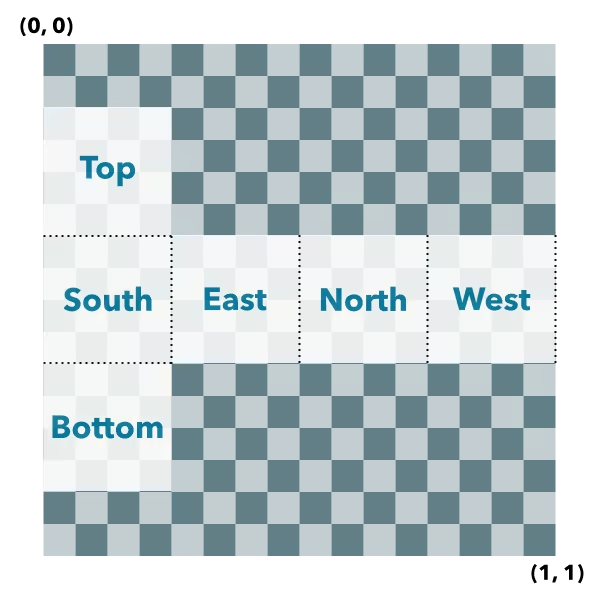
Box UV coordinate space
The box geometry will have UV coordinates generated according to the following scheme:
- Signature
-
createBox (location: Point, parameters?: CreateBoxParameters): Mesh
Parameters
| Parameter | Type | Description | Required |
|---|---|---|---|
| location | The location bottom center of the box. | | |
| parameters | Parameters to configure the box creation. | |
- Returns
- Mesh
The resulting mesh.
- Examples
- let mesh = meshUtils.createBox(point, {size: {width: 10,height: 100,depth: 20},material: {color: "green"}});let mesh = meshUtils.createBox(point, {imageFace: "top",material: {colorTexture: new MeshTexture({ url: "./url-to-image.png" })}});
createSphere
- Since
- ArcGIS Maps SDK for JavaScript 5.1
Creates a mesh representing a sphere. The spatial reference of the resulting mesh is the same as the location where it is placed.
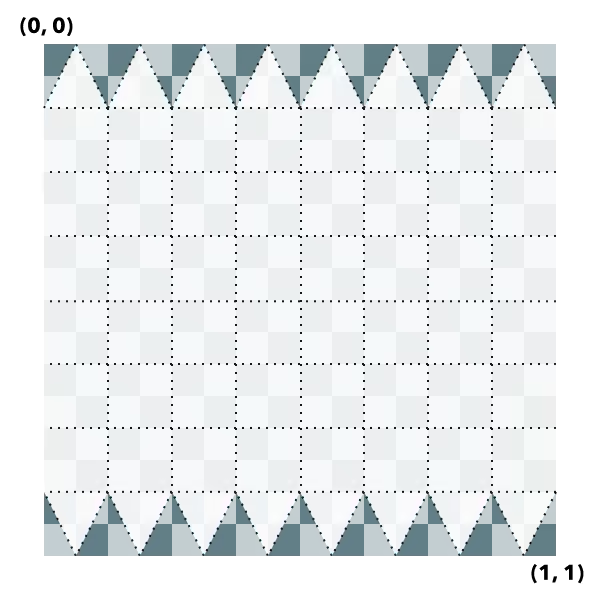
Sphere UV coordinate space
The sphere geometry will have UV coordinates generated according to the following scheme (example is shown for 8x8 vertices sphere):
- Signature
-
createSphere (location: Point, parameters?: CreateSphereParameters): Mesh
Parameters
| Parameter | Type | Description | Required |
|---|---|---|---|
| location | The location of the bottom center of the sphere. | | |
| parameters | Parameters to configure the sphere creation. | |
- Returns
- Mesh
The resulting mesh.
createCylinder
- Since
- ArcGIS Maps SDK for JavaScript 5.1
Creates a mesh representing a cylinder. The spatial reference of the resulting mesh is the same as the location where it is placed.
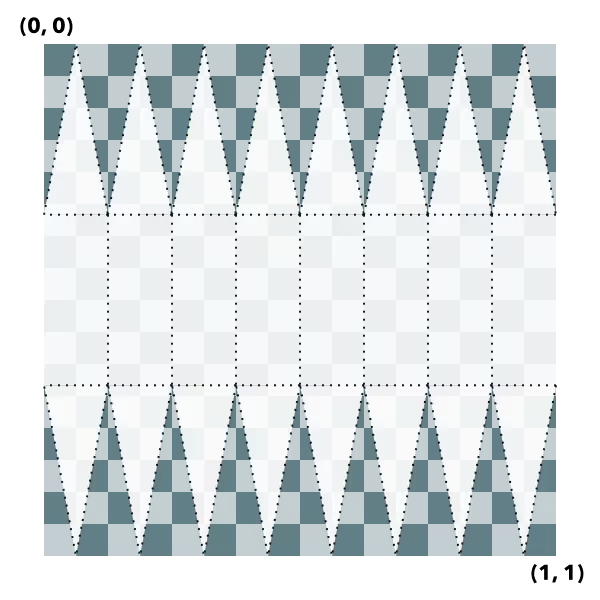
Cylinder UV coordinate space
The cylinder geometry will have UV coordinates generated according to the following scheme (example is shown for 8 vertices cylinder):
- Signature
-
createCylinder (location: Point, parameters?: CreateCylinderParameters): Mesh
Parameters
| Parameter | Type | Description | Required |
|---|---|---|---|
| location | The location of the bottom center of the cylinder. | | |
| parameters | Parameters to configure the cylinder creation. | |
- Returns
- Mesh
The resulting mesh.
createPlane
- Since
- ArcGIS Maps SDK for JavaScript 5.1
Creates a mesh representing a plane. The spatial reference of the resulting mesh is the same as the location where it is placed. A plane consists of two triangles and may be conveniently oriented at creation time.
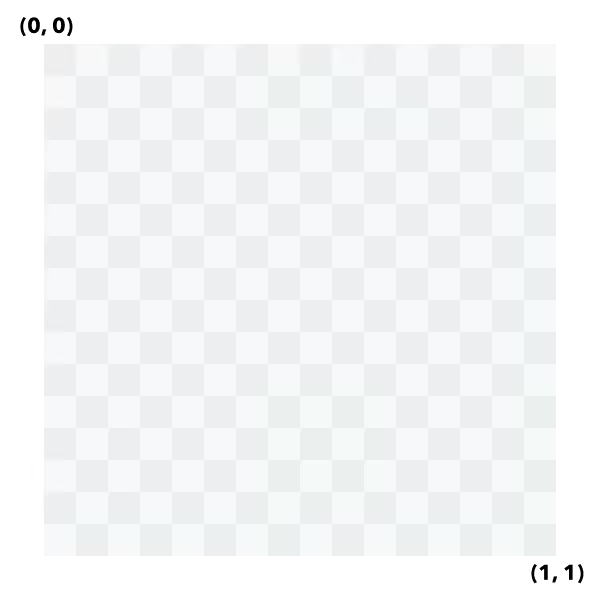
Plane UV coordinate space
The plane geometry will have UV coordinates generated according to the following scheme:
- Signature
-
createPlane (location: Point, parameters?: CreatePlaneParameters): Mesh
Parameters
| Parameter | Type | Description | Required |
|---|---|---|---|
| location | The location of the bottom center of the plane. | | |
| parameters | Parameters to configure the plane creation. | |
- Returns
- Mesh
The resulting mesh.
createFromPolygon
- Since
- ArcGIS Maps SDK for JavaScript 5.1
Creates a new mesh geometry from a polygon geometry. The resulting mesh contains only
a position vertex attribute and a single component with faces. The default shading will be
set to flat. The spatial reference of the resulting mesh is the same
as the input polygon. The resulting mesh will not contain any UV nor normal vertex attributes.
- Signature
-
createFromPolygon (polygon: Polygon, parameters?: CreateFromPolygonParameters): Promise<Mesh>
Parameters
| Parameter | Type | Description | Required |
|---|---|---|---|
| polygon | The input polygon. | | |
| parameters | Optional parameters. | |
createFromGLTF
- Since
- ArcGIS Maps SDK for JavaScript 5.1
Creates a new mesh geometry from a glTF model referenced by the url parameter.
The spatial reference of the resulting mesh is the same as the spatial reference of the location parameter. For
more information on the supported glTF features you can read the
Visualizing points with 3D symbols guide topic. Animations are currently unsupported.
- Signature
-
createFromGLTF (location: Point, url: string, parameters?: CreateFromGLTFParameters): Promise<Mesh>
Parameters
| Parameter | Type | Description | Required |
|---|---|---|---|
| location | The location of the origin of the model. If the location does not
contain a z-value, z is assumed to be | | |
| url | The URL of the glTF model. The URL should point to a glTF file (.gltf or .glb) which can reference additional binary (.bin) and image files (.jpg, .png). | | |
| parameters | Parameters to configure the mesh from glTF creation. | |