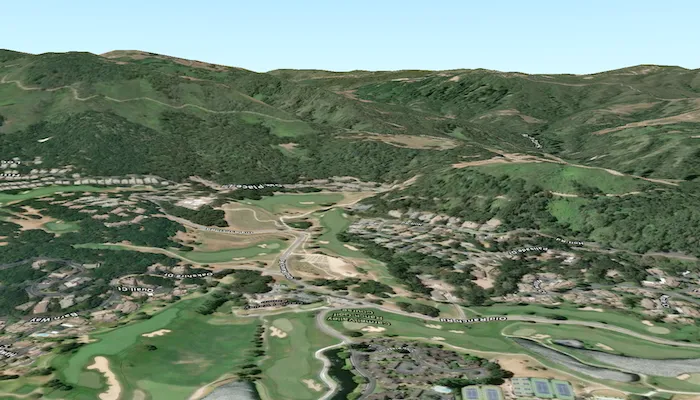
Set the terrain surface with elevation described by a local tile package.
Use case
In a scene view, the terrain surface is what the basemap, operational layers, and graphics are draped onto. For example, when viewing a scene in a mountainous region, applying a terrain surface to the scene will help in recognizing the slopes, valleys, and elevated areas.
How to use the sample
When loaded, the sample will show a scene with a terrain surface applied. Pan and zoom to explore the scene and observe how the terrain surface allows visualizing elevation differences.
How it works
- Create an
ArcGISScenewith anArcGISImagerybasemap style. - Create an
ArcGISTiledElevationSourceusing the path to a local elevation tile package (.tpkx). - Create a
Surfaceand add the elevation source to the surface’selevationSourcescollection. - Assign the
surfaceto the scene’sbaseSurface. - Display the scene in a
SceneViewby passing theArcGISScene.
Relevant API
- ArcGISTiledElevationSource
- Surface
Offline data
This sample uses the Monterey Elevation tile package, using CompactV2 storage format (.tpkx). It is downloaded from ArcGIS Online automatically.
Additional information
The tile package must be a LERC (limited error raster compression) encoded TPK/TPKX. Details on can be found in the topic Share a tile package in the ArcGIS Pro documentation.
Tags
3D, elevation, LERC, surface, terrain, tile cache
Sample code
/* Copyright 2025 Esri * * Licensed under the Apache License, Version 2.0 (the "License"); * you may not use this file except in compliance with the License. * You may obtain a copy of the License at * *    http://www.apache.org/licenses/LICENSE-2.0 * * Unless required by applicable law or agreed to in writing, software * distributed under the License is distributed on an "AS IS" BASIS, * WITHOUT WARRANTIES OR CONDITIONS OF ANY KIND, either express or implied. * See the License for the specific language governing permissions and * limitations under the License. * */
package com.esri.arcgismaps.sample.addelevationsourcefromtilepackage.components
import android.app.Applicationimport androidx.lifecycle.AndroidViewModelimport androidx.lifecycle.viewModelScopeimport com.arcgismaps.geometry.Pointimport com.arcgismaps.geometry.SpatialReferenceimport com.arcgismaps.mapping.ArcGISSceneimport com.arcgismaps.mapping.ArcGISTiledElevationSourceimport com.arcgismaps.mapping.BasemapStyleimport com.arcgismaps.mapping.Surfaceimport com.arcgismaps.mapping.Viewpointimport com.arcgismaps.mapping.view.Cameraimport com.esri.arcgismaps.sample.addelevationsourcefromtilepackage.Rimport com.esri.arcgismaps.sample.sampleslib.components.MessageDialogViewModelimport kotlinx.coroutines.launchimport java.io.File
class AddElevationSourceFromTilePackageViewModel(app: Application) : AndroidViewModel(app) {    // Message dialog view model to display errors    val messageDialogVM = MessageDialogViewModel()
    // Base provision path for this sample's offline resources    private val provisionPath: String by lazy {        val basePath = app.getExternalFilesDir(null)?.path ?: ""        basePath + File.separator + app.getString(R.string.add_elevation_source_from_tile_package_app_name)    }
    // Camera location point (Monterey, CA)    private val cameraLocation: Point by lazy {        Point(            x = -121.8,            y = 36.525,            z = 300.0,            spatialReference = SpatialReference.wgs84()        )    }
    // Camera to view the scene    private val camera: Camera by lazy {        Camera(            locationPoint = cameraLocation,            heading = 180.0,            pitch = 80.0,            roll = 0.0        )    }
    // Create the ArcGISScene with imagery basemap    val arcGISScene: ArcGISScene = ArcGISScene(BasemapStyle.ArcGISImagery).apply {        // Create a surface and add the local elevation source if found        baseSurface = Surface().apply {            val tilePackageFile = File(provisionPath, "MontereyElevation.tpkx")            if (tilePackageFile.exists()) {                elevationSources.add(ArcGISTiledElevationSource(tilePackageFile.path))            } else {                messageDialogVM.showMessageDialog(                    title = "Elevation tile package not found",                    description = "Expected file at:\n${tilePackageFile.path}"                )            }        }        // Set initial viewpoint using boundingGeometry with camera        initialViewpoint = Viewpoint(            boundingGeometry = cameraLocation,            camera = camera        )    }
    init {        viewModelScope.launch {            arcGISScene.load().onFailure { error ->                messageDialogVM.showMessageDialog(error)            }        }    }}
/* Copyright 2025 Esri * * Licensed under the Apache License, Version 2.0 (the "License"); * you may not use this file except in compliance with the License. * You may obtain a copy of the License at * * http://www.apache.org/licenses/LICENSE-2.0 * * Unless required by applicable law or agreed to in writing, software * distributed under the License is distributed on an "AS IS" BASIS, * WITHOUT WARRANTIES OR CONDITIONS OF ANY KIND, either express or implied. * See the License for the specific language governing permissions and * limitations under the License. * */
package com.esri.arcgismaps.sample.addelevationsourcefromtilepackage
import android.os.Bundleimport androidx.activity.ComponentActivityimport androidx.activity.enableEdgeToEdgeimport androidx.activity.compose.setContentimport androidx.compose.material3.MaterialThemeimport androidx.compose.material3.Surfaceimport androidx.compose.runtime.Composableimport com.esri.arcgismaps.sample.sampleslib.theme.SampleAppThemeimport com.esri.arcgismaps.sample.addelevationsourcefromtilepackage.screens.AddElevationSourceFromTilePackageScreen
class MainActivity : ComponentActivity() {
override fun onCreate(savedInstanceState: Bundle?) { super.onCreate(savedInstanceState)
enableEdgeToEdge() setContent { SampleAppTheme { AddElevationSourceFromTilePackageApp() } } }
@Composable private fun AddElevationSourceFromTilePackageApp() { Surface(color = MaterialTheme.colorScheme.background) { AddElevationSourceFromTilePackageScreen( sampleName = getString(R.string.add_elevation_source_from_tile_package_app_name) ) } }}/* Copyright 2025 Esri * * Licensed under the Apache License, Version 2.0 (the "License"); * you may not use this file except in compliance with the License. * You may obtain a copy of the License at * * http://www.apache.org/licenses/LICENSE-2.0 * * Unless required by applicable law or agreed to in writing, software * distributed under the License is distributed on an "AS IS" BASIS, * WITHOUT WARRANTIES OR CONDITIONS OF ANY KIND, either express or implied. * See the License for the specific language governing permissions and * limitations under the License. * */
package com.esri.arcgismaps.sample.addelevationsourcefromtilepackage
import android.content.Intentimport android.os.Bundleimport com.esri.arcgismaps.sample.sampleslib.DownloaderActivity
class DownloadActivity : DownloaderActivity() { override fun onCreate(savedInstanceState: Bundle?) { super.onCreate(savedInstanceState) downloadAndStartSample( Intent(this, MainActivity::class.java), getString(R.string.add_elevation_source_from_tile_package_app_name), listOf( "https://arcgisruntime.maps.arcgis.com/home/item.html?id=52ca74b4ba8042b78b3c653696f34a9c" ) ) }}/* Copyright 2025 Esri * * Licensed under the Apache License, Version 2.0 (the "License"); * you may not use this file except in compliance with the License. * You may obtain a copy of the License at * * http://www.apache.org/licenses/LICENSE-2.0 * * Unless required by applicable law or agreed to in writing, software * distributed under the License is distributed on an "AS IS" BASIS, * WITHOUT WARRANTIES OR CONDITIONS OF ANY KIND, either express or implied. * See the License for the specific language governing permissions and * limitations under the License. * */
package com.esri.arcgismaps.sample.addelevationsourcefromtilepackage.screens
import androidx.compose.foundation.layout.Columnimport androidx.compose.foundation.layout.fillMaxSizeimport androidx.compose.foundation.layout.paddingimport androidx.compose.material3.Scaffoldimport androidx.compose.runtime.Composableimport androidx.compose.ui.Modifierimport androidx.lifecycle.viewmodel.compose.viewModelimport com.arcgismaps.toolkit.geoviewcompose.SceneViewimport com.esri.arcgismaps.sample.addelevationsourcefromtilepackage.components.AddElevationSourceFromTilePackageViewModelimport com.esri.arcgismaps.sample.sampleslib.components.MessageDialogimport com.esri.arcgismaps.sample.sampleslib.components.SampleTopAppBar
@Composablefun AddElevationSourceFromTilePackageScreen(sampleName: String) { val sceneViewModel: AddElevationSourceFromTilePackageViewModel = viewModel()
Scaffold( topBar = { SampleTopAppBar(title = sampleName) }, content = { padding -> Column( modifier = Modifier .fillMaxSize() .padding(padding) ) { SceneView( modifier = Modifier .fillMaxSize() .weight(1f), arcGISScene = sceneViewModel.arcGISScene ) }
// Display a dialog if the sample encounters an error sceneViewModel.messageDialogVM.apply { if (dialogStatus) { MessageDialog( title = messageTitle, description = messageDescription, onDismissRequest = ::dismissDialog ) } } } )}