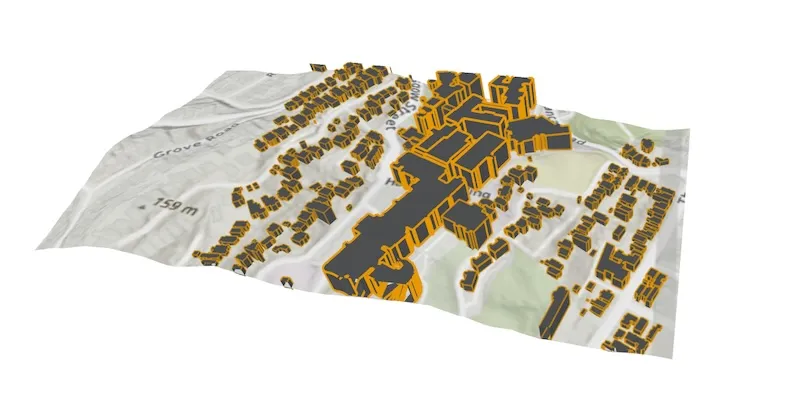
Display a local scene with a topographic surface and 3D scene layer clipped to a local area.
Use case
A LocalSceneView is a user interface that displays 3D basemaps and layer content described in an ArcGisScene with a local SceneViewingMode.
Unlike a global scene which is drawn on a globe using a geographic coordinate system, a local scene is drawn on a flat surface and supports projected coordinate systems. They are generally used to view local data and are often clipped to a specific area of interest. Currently, LocalSceneView cannot display data provided by a global scene and SceneView cannot display data provided by a local scene.
The LocalSceneView displays the clipped area of the local scene, supports user interactions such as pan and zoom, and provides access to the underlying scene data.
How to use the sample
This sample displays a local scene clipped to an extent. Pan and zoom to explore the scene.
How it works
- Create a local scene object with the
ArcGISScene(arcGISTopographic, SceneViewingMode.local)constructor. - Create an
ArcGISTiledElevationSourceobject and add it to the local scene’s base surface. - Create an
ArcGISSceneLayerand add it to the local scene’s operational layers. - Create an
Envelopeand set it to thescene.clippingArea, then enable clipping by settingscene.isClippingEnabledtotrue. - Create a
LocalSceneViewobject to display the scene. - Set the initial viewpoint for the local scene.
- Set the local scene to the local scene view.
Relevant API
- ArcGISScene
- ArcGISSceneLayer
- ArcGISTiledElevationSource
- LocalSceneView
Additional information
This sample requires a device capable of OpenGL ES 3.2 and will not run on an emulator.
Tags
3D, basemap, elevation, scene, surface
Sample code
/* Copyright 2025 Esri * * Licensed under the Apache License, Version 2.0 (the "License"); * you may not use this file except in compliance with the License. * You may obtain a copy of the License at * *    http://www.apache.org/licenses/LICENSE-2.0 * * Unless required by applicable law or agreed to in writing, software * distributed under the License is distributed on an "AS IS" BASIS, * WITHOUT WARRANTIES OR CONDITIONS OF ANY KIND, either express or implied. * See the License for the specific language governing permissions and * limitations under the License. * */
package com.esri.arcgismaps.sample.displaylocalscene
import android.os.Bundleimport androidx.activity.ComponentActivityimport androidx.activity.enableEdgeToEdgeimport androidx.activity.compose.setContentimport androidx.compose.material3.MaterialThemeimport androidx.compose.material3.Surfaceimport androidx.compose.runtime.Composableimport com.esri.arcgismaps.sample.sampleslib.theme.SampleAppThemeimport com.esri.arcgismaps.sample.displaylocalscene.screens.DisplayLocalSceneScreen
class MainActivity : ComponentActivity() {
    override fun onCreate(savedInstanceState: Bundle?) {        super.onCreate(savedInstanceState)
        enableEdgeToEdge()        setContent {            SampleAppTheme {                DisplayLocalSceneApp()            }        }    }
    @Composable    private fun DisplayLocalSceneApp() {        Surface(color = MaterialTheme.colorScheme.background) {            DisplayLocalSceneScreen(                sampleName = getString(R.string.display_local_scene_app_name)            )        }    }}
/* Copyright 2025 Esri * * Licensed under the Apache License, Version 2.0 (the "License"); * you may not use this file except in compliance with the License. * You may obtain a copy of the License at * * http://www.apache.org/licenses/LICENSE-2.0 * * Unless required by applicable law or agreed to in writing, software * distributed under the License is distributed on an "AS IS" BASIS, * WITHOUT WARRANTIES OR CONDITIONS OF ANY KIND, either express or implied. * See the License for the specific language governing permissions and * limitations under the License. * */
package com.esri.arcgismaps.sample.displaylocalscene.screens
import androidx.compose.foundation.layout.Columnimport androidx.compose.foundation.layout.fillMaxSizeimport androidx.compose.foundation.layout.paddingimport androidx.compose.material3.Scaffoldimport androidx.compose.runtime.Composableimport androidx.compose.runtime.rememberimport androidx.compose.ui.Modifierimport com.arcgismaps.geometry.Envelopeimport com.arcgismaps.geometry.Pointimport com.arcgismaps.geometry.SpatialReferenceimport com.arcgismaps.mapping.ArcGISSceneimport com.arcgismaps.mapping.ArcGISTiledElevationSourceimport com.arcgismaps.mapping.BasemapStyleimport com.arcgismaps.mapping.Viewpointimport com.arcgismaps.mapping.layers.ArcGISSceneLayerimport com.arcgismaps.mapping.view.Cameraimport com.arcgismaps.mapping.view.SceneViewingModeimport com.arcgismaps.toolkit.geoviewcompose.LocalSceneViewimport com.esri.arcgismaps.sample.sampleslib.components.MessageDialogimport com.esri.arcgismaps.sample.sampleslib.components.MessageDialogViewModelimport com.esri.arcgismaps.sample.sampleslib.components.SampleTopAppBar
/** * Main screen layout for the sample app */@Composablefun DisplayLocalSceneScreen( sampleName: String, messageDialogVM: MessageDialogViewModel = MessageDialogViewModel()) { Scaffold( topBar = { SampleTopAppBar(title = sampleName) }, content = { Column( modifier = Modifier .fillMaxSize() .padding(it), ) { val sceneLayer = remember { ArcGISSceneLayer("https://www.arcgis.com/home/item.html?id=61da8dc1a7bc4eea901c20ffb3f8b7af") }
val elevationSource = remember { ArcGISTiledElevationSource("https://elevation3d.arcgis.com/arcgis/rest/services/WorldElevation3D/Terrain3D/ImageServer") }
val arcGISScene = remember { ArcGISScene( viewingMode = SceneViewingMode.Local, basemapStyle = BasemapStyle.ArcGISTopographic ).apply { operationalLayers.add(sceneLayer) baseSurface.elevationSources.add(elevationSource)
initialViewpoint = Viewpoint( center = Point( x = 19455026.8116, y = -5054995.7415, spatialReference = SpatialReference.webMercator() ), scale = 8314.6991, camera = Camera( locationPoint = Point( x = 19455578.6821, y = -5056336.2227, z = 1699.3366, spatialReference = SpatialReference.webMercator()), heading = 338.7410, pitch = 40.3763, roll = 0.0, ) ) clippingArea = Envelope( xMin = 19454578.8235, yMin = -5055381.4798, xMax = 19455518.8814, yMax = -5054888.4150, spatialReference = SpatialReference.webMercator() ) isClippingEnabled = true } }
LocalSceneView( modifier = Modifier.fillMaxSize(), scene = arcGISScene, onCriticalErrorChanged = messageDialogVM::showMessageDialog ) }
messageDialogVM.apply { if (dialogStatus) { MessageDialog( title = messageTitle, description = messageDescription, onDismissRequest = ::dismissDialog ) } } } )}