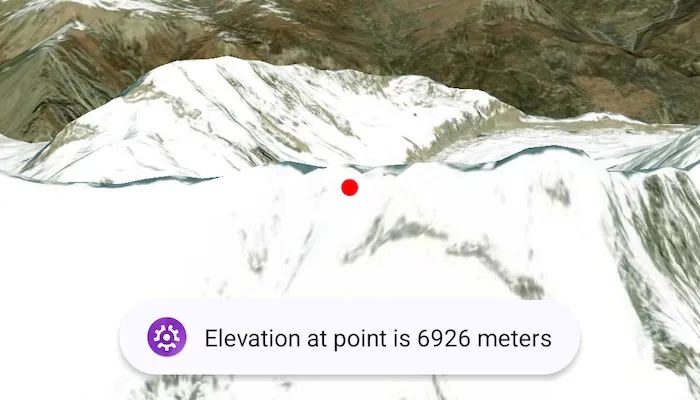
Get the elevation for a given point on a surface in a scene.
Use case
Knowing the elevation at a given point in a landscape can aid in navigation, planning and survey in the field.
How to use the sample
Tap anywhere on the surface to get the elevation at that point. Elevation is reported in meters since the scene view is in WGS84.
How it works
- Create a composable
SceneViewandArcGISScenewith an imagery base map. - Set an
ArcGISTiledElevationSourceas the elevation source of the scene’sbaseSurface. - Use the
screenToLocation(screenCoordinate)function on the scene view to convert the tapped screen coordinate into a point on surface. - Use the
getElevation(scenePoint)method on the base surface to asynchronously get the elevation.
Relevant API
- ArcGISTiledElevationSource
- BaseSurface
- ElevationSource
- SceneView
Additional information
getElevation(scenePoint) retrieves the most accurate available elevation value at a given point. To do this, the method must go to the server or local raster file and load the highest level of detail of data for the target location and return the elevation value.
If multiple elevation sources are present in the surface, the top most visible elevation source with a valid elevation in the given location is used to determine the result.
Tags
elevation, surface
Sample code
/* Copyright 2025 Esri * * Licensed under the Apache License, Version 2.0 (the "License"); * you may not use this file except in compliance with the License. * You may obtain a copy of the License at * *    http://www.apache.org/licenses/LICENSE-2.0 * * Unless required by applicable law or agreed to in writing, software * distributed under the License is distributed on an "AS IS" BASIS, * WITHOUT WARRANTIES OR CONDITIONS OF ANY KIND, either express or implied. * See the License for the specific language governing permissions and * limitations under the License. * */
package com.esri.arcgismaps.sample.getelevationatpointonsurface.components
import android.app.Applicationimport android.widget.Toastimport androidx.lifecycle.AndroidViewModelimport androidx.lifecycle.viewModelScopeimport com.arcgismaps.mapping.ArcGISSceneimport com.arcgismaps.mapping.ArcGISTiledElevationSourceimport com.arcgismaps.mapping.BasemapStyleimport com.arcgismaps.mapping.symbology.SimpleMarkerSymbolimport com.arcgismaps.mapping.symbology.SimpleMarkerSymbolStyleimport com.arcgismaps.mapping.view.Cameraimport com.arcgismaps.mapping.view.Graphicimport com.arcgismaps.mapping.view.GraphicsOverlayimport com.arcgismaps.mapping.view.SingleTapConfirmedEventimport com.arcgismaps.toolkit.geoviewcompose.SceneViewProxyimport com.esri.arcgismaps.sample.sampleslib.components.MessageDialogViewModelimport kotlinx.coroutines.launchimport kotlin.math.roundToInt

class GetElevationAtPointOnSurfaceViewModel(application: Application) : AndroidViewModel(application) {
    val sceneViewProxy = SceneViewProxy()
    val arcGISScene = ArcGISScene(BasemapStyle.ArcGISImagery).apply {        // Add an elevation source to the scene's base surface.        baseSurface.elevationSources.add(            ArcGISTiledElevationSource(                "https://elevation3d.arcgis.com/arcgis/rest/services/WorldElevation3D/Terrain3D/ImageServer"            )        )    }
    // Graphics overlay used to add feature graphics to the map    val graphicsOverlay = GraphicsOverlay()
    // Create a message dialog view model for handling error messages    val messageDialogVM = MessageDialogViewModel()
    init {        viewModelScope.launch {            arcGISScene.load().onSuccess {                // Set the initial viewpoint of the scene view, once loaded                sceneViewProxy.setViewpointCamera(                    Camera(                        latitude = 28.42, longitude = 83.9, altitude = 10000.0, heading = 10.0, pitch = 80.0, roll = 0.0                    )                )            }.onFailure { error ->                messageDialogVM.showMessageDialog(                    "Failed to load map", error.message.toString()                )            }        }    }
    /**     * Get the elevation at the point on the surface where the user taps.     */    fun getElevation(singleTapConfirmedEvent: SingleTapConfirmedEvent) {        viewModelScope.launch {            sceneViewProxy.screenToLocation(singleTapConfirmedEvent.screenCoordinate).onSuccess { scenePoint ->                arcGISScene.baseSurface.getElevation(scenePoint).onSuccess { elevation ->                    // Create a point symbol to mark where elevation is being measured                    val circleSymbol = SimpleMarkerSymbol(                        style = SimpleMarkerSymbolStyle.Circle, color = com.arcgismaps.Color.red, size = 10f                    )                    // Add the graphic to the graphics overlay                    graphicsOverlay.graphics.add(Graphic(geometry = scenePoint, symbol = circleSymbol))                    // Show a toast message with the elevation                    Toast.makeText(                        getApplication(), "Elevation at point is ${elevation.roundToInt()} meters", Toast.LENGTH_LONG                    ).show()                }.onFailure { error ->                    messageDialogVM.showMessageDialog(                        "Failed to get elevation", error.message.toString()                    )                }            }        }    }}
/* Copyright 2025 Esri * * Licensed under the Apache License, Version 2.0 (the "License"); * you may not use this file except in compliance with the License. * You may obtain a copy of the License at * * http://www.apache.org/licenses/LICENSE-2.0 * * Unless required by applicable law or agreed to in writing, software * distributed under the License is distributed on an "AS IS" BASIS, * WITHOUT WARRANTIES OR CONDITIONS OF ANY KIND, either express or implied. * See the License for the specific language governing permissions and * limitations under the License. * */
package com.esri.arcgismaps.sample.getelevationatpointonsurface
import android.os.Bundleimport androidx.activity.ComponentActivityimport androidx.activity.compose.setContentimport androidx.activity.enableEdgeToEdgeimport androidx.compose.material3.MaterialThemeimport androidx.compose.material3.Surfaceimport androidx.compose.runtime.Composableimport com.esri.arcgismaps.sample.sampleslib.theme.SampleAppThemeimport com.esri.arcgismaps.sample.getelevationatpointonsurface.screens.GetElevationAtPointOnSurfaceScreen
class MainActivity : ComponentActivity() {
override fun onCreate(savedInstanceState: Bundle?) { super.onCreate(savedInstanceState)
enableEdgeToEdge() setContent { SampleAppTheme { GetElevationAtPointOnSurfaceApp() } } }
@Composable private fun GetElevationAtPointOnSurfaceApp() { Surface(color = MaterialTheme.colorScheme.background) { GetElevationAtPointOnSurfaceScreen( sampleName = getString(R.string.get_elevation_at_point_on_surface_app_name) ) } }}/* Copyright 2025 Esri * * Licensed under the Apache License, Version 2.0 (the "License"); * you may not use this file except in compliance with the License. * You may obtain a copy of the License at * * http://www.apache.org/licenses/LICENSE-2.0 * * Unless required by applicable law or agreed to in writing, software * distributed under the License is distributed on an "AS IS" BASIS, * WITHOUT WARRANTIES OR CONDITIONS OF ANY KIND, either express or implied. * See the License for the specific language governing permissions and * limitations under the License. * */
package com.esri.arcgismaps.sample.getelevationatpointonsurface.screens
import androidx.compose.foundation.layout.Columnimport androidx.compose.foundation.layout.fillMaxSizeimport androidx.compose.foundation.layout.paddingimport androidx.compose.material3.Scaffoldimport androidx.compose.runtime.Composableimport androidx.compose.ui.Modifierimport androidx.lifecycle.viewmodel.compose.viewModelimport com.arcgismaps.toolkit.geoviewcompose.SceneViewimport com.esri.arcgismaps.sample.getelevationatpointonsurface.components.GetElevationAtPointOnSurfaceViewModelimport com.esri.arcgismaps.sample.sampleslib.components.MessageDialogimport com.esri.arcgismaps.sample.sampleslib.components.SampleTopAppBar
/** * Main screen layout for the sample app */@Composablefun GetElevationAtPointOnSurfaceScreen(sampleName: String) { val sceneViewModel: GetElevationAtPointOnSurfaceViewModel = viewModel() Scaffold(topBar = { SampleTopAppBar(title = sampleName) }, content = { Column( modifier = Modifier .fillMaxSize() .padding(it), ) { SceneView( modifier = Modifier .fillMaxSize() .weight(1f), arcGISScene = sceneViewModel.arcGISScene, graphicsOverlays = listOf(sceneViewModel.graphicsOverlay), // On single tap, call get elevation in the view model onSingleTapConfirmed = sceneViewModel::getElevation, sceneViewProxy = sceneViewModel.sceneViewProxy, ) }
sceneViewModel.messageDialogVM.apply { if (dialogStatus) { MessageDialog( title = messageTitle, description = messageDescription, onDismissRequest = ::dismissDialog ) } } })}