Display local 3D point cloud data.
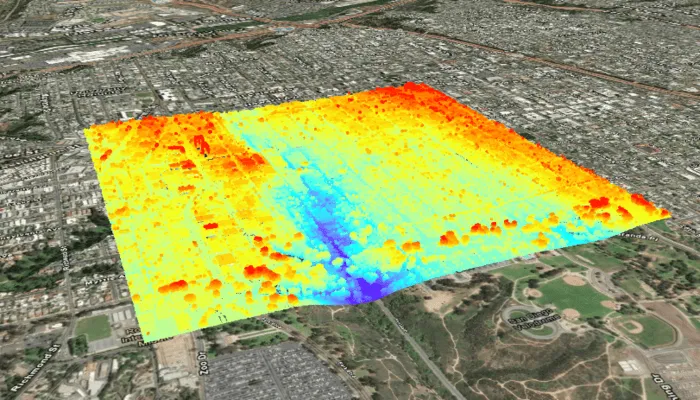
Use case
Point clouds are often used to visualize massive sets of sensor data, such as lidar. The point locations indicate where the sensor data was measured spatially, and the color or size of the points indicate the measured/derived value of the sensor reading. In the case of lidar, the color of the visualized point could be the color of the reflected light so that the point cloud forms a true color 3D image of the area.
Point clouds can be loaded offline from scene layer packages (.slpk).
How to use the sample
The sample starts with a point cloud layer loaded and draped on top of a scene. Pan and zoom to explore the scene and see the detail of the point cloud layer.
How it works
- Create a
PointCloudLayerwith the path to a local.slpkfile containing a point cloud layer. - Add the layer to a scene’s operational layers collection.
Relevant API
- PointCloudLayer
About the data
This sample uses a Scene Layer Package file (SLPK) containing point cloud data for Balboa Park in San Diego, California. Created and provided by USGS.
Tags
3D, lidar, point cloud
Sample code
/* Copyright 2025 Esri * * Licensed under the Apache License, Version 2.0 (the "License"); * you may not use this file except in compliance with the License. * You may obtain a copy of the License at * *    http://www.apache.org/licenses/LICENSE-2.0 * * Unless required by applicable law or agreed to in writing, software * distributed under the License is distributed on an "AS IS" BASIS, * WITHOUT WARRANTIES OR CONDITIONS OF ANY KIND, either express or implied. * See the License for the specific language governing permissions and * limitations under the License. * */
package com.esri.arcgismaps.sample.addpointcloudlayerfromfile.components
import android.app.Applicationimport androidx.lifecycle.AndroidViewModelimport androidx.lifecycle.viewModelScopeimport com.arcgismaps.mapping.ArcGISSceneimport com.arcgismaps.mapping.ArcGISTiledElevationSourceimport com.arcgismaps.mapping.BasemapStyleimport com.arcgismaps.mapping.Viewpointimport com.arcgismaps.mapping.layers.PointCloudLayerimport com.arcgismaps.mapping.view.Cameraimport com.esri.arcgismaps.sample.addpointcloudlayerfromfile.Rimport com.esri.arcgismaps.sample.sampleslib.components.MessageDialogViewModelimport kotlinx.coroutines.launchimport java.io.File
/** * ViewModel for the Add point cloud layer from file sample. */class AddPointCloudLayerFromFileViewModel(private val app: Application) : AndroidViewModel(app) {
    // The scene displayed in the SceneView composable.    val arcGISScene = ArcGISScene(BasemapStyle.ArcGISImagery).apply {        // Set an initial camera viewpoint focused on the point cloud area.        val camera = Camera(            latitude = 32.720195,            longitude = -117.155593,            altitude = 1050.0,            heading = 23.0,            pitch = 70.0,            roll = 0.0        )        initialViewpoint = Viewpoint(camera = camera, boundingGeometry = camera.location)    }
    // Folder path for the sample provisioned directory.    private val provisionPath: String by lazy {        app.getExternalFilesDir(null)?.path + File.separator + app.getString(R.string.add_point_cloud_layer_from_file_app_name)    }
    // Name of the local slpk file provisioned on device.    private val slpkFileName = "sandiego-north-balboa-pointcloud.slpk"
    // File path to the local slpk.    private val slpkFilePath: String        get() = File(provisionPath, slpkFileName).path
    // World 3D elevation service.    private val elevationSource = ArcGISTiledElevationSource(        uri = "https://elevation3d.arcgis.com/arcgis/rest/services/WorldElevation3D/Terrain3D/ImageServer"    )
    // Message dialog helper to show load errors.    val messageDialogVM = MessageDialogViewModel()
    init {        // Create the point cloud layer from the local SLPK file. The file must exist at the provision path.        val slpkFile = File(slpkFilePath)        if (!slpkFile.exists()) {            messageDialogVM.showMessageDialog(                title = "Point cloud file not found",                description = "Expected .slpk at: $slpkFilePath."            )        } else {            viewModelScope.launch {                // Add an elevation source so point cloud will be draped properly on the surface.                arcGISScene.baseSurface.elevationSources.add(elevationSource)
                // Add the point cloud layer to the scene's operational layers.                arcGISScene.operationalLayers.add(PointCloudLayer(uri = slpkFile.path))
                // Load the scene and the point cloud layer.                arcGISScene.load().onFailure { messageDialogVM.showMessageDialog(it) }            }        }    }}
/* Copyright 2025 Esri * * Licensed under the Apache License, Version 2.0 (the "License"); * you may not use this file except in compliance with the License. * You may obtain a copy of the License at * * http://www.apache.org/licenses/LICENSE-2.0 * * Unless required by applicable law or agreed to in writing, software * distributed under the License is distributed on an "AS IS" BASIS, * WITHOUT WARRANTIES OR CONDITIONS OF ANY KIND, either express or implied. * See the License for the specific language governing permissions and * limitations under the License. * */
package com.esri.arcgismaps.sample.addpointcloudlayerfromfile
import android.os.Bundleimport androidx.activity.ComponentActivityimport androidx.activity.enableEdgeToEdgeimport androidx.activity.compose.setContentimport androidx.compose.material3.MaterialThemeimport androidx.compose.material3.Surfaceimport androidx.compose.runtime.Composableimport com.esri.arcgismaps.sample.sampleslib.theme.SampleAppThemeimport com.esri.arcgismaps.sample.addpointcloudlayerfromfile.screens.AddPointCloudLayerFromFileScreen
class MainActivity : ComponentActivity() {
override fun onCreate(savedInstanceState: Bundle?) { super.onCreate(savedInstanceState)
enableEdgeToEdge() setContent { SampleAppTheme { AddPointCloudLayerFromFileApp() } } }
@Composable private fun AddPointCloudLayerFromFileApp() { Surface(color = MaterialTheme.colorScheme.background) { AddPointCloudLayerFromFileScreen( sampleName = getString(R.string.add_point_cloud_layer_from_file_app_name) ) } }}/* Copyright 2025 Esri * * Licensed under the Apache License, Version 2.0 (the "License"); * you may not use this file except in compliance with the License. * You may obtain a copy of the License at * * http://www.apache.org/licenses/LICENSE-2.0 * * Unless required by applicable law or agreed to in writing, software * distributed under the License is distributed on an "AS IS" BASIS, * WITHOUT WARRANTIES OR CONDITIONS OF ANY KIND, either express or implied. * See the License for the specific language governing permissions and * limitations under the License. * */
package com.esri.arcgismaps.sample.addpointcloudlayerfromfile
import android.content.Intentimport android.os.Bundleimport com.esri.arcgismaps.sample.sampleslib.DownloaderActivity
class DownloadActivity : DownloaderActivity() { override fun onCreate(savedInstanceState: Bundle?) { super.onCreate(savedInstanceState) downloadAndStartSample( Intent(this, MainActivity::class.java), getString(R.string.add_point_cloud_layer_from_file_app_name), listOf( "https://arcgisruntime.maps.arcgis.com/home/item.html?id=34da965ca51d4c68aa9b3a38edb29e00" ) ) }}/* Copyright 2025 Esri * * Licensed under the Apache License, Version 2.0 (the "License"); * you may not use this file except in compliance with the License. * You may obtain a copy of the License at * * http://www.apache.org/licenses/LICENSE-2.0 * * Unless required by applicable law or agreed to in writing, software * distributed under the License is distributed on an "AS IS" BASIS, * WITHOUT WARRANTIES OR CONDITIONS OF ANY KIND, either express or implied. * See the License for the specific language governing permissions and * limitations under the License. * */
package com.esri.arcgismaps.sample.addpointcloudlayerfromfile.screens
import androidx.compose.foundation.layout.fillMaxSizeimport androidx.compose.foundation.layout.paddingimport androidx.compose.material3.Scaffoldimport androidx.compose.runtime.Composableimport androidx.compose.ui.Modifierimport androidx.lifecycle.viewmodel.compose.viewModelimport com.arcgismaps.toolkit.geoviewcompose.SceneViewimport com.esri.arcgismaps.sample.addpointcloudlayerfromfile.components.AddPointCloudLayerFromFileViewModelimport com.esri.arcgismaps.sample.sampleslib.components.MessageDialogimport com.esri.arcgismaps.sample.sampleslib.components.SampleTopAppBar
/** * Main screen layout for the Add point cloud layer from file sample. */@Composablefun AddPointCloudLayerFromFileScreen(sampleName: String) { val viewModel: AddPointCloudLayerFromFileViewModel = viewModel()
Scaffold( topBar = { SampleTopAppBar(title = sampleName) }, content = { paddingValues -> // SceneView displays the 3D Scene provided by the ViewModel. SceneView( modifier = Modifier .fillMaxSize() .padding(paddingValues), arcGISScene = viewModel.arcGISScene ) viewModel.messageDialogVM.apply { if (dialogStatus) { MessageDialog( title = messageTitle, description = messageDescription, onDismissRequest = ::dismissDialog ) } } } )}