See through terrain in a scene and move the camera underground.
Use case
By default, a scene’s terrain is fully opaque, and the camera cannot go underground. To see underground features such as pipes in a utility network, you can lower the opacity of the terrain surface and set the navigation constraint on the surface to allow underground navigation.
How to use the sample
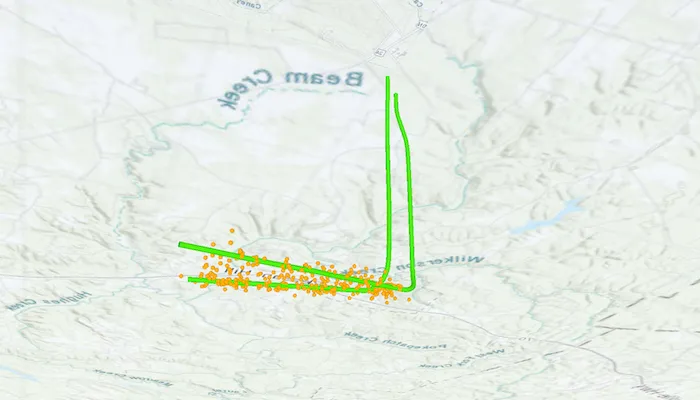
The sample loads a scene with underground features. Pan and zoom to explore the scene. Observe how the opacity of the base surface is reduced and the navigation constraint is removed, allowing you to pan and zoom through the base surface.
How it works
- Display a
ArcGISScenein aSceneView, which contains layers with underground features. - To see underground, get the scene’s base surface and set its opacity to a value between 0 and 1.
- To allow the camera to go underground, set the surface’s navigation constraint to
NavigationConstraint.None.
Relevant API
- NavigationConstraint
- Surface
About the data
This sample shows an Underground Wellbores and Seismic Events (Point Scene Layer) Webscene hosted on ArcGIS Online. The data displays a point scene layer showing underground wellbore paths (green polylines) and seismic events (orange points).
Tags
3D, subsurface, underground, utilities
Sample code
/* Copyright 2025 Esri * * Licensed under the Apache License, Version 2.0 (the "License"); * you may not use this file except in compliance with the License. * You may obtain a copy of the License at * *    http://www.apache.org/licenses/LICENSE-2.0 * * Unless required by applicable law or agreed to in writing, software * distributed under the License is distributed on an "AS IS" BASIS, * WITHOUT WARRANTIES OR CONDITIONS OF ANY KIND, either express or implied. * See the License for the specific language governing permissions and * limitations under the License. * */
package com.esri.arcgismaps.sample.setsurfacenavigationconstraint.components
import android.app.Applicationimport androidx.lifecycle.AndroidViewModelimport androidx.lifecycle.viewModelScopeimport com.arcgismaps.mapping.ArcGISSceneimport com.arcgismaps.mapping.NavigationConstraintimport com.arcgismaps.mapping.PortalItemimport com.arcgismaps.portal.Portalimport com.esri.arcgismaps.sample.sampleslib.components.MessageDialogViewModelimport kotlinx.coroutines.launch
class SetSurfaceNavigationConstraintViewModel(app: Application) : AndroidViewModel(app) {
    // ArcGISScene created from a web scene portal item.    // Configure the base surface to allow underground navigation and reduce opacity.    val arcGISScene = ArcGISScene(        item = PortalItem(            portal = Portal.arcGISOnline(connection = Portal.Connection.Anonymous),            itemId = "91a4fafd747a47c7bab7797066cb9272"        )    ).apply {        // Allow the camera to move above and below the elevation surface.        baseSurface.navigationConstraint = NavigationConstraint.None        // Sets the opacity so that it is possible to see below the surface.        baseSurface.opacity = 0.7f    }
    // Message dialog view model for handling error messages    val messageDialogVM = MessageDialogViewModel()
    init {        viewModelScope.launch {            // Load the scene and display an error if loading fails            arcGISScene.load().onFailure { error ->                messageDialogVM.showMessageDialog(                    title = "Error loading scene",                    description = error.message.toString()                )            }        }    }}
/* Copyright 2025 Esri * * Licensed under the Apache License, Version 2.0 (the "License"); * you may not use this file except in compliance with the License. * You may obtain a copy of the License at * * http://www.apache.org/licenses/LICENSE-2.0 * * Unless required by applicable law or agreed to in writing, software * distributed under the License is distributed on an "AS IS" BASIS, * WITHOUT WARRANTIES OR CONDITIONS OF ANY KIND, either express or implied. * See the License for the specific language governing permissions and * limitations under the License. * */
package com.esri.arcgismaps.sample.setsurfacenavigationconstraint
import android.os.Bundleimport androidx.activity.ComponentActivityimport androidx.activity.enableEdgeToEdgeimport androidx.activity.compose.setContentimport androidx.compose.material3.MaterialThemeimport androidx.compose.material3.Surfaceimport androidx.compose.runtime.Composableimport com.esri.arcgismaps.sample.sampleslib.theme.SampleAppThemeimport com.esri.arcgismaps.sample.setsurfacenavigationconstraint.screens.SetSurfaceNavigationConstraintScreen
class MainActivity : ComponentActivity() {
override fun onCreate(savedInstanceState: Bundle?) { super.onCreate(savedInstanceState)
enableEdgeToEdge() setContent { SampleAppTheme { SetSurfaceNavigationConstraintApp() } } }
@Composable private fun SetSurfaceNavigationConstraintApp() { Surface(color = MaterialTheme.colorScheme.background) { SetSurfaceNavigationConstraintScreen( sampleName = getString(R.string.set_surface_navigation_constraint_app_name) ) } }}/* Copyright 2025 Esri * * Licensed under the Apache License, Version 2.0 (the "License"); * you may not use this file except in compliance with the License. * You may obtain a copy of the License at * * http://www.apache.org/licenses/LICENSE-2.0 * * Unless required by applicable law or agreed to in writing, software * distributed under the License is distributed on an "AS IS" BASIS, * WITHOUT WARRANTIES OR CONDITIONS OF ANY KIND, either express or implied. * See the License for the specific language governing permissions and * limitations under the License. * */
package com.esri.arcgismaps.sample.setsurfacenavigationconstraint.screens
import androidx.compose.foundation.layout.Columnimport androidx.compose.foundation.layout.fillMaxSizeimport androidx.compose.foundation.layout.paddingimport androidx.compose.material3.Scaffoldimport androidx.compose.runtime.Composableimport androidx.compose.ui.Modifierimport androidx.lifecycle.viewmodel.compose.viewModelimport com.arcgismaps.toolkit.geoviewcompose.SceneViewimport com.esri.arcgismaps.sample.setsurfacenavigationconstraint.components.SetSurfaceNavigationConstraintViewModelimport com.esri.arcgismaps.sample.sampleslib.components.MessageDialogimport com.esri.arcgismaps.sample.sampleslib.components.SampleTopAppBar
/** * Main screen layout for the sample app */@Composablefun SetSurfaceNavigationConstraintScreen(sampleName: String) { val sceneViewModel: SetSurfaceNavigationConstraintViewModel = viewModel()
Scaffold( topBar = { SampleTopAppBar(title = sampleName) }, content = { paddingValues -> Column( modifier = Modifier .fillMaxSize() .padding(paddingValues) ) { SceneView( modifier = Modifier.fillMaxSize(), arcGISScene = sceneViewModel.arcGISScene ) }
// Display a dialog if the sample encounters an error sceneViewModel.messageDialogVM.apply { if (dialogStatus) { MessageDialog( title = messageTitle, description = messageDescription, onDismissRequest = ::dismissDialog ) } } } )}