Offline maps
This SDK supports maps that are always connected, occasionally connected, and fully disconnected.
-
Always connected: Users expect their apps to have constant access to online map and layer services. If the device loses network connectivity, the application will lose access to these services, resulting in loss of data and, perhaps, app failure.
-
Occasionally connected: Apps that are occasionally connected can download an offline map
An offline map is a map area and its data content downloaded from an offline-enabled web map for use in offline applications built with ArcGIS Maps SDKs for Native Apps. from a web mapA web map is a map stored as a JSON object that defines properties such as the basemap layer, data layers, layer styles, and pop-up styles. Its JSON structure is defined by the web map specification. when a connection is available and continue to work offline when the device is disconnected. When connectivity is restored, any changes to operational data in the offline map can be synchronized with the online services in the source web map. Occasionally connected apps can adopt the following workflows:- Ahead of time
The ahead-of-time workflow, also known as the preplanned workflow, is a development pattern for building offline applications where offline map areas in a web map are used by the offline application. : The web map author defines the area of interest as an offline map areaAn offline map area, also known as a preplanned map area, is an area in a web map used to create an offline map. . The offline map area generates an offline mapAn offline map is a map area and its data content downloaded from an offline-enabled web map for use in offline applications built with ArcGIS Maps SDKs for Native Apps. with its data content, on a regular basis. Any number of mobile workers can download this offline map and take it into the field. Use this workflow if you have a large crew that need to operate with an identical offline map. This workflow is also referred to as the preplanned workflow. - On demand
The on-demand workflow is a development pattern for building offline applications where the offline application defines an area of a web map to take offline. : Each mobile worker defines the area of interest and the content to include from the web map, generates the offline map, and downloads it to their device, as required. Use this workflow if your mobile worker needs to specify the area of the web map to be taken offline.
- Ahead of time
-
Fully disconnected: A fully disconnected workflow is suitable for apps that do not require regular data updates, or for apps that will never have access to a network connection. Apps can operate in a fully disconnected environment by opening mobile map packages
A mobile map package (MMPK) is a standalone file that contains one or more map definitions, including the basemap layers, data layers, layer styles, and pop-up styles for use in offline applications built with ArcGIS Maps SDKs for Native Apps. or mobile scene packagesA mobile scene package (MSPK) is a standalone file that contains one or more scene definitions, including the basemap layers, elevation layers, data layers, layer styles, and pop-up styles for use in offline applications built with ArcGIS Maps SDKs for Native Apps. created with ArcGIS Pro. These read-only packages can be shared within an organization or distributed by traditional means and copied onto any number of devicesA device is nearly any kind of computer, including desktops, laptops, mobile phones, and tablets. . See Take a map offline with ArcGIS Pro or Take a scene offline with ArcGIS Pro for more details.
Workflow capabilities summary
| Capability | Ahead-of-time (map) | On-demand (map) | Mobile Map Package | Mobile Scene Package |
|---|---|---|---|---|
| Display, interact, identify, and analyze layers | Yes | Yes | Yes | Yes |
| Edit feature | Yes | Yes | No | No |
| Synchronize edits with the online feature service | Yes | Yes | No | No |
| Share offline maps | Yes | No | No | No |
| Receive update packages from feature services. | Yes | No | No | No |
| Geocoding | No | No | Yes | Yes |
| Routing | No | No | Yes | No |
| Support raster | No | No | Yes | Yes |
| Support online layers | No | Yes | Yes | Yes |
| Simple editing with utility networks | Yes | Yes | No | No |
| View utility network associations.* | Yes | Yes | No | No |
* Taking utility networks
Enable services for offline use
To access layer content while offline with the ahead-of-time
Feature services
You must sync-enable a feature service
- In the ArcGIS Enterprise help, see Prepare data for offline use in the ArcGIS Server documentation.
- In the ArcGIS Online help, see Manage settings for editing.
Vector tile services and map tile services
If you want tile service data to be downloaded with the offline mapexportTiles capability enabled. For more information, see the ArcGIS REST API documentation for Vector tile service - Export Tiles and Map service - Export Tiles. To enable this capability, follow these instructions:
- In the ArcGIS Enterprise help, see Allow clients to export cache tiles.
- In the ArcGIS Online help, see Manage hosted tile layers.
Tutorials

Create an offline map area

Display an offline map (on-demand)
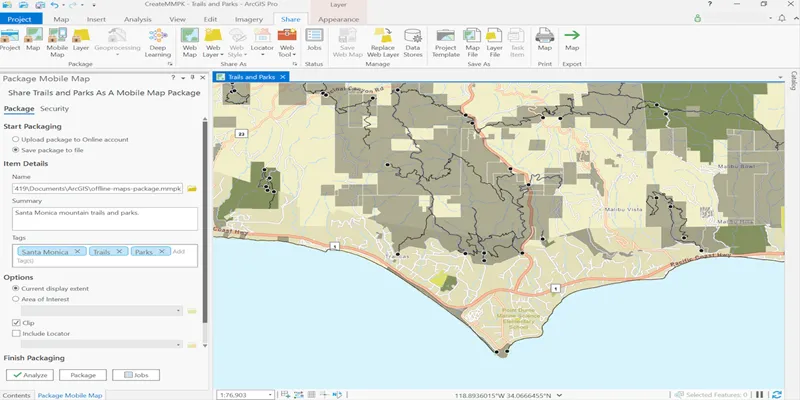
Create a mobile map package

Display a map from a mobile map package
Samples

Generate offline map

Generate geodatabase replica from feature service

Display map from mobile map package

Download vector tiles to local cache

Display scene from mobile scene package

Add feature layers
