Learn how to use ArcGIS Pro
Prerequisites
You need an ArcGIS account
Steps
Add layers to your account in ArcGIS Online
The first step to creating a mobile map package
-
Go to ArcGIS Online and sign in.
-
In the top menu, click Content > New Item > From a URL. In the New item window, set the following values to add the Trailheads layer:
- URL: https://services3.arcgis.com/GVgbJbqm8hXASVYi/arcgis/rest/services/Trailheads/FeatureServer/
- Type: ArcGIS Server web service
- Title: Trailheads
- Tags: Trail heads
Click Save to add the layer to your portal.
-
Use the URLs below and repeat the steps above to add the Trails and Parks and Open Spaces layers to ArcGIS Online. Be sure to use unique titles and tags for each layer.
Download the basemap vector tile package
To use a basemap layer
- Download the LosAngeles (.vtpk) file that includes the basemap vector tiles for the area of interest.
Set up the map in ArcGIS Pro
Now combine the basemap layer
- Start ArcGIS Pro
ArcGIS Pro is a professional desktop GIS application that can explore, visualize, analyze, and manage 2D and 3D data. . Under New Project, click Start without a template. - On the main ribbon, click the Insert tab and then New Map > New Basemap to create a new map with a basemap.
- In the Map tab, click + Add Data > Browse and navigate to the LosAngeles.vtpk vector tile file you downloaded earlier. Click Ok to select the file and add it to the basemap.
- You will see a small white dot on the map that marks the location of the basemap. Zoom in on the dot until the Los Angeles basemap area becomes visible.
- In the Contents window, right click Basemap > Save as a map file and save the basemap as
Basemap.mapx. - In the main ribbon, click the Insert tab and then New Map > New Map to create a new map.
- In the Map tab, click Basemap and scroll down to the bottom. Select
Basemapwhich is the basemap you just created. - In the Map tab, click + Add Data > Browse. In the dialog, click Portal > My Content > Trailheads to add the layer to the map. Click Ok to close the window.
- Use the same steps above to add Trails and Parks and Open Space layers to the map. You can control-click to select multiple items in the Add data dialog.
- In the Map tab, click Locate and type
Mahou Rivierain the search box and then hit the enter key. This will zoom the map to the correct location.
Create the mobile map package file
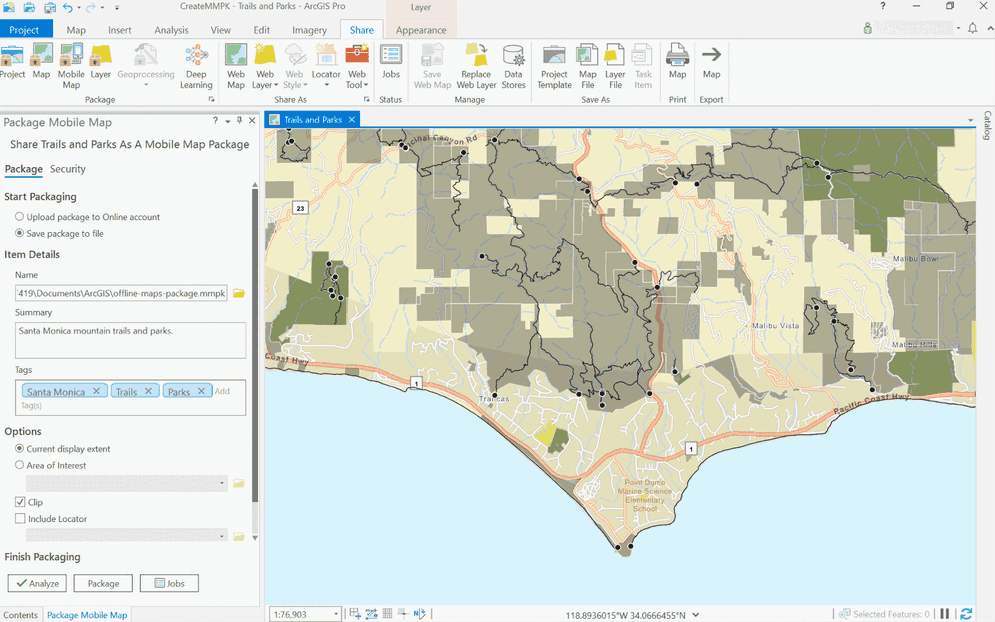
The final step is to use a sharing tool in ArcGIS Pro to export the mobile map package. In this case you will clip the layers out that fall within the current visible extent of the map.
- In the main ribbon, click the Share tab and then Mobile Map.
- On the left side of the application in the Package Mobile Map window, set the following properties:
- Save package to file: Selected (Saves a mobile map package
.mmpkfile to local storage). - Name: Click the folder to select a save location for the mobile map package. Name it
Santa.Monica Map.mmpk - Summary: Santa Monica mountain trails and parks.
- Tags: Santa Monica, Trails, Parks
- Current Display Extent: Checked (Ensure the map is zoomed to the area you want to package. e.g. Mahou Riviera)
- Save package to file: Selected (Saves a mobile map package
- Click Package to create the mobile map package.
Your finished mobile map packageSanta. The file should contain data for the trailheads, trails, and parks layers, and vector tiles for the topographic basemap for the area south of the Santa Monica mountains.
What's next?
Learn how to use the mobile map package

Display a map from a mobile map package
Access and display a map from a mobile map package for offline use.