Learn how to execute a SQL query to return features
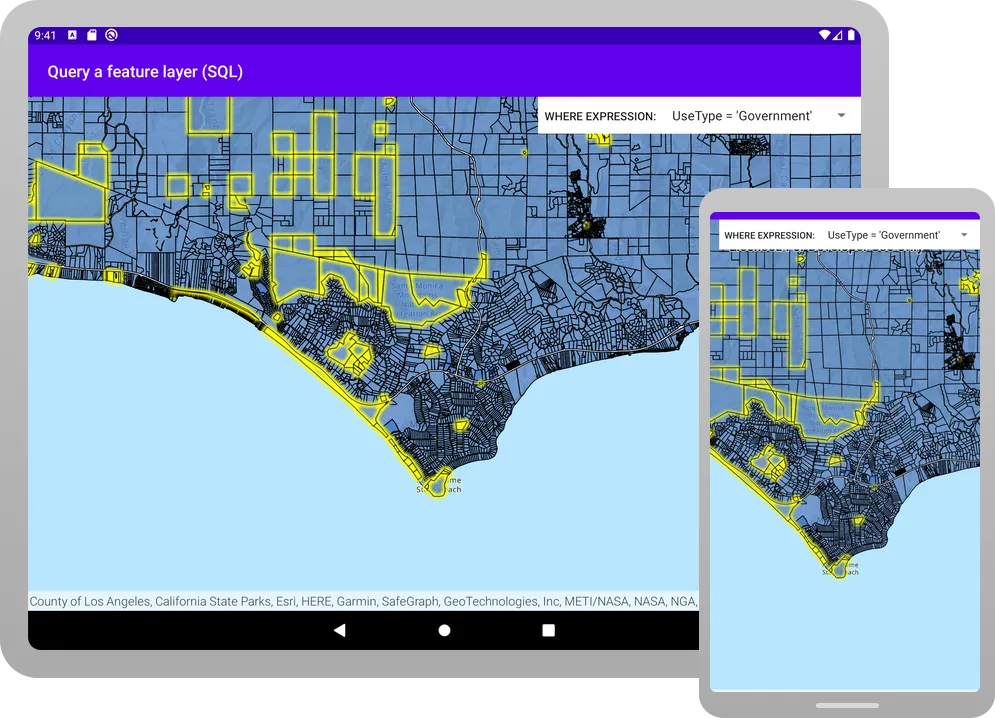
A feature layer
In this tutorial, you’ll write code to perform SQL queries that return a subset of features
Prerequisites
Before starting this tutorial, you need the following:
-
An ArcGIS Location Platform or ArcGIS Online account.
-
A development and deployment environment that meets the system requirements.
-
An IDE for Android development in Kotlin.
Develop or Download
You have two options for completing this tutorial:
Option 1: Develop the code
Open an Android Studio project
-
Open the project you created by completing the Display a map tutorial.
-
Continue with the following instructions to execute a SQL query to return features from a feature layer based on spatial and attribute criteria.
-
Modify the old project for use in this new tutorial.
-
On your file system, delete the .idea folder, if present, at the top level of your project.
-
In the Android view, open app > res > values > strings.xml.
In the
<string name="app_name">element, change the text content to Query a feature layer (SQL).strings.xml<resources><string name="app_name">Query a feature layer (SQL)</string></resources> -
In the Android view, open Gradle Scripts > settings.gradle.kts.
Change the value of
rootProject.nameto “Query a feature layer (SQL)”.settings.gradle.kts14 collapsed linespluginManagement {repositories {google {content {includeGroupByRegex("com\\.android.*")includeGroupByRegex("com\\.google.*")includeGroupByRegex("androidx.*")}}mavenCentral()gradlePluginPortal()}}dependencyResolutionManagement {repositoriesMode.set(RepositoriesMode.FAIL_ON_PROJECT_REPOS)repositories {google()mavenCentral()maven { url = uri("https://esri.jfrog.io/artifactory/arcgis") }}}rootProject.name = "Query a feature layer (SQL)"include(":app") -
Click File > Sync Project with Gradle files. Android Studio will recognize your changes and create a new .idea folder.
-
Add import statements
-
Modify import statements to reference the packages and classes required for this tutorial.
MainScreen.kt@file:OptIn(ExperimentalMaterial3Api::class)package com.example.app.screensimport android.content.Contextimport android.widget.Toastimport androidx.compose.foundation.layout.Columnimport androidx.compose.foundation.layout.fillMaxSizeimport androidx.compose.foundation.layout.fillMaxWidthimport androidx.compose.foundation.layout.paddingimport androidx.compose.material3.DropdownMenuItemimport androidx.compose.material3.ExperimentalMaterial3Apiimport androidx.compose.material3.ExposedDropdownMenuBoximport androidx.compose.material3.MenuAnchorTypeimport androidx.compose.material3.Scaffoldimport androidx.compose.material3.Textimport androidx.compose.material3.TextFieldimport androidx.compose.material3.TopAppBarimport androidx.compose.runtime.Composableimport androidx.compose.runtime.mutableStateOfimport androidx.compose.runtime.rememberimport androidx.compose.runtime.rememberCoroutineScopeimport androidx.compose.ui.Modifierimport androidx.compose.ui.platform.LocalContextimport androidx.compose.ui.res.stringResourceimport com.arcgismaps.data.QueryParametersimport com.arcgismaps.data.ServiceFeatureTableimport com.arcgismaps.geometry.Envelopeimport com.arcgismaps.mapping.ArcGISMapimport com.arcgismaps.mapping.BasemapStyleimport com.arcgismaps.mapping.Viewpointimport com.arcgismaps.mapping.layers.FeatureLayerimport com.arcgismaps.toolkit.geoviewcompose.MapViewimport com.example.app.Rimport kotlinx.coroutines.Job -
In the
MainScreencomposable, create variables that will be passed to various functions in theMainScreen.ktfile.MainScreen.kt@Composablefun MainScreen() {val context = LocalContext.currentval coroutineScope = rememberCoroutineScope()val currentQueryJob = remember { mutableStateOf<Job?>(null) }// Store the current viewpoint geometry extent of the map.val currentExtent = remember { mutableStateOf<Envelope?>(null) }Scaffold(topBar = { TopAppBar(title = { Text(text = stringResource(id = R.string.app_name)) }) }) {MapView(modifier = Modifier.fillMaxSize(),arcGISMap = map,)}}Most of these are remembered variables and use either
remember()orrememberCoroutineScope()Briefly, these variables are:
-
context: The local context of your app. -
coroutineScope: Set torememberCoroutineScope(). You will use this variable to launch a coroutine. -
currentQueryJob: Of typeMutableState<Job?>, which references the Kotlin coroutineJob. (It does not reference the interfaceJobfrom ArcGIS Maps SDK for Kotlin.) Note thatcoroutineScope.launch {}returns a Kotlin coroutineJob. -
currentExtent: Of typeMutableState<Envelope?>. The extent (which is anEnvelope) of the currentFeatureLayer. Your query will be limited to this extent.
-
Create the Parcels feature layer and create a map with it
You will create a service feature table from a feature service URL. Then you will create a feature layer from that table and create an ArcGISMap with the feature layer.
-
In the
MainScreenblock, create aServiceFeatureTableusing the feature service URL. Next, create aFeatureLayerusing that service feature table. Define bothserviceFeatureTableandfeatureLayeras local variables in theMainScreencomposable.The features in this feature service are land parcels in Los Angeles county.
MainScreen.kt@Composablefun MainScreen() {val context = LocalContext.currentval coroutineScope = rememberCoroutineScope()val currentQueryJob = remember { mutableStateOf<Job?>(null) }// Store the current viewpoint geometry extent of the map.val currentExtent = remember { mutableStateOf<Envelope?>(null) }// Create a service feature table from a Los Angeles County parcels feature service.val serviceFeatureTable = ServiceFeatureTable(uri = "https://services3.arcgis.com/GVgbJbqm8hXASVYi/arcgis/rest/services/LA_County_Parcels/FeatureServer/0")val featureLayer = remember { FeatureLayer.createWithFeatureTable(serviceFeatureTable) }Scaffold(topBar = { TopAppBar(title = { Text(text = stringResource(id = R.string.app_name)) }) }) {MapView(modifier = Modifier.fillMaxSize(),arcGISMap = map,)}} -
Modify the top-level function
createMap()to take aFeatureLayer. Then add the feature layer to theoperationalLayersproperty ofMapView.MainScreen.kt66 collapsed lines@file:OptIn(ExperimentalMaterial3Api::class)package com.example.app.screensimport android.content.Contextimport android.widget.Toastimport androidx.compose.foundation.layout.Columnimport androidx.compose.foundation.layout.fillMaxSizeimport androidx.compose.foundation.layout.fillMaxWidthimport androidx.compose.foundation.layout.paddingimport androidx.compose.material3.DropdownMenuItemimport androidx.compose.material3.ExperimentalMaterial3Apiimport androidx.compose.material3.ExposedDropdownMenuBoximport androidx.compose.material3.MenuAnchorTypeimport androidx.compose.material3.Scaffoldimport androidx.compose.material3.Textimport androidx.compose.material3.TextFieldimport androidx.compose.material3.TopAppBarimport androidx.compose.runtime.Composableimport androidx.compose.runtime.mutableStateOfimport androidx.compose.runtime.rememberimport androidx.compose.runtime.rememberCoroutineScopeimport androidx.compose.ui.Modifierimport androidx.compose.ui.platform.LocalContextimport androidx.compose.ui.res.stringResourceimport com.arcgismaps.data.QueryParametersimport com.arcgismaps.data.ServiceFeatureTableimport com.arcgismaps.geometry.Envelopeimport com.arcgismaps.mapping.ArcGISMapimport com.arcgismaps.mapping.BasemapStyleimport com.arcgismaps.mapping.Viewpointimport com.arcgismaps.mapping.layers.FeatureLayerimport com.arcgismaps.toolkit.geoviewcompose.MapViewimport com.example.app.Rimport kotlinx.coroutines.Jobimport kotlinx.coroutines.launch@Composablefun MainScreen() {val context = LocalContext.currentval coroutineScope = rememberCoroutineScope()val currentQueryJob = remember { mutableStateOf<Job?>(null) }// Store the current viewpoint geometry extent of the map.val currentExtent = remember { mutableStateOf<Envelope?>(null) }// Create a service feature table from a Los Angeles County parcels feature service.val serviceFeatureTable = ServiceFeatureTable(uri = "https://services3.arcgis.com/GVgbJbqm8hXASVYi/arcgis/rest/services/LA_County_Parcels/FeatureServer/0")val featureLayer = remember { FeatureLayer.createWithFeatureTable(serviceFeatureTable) }Scaffold(topBar = { TopAppBar(title = { Text(text = stringResource(id = R.string.app_name)) }) }) {MapView(modifier = Modifier.fillMaxSize(),arcGISMap = map,)}}fun createMap(featureLayer: FeatureLayer): ArcGISMap {return ArcGISMap(BasemapStyle.ArcGISTopographic).apply {initialViewpoint = Viewpoint(latitude = 34.0270,longitude = -118.8050,scale = 72000.0)operationalLayers.add(featureLayer)}}49 collapsed lines/*** Query the [serviceFeatureTable] based on the [whereExpression] on the given* [queryExtent] and select the resulting features on the [featureLayer]*/suspend fun queryFeatureLayer(context: Context,serviceFeatureTable: ServiceFeatureTable,featureLayer: FeatureLayer,whereExpression: String,queryExtent: Envelope?) {// Clear any previous selections.featureLayer.clearSelection()// Create query parameters with the where expression and the current extent// and have geometry values returned in the results.val queryParameters = QueryParameters().apply {whereClause = whereExpressionreturnGeometry = truegeometry = queryExtent}try {// Query the feature table with the query parameters.val featureQueryResult = serviceFeatureTable.queryFeatures(queryParameters).getOrThrow()// Iterate through the result and select the features on the feature layer.val resultIterator = featureQueryResult.iterator()if (resultIterator.hasNext()) {resultIterator.forEach { feature ->featureLayer.selectFeature(feature)}} else {showMessage(context,"No parcels found in the current extent, using Where expression: $whereExpression")}} catch (e: Exception) {showMessage(context, "Feature search failed for: $whereExpression, ${e.message}")}}fun showMessage(context: Context, message: String) {Toast.makeText(context, message, Toast.LENGTH_LONG).show()} -
In the
MainScreencomposable, modify the existingcreateMap()call by passingfeatureLayeras a parameter.MainScreen.kt37 collapsed lines@file:OptIn(ExperimentalMaterial3Api::class)package com.example.app.screensimport android.content.Contextimport android.widget.Toastimport androidx.compose.foundation.layout.Columnimport androidx.compose.foundation.layout.fillMaxSizeimport androidx.compose.foundation.layout.fillMaxWidthimport androidx.compose.foundation.layout.paddingimport androidx.compose.material3.DropdownMenuItemimport androidx.compose.material3.ExperimentalMaterial3Apiimport androidx.compose.material3.ExposedDropdownMenuBoximport androidx.compose.material3.MenuAnchorTypeimport androidx.compose.material3.Scaffoldimport androidx.compose.material3.Textimport androidx.compose.material3.TextFieldimport androidx.compose.material3.TopAppBarimport androidx.compose.runtime.Composableimport androidx.compose.runtime.mutableStateOfimport androidx.compose.runtime.rememberimport androidx.compose.runtime.rememberCoroutineScopeimport androidx.compose.ui.Modifierimport androidx.compose.ui.platform.LocalContextimport androidx.compose.ui.res.stringResourceimport com.arcgismaps.data.QueryParametersimport com.arcgismaps.data.ServiceFeatureTableimport com.arcgismaps.geometry.Envelopeimport com.arcgismaps.mapping.ArcGISMapimport com.arcgismaps.mapping.BasemapStyleimport com.arcgismaps.mapping.Viewpointimport com.arcgismaps.mapping.layers.FeatureLayerimport com.arcgismaps.toolkit.geoviewcompose.MapViewimport com.example.app.Rimport kotlinx.coroutines.Jobimport kotlinx.coroutines.launch@Composablefun MainScreen() {val context = LocalContext.currentval coroutineScope = rememberCoroutineScope()val currentQueryJob = remember { mutableStateOf<Job?>(null) }// Store the current viewpoint geometry extent of the map.val currentExtent = remember { mutableStateOf<Envelope?>(null) }// Create a service feature table from a Los Angeles County parcels feature service.val serviceFeatureTable = ServiceFeatureTable(uri = "https://services3.arcgis.com/GVgbJbqm8hXASVYi/arcgis/rest/services/LA_County_Parcels/FeatureServer/0")val featureLayer = remember { FeatureLayer.createWithFeatureTable(serviceFeatureTable) }val map = remember {createMap(featureLayer)}Scaffold(topBar = { TopAppBar(title = { Text(text = stringResource(id = R.string.app_name)) }) }) {MapView(modifier = Modifier.fillMaxSize(),arcGISMap = map,)}}63 collapsed linesfun createMap(featureLayer: FeatureLayer): ArcGISMap {return ArcGISMap(BasemapStyle.ArcGISTopographic).apply {initialViewpoint = Viewpoint(latitude = 34.0270,longitude = -118.8050,scale = 72000.0)operationalLayers.add(featureLayer)}}/*** Query the [serviceFeatureTable] based on the [whereExpression] on the given* [queryExtent] and select the resulting features on the [featureLayer]*/suspend fun queryFeatureLayer(context: Context,serviceFeatureTable: ServiceFeatureTable,featureLayer: FeatureLayer,whereExpression: String,queryExtent: Envelope?) {// Clear any previous selections.featureLayer.clearSelection()// Create query parameters with the where expression and the current extent// and have geometry values returned in the results.val queryParameters = QueryParameters().apply {whereClause = whereExpressionreturnGeometry = truegeometry = queryExtent}try {// Query the feature table with the query parameters.val featureQueryResult = serviceFeatureTable.queryFeatures(queryParameters).getOrThrow()// Iterate through the result and select the features on the feature layer.val resultIterator = featureQueryResult.iterator()if (resultIterator.hasNext()) {resultIterator.forEach { feature ->featureLayer.selectFeature(feature)}} else {showMessage(context,"No parcels found in the current extent, using Where expression: $whereExpression")}} catch (e: Exception) {showMessage(context, "Feature search failed for: $whereExpression, ${e.message}")}}fun showMessage(context: Context, message: String) {Toast.makeText(context, message, Toast.LENGTH_LONG).show()}
Create a function to query the feature layer
Create a function that clears any currently selected features and executes a new query to find features in the map’s current extent that meet the selected attribute expression (the SQL WHERE expression). It then gets the features returned by FeatureQueryResult and selects them (in yellow highlight) in the parcels layer.
-
Define a top-level
suspendfunction namedqueryFeatureLayer(). Declare the parameters shown below.MainScreen.kt137 collapsed lines@file:OptIn(ExperimentalMaterial3Api::class)package com.example.app.screensimport android.content.Contextimport android.widget.Toastimport androidx.compose.foundation.layout.Columnimport androidx.compose.foundation.layout.fillMaxSizeimport androidx.compose.foundation.layout.fillMaxWidthimport androidx.compose.foundation.layout.paddingimport androidx.compose.material3.DropdownMenuItemimport androidx.compose.material3.ExperimentalMaterial3Apiimport androidx.compose.material3.ExposedDropdownMenuBoximport androidx.compose.material3.MenuAnchorTypeimport androidx.compose.material3.Scaffoldimport androidx.compose.material3.Textimport androidx.compose.material3.TextFieldimport androidx.compose.material3.TopAppBarimport androidx.compose.runtime.Composableimport androidx.compose.runtime.mutableStateOfimport androidx.compose.runtime.rememberimport androidx.compose.runtime.rememberCoroutineScopeimport androidx.compose.ui.Modifierimport androidx.compose.ui.platform.LocalContextimport androidx.compose.ui.res.stringResourceimport com.arcgismaps.data.QueryParametersimport com.arcgismaps.data.ServiceFeatureTableimport com.arcgismaps.geometry.Envelopeimport com.arcgismaps.mapping.ArcGISMapimport com.arcgismaps.mapping.BasemapStyleimport com.arcgismaps.mapping.Viewpointimport com.arcgismaps.mapping.layers.FeatureLayerimport com.arcgismaps.toolkit.geoviewcompose.MapViewimport com.example.app.Rimport kotlinx.coroutines.Jobimport kotlinx.coroutines.launch@Composablefun MainScreen() {val context = LocalContext.currentval coroutineScope = rememberCoroutineScope()val currentQueryJob = remember { mutableStateOf<Job?>(null) }// Store the current viewpoint geometry extent of the map.val currentExtent = remember { mutableStateOf<Envelope?>(null) }// Create a service feature table from a Los Angeles County parcels feature service.val serviceFeatureTable = ServiceFeatureTable(uri = "https://services3.arcgis.com/GVgbJbqm8hXASVYi/arcgis/rest/services/LA_County_Parcels/FeatureServer/0")val featureLayer = remember { FeatureLayer.createWithFeatureTable(serviceFeatureTable) }val map = remember {createMap(featureLayer)}Scaffold(topBar = { TopAppBar(title = { Text(text = stringResource(id = R.string.app_name)) }) }) {MapView(modifier = Modifier.fillMaxSize(),arcGISMap = map,)}}@Composablefun QueryDropDownMenu(onItemClicked: (String) -> Unit) {val expanded = remember { mutableStateOf(false) }var selectedText = remember { mutableStateOf("") }val options = listOf("UseType = \'Government\'","UseType = \'Residential\'","UseType = \'Irrigated Farm\'","TaxRateArea = 10853","TaxRateArea = 10860","Roll_LandValue > 1000000","Roll_LandValue < 1000000")ExposedDropdownMenuBox(expanded = expanded.value,onExpandedChange = {expanded.value = !expanded.value}) {TextField(modifier = Modifier.menuAnchor(type = MenuAnchorType.PrimaryNotEditable, enabled = true),value = selectedText.value,onValueChange = {},readOnly = true,label = { Text("Select a query expression") })ExposedDropdownMenu(expanded = expanded.value,onDismissRequest = {expanded.value = false}) {options.forEach { selectionOption ->DropdownMenuItem(text = { Text(text = selectionOption) },onClick = {selectedText.value = selectionOptionexpanded.value = falseonItemClicked(selectedText.value)})}}}}fun createMap(featureLayer: FeatureLayer): ArcGISMap {return ArcGISMap(BasemapStyle.ArcGISTopographic).apply {initialViewpoint = Viewpoint(latitude = 34.0270,longitude = -118.8050,scale = 72000.0)operationalLayers.add(featureLayer)}}/*** Query the [serviceFeatureTable] based on the [whereExpression] on the given* [queryExtent] and select the resulting features on the [featureLayer]*/suspend fun queryFeatureLayer(context: Context,serviceFeatureTable: ServiceFeatureTable,featureLayer: FeatureLayer,whereExpression: String,queryExtent: Envelope?) {}4 collapsed linesfun showMessage(context: Context, message: String) {Toast.makeText(context, message, Toast.LENGTH_LONG).show()} -
Create a
QueryParametersinstance, and set thewhereClause,returnGeometry, andgeometryproperties on the query parameters.MainScreen.kt137 collapsed lines@file:OptIn(ExperimentalMaterial3Api::class)package com.example.app.screensimport android.content.Contextimport android.widget.Toastimport androidx.compose.foundation.layout.Columnimport androidx.compose.foundation.layout.fillMaxSizeimport androidx.compose.foundation.layout.fillMaxWidthimport androidx.compose.foundation.layout.paddingimport androidx.compose.material3.DropdownMenuItemimport androidx.compose.material3.ExperimentalMaterial3Apiimport androidx.compose.material3.ExposedDropdownMenuBoximport androidx.compose.material3.MenuAnchorTypeimport androidx.compose.material3.Scaffoldimport androidx.compose.material3.Textimport androidx.compose.material3.TextFieldimport androidx.compose.material3.TopAppBarimport androidx.compose.runtime.Composableimport androidx.compose.runtime.mutableStateOfimport androidx.compose.runtime.rememberimport androidx.compose.runtime.rememberCoroutineScopeimport androidx.compose.ui.Modifierimport androidx.compose.ui.platform.LocalContextimport androidx.compose.ui.res.stringResourceimport com.arcgismaps.data.QueryParametersimport com.arcgismaps.data.ServiceFeatureTableimport com.arcgismaps.geometry.Envelopeimport com.arcgismaps.mapping.ArcGISMapimport com.arcgismaps.mapping.BasemapStyleimport com.arcgismaps.mapping.Viewpointimport com.arcgismaps.mapping.layers.FeatureLayerimport com.arcgismaps.toolkit.geoviewcompose.MapViewimport com.example.app.Rimport kotlinx.coroutines.Jobimport kotlinx.coroutines.launch@Composablefun MainScreen() {val context = LocalContext.currentval coroutineScope = rememberCoroutineScope()val currentQueryJob = remember { mutableStateOf<Job?>(null) }// Store the current viewpoint geometry extent of the map.val currentExtent = remember { mutableStateOf<Envelope?>(null) }// Create a service feature table from a Los Angeles County parcels feature service.val serviceFeatureTable = ServiceFeatureTable(uri = "https://services3.arcgis.com/GVgbJbqm8hXASVYi/arcgis/rest/services/LA_County_Parcels/FeatureServer/0")val featureLayer = remember { FeatureLayer.createWithFeatureTable(serviceFeatureTable) }val map = remember {createMap(featureLayer)}Scaffold(topBar = { TopAppBar(title = { Text(text = stringResource(id = R.string.app_name)) }) }) {MapView(modifier = Modifier.fillMaxSize(),arcGISMap = map,)}}@Composablefun QueryDropDownMenu(onItemClicked: (String) -> Unit) {val expanded = remember { mutableStateOf(false) }var selectedText = remember { mutableStateOf("") }val options = listOf("UseType = \'Government\'","UseType = \'Residential\'","UseType = \'Irrigated Farm\'","TaxRateArea = 10853","TaxRateArea = 10860","Roll_LandValue > 1000000","Roll_LandValue < 1000000")ExposedDropdownMenuBox(expanded = expanded.value,onExpandedChange = {expanded.value = !expanded.value}) {TextField(modifier = Modifier.menuAnchor(type = MenuAnchorType.PrimaryNotEditable, enabled = true),value = selectedText.value,onValueChange = {},readOnly = true,label = { Text("Select a query expression") })ExposedDropdownMenu(expanded = expanded.value,onDismissRequest = {expanded.value = false}) {options.forEach { selectionOption ->DropdownMenuItem(text = { Text(text = selectionOption) },onClick = {selectedText.value = selectionOptionexpanded.value = falseonItemClicked(selectedText.value)})}}}}fun createMap(featureLayer: FeatureLayer): ArcGISMap {return ArcGISMap(BasemapStyle.ArcGISTopographic).apply {initialViewpoint = Viewpoint(latitude = 34.0270,longitude = -118.8050,scale = 72000.0)operationalLayers.add(featureLayer)}}/*** Query the [serviceFeatureTable] based on the [whereExpression] on the given* [queryExtent] and select the resulting features on the [featureLayer]*/suspend fun queryFeatureLayer(context: Context,serviceFeatureTable: ServiceFeatureTable,featureLayer: FeatureLayer,whereExpression: String,queryExtent: Envelope?) {// Clear any previous selections.featureLayer.clearSelection()// Create query parameters with the where expression and the current extent// and have geometry values returned in the results.val queryParameters = QueryParameters().apply {whereClause = whereExpressionreturnGeometry = truegeometry = queryExtent}}4 collapsed linesfun showMessage(context: Context, message: String) {Toast.makeText(context, message, Toast.LENGTH_LONG).show()} -
Within
try-catchstatements, callServiceFeatureTable.queryFeatures(), passingqueryParameters.Next, get the iterator on
featureQueryResult. If theresultIteratorhas any features to return, then iterate over those features and select them (with highlight) on the feature layer.Then show a message if the query returns no features in the current extent. Last, display a message in the
catchclause in case the feature search failed.MainScreen.kt156 collapsed lines@file:OptIn(ExperimentalMaterial3Api::class)package com.example.app.screensimport android.content.Contextimport android.widget.Toastimport androidx.compose.foundation.layout.Columnimport androidx.compose.foundation.layout.fillMaxSizeimport androidx.compose.foundation.layout.fillMaxWidthimport androidx.compose.foundation.layout.paddingimport androidx.compose.material3.DropdownMenuItemimport androidx.compose.material3.ExperimentalMaterial3Apiimport androidx.compose.material3.ExposedDropdownMenuBoximport androidx.compose.material3.MenuAnchorTypeimport androidx.compose.material3.Scaffoldimport androidx.compose.material3.Textimport androidx.compose.material3.TextFieldimport androidx.compose.material3.TopAppBarimport androidx.compose.runtime.Composableimport androidx.compose.runtime.mutableStateOfimport androidx.compose.runtime.rememberimport androidx.compose.runtime.rememberCoroutineScopeimport androidx.compose.ui.Modifierimport androidx.compose.ui.platform.LocalContextimport androidx.compose.ui.res.stringResourceimport com.arcgismaps.data.QueryParametersimport com.arcgismaps.data.ServiceFeatureTableimport com.arcgismaps.geometry.Envelopeimport com.arcgismaps.mapping.ArcGISMapimport com.arcgismaps.mapping.BasemapStyleimport com.arcgismaps.mapping.Viewpointimport com.arcgismaps.mapping.layers.FeatureLayerimport com.arcgismaps.toolkit.geoviewcompose.MapViewimport com.example.app.Rimport kotlinx.coroutines.Jobimport kotlinx.coroutines.launch@Composablefun MainScreen() {val context = LocalContext.currentval coroutineScope = rememberCoroutineScope()val currentQueryJob = remember { mutableStateOf<Job?>(null) }// Store the current viewpoint geometry extent of the map.val currentExtent = remember { mutableStateOf<Envelope?>(null) }// Create a service feature table from a Los Angeles County parcels feature service.val serviceFeatureTable = ServiceFeatureTable(uri = "https://services3.arcgis.com/GVgbJbqm8hXASVYi/arcgis/rest/services/LA_County_Parcels/FeatureServer/0")val featureLayer = remember { FeatureLayer.createWithFeatureTable(serviceFeatureTable) }val map = remember {createMap(featureLayer)}Scaffold(topBar = { TopAppBar(title = { Text(text = stringResource(id = R.string.app_name)) }) }) {Column(Modifier.fillMaxSize().padding(it)) {QueryDropDownMenu(onItemClicked = { sqlQueryExpression ->// Cancel the previous query job if it exists.currentQueryJob.value?.cancel()currentQueryJob.value = coroutineScope.launch {queryFeatureLayer(context = context,serviceFeatureTable = serviceFeatureTable,featureLayer = featureLayer,whereExpression = sqlQueryExpression,queryExtent = currentExtent.value)}})MapView(modifier = Modifier.fillMaxSize(),arcGISMap = map,)}}@Composablefun QueryDropDownMenu(onItemClicked: (String) -> Unit) {val expanded = remember { mutableStateOf(false) }var selectedText = remember { mutableStateOf("") }val options = listOf("UseType = \'Government\'","UseType = \'Residential\'","UseType = \'Irrigated Farm\'","TaxRateArea = 10853","TaxRateArea = 10860","Roll_LandValue > 1000000","Roll_LandValue < 1000000")ExposedDropdownMenuBox(expanded = expanded.value,onExpandedChange = {expanded.value = !expanded.value}) {TextField(modifier = Modifier.menuAnchor(type = MenuAnchorType.PrimaryNotEditable, enabled = true),value = selectedText.value,onValueChange = {},readOnly = true,label = { Text("Select a query expression") })ExposedDropdownMenu(expanded = expanded.value,onDismissRequest = {expanded.value = false}) {options.forEach { selectionOption ->DropdownMenuItem(text = { Text(text = selectionOption) },onClick = {selectedText.value = selectionOptionexpanded.value = falseonItemClicked(selectedText.value)})}}}}fun createMap(featureLayer: FeatureLayer): ArcGISMap {return ArcGISMap(BasemapStyle.ArcGISTopographic).apply {initialViewpoint = Viewpoint(latitude = 34.0270,longitude = -118.8050,scale = 72000.0)operationalLayers.add(featureLayer)}}/*** Query the [serviceFeatureTable] based on the [whereExpression] on the given* [queryExtent] and select the resulting features on the [featureLayer]*/suspend fun queryFeatureLayer(context: Context,serviceFeatureTable: ServiceFeatureTable,featureLayer: FeatureLayer,whereExpression: String,queryExtent: Envelope?) {// Clear any previous selections.featureLayer.clearSelection()// Create query parameters with the where expression and the current extent// and have geometry values returned in the results.val queryParameters = QueryParameters().apply {whereClause = whereExpressionreturnGeometry = truegeometry = queryExtent}try {// Query the feature table with the query parameters.val featureQueryResult = serviceFeatureTable.queryFeatures(queryParameters).getOrThrow()// Iterate through the result and select the features on the feature layer.val resultIterator = featureQueryResult.iterator()if (resultIterator.hasNext()) {resultIterator.forEach { feature ->featureLayer.selectFeature(feature)}} else {showMessage(context,"No parcels found in the current extent, using Where expression: $whereExpression")}} catch (e: Exception) {showMessage(context, "Feature search failed for: $whereExpression, ${e.message}")}}4 collapsed linesfun showMessage(context: Context, message: String) {Toast.makeText(context, message, Toast.LENGTH_LONG).show()}
Create a drop-down menu for query expressions
Create a drop-down menu that allows the user to choose from a list of pre-defined SQL query expressions.
-
Define a composable function named
QueryDropDownMenu. Declare anonItemClickedparameter that takes a lambda to be invoked when the user selects an item from the drop-down menu.In the
QueryDropDownMenublock, create tworemembervariables namedexpandedandselection.-
The
expandedvariable holds a state value, of typeMutableState<Boolean>, that indicates whether the drop-down menu is visually expanded on the device screen. -
The
selectionvariable holds a state value, of typeMutableState<String>, indicates the item that the user chose from the drop-down menu.
Create a list of the SQL query expressions and assign it to a variable named
sqlQueryExpressions. Each expression is a string.MainScreen.kt72 collapsed lines@file:OptIn(ExperimentalMaterial3Api::class)package com.example.app.screensimport android.content.Contextimport android.widget.Toastimport androidx.compose.foundation.layout.Columnimport androidx.compose.foundation.layout.fillMaxSizeimport androidx.compose.foundation.layout.fillMaxWidthimport androidx.compose.foundation.layout.paddingimport androidx.compose.material3.DropdownMenuItemimport androidx.compose.material3.ExperimentalMaterial3Apiimport androidx.compose.material3.ExposedDropdownMenuBoximport androidx.compose.material3.MenuAnchorTypeimport androidx.compose.material3.Scaffoldimport androidx.compose.material3.Textimport androidx.compose.material3.TextFieldimport androidx.compose.material3.TopAppBarimport androidx.compose.runtime.Composableimport androidx.compose.runtime.mutableStateOfimport androidx.compose.runtime.rememberimport androidx.compose.runtime.rememberCoroutineScopeimport androidx.compose.ui.Modifierimport androidx.compose.ui.platform.LocalContextimport androidx.compose.ui.res.stringResourceimport com.arcgismaps.data.QueryParametersimport com.arcgismaps.data.ServiceFeatureTableimport com.arcgismaps.geometry.Envelopeimport com.arcgismaps.mapping.ArcGISMapimport com.arcgismaps.mapping.BasemapStyleimport com.arcgismaps.mapping.Viewpointimport com.arcgismaps.mapping.layers.FeatureLayerimport com.arcgismaps.toolkit.geoviewcompose.MapViewimport com.example.app.Rimport kotlinx.coroutines.Jobimport kotlinx.coroutines.launch@Composablefun MainScreen() {val context = LocalContext.currentval coroutineScope = rememberCoroutineScope()val currentQueryJob = remember { mutableStateOf<Job?>(null) }// Store the current viewpoint geometry extent of the map.val currentExtent = remember { mutableStateOf<Envelope?>(null) }// Create a service feature table from a Los Angeles County parcels feature service.val serviceFeatureTable = ServiceFeatureTable(uri = "https://services3.arcgis.com/GVgbJbqm8hXASVYi/arcgis/rest/services/LA_County_Parcels/FeatureServer/0")val featureLayer = remember { FeatureLayer.createWithFeatureTable(serviceFeatureTable) }val map = remember {createMap(featureLayer)}Scaffold(topBar = { TopAppBar(title = { Text(text = stringResource(id = R.string.app_name)) }) }) {MapView(modifier = Modifier.fillMaxSize(),arcGISMap = map,)}}@Composablefun QueryDropDownMenu(onItemClicked: (String) -> Unit) {val expanded = remember { mutableStateOf(false) }var selectedText = remember { mutableStateOf("") }val options = listOf("UseType = \'Government\'","UseType = \'Residential\'","UseType = \'Irrigated Farm\'","TaxRateArea = 10853","TaxRateArea = 10860","Roll_LandValue > 1000000","Roll_LandValue < 1000000")}63 collapsed linesfun createMap(featureLayer: FeatureLayer): ArcGISMap {return ArcGISMap(BasemapStyle.ArcGISTopographic).apply {initialViewpoint = Viewpoint(latitude = 34.0270,longitude = -118.8050,scale = 72000.0)operationalLayers.add(featureLayer)}}/*** Query the [serviceFeatureTable] based on the [whereExpression] on the given* [queryExtent] and select the resulting features on the [featureLayer]*/suspend fun queryFeatureLayer(context: Context,serviceFeatureTable: ServiceFeatureTable,featureLayer: FeatureLayer,whereExpression: String,queryExtent: Envelope?) {// Clear any previous selections.featureLayer.clearSelection()// Create query parameters with the where expression and the current extent// and have geometry values returned in the results.val queryParameters = QueryParameters().apply {whereClause = whereExpressionreturnGeometry = truegeometry = queryExtent}try {// Query the feature table with the query parameters.val featureQueryResult = serviceFeatureTable.queryFeatures(queryParameters).getOrThrow()// Iterate through the result and select the features on the feature layer.val resultIterator = featureQueryResult.iterator()if (resultIterator.hasNext()) {resultIterator.forEach { feature ->featureLayer.selectFeature(feature)}} else {showMessage(context,"No parcels found in the current extent, using Where expression: $whereExpression")}} catch (e: Exception) {showMessage(context, "Feature search failed for: $whereExpression, ${e.message}")}}fun showMessage(context: Context, message: String) {Toast.makeText(context, message, Toast.LENGTH_LONG).show()} -
-
Call the
ExposedDropDownMenuBoxcomposable. Pass the following parameters:- The state value of the
expandedvariable. - A lambda that toggles the state value of the
expandedvariable. The lambda is automatically called when the exposed dropdown menu is clicked and the expansion state changes.
In the
ExposedDropDownMenuBoxblock, call the composableTextField. Pass the parameters shown below. For thevalueparameter, pass the state value of theselectionvariable.MainScreen.kt97 collapsed lines@file:OptIn(ExperimentalMaterial3Api::class)package com.example.app.screensimport android.content.Contextimport android.widget.Toastimport androidx.compose.foundation.layout.Columnimport androidx.compose.foundation.layout.fillMaxSizeimport androidx.compose.foundation.layout.fillMaxWidthimport androidx.compose.foundation.layout.paddingimport androidx.compose.material3.DropdownMenuItemimport androidx.compose.material3.ExperimentalMaterial3Apiimport androidx.compose.material3.ExposedDropdownMenuBoximport androidx.compose.material3.MenuAnchorTypeimport androidx.compose.material3.Scaffoldimport androidx.compose.material3.Textimport androidx.compose.material3.TextFieldimport androidx.compose.material3.TopAppBarimport androidx.compose.runtime.Composableimport androidx.compose.runtime.mutableStateOfimport androidx.compose.runtime.rememberimport androidx.compose.runtime.rememberCoroutineScopeimport androidx.compose.ui.Modifierimport androidx.compose.ui.platform.LocalContextimport androidx.compose.ui.res.stringResourceimport com.arcgismaps.data.QueryParametersimport com.arcgismaps.data.ServiceFeatureTableimport com.arcgismaps.geometry.Envelopeimport com.arcgismaps.mapping.ArcGISMapimport com.arcgismaps.mapping.BasemapStyleimport com.arcgismaps.mapping.Viewpointimport com.arcgismaps.mapping.layers.FeatureLayerimport com.arcgismaps.toolkit.geoviewcompose.MapViewimport com.example.app.Rimport kotlinx.coroutines.Jobimport kotlinx.coroutines.launch@Composablefun MainScreen() {val context = LocalContext.currentval coroutineScope = rememberCoroutineScope()val currentQueryJob = remember { mutableStateOf<Job?>(null) }// Store the current viewpoint geometry extent of the map.val currentExtent = remember { mutableStateOf<Envelope?>(null) }// Create a service feature table from a Los Angeles County parcels feature service.val serviceFeatureTable = ServiceFeatureTable(uri = "https://services3.arcgis.com/GVgbJbqm8hXASVYi/arcgis/rest/services/LA_County_Parcels/FeatureServer/0")val featureLayer = remember { FeatureLayer.createWithFeatureTable(serviceFeatureTable) }val map = remember {createMap(featureLayer)}Scaffold(topBar = { TopAppBar(title = { Text(text = stringResource(id = R.string.app_name)) }) }) {Column(Modifier.fillMaxSize().padding(it)) {QueryDropDownMenu(onItemClicked = { sqlQueryExpression ->// Cancel the previous query job if it exists.currentQueryJob.value?.cancel()currentQueryJob.value = coroutineScope.launch {queryFeatureLayer(context = context,serviceFeatureTable = serviceFeatureTable,featureLayer = featureLayer,whereExpression = sqlQueryExpression,queryExtent = currentExtent.value)}})MapView(modifier = Modifier.fillMaxSize(),arcGISMap = map,onViewpointChangedForBoundingGeometry = { viewpoint ->currentExtent.value = viewpoint.targetGeometry.extent})}}}@Composablefun QueryDropDownMenu(onItemClicked: (String) -> Unit) {val expanded = remember { mutableStateOf(false) }var selectedText = remember { mutableStateOf("") }val options = listOf("UseType = \'Government\'","UseType = \'Residential\'","UseType = \'Irrigated Farm\'","TaxRateArea = 10853","TaxRateArea = 10860","Roll_LandValue > 1000000","Roll_LandValue < 1000000")ExposedDropdownMenuBox(expanded = expanded.value,onExpandedChange = {expanded.value = !expanded.value}) {TextField(modifier = Modifier.menuAnchor(type = MenuAnchorType.PrimaryNotEditable, enabled = true),value = selectedText.value,onValueChange = {},readOnly = true,label = { Text("Select a query expression") })}}63 collapsed linesfun createMap(featureLayer: FeatureLayer): ArcGISMap {return ArcGISMap(BasemapStyle.ArcGISTopographic).apply {initialViewpoint = Viewpoint(latitude = 34.0270,longitude = -118.8050,scale = 72000.0)operationalLayers.add(featureLayer)}}/*** Query the [serviceFeatureTable] based on the [whereExpression] on the given* [queryExtent] and select the resulting features on the [featureLayer]*/suspend fun queryFeatureLayer(context: Context,serviceFeatureTable: ServiceFeatureTable,featureLayer: FeatureLayer,whereExpression: String,queryExtent: Envelope?) {// Clear any previous selections.featureLayer.clearSelection()// Create query parameters with the where expression and the current extent// and have geometry values returned in the results.val queryParameters = QueryParameters().apply {whereClause = whereExpressionreturnGeometry = truegeometry = queryExtent}try {// Query the feature table with the query parameters.val featureQueryResult = serviceFeatureTable.queryFeatures(queryParameters).getOrThrow()// Iterate through the result and select the features on the feature layer.val resultIterator = featureQueryResult.iterator()if (resultIterator.hasNext()) {resultIterator.forEach { feature ->featureLayer.selectFeature(feature)}} else {showMessage(context,"No parcels found in the current extent, using Where expression: $whereExpression")}} catch (e: Exception) {showMessage(context, "Feature search failed for: $whereExpression, ${e.message}")}}fun showMessage(context: Context, message: String) {Toast.makeText(context, message, Toast.LENGTH_LONG).show()} - The state value of the
-
Continuing in the
ExposedDropDownMenuBoxcomposable: callExposedDropdownMenu. Pass the state value of theexpandedvariable. Also pass a lambda that sets the state value ofexpandedto false (that is, hides the displayed drop-down menu).In the
ExposedDropDownMenublock, loop over the list of SQL query expressions. For each expression, call theDropDownMenuItemcomposable. Pass values for the following parameters.-
For
text, pass a lambda that adds aTextdisplaying the current SQL query expression. -
For
onClick, pass a lambda that does the following:- Assigns the
selectionOptionto the state value of theselectionvariable. - Sets the state value of the
expandedvariable to false (to hide the exposed drop-down menu when the user selects an item from the menu). - Call the
onItemClickedparameter (the function passed to theQueryDropDownMenu) and pass the state value of theselectionvariable.
- Assigns the
MainScreen.kt97 collapsed lines@file:OptIn(ExperimentalMaterial3Api::class)package com.example.app.screensimport android.content.Contextimport android.widget.Toastimport androidx.compose.foundation.layout.Columnimport androidx.compose.foundation.layout.fillMaxSizeimport androidx.compose.foundation.layout.fillMaxWidthimport androidx.compose.foundation.layout.paddingimport androidx.compose.material3.DropdownMenuItemimport androidx.compose.material3.ExperimentalMaterial3Apiimport androidx.compose.material3.ExposedDropdownMenuBoximport androidx.compose.material3.MenuAnchorTypeimport androidx.compose.material3.Scaffoldimport androidx.compose.material3.Textimport androidx.compose.material3.TextFieldimport androidx.compose.material3.TopAppBarimport androidx.compose.runtime.Composableimport androidx.compose.runtime.mutableStateOfimport androidx.compose.runtime.rememberimport androidx.compose.runtime.rememberCoroutineScopeimport androidx.compose.ui.Modifierimport androidx.compose.ui.platform.LocalContextimport androidx.compose.ui.res.stringResourceimport com.arcgismaps.data.QueryParametersimport com.arcgismaps.data.ServiceFeatureTableimport com.arcgismaps.geometry.Envelopeimport com.arcgismaps.mapping.ArcGISMapimport com.arcgismaps.mapping.BasemapStyleimport com.arcgismaps.mapping.Viewpointimport com.arcgismaps.mapping.layers.FeatureLayerimport com.arcgismaps.toolkit.geoviewcompose.MapViewimport com.example.app.Rimport kotlinx.coroutines.Jobimport kotlinx.coroutines.launch@Composablefun MainScreen() {val context = LocalContext.currentval coroutineScope = rememberCoroutineScope()val currentQueryJob = remember { mutableStateOf<Job?>(null) }// Store the current viewpoint geometry extent of the map.val currentExtent = remember { mutableStateOf<Envelope?>(null) }// Create a service feature table from a Los Angeles County parcels feature service.val serviceFeatureTable = ServiceFeatureTable(uri = "https://services3.arcgis.com/GVgbJbqm8hXASVYi/arcgis/rest/services/LA_County_Parcels/FeatureServer/0")val featureLayer = remember { FeatureLayer.createWithFeatureTable(serviceFeatureTable) }val map = remember {createMap(featureLayer)}Scaffold(topBar = { TopAppBar(title = { Text(text = stringResource(id = R.string.app_name)) }) }) {Column(Modifier.fillMaxSize().padding(it)) {QueryDropDownMenu(onItemClicked = { sqlQueryExpression ->// Cancel the previous query job if it exists.currentQueryJob.value?.cancel()currentQueryJob.value = coroutineScope.launch {queryFeatureLayer(context = context,serviceFeatureTable = serviceFeatureTable,featureLayer = featureLayer,whereExpression = sqlQueryExpression,queryExtent = currentExtent.value)}})MapView(modifier = Modifier.fillMaxSize(),arcGISMap = map,onViewpointChangedForBoundingGeometry = { viewpoint ->currentExtent.value = viewpoint.targetGeometry.extent})}}}@Composablefun QueryDropDownMenu(onItemClicked: (String) -> Unit) {val expanded = remember { mutableStateOf(false) }var selectedText = remember { mutableStateOf("") }val options = listOf("UseType = \'Government\'","UseType = \'Residential\'","UseType = \'Irrigated Farm\'","TaxRateArea = 10853","TaxRateArea = 10860","Roll_LandValue > 1000000","Roll_LandValue < 1000000")ExposedDropdownMenuBox(expanded = expanded.value,onExpandedChange = {expanded.value = !expanded.value}) {TextField(modifier = Modifier.menuAnchor(type = MenuAnchorType.PrimaryNotEditable, enabled = true),value = selectedText.value,onValueChange = {},readOnly = true,label = { Text("Select a query expression") })ExposedDropdownMenu(expanded = expanded.value,onDismissRequest = {expanded.value = false}) {options.forEach { selectionOption ->DropdownMenuItem(text = { Text(text = selectionOption) },onClick = {selectedText.value = selectionOptionexpanded.value = falseonItemClicked(selectedText.value)})}}}}63 collapsed linesfun createMap(featureLayer: FeatureLayer): ArcGISMap {return ArcGISMap(BasemapStyle.ArcGISTopographic).apply {initialViewpoint = Viewpoint(latitude = 34.0270,longitude = -118.8050,scale = 72000.0)operationalLayers.add(featureLayer)}}/*** Query the [serviceFeatureTable] based on the [whereExpression] on the given* [queryExtent] and select the resulting features on the [featureLayer]*/suspend fun queryFeatureLayer(context: Context,serviceFeatureTable: ServiceFeatureTable,featureLayer: FeatureLayer,whereExpression: String,queryExtent: Envelope?) {// Clear any previous selections.featureLayer.clearSelection()// Create query parameters with the where expression and the current extent// and have geometry values returned in the results.val queryParameters = QueryParameters().apply {whereClause = whereExpressionreturnGeometry = truegeometry = queryExtent}try {// Query the feature table with the query parameters.val featureQueryResult = serviceFeatureTable.queryFeatures(queryParameters).getOrThrow()// Iterate through the result and select the features on the feature layer.val resultIterator = featureQueryResult.iterator()if (resultIterator.hasNext()) {resultIterator.forEach { feature ->featureLayer.selectFeature(feature)}} else {showMessage(context,"No parcels found in the current extent, using Where expression: $whereExpression")}} catch (e: Exception) {showMessage(context, "Feature search failed for: $whereExpression, ${e.message}")}}fun showMessage(context: Context, message: String) {Toast.makeText(context, message, Toast.LENGTH_LONG).show()} -
In Scaffold, call the QueryDropDownMenu composable.
-
Inside the
Scaffoldblock, find theMapViewfrom the Display a map tutorial and replace it with a call ofColumn. AColumnallows you to display the drop-down menu at the top of the screen and the map view directly below.MainScreen.kt58 collapsed lines@file:OptIn(ExperimentalMaterial3Api::class)package com.example.app.screensimport android.content.Contextimport android.widget.Toastimport androidx.compose.foundation.layout.Columnimport androidx.compose.foundation.layout.fillMaxSizeimport androidx.compose.foundation.layout.fillMaxWidthimport androidx.compose.foundation.layout.paddingimport androidx.compose.material3.DropdownMenuItemimport androidx.compose.material3.ExperimentalMaterial3Apiimport androidx.compose.material3.ExposedDropdownMenuBoximport androidx.compose.material3.MenuAnchorTypeimport androidx.compose.material3.Scaffoldimport androidx.compose.material3.Textimport androidx.compose.material3.TextFieldimport androidx.compose.material3.TopAppBarimport androidx.compose.runtime.Composableimport androidx.compose.runtime.mutableStateOfimport androidx.compose.runtime.rememberimport androidx.compose.runtime.rememberCoroutineScopeimport androidx.compose.ui.Modifierimport androidx.compose.ui.platform.LocalContextimport androidx.compose.ui.res.stringResourceimport com.arcgismaps.data.QueryParametersimport com.arcgismaps.data.ServiceFeatureTableimport com.arcgismaps.geometry.Envelopeimport com.arcgismaps.mapping.ArcGISMapimport com.arcgismaps.mapping.BasemapStyleimport com.arcgismaps.mapping.Viewpointimport com.arcgismaps.mapping.layers.FeatureLayerimport com.arcgismaps.toolkit.geoviewcompose.MapViewimport com.example.app.Rimport kotlinx.coroutines.Jobimport kotlinx.coroutines.launch@Composablefun MainScreen() {val context = LocalContext.currentval coroutineScope = rememberCoroutineScope()val currentQueryJob = remember { mutableStateOf<Job?>(null) }// Store the current viewpoint geometry extent of the map.val currentExtent = remember { mutableStateOf<Envelope?>(null) }// Create a service feature table from a Los Angeles County parcels feature service.val serviceFeatureTable = ServiceFeatureTable(uri = "https://services3.arcgis.com/GVgbJbqm8hXASVYi/arcgis/rest/services/LA_County_Parcels/FeatureServer/0")val featureLayer = remember { FeatureLayer.createWithFeatureTable(serviceFeatureTable) }val map = remember {createMap(featureLayer)}Scaffold(topBar = { TopAppBar(title = { Text(text = stringResource(id = R.string.app_name)) }) }) {Column(Modifier.fillMaxSize().padding(it)) {}}116 collapsed lines}@Composablefun QueryDropDownMenu(onItemClicked: (String) -> Unit) {val expanded = remember { mutableStateOf(false) }var selectedText = remember { mutableStateOf("") }val options = listOf("UseType = \'Government\'","UseType = \'Residential\'","UseType = \'Irrigated Farm\'","TaxRateArea = 10853","TaxRateArea = 10860","Roll_LandValue > 1000000","Roll_LandValue < 1000000")ExposedDropdownMenuBox(expanded = expanded.value,onExpandedChange = {expanded.value = !expanded.value}) {TextField(modifier = Modifier.menuAnchor(type = MenuAnchorType.PrimaryNotEditable, enabled = true),value = selectedText.value,onValueChange = {},readOnly = true,label = { Text("Select a query expression") })ExposedDropdownMenu(expanded = expanded.value,onDismissRequest = {expanded.value = false}) {options.forEach { selectionOption ->DropdownMenuItem(text = { Text(text = selectionOption) },onClick = {selectedText.value = selectionOptionexpanded.value = falseonItemClicked(selectedText.value)})}}}}fun createMap(featureLayer: FeatureLayer): ArcGISMap {return ArcGISMap(BasemapStyle.ArcGISTopographic).apply {initialViewpoint = Viewpoint(latitude = 34.0270,longitude = -118.8050,scale = 72000.0)operationalLayers.add(featureLayer)}}/*** Query the [serviceFeatureTable] based on the [whereExpression] on the given* [queryExtent] and select the resulting features on the [featureLayer]*/suspend fun queryFeatureLayer(context: Context,serviceFeatureTable: ServiceFeatureTable,featureLayer: FeatureLayer,whereExpression: String,queryExtent: Envelope?) {// Clear any previous selections.featureLayer.clearSelection()// Create query parameters with the where expression and the current extent// and have geometry values returned in the results.val queryParameters = QueryParameters().apply {whereClause = whereExpressionreturnGeometry = truegeometry = queryExtent}try {// Query the feature table with the query parameters.val featureQueryResult = serviceFeatureTable.queryFeatures(queryParameters).getOrThrow()// Iterate through the result and select the features on the feature layer.val resultIterator = featureQueryResult.iterator()if (resultIterator.hasNext()) {resultIterator.forEach { feature ->featureLayer.selectFeature(feature)}} else {showMessage(context,"No parcels found in the current extent, using Where expression: $whereExpression")}} catch (e: Exception) {showMessage(context, "Feature search failed for: $whereExpression, ${e.message}")}}fun showMessage(context: Context, message: String) {Toast.makeText(context, message, Toast.LENGTH_LONG).show()} -
Call the
QueryDropDownMenucomposable function you created above. For theonItemClickedparameter, pass a lambda that does the following:- Cancels any coroutine
Jobthat is currently running. - Launches a coroutine.
- Within the
launchblock, calls thequeryFeatureLayer()function you defined above. You should pass the arguments shown below. Note that thesqlQueryExpressionis the parameter passed to the lambda.
MainScreen.kt58 collapsed lines@file:OptIn(ExperimentalMaterial3Api::class)package com.example.app.screensimport android.content.Contextimport android.widget.Toastimport androidx.compose.foundation.layout.Columnimport androidx.compose.foundation.layout.fillMaxSizeimport androidx.compose.foundation.layout.fillMaxWidthimport androidx.compose.foundation.layout.paddingimport androidx.compose.material3.DropdownMenuItemimport androidx.compose.material3.ExperimentalMaterial3Apiimport androidx.compose.material3.ExposedDropdownMenuBoximport androidx.compose.material3.MenuAnchorTypeimport androidx.compose.material3.Scaffoldimport androidx.compose.material3.Textimport androidx.compose.material3.TextFieldimport androidx.compose.material3.TopAppBarimport androidx.compose.runtime.Composableimport androidx.compose.runtime.mutableStateOfimport androidx.compose.runtime.rememberimport androidx.compose.runtime.rememberCoroutineScopeimport androidx.compose.ui.Modifierimport androidx.compose.ui.platform.LocalContextimport androidx.compose.ui.res.stringResourceimport com.arcgismaps.data.QueryParametersimport com.arcgismaps.data.ServiceFeatureTableimport com.arcgismaps.geometry.Envelopeimport com.arcgismaps.mapping.ArcGISMapimport com.arcgismaps.mapping.BasemapStyleimport com.arcgismaps.mapping.Viewpointimport com.arcgismaps.mapping.layers.FeatureLayerimport com.arcgismaps.toolkit.geoviewcompose.MapViewimport com.example.app.Rimport kotlinx.coroutines.Jobimport kotlinx.coroutines.launch@Composablefun MainScreen() {val context = LocalContext.currentval coroutineScope = rememberCoroutineScope()val currentQueryJob = remember { mutableStateOf<Job?>(null) }// Store the current viewpoint geometry extent of the map.val currentExtent = remember { mutableStateOf<Envelope?>(null) }// Create a service feature table from a Los Angeles County parcels feature service.val serviceFeatureTable = ServiceFeatureTable(uri = "https://services3.arcgis.com/GVgbJbqm8hXASVYi/arcgis/rest/services/LA_County_Parcels/FeatureServer/0")val featureLayer = remember { FeatureLayer.createWithFeatureTable(serviceFeatureTable) }val map = remember {createMap(featureLayer)}Scaffold(topBar = { TopAppBar(title = { Text(text = stringResource(id = R.string.app_name)) }) }) {Column(Modifier.fillMaxSize().padding(it)) {QueryDropDownMenu(onItemClicked = { sqlQueryExpression ->// Cancel the previous query job if it exists.currentQueryJob.value?.cancel()currentQueryJob.value = coroutineScope.launch {queryFeatureLayer(context = context,serviceFeatureTable = serviceFeatureTable,featureLayer = featureLayer,whereExpression = sqlQueryExpression,queryExtent = currentExtent.value)}})}}116 collapsed lines}@Composablefun QueryDropDownMenu(onItemClicked: (String) -> Unit) {val expanded = remember { mutableStateOf(false) }var selectedText = remember { mutableStateOf("") }val options = listOf("UseType = \'Government\'","UseType = \'Residential\'","UseType = \'Irrigated Farm\'","TaxRateArea = 10853","TaxRateArea = 10860","Roll_LandValue > 1000000","Roll_LandValue < 1000000")ExposedDropdownMenuBox(expanded = expanded.value,onExpandedChange = {expanded.value = !expanded.value}) {TextField(modifier = Modifier.menuAnchor(type = MenuAnchorType.PrimaryNotEditable, enabled = true),value = selectedText.value,onValueChange = {},readOnly = true,label = { Text("Select a query expression") })ExposedDropdownMenu(expanded = expanded.value,onDismissRequest = {expanded.value = false}) {options.forEach { selectionOption ->DropdownMenuItem(text = { Text(text = selectionOption) },onClick = {selectedText.value = selectionOptionexpanded.value = falseonItemClicked(selectedText.value)})}}}}fun createMap(featureLayer: FeatureLayer): ArcGISMap {return ArcGISMap(BasemapStyle.ArcGISTopographic).apply {initialViewpoint = Viewpoint(latitude = 34.0270,longitude = -118.8050,scale = 72000.0)operationalLayers.add(featureLayer)}}/*** Query the [serviceFeatureTable] based on the [whereExpression] on the given* [queryExtent] and select the resulting features on the [featureLayer]*/suspend fun queryFeatureLayer(context: Context,serviceFeatureTable: ServiceFeatureTable,featureLayer: FeatureLayer,whereExpression: String,queryExtent: Envelope?) {// Clear any previous selections.featureLayer.clearSelection()// Create query parameters with the where expression and the current extent// and have geometry values returned in the results.val queryParameters = QueryParameters().apply {whereClause = whereExpressionreturnGeometry = truegeometry = queryExtent}try {// Query the feature table with the query parameters.val featureQueryResult = serviceFeatureTable.queryFeatures(queryParameters).getOrThrow()// Iterate through the result and select the features on the feature layer.val resultIterator = featureQueryResult.iterator()if (resultIterator.hasNext()) {resultIterator.forEach { feature ->featureLayer.selectFeature(feature)}} else {showMessage(context,"No parcels found in the current extent, using Where expression: $whereExpression")}} catch (e: Exception) {showMessage(context, "Feature search failed for: $whereExpression, ${e.message}")}}fun showMessage(context: Context, message: String) {Toast.makeText(context, message, Toast.LENGTH_LONG).show()} - Cancels any coroutine
-
Add back the
MapView.MainScreen.kt58 collapsed lines@file:OptIn(ExperimentalMaterial3Api::class)package com.example.app.screensimport android.content.Contextimport android.widget.Toastimport androidx.compose.foundation.layout.Columnimport androidx.compose.foundation.layout.fillMaxSizeimport androidx.compose.foundation.layout.fillMaxWidthimport androidx.compose.foundation.layout.paddingimport androidx.compose.material3.DropdownMenuItemimport androidx.compose.material3.ExperimentalMaterial3Apiimport androidx.compose.material3.ExposedDropdownMenuBoximport androidx.compose.material3.MenuAnchorTypeimport androidx.compose.material3.Scaffoldimport androidx.compose.material3.Textimport androidx.compose.material3.TextFieldimport androidx.compose.material3.TopAppBarimport androidx.compose.runtime.Composableimport androidx.compose.runtime.mutableStateOfimport androidx.compose.runtime.rememberimport androidx.compose.runtime.rememberCoroutineScopeimport androidx.compose.ui.Modifierimport androidx.compose.ui.platform.LocalContextimport androidx.compose.ui.res.stringResourceimport com.arcgismaps.data.QueryParametersimport com.arcgismaps.data.ServiceFeatureTableimport com.arcgismaps.geometry.Envelopeimport com.arcgismaps.mapping.ArcGISMapimport com.arcgismaps.mapping.BasemapStyleimport com.arcgismaps.mapping.Viewpointimport com.arcgismaps.mapping.layers.FeatureLayerimport com.arcgismaps.toolkit.geoviewcompose.MapViewimport com.example.app.Rimport kotlinx.coroutines.Jobimport kotlinx.coroutines.launch@Composablefun MainScreen() {val context = LocalContext.currentval coroutineScope = rememberCoroutineScope()val currentQueryJob = remember { mutableStateOf<Job?>(null) }// Store the current viewpoint geometry extent of the map.val currentExtent = remember { mutableStateOf<Envelope?>(null) }// Create a service feature table from a Los Angeles County parcels feature service.val serviceFeatureTable = ServiceFeatureTable(uri = "https://services3.arcgis.com/GVgbJbqm8hXASVYi/arcgis/rest/services/LA_County_Parcels/FeatureServer/0")val featureLayer = remember { FeatureLayer.createWithFeatureTable(serviceFeatureTable) }val map = remember {createMap(featureLayer)}Scaffold(topBar = { TopAppBar(title = { Text(text = stringResource(id = R.string.app_name)) }) }) {Column(Modifier.fillMaxSize().padding(it)) {QueryDropDownMenu(onItemClicked = { sqlQueryExpression ->// Cancel the previous query job if it exists.currentQueryJob.value?.cancel()currentQueryJob.value = coroutineScope.launch {queryFeatureLayer(context = context,serviceFeatureTable = serviceFeatureTable,featureLayer = featureLayer,whereExpression = sqlQueryExpression,queryExtent = currentExtent.value)}})MapView(modifier = Modifier.fillMaxSize(),arcGISMap = map,)}}116 collapsed lines}@Composablefun QueryDropDownMenu(onItemClicked: (String) -> Unit) {val expanded = remember { mutableStateOf(false) }var selectedText = remember { mutableStateOf("") }val options = listOf("UseType = \'Government\'","UseType = \'Residential\'","UseType = \'Irrigated Farm\'","TaxRateArea = 10853","TaxRateArea = 10860","Roll_LandValue > 1000000","Roll_LandValue < 1000000")ExposedDropdownMenuBox(expanded = expanded.value,onExpandedChange = {expanded.value = !expanded.value}) {TextField(modifier = Modifier.menuAnchor(type = MenuAnchorType.PrimaryNotEditable, enabled = true),value = selectedText.value,onValueChange = {},readOnly = true,label = { Text("Select a query expression") })ExposedDropdownMenu(expanded = expanded.value,onDismissRequest = {expanded.value = false}) {options.forEach { selectionOption ->DropdownMenuItem(text = { Text(text = selectionOption) },onClick = {selectedText.value = selectionOptionexpanded.value = falseonItemClicked(selectedText.value)})}}}}fun createMap(featureLayer: FeatureLayer): ArcGISMap {return ArcGISMap(BasemapStyle.ArcGISTopographic).apply {initialViewpoint = Viewpoint(latitude = 34.0270,longitude = -118.8050,scale = 72000.0)operationalLayers.add(featureLayer)}}/*** Query the [serviceFeatureTable] based on the [whereExpression] on the given* [queryExtent] and select the resulting features on the [featureLayer]*/suspend fun queryFeatureLayer(context: Context,serviceFeatureTable: ServiceFeatureTable,featureLayer: FeatureLayer,whereExpression: String,queryExtent: Envelope?) {// Clear any previous selections.featureLayer.clearSelection()// Create query parameters with the where expression and the current extent// and have geometry values returned in the results.val queryParameters = QueryParameters().apply {whereClause = whereExpressionreturnGeometry = truegeometry = queryExtent}try {// Query the feature table with the query parameters.val featureQueryResult = serviceFeatureTable.queryFeatures(queryParameters).getOrThrow()// Iterate through the result and select the features on the feature layer.val resultIterator = featureQueryResult.iterator()if (resultIterator.hasNext()) {resultIterator.forEach { feature ->featureLayer.selectFeature(feature)}} else {showMessage(context,"No parcels found in the current extent, using Where expression: $whereExpression")}} catch (e: Exception) {showMessage(context, "Feature search failed for: $whereExpression, ${e.message}")}}fun showMessage(context: Context, message: String) {Toast.makeText(context, message, Toast.LENGTH_LONG).show()} -
Pass the
onViewpointChangedForBoundingGeometryparameter toMapView. For that parameter, pass a lambda that assigns the current viewpoint’s extent to the state value of thecurrentExtentvariable.MainScreen.kt58 collapsed lines@file:OptIn(ExperimentalMaterial3Api::class)package com.example.app.screensimport android.content.Contextimport android.widget.Toastimport androidx.compose.foundation.layout.Columnimport androidx.compose.foundation.layout.fillMaxSizeimport androidx.compose.foundation.layout.fillMaxWidthimport androidx.compose.foundation.layout.paddingimport androidx.compose.material3.DropdownMenuItemimport androidx.compose.material3.ExperimentalMaterial3Apiimport androidx.compose.material3.ExposedDropdownMenuBoximport androidx.compose.material3.MenuAnchorTypeimport androidx.compose.material3.Scaffoldimport androidx.compose.material3.Textimport androidx.compose.material3.TextFieldimport androidx.compose.material3.TopAppBarimport androidx.compose.runtime.Composableimport androidx.compose.runtime.mutableStateOfimport androidx.compose.runtime.rememberimport androidx.compose.runtime.rememberCoroutineScopeimport androidx.compose.ui.Modifierimport androidx.compose.ui.platform.LocalContextimport androidx.compose.ui.res.stringResourceimport com.arcgismaps.data.QueryParametersimport com.arcgismaps.data.ServiceFeatureTableimport com.arcgismaps.geometry.Envelopeimport com.arcgismaps.mapping.ArcGISMapimport com.arcgismaps.mapping.BasemapStyleimport com.arcgismaps.mapping.Viewpointimport com.arcgismaps.mapping.layers.FeatureLayerimport com.arcgismaps.toolkit.geoviewcompose.MapViewimport com.example.app.Rimport kotlinx.coroutines.Jobimport kotlinx.coroutines.launch@Composablefun MainScreen() {val context = LocalContext.currentval coroutineScope = rememberCoroutineScope()val currentQueryJob = remember { mutableStateOf<Job?>(null) }// Store the current viewpoint geometry extent of the map.val currentExtent = remember { mutableStateOf<Envelope?>(null) }// Create a service feature table from a Los Angeles County parcels feature service.val serviceFeatureTable = ServiceFeatureTable(uri = "https://services3.arcgis.com/GVgbJbqm8hXASVYi/arcgis/rest/services/LA_County_Parcels/FeatureServer/0")val featureLayer = remember { FeatureLayer.createWithFeatureTable(serviceFeatureTable) }val map = remember {createMap(featureLayer)}Scaffold(topBar = { TopAppBar(title = { Text(text = stringResource(id = R.string.app_name)) }) }) {Column(Modifier.fillMaxSize().padding(it)) {QueryDropDownMenu(onItemClicked = { sqlQueryExpression ->// Cancel the previous query job if it exists.currentQueryJob.value?.cancel()currentQueryJob.value = coroutineScope.launch {queryFeatureLayer(context = context,serviceFeatureTable = serviceFeatureTable,featureLayer = featureLayer,whereExpression = sqlQueryExpression,queryExtent = currentExtent.value)}})MapView(modifier = Modifier.fillMaxSize(),arcGISMap = map,onViewpointChangedForBoundingGeometry = { viewpoint ->currentExtent.value = viewpoint.targetGeometry.extent})}}116 collapsed lines}@Composablefun QueryDropDownMenu(onItemClicked: (String) -> Unit) {val expanded = remember { mutableStateOf(false) }var selectedText = remember { mutableStateOf("") }val options = listOf("UseType = \'Government\'","UseType = \'Residential\'","UseType = \'Irrigated Farm\'","TaxRateArea = 10853","TaxRateArea = 10860","Roll_LandValue > 1000000","Roll_LandValue < 1000000")ExposedDropdownMenuBox(expanded = expanded.value,onExpandedChange = {expanded.value = !expanded.value}) {TextField(modifier = Modifier.menuAnchor(type = MenuAnchorType.PrimaryNotEditable, enabled = true),value = selectedText.value,onValueChange = {},readOnly = true,label = { Text("Select a query expression") })ExposedDropdownMenu(expanded = expanded.value,onDismissRequest = {expanded.value = false}) {options.forEach { selectionOption ->DropdownMenuItem(text = { Text(text = selectionOption) },onClick = {selectedText.value = selectionOptionexpanded.value = falseonItemClicked(selectedText.value)})}}}}fun createMap(featureLayer: FeatureLayer): ArcGISMap {return ArcGISMap(BasemapStyle.ArcGISTopographic).apply {initialViewpoint = Viewpoint(latitude = 34.0270,longitude = -118.8050,scale = 72000.0)operationalLayers.add(featureLayer)}}/*** Query the [serviceFeatureTable] based on the [whereExpression] on the given* [queryExtent] and select the resulting features on the [featureLayer]*/suspend fun queryFeatureLayer(context: Context,serviceFeatureTable: ServiceFeatureTable,featureLayer: FeatureLayer,whereExpression: String,queryExtent: Envelope?) {// Clear any previous selections.featureLayer.clearSelection()// Create query parameters with the where expression and the current extent// and have geometry values returned in the results.val queryParameters = QueryParameters().apply {whereClause = whereExpressionreturnGeometry = truegeometry = queryExtent}try {// Query the feature table with the query parameters.val featureQueryResult = serviceFeatureTable.queryFeatures(queryParameters).getOrThrow()// Iterate through the result and select the features on the feature layer.val resultIterator = featureQueryResult.iterator()if (resultIterator.hasNext()) {resultIterator.forEach { feature ->featureLayer.selectFeature(feature)}} else {showMessage(context,"No parcels found in the current extent, using Where expression: $whereExpression")}} catch (e: Exception) {showMessage(context, "Feature search failed for: $whereExpression, ${e.message}")}}fun showMessage(context: Context, message: String) {Toast.makeText(context, message, Toast.LENGTH_LONG).show()} -
(Optional) The code in this tutorial calls a function to display messages to the user. One possible implementation of
showMessage()is the following.MainScreen.kt207 collapsed lines@file:OptIn(ExperimentalMaterial3Api::class)package com.example.app.screensimport android.content.Contextimport android.widget.Toastimport androidx.compose.foundation.layout.Columnimport androidx.compose.foundation.layout.fillMaxSizeimport androidx.compose.foundation.layout.fillMaxWidthimport androidx.compose.foundation.layout.paddingimport androidx.compose.material3.DropdownMenuItemimport androidx.compose.material3.ExperimentalMaterial3Apiimport androidx.compose.material3.ExposedDropdownMenuBoximport androidx.compose.material3.MenuAnchorTypeimport androidx.compose.material3.Scaffoldimport androidx.compose.material3.Textimport androidx.compose.material3.TextFieldimport androidx.compose.material3.TopAppBarimport androidx.compose.runtime.Composableimport androidx.compose.runtime.mutableStateOfimport androidx.compose.runtime.rememberimport androidx.compose.runtime.rememberCoroutineScopeimport androidx.compose.ui.Modifierimport androidx.compose.ui.platform.LocalContextimport androidx.compose.ui.res.stringResourceimport com.arcgismaps.data.QueryParametersimport com.arcgismaps.data.ServiceFeatureTableimport com.arcgismaps.geometry.Envelopeimport com.arcgismaps.mapping.ArcGISMapimport com.arcgismaps.mapping.BasemapStyleimport com.arcgismaps.mapping.Viewpointimport com.arcgismaps.mapping.layers.FeatureLayerimport com.arcgismaps.toolkit.geoviewcompose.MapViewimport com.example.app.Rimport kotlinx.coroutines.Jobimport kotlinx.coroutines.launch@Composablefun MainScreen() {val context = LocalContext.currentval coroutineScope = rememberCoroutineScope()val currentQueryJob = remember { mutableStateOf<Job?>(null) }// Store the current viewpoint geometry extent of the map.val currentExtent = remember { mutableStateOf<Envelope?>(null) }// Create a service feature table from a Los Angeles County parcels feature service.val serviceFeatureTable = ServiceFeatureTable(uri = "https://services3.arcgis.com/GVgbJbqm8hXASVYi/arcgis/rest/services/LA_County_Parcels/FeatureServer/0")val featureLayer = remember { FeatureLayer.createWithFeatureTable(serviceFeatureTable) }val map = remember {createMap(featureLayer)}Scaffold(topBar = { TopAppBar(title = { Text(text = stringResource(id = R.string.app_name)) }) }) {Column(Modifier.fillMaxSize().padding(it)) {QueryDropDownMenu(onItemClicked = { sqlQueryExpression ->// Cancel the previous query job if it exists.currentQueryJob.value?.cancel()currentQueryJob.value = coroutineScope.launch {queryFeatureLayer(context = context,serviceFeatureTable = serviceFeatureTable,featureLayer = featureLayer,whereExpression = sqlQueryExpression,queryExtent = currentExtent.value)}})MapView(modifier = Modifier.fillMaxSize(),arcGISMap = map,onViewpointChangedForBoundingGeometry = { viewpoint ->currentExtent.value = viewpoint.targetGeometry.extent})}}}@Composablefun QueryDropDownMenu(onItemClicked: (String) -> Unit) {val expanded = remember { mutableStateOf(false) }var selectedText = remember { mutableStateOf("") }val options = listOf("UseType = \'Government\'","UseType = \'Residential\'","UseType = \'Irrigated Farm\'","TaxRateArea = 10853","TaxRateArea = 10860","Roll_LandValue > 1000000","Roll_LandValue < 1000000")ExposedDropdownMenuBox(expanded = expanded.value,onExpandedChange = {expanded.value = !expanded.value}) {TextField(modifier = Modifier.menuAnchor(type = MenuAnchorType.PrimaryNotEditable, enabled = true),value = selectedText.value,onValueChange = {},readOnly = true,label = { Text("Select a query expression") })ExposedDropdownMenu(expanded = expanded.value,onDismissRequest = {expanded.value = false}) {options.forEach { selectionOption ->DropdownMenuItem(text = { Text(text = selectionOption) },onClick = {selectedText.value = selectionOptionexpanded.value = falseonItemClicked(selectedText.value)})}}}}fun createMap(featureLayer: FeatureLayer): ArcGISMap {return ArcGISMap(BasemapStyle.ArcGISTopographic).apply {initialViewpoint = Viewpoint(latitude = 34.0270,longitude = -118.8050,scale = 72000.0)operationalLayers.add(featureLayer)}}/*** Query the [serviceFeatureTable] based on the [whereExpression] on the given* [queryExtent] and select the resulting features on the [featureLayer]*/suspend fun queryFeatureLayer(context: Context,serviceFeatureTable: ServiceFeatureTable,featureLayer: FeatureLayer,whereExpression: String,queryExtent: Envelope?) {// Clear any previous selections.featureLayer.clearSelection()// Create query parameters with the where expression and the current extent// and have geometry values returned in the results.val queryParameters = QueryParameters().apply {whereClause = whereExpressionreturnGeometry = truegeometry = queryExtent}try {// Query the feature table with the query parameters.val featureQueryResult = serviceFeatureTable.queryFeatures(queryParameters).getOrThrow()// Iterate through the result and select the features on the feature layer.val resultIterator = featureQueryResult.iterator()if (resultIterator.hasNext()) {resultIterator.forEach { feature ->featureLayer.selectFeature(feature)}} else {showMessage(context,"No parcels found in the current extent, using Where expression: $whereExpression")}} catch (e: Exception) {showMessage(context, "Feature search failed for: $whereExpression, ${e.message}")}}fun showMessage(context: Context, message: String) {Toast.makeText(context, message, Toast.LENGTH_LONG).show()} -
Click Run > Run > app to run the app.
The app loads with the map centered on the Santa Monica Mountains in California with the parcels feature layer displayed. Choose an attribute expression, and parcels in the current extent that meet the selected criteria will display in the specified selection color.
Alternatively, you can download the tutorial solution, as follows.
Option 2: Download the solution
-
Click the Download solution link in the right-hand side of this page.
-
Unzip the file to a location on your machine.
-
Run Android Studio.
-
Go to File > Open…. Navigate to the solution folder and click Open.
On Windows: If you are in the Welcome to Android Studio dialog, click Open and navigate to the solution folder. Then click Open.
Since the downloaded solution does not contain authentication credentials, you must first set up authentication to create credentials, and then add the developer credentials to the solution.
Set up authentication
To access the secure ArcGIS location services
You can implement API key authentication or user authentication in this tutorial. Compare the differences below:
API key authentication
- Users are not required to sign in.
- Requires creating an API key credential
API key credentials are an item that contains the parameters used to create and manage long-lived access tokens for API key authentication. They are a type of developer credential. with the correct privileges. - API keys
An API key is a long-lived access token created using API key credentials. They are valid for up to one year and are typically embedded directly into client applications. are long-lived access tokens. - Service usage is billed to the API key owner/developer.
- Simplest authentication method to implement.
- Recommended approach for new ArcGIS developers.
Learn more in API key authentication.
User authentication
- Users are required to sign in with an ArcGIS account
An ArcGIS account is an identity with a user type and set of privileges that can access specific ArcGIS products, tools, APIs, services, and resources. The main account types that can be used for development are an ArcGIS Location Platform account, ArcGIS Online account, and ArcGIS Enterprise account. ArcGIS Location Platform and ArcGIS Online accounts are also associated with a subscription. . - User accounts must have privilege
Privileges are a set of permissions assigned to ArcGIS accounts, developer credentials, and applications that grant access to secure resources and functionality in ArcGIS. to access the ArcGIS servicesA service, also known as an ArcGIS service, is software that supports an ArcGIS REST API and provides geospatial functionality or data. A service can be hosted by Esri or in ArcGIS Enterprise. used in application. - Requires creating OAuth credentials
OAuth credentials are an item that contains parameters required to implement user authentication or app authentication, including a .client_id,client_secret, and redirect URIs. They are a type of developer credential. - Application uses a redirect URL and client ID.
- Service usage is billed to the organization of the user signed into the application.
Learn more in User authentication.
To complete this tutorial, click on the tab in the switcher below for your authentication type of choice, either API key authentication or User authentication.
Create a new API key access token
-
Complete the Create an API key tutorial and create an API key with the following privilege(s)
Privileges are a set of permissions assigned to ArcGIS accounts, developer credentials, and applications that grant access to secure resources and functionality in ArcGIS. :- Privileges
- Location services > Basemaps
- Privileges
-
Copy and paste the API key access token into a safe location. It will be used in a later step.
Create new OAuth credentials to access the secure resources used in this tutorial.
-
Complete the Create OAuth credentials for user authentication tutorial to obtain a Client ID and Redirect URL.
A
Client IDuniquely identifies your app on the authenticating server. If the server cannot find an app with the provided Client ID, it will not proceed with authentication.The
Redirect URL(also referred to as a callback url) is used to identify a response from the authenticating server when the system returns control back to your app after an OAuth login. Since it does not necessarily represent a valid endpoint that a user could navigate to, the redirect URL can use a custom scheme, such asmy-app://auth. It is important to make sure the redirect URL used in your app’s code matches a redirect URL configured on the authenticating server. -
Copy and paste the Client ID and Redirect URL into a safe location. They will be used in a later step.
All users that access this application need account privileges
Set developer credentials in the solution
To allow your app users to access ArcGIS location services
-
In the Android view of Android Studio, open app > kotlin+java > com.example.app > MainActivity. Set the
AuthenticationModeto.API_KEY.MainActivity.kt14 collapsed linespackage com.example.appimport android.os.Bundleimport androidx.activity.ComponentActivityimport androidx.activity.compose.setContentimport androidx.activity.enableEdgeToEdgeimport com.arcgismaps.ApiKeyimport com.arcgismaps.ArcGISEnvironmentimport com.arcgismaps.httpcore.authentication.OAuthUserConfigurationimport com.arcgismaps.toolkit.authentication.AuthenticatorStateimport com.arcgismaps.toolkit.authentication.DialogAuthenticatorimport com.example.app.screens.MainScreenimport com.example.app.ui.theme.TutorialThemeclass MainActivity : ComponentActivity() {private enum class AuthenticationMode { API_KEY, USER_AUTH }private val authenticationMode = AuthenticationMode.API_KEY42 collapsed linesprivate val authenticatorState = AuthenticatorState()override fun onCreate(savedInstanceState: Bundle?) {super.onCreate(savedInstanceState)when (authenticationMode) {AuthenticationMode.API_KEY -> {ArcGISEnvironment.apiKey = ApiKey.create("YOUR_ACCESS_TOKEN")}AuthenticationMode.USER_AUTH -> {authenticatorState.oAuthUserConfigurations = listOf(OAuthUserConfiguration(portalUrl = "https://www.arcgis.com",clientId = "YOUR_CLIENT_ID",redirectUrl = "YOUR_REDIRECT_URL"))}}enableEdgeToEdge()setContent {TutorialTheme {MainScreen()if (authenticationMode == AuthenticationMode.USER_AUTH) {DialogAuthenticator(authenticatorState)}}}}} -
Set the
apiKeyproperty with your API key access token.MainActivity.kt22 collapsed linespackage com.example.appimport android.os.Bundleimport androidx.activity.ComponentActivityimport androidx.activity.compose.setContentimport androidx.activity.enableEdgeToEdgeimport com.arcgismaps.ApiKeyimport com.arcgismaps.ArcGISEnvironmentimport com.arcgismaps.httpcore.authentication.OAuthUserConfigurationimport com.arcgismaps.toolkit.authentication.AuthenticatorStateimport com.arcgismaps.toolkit.authentication.DialogAuthenticatorimport com.example.app.screens.MainScreenimport com.example.app.ui.theme.TutorialThemeclass MainActivity : ComponentActivity() {private enum class AuthenticationMode { API_KEY, USER_AUTH }private val authenticationMode = AuthenticationMode.API_KEYprivate val authenticatorState = AuthenticatorState()override fun onCreate(savedInstanceState: Bundle?) {super.onCreate(savedInstanceState)when (authenticationMode) {AuthenticationMode.API_KEY -> {ArcGISEnvironment.apiKey = ApiKey.create("YOUR_ACCESS_TOKEN")}30 collapsed linesAuthenticationMode.USER_AUTH -> {authenticatorState.oAuthUserConfigurations = listOf(OAuthUserConfiguration(portalUrl = "https://www.arcgis.com",clientId = "YOUR_CLIENT_ID",redirectUrl = "YOUR_REDIRECT_URL"))}}enableEdgeToEdge()setContent {TutorialTheme {MainScreen()if (authenticationMode == AuthenticationMode.USER_AUTH) {DialogAuthenticator(authenticatorState)}}}}}
Best Practice: The access token is stored directly in the code as a convenience for this tutorial. Do not store credentials directly in source code in a production environment.
-
In the Android view of Android Studio, open app > kotlin+java > com.example.app > MainActivity. Set the
AuthenticationModeto.USER_AUTH.MainActivity.ktclass MainActivity : ComponentActivity() {private enum class AuthenticationMode { API_KEY, USER_AUTH }private val authenticationMode = AuthenticationMode.USER_AUTH -
Set your
clientIDandredirectURLvalues. You must use the RedirectURL that you supplied for your app in theuser authenticationpart of the Set up authentication step.MainActivity.ktAuthenticationMode.USER_AUTH -> {authenticatorState.oAuthUserConfigurations = listOf(OAuthUserConfiguration(portalUrl = "https://www.arcgis.com",clientId = "YOUR_CLIENT_ID",redirectUrl = "YOUR_REDIRECT_URL")) -
Open app > manifests > AndroidManifest.xml.
-
Set the
android:schemeandandroid:hostusing the scheme and host from your RedirectURL.A redirectURL is composed of a scheme and a host component. The format for the redirect url is
scheme://host. For example, if the redirect url ismyscheme://myhostthen the scheme ismyschemeand the host ismyhost.AndroidManifest.xml41 collapsed lines<?xml version="1.0" encoding="utf-8"?><manifest xmlns:android="http://schemas.android.com/apk/res/android"xmlns:tools="http://schemas.android.com/tools"><uses-permission android:name="android.permission.INTERNET" /><applicationandroid:allowBackup="true"android:dataExtractionRules="@xml/data_extraction_rules"android:fullBackupContent="@xml/backup_rules"android:icon="@mipmap/ic_launcher"android:label="@string/app_name"android:roundIcon="@mipmap/ic_launcher_round"android:supportsRtl="true"android:theme="@style/Theme.Tutorial"tools:targetApi="31"><activityandroid:name=".MainActivity"android:exported="true"android:label="@string/app_name"android:theme="@style/Theme.Tutorial"><intent-filter><action android:name="android.intent.action.MAIN" /><category android:name="android.intent.category.LAUNCHER" /></intent-filter></activity><activityandroid:name="com.arcgismaps.toolkit.authentication.AuthenticationActivity"android:configChanges="keyboard|keyboardHidden|orientation|screenSize"android:exported="true"android:launchMode="singleTop" ><intent-filter><action android:name="android.intent.action.VIEW" /><category android:name="android.intent.category.DEFAULT" /><category android:name="android.intent.category.BROWSABLE" /><dataandroid:scheme="your_redirect_url_scheme"android:host="your_redirect_url_host" />6 collapsed lines</intent-filter></activity></application></manifest>
Best Practice: The OAuth credentials are stored directly in the code as a convenience for this tutorial. Do not store credentials directly in source code in a production environment.
Run the app
Click Run > Run > app to run the app.
The app loads with the map centered on the Santa Monica Mountains in California with the parcels feature layer displayed. Choose an attribute expression, and parcels in the current extent that meet the selected criteria will display in the specified selection color.
What’s next?
Learn how to use additional API features, ArcGIS location services, and ArcGIS tools in these tutorials: