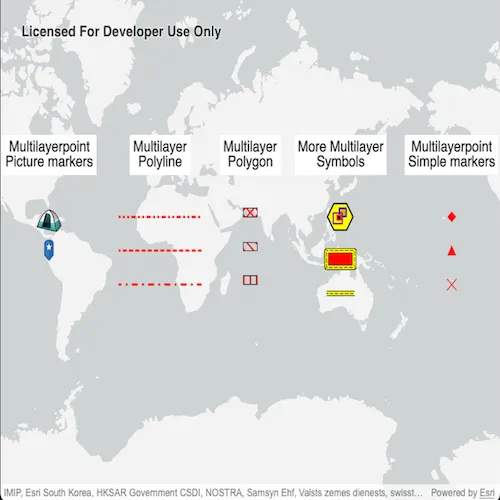
Show different kinds of multilayer symbols on a map similar to some pre-defined 2D simple symbol styles.
Use case
Allows you to customize a graphic with a multilayer symbol. For example, you may want more customizable symbols than the one that is provided with the API to display a unique representation of a landmark.
How to use the sample
The sample loads multilayer symbols for points, polylines, and polygons.
How it works
- Create multilayer symbols for each predefined 2D simple symbol style.
- For multilayer point symbols, use the
MultilayerPointSymbolconstructor. - For multilayer polyline symbols, use the
MultilayerPolylineSymbolconstructor. - For multilayer polygon symbols, use the
MultilayerPolygonSymbolconstructor.
- For multilayer point symbols, use the
- Create graphics by passing in a geometry and the associated symbol.
- Add graphics to the graphics overlay with
graphicsOverlay->graphics()->append(graphic)
Relevant API
- Graphic
- GraphicsOverlay
- MultiLayerPointSymbol
- MultiLayerPolygonSymbol
- MultiLayerPolylineSymbol
- PictureMarkerSymbolLayer
- SolidFillSymbolLayer
- SolidStrokeSymbolLayer
- VectorMarkerSymbolLayer
About the data
The campsite picture marker symbol is constructed from a URL.

Tags
graphic, marker, multilayer, picture, symbol
Sample code
// [WriteFile Name=RenderMultilayerSymbols, Category=DisplayInformation]// [Legal]// Copyright 2025 Esri.//// Licensed under the Apache License, Version 2.0 (the "License");// you may not use this file except in compliance with the License.// You may obtain a copy of the License at// http://www.apache.org/licenses/LICENSE-2.0//// Unless required by applicable law or agreed to in writing, software// distributed under the License is distributed on an "AS IS" BASIS,// WITHOUT WARRANTIES OR CONDITIONS OF ANY KIND, either express or implied.// See the License for the specific language governing permissions and// limitations under the License.// [Legal]
#ifdef PCH_BUILD#include "pch.hpp"#endif // PCH_BUILD
// sample headers#include "RenderMultilayerSymbols.h"
// ArcGIS Maps SDK headers#include "DashGeometricEffect.h"#include "Envelope.h"#include "GeometricEffectListModel.h"#include "Geometry.h"#include "Graphic.h"#include "GraphicListModel.h"#include "GraphicsOverlay.h"#include "GraphicsOverlayListModel.h"#include "HatchFillSymbolLayer.h"#include "Map.h"#include "MapQuickView.h"#include "MapTypes.h"#include "MultilayerPointSymbol.h"#include "MultilayerPolygonSymbol.h"#include "MultilayerPolylineSymbol.h"#include "PictureMarkerSymbolLayer.h"#include "Point.h"#include "PolygonBuilder.h"#include "PolylineBuilder.h"#include "SolidFillSymbolLayer.h"#include "SolidStrokeSymbolLayer.h"#include "SpatialReference.h"#include "StrokeSymbolLayer.h"#include "SymbolAnchor.h"#include "SymbolTypes.h"#include "TextSymbol.h"#include "VectorMarkerSymbolElement.h"#include "VectorMarkerSymbolLayer.h"#include "Viewpoint.h"
// Qt headers#include <QColor>#include <QFile>#include <QFuture>#include <QImage>#include <QUrl>
using namespace Esri::ArcGISRuntime;
namespace{  constexpr double symbolOffset = 20.0;}
RenderMultilayerSymbols::RenderMultilayerSymbols(QObject* parent /* = nullptr */) :  QObject(parent),  m_map(new Map(BasemapStyle::ArcGISLightGray, this)){}
RenderMultilayerSymbols::~RenderMultilayerSymbols() = default;
void RenderMultilayerSymbols::init(){  // Register the map view for QML  qmlRegisterType<MapQuickView>("Esri.Samples", 1, 0, "MapView");  qmlRegisterType<RenderMultilayerSymbols>("Esri.Samples", 1, 0, "RenderMultilayerSymbolsSample");}
MapQuickView* RenderMultilayerSymbols::mapView() const{  return m_mapView;}
// Set the view (created in QML)void RenderMultilayerSymbols::setMapView(MapQuickView* mapView){  if (!mapView || mapView == m_mapView)  {    return;  }
  m_mapView = mapView;  m_mapView->setMap(m_map);
  // Set initial view  const Point centerPoint(65.0, 0.0, SpatialReference::wgs84());  Viewpoint initalViewPoint(centerPoint);  m_mapView->setViewpointAsync(initalViewPoint);
  addAllGraphics();
  emit mapViewChanged();}
void RenderMultilayerSymbols::addAllGraphics(){  GraphicsOverlay* overlay = new GraphicsOverlay(this);
  // Create text graphics for section headers  TextSymbol* textSymbol = new TextSymbol(this);  textSymbol->setText("Multilayerpoint\nSimple markers");  textSymbol->setColor(Qt::black);  textSymbol->setSize(20);  textSymbol->setBackgroundColor(Qt::white);  textSymbol->setOutlineColor(Qt::black);  textSymbol->setOutlineWidth(1);
  Point textPoint(-150, 50, SpatialReference::wgs84());  Graphic* textGraphicForMarkers = new Graphic(textPoint, textSymbol, this);  overlay->graphics()->append(textGraphicForMarkers);
  addPointGraphicsWithMarkerSymbols(overlay);
  textSymbol = new TextSymbol(this);  textSymbol->setText("Multilayerpoint\nPicture markers");  textSymbol->setColor(Qt::black);  textSymbol->setSize(20);  textSymbol->setBackgroundColor(Qt::white);  textSymbol->setOutlineColor(Qt::black);  textSymbol->setOutlineWidth(1);
  textPoint = Point(-80, 50, SpatialReference::wgs84());  Graphic* textGraphicForPictureMarkers = new Graphic(textPoint, textSymbol, this);  overlay->graphics()->append(textGraphicForPictureMarkers);
  addPointGraphicsWithPictureMarkerSymbolFromUri(overlay);  addPointGraphicsWithPictureMarkerSymbolFromResources(overlay);
  textSymbol = new TextSymbol(this);  textSymbol->setText("Multilayer\nPolyline");  textSymbol->setColor(Qt::black);  textSymbol->setSize(20);  textSymbol->setBackgroundColor(Qt::white);  textSymbol->setOutlineColor(Qt::black);  textSymbol->setOutlineWidth(1);
  textPoint = Point(0, 50, SpatialReference::wgs84());  Graphic* textGraphicForLineSymbols = new Graphic(textPoint, textSymbol, this);  overlay->graphics()->append(textGraphicForLineSymbols);
  addLineGraphicsWithMarkerSymbols(overlay);
  textSymbol = new TextSymbol(this);  textSymbol->setText("Multilayer\nPolygon");  textSymbol->setColor(Qt::black);  textSymbol->setSize(20);  textSymbol->setBackgroundColor(Qt::white);  textSymbol->setOutlineColor(Qt::black);  textSymbol->setOutlineWidth(1);
  textPoint = Point(65, 50, SpatialReference::wgs84());  Graphic* textGraphicForFillSymbols = new Graphic(textPoint, textSymbol, this);  overlay->graphics()->append(textGraphicForFillSymbols);
  addPolygonGraphicsWithMarkerSymbols(overlay);
  textSymbol = new TextSymbol(this);  textSymbol->setText("More Multilayer\nSymbols");  textSymbol->setColor(Qt::black);  textSymbol->setSize(20);  textSymbol->setBackgroundColor(Qt::white);  textSymbol->setOutlineColor(Qt::black);  textSymbol->setOutlineWidth(1);
  textPoint = Point(130, 50, SpatialReference::wgs84());  Graphic* textGraphicForComplexSymbols = new Graphic(textPoint, textSymbol, this);  overlay->graphics()->append(textGraphicForComplexSymbols);
  addComplexPointGraphic(overlay);  addComplexPolygonGraphic(overlay);  addComplexPolylineGraphic(overlay);
  m_mapView->graphicsOverlays()->append(overlay);}
void RenderMultilayerSymbols::addPointGraphicsWithMarkerSymbols(GraphicsOverlay* overlay){  // Create a solid fill symbol layer with red color and create a MultilayerPolygonSymbol.  SolidFillSymbolLayer* redFillSymbolLayer = new SolidFillSymbolLayer(Qt::red, this);  MultilayerPolygonSymbol* redFillMultilayerPolygonSymbol = new MultilayerPolygonSymbol(QList<SymbolLayer*>{redFillSymbolLayer}, this);
  // Diamond  // Define a diamond shape geometry using JSON format. The "rings" array specifies the vertices of the diamond.  Geometry diamondGeometry = Geometry::fromJson(R"({"rings":[[[0.0,2.5],[2.5,0.0],[0.0,-2.5],[-2.5,0.0],[0.0,2.5]]]})");
  // Create a vector marker symbol element using the diamond geometry and the red fill symbol and create a layer.  VectorMarkerSymbolElement* diamondVectorMarkerElement = new VectorMarkerSymbolElement(diamondGeometry, redFillMultilayerPolygonSymbol, this);  VectorMarkerSymbolLayer* diamondVectorMarkerLayer =    new VectorMarkerSymbolLayer(QList<VectorMarkerSymbolElement*>{diamondVectorMarkerElement}, this);
  // Create a multilayer point symbol that uses the diamond vector marker layer.  MultilayerPointSymbol* diamondSymbol = new MultilayerPointSymbol(QList<SymbolLayer*>{diamondVectorMarkerLayer}, this);
  // Create point graphics using the diamond symbol created above  const Point diamondPoint(-150, 20, SpatialReference::wgs84());  Graphic* diamondGraphic = new Graphic(diamondPoint, diamondSymbol, this);  overlay->graphics()->append(diamondGraphic);
  // Triangle  // Define a triangle shape geometry using JSON format. The "rings" array specifies the vertices of the triangle.  Geometry triangleGeometry = Geometry::fromJson(R"({"rings":[[[0.0,5.0],[5,-5.0],[-5,-5.0],[0.0,5.0]]]})");
  // Create a vector marker symbol element using the triangle geometry and the multilayer polygon symbol and create a layer.  VectorMarkerSymbolElement* triangleVectorMarkerElement = new VectorMarkerSymbolElement(triangleGeometry, redFillMultilayerPolygonSymbol, this);  VectorMarkerSymbolLayer* triangleVectorMarkerLayer =    new VectorMarkerSymbolLayer(QList<VectorMarkerSymbolElement*>{triangleVectorMarkerElement}, this);
  // Create a multilayer point symbol that uses the triangle vector marker layer.  MultilayerPointSymbol* triangleSymbol = new MultilayerPointSymbol(QList<SymbolLayer*>{triangleVectorMarkerLayer}, this);
  // Create point graphics using the triangle symbol created above  const Point trianglePoint(-150, 20 - symbolOffset, SpatialReference::wgs84());  Graphic* triangleGraphic = new Graphic(trianglePoint, triangleSymbol, this);  overlay->graphics()->append(triangleGraphic);
  // Cross  // Define a cross shape geometry using JSON format. The "paths" array specifies the lines that form the cross.  Geometry crossGeometry = Geometry::fromJson(R"({"paths":[[[-1,1],[0,0],[1,-1]],[[1,1],[0,0],[-1,-1]]]})");
  // Create a solid stroke symbol layer with red color and create a MultilayerPolylineSymbol.  SolidStrokeSymbolLayer* redStroke = new SolidStrokeSymbolLayer(1, Qt::red, this);  MultilayerPolylineSymbol* redStrokeMultilayerPolylineSymbol = new MultilayerPolylineSymbol(QList<SymbolLayer*>{redStroke}, this);
  // Create a vector marker symbol element using the cross geometry and the multilayer polyline symbol and create a layer.  VectorMarkerSymbolElement* crossVectorMarkerElement = new VectorMarkerSymbolElement(crossGeometry, redStrokeMultilayerPolylineSymbol, this);  VectorMarkerSymbolLayer* crossVectorMarkerLayer = new VectorMarkerSymbolLayer(QList<VectorMarkerSymbolElement*>{crossVectorMarkerElement}, this);
  // Create a multilayer point symbol that uses the cross vector marker layer.  MultilayerPointSymbol* crossSymbol = new MultilayerPointSymbol(QList<SymbolLayer*>{crossVectorMarkerLayer}, this);
  // Create point graphics using the cross symbol created above  const Point crossPoint(-150, 20 - 2 * symbolOffset, SpatialReference::wgs84());  Graphic* crossGraphic = new Graphic(crossPoint, crossSymbol, this);  overlay->graphics()->append(crossGraphic);}
void RenderMultilayerSymbols::addPointGraphicsWithPictureMarkerSymbolFromUri(GraphicsOverlay* overlay){  const QUrl symbolUri("https://static.arcgis.com/images/Symbols/OutdoorRecreation/Camping.png");
  // Create a new symbol using Uri  PictureMarkerSymbolLayer* campsiteMarker = new PictureMarkerSymbolLayer(symbolUri, this);  campsiteMarker->setSize(40);  MultilayerPointSymbol* campsiteSymbol = new MultilayerPointSymbol(QList<SymbolLayer*>{campsiteMarker}, this);
  const Point campsitePoint(-80, 20, SpatialReference::wgs84());
  // Create graphic with the location and symbol  Graphic* campsiteGraphic = new Graphic(campsitePoint, campsiteSymbol, this);  overlay->graphics()->append(campsiteGraphic);}
void RenderMultilayerSymbols::addPointGraphicsWithPictureMarkerSymbolFromResources(GraphicsOverlay* overlay){  // File pin_star_blue.png loaded from resouces.  const QString resourcePath(":/Samples/DisplayInformation/RenderMultilayerSymbols/pin_star_blue.png");
  if (QFile::exists(resourcePath))  {    QImage img(resourcePath);
    // Create new PictureMarkerSymbolLayer from the runtime image object    PictureMarkerSymbolLayer* pinMarker = new PictureMarkerSymbolLayer(img, this);    pinMarker->setSize(50);
    // Create a new multilayerpoint symbol with the PictureMarkerSymbolLayer    MultilayerPointSymbol* pinSymbol = new MultilayerPointSymbol(QList<SymbolLayer*>{pinMarker}, this);
    // Create location for the pin    const Point pinPoint(-80, 20 - symbolOffset, SpatialReference::wgs84());
    // Create graphic with the location and symbol    Graphic* pinGraphic = new Graphic(pinPoint, pinSymbol, this);    overlay->graphics()->append(pinGraphic);  }}
void RenderMultilayerSymbols::addLineGraphicsWithMarkerSymbols(GraphicsOverlay* overlay){  MultilayerPolylineSymbol* lineSymbol = nullptr;  SolidStrokeSymbolLayer* strokeLayer = nullptr;
  // Dash style 1 - ShortDashDotDot  // Create a polyline for the multilayer polyline symbol  PolylineBuilder* polylineBuilder = new PolylineBuilder(SpatialReference::wgs84(), this);  polylineBuilder->addPoint(Point(-30, 20, SpatialReference::wgs84()));  polylineBuilder->addPoint(Point(30, 20, SpatialReference::wgs84()));
  strokeLayer = new SolidStrokeSymbolLayer(3, Qt::red, this);  strokeLayer->setCapStyle(StrokeSymbolLayerCapStyle::Round);
  // Dash geometric effects that define the dash and dot template used by different line style  DashGeometricEffect* dashEffect = new DashGeometricEffect(this);
  // Create a dash effect  QList<double> dashTemplate = {4, 6, 0.5, 6, 0.5, 6};  dashEffect->setDashTemplate(dashTemplate);  strokeLayer->geometricEffects()->append(dashEffect);
  lineSymbol = new MultilayerPolylineSymbol(QList<SymbolLayer*>{strokeLayer}, this);
  // Create a polyline graphic with geometry using the symbol created above  Graphic* shortDashDotGraphic = new Graphic(polylineBuilder->toGeometry(), lineSymbol, this);  overlay->graphics()->append(shortDashDotGraphic);
  // Dash style 2 - ShortDash  polylineBuilder = new PolylineBuilder(SpatialReference::wgs84(), this);  polylineBuilder->addPoint(Point(-30, 20 - symbolOffset, SpatialReference::wgs84()));  polylineBuilder->addPoint(Point(30, 20 - symbolOffset, SpatialReference::wgs84()));
  strokeLayer = new SolidStrokeSymbolLayer(3, Qt::red, this);  strokeLayer->setCapStyle(StrokeSymbolLayerCapStyle::Round);  dashEffect = new DashGeometricEffect(this);
  // Create a dash effect  dashTemplate = {4, 6};  dashEffect->setDashTemplate(dashTemplate);  strokeLayer->geometricEffects()->append(dashEffect);
  lineSymbol = new MultilayerPolylineSymbol(QList<SymbolLayer*>{strokeLayer}, this);
  // Create a polyline graphic with geometry using the symbol created above  Graphic* shortDashGraphic = new Graphic(polylineBuilder->toGeometry(), lineSymbol, this);  overlay->graphics()->append(shortDashGraphic);
  // Dash style 3 - DashDot  polylineBuilder = new PolylineBuilder(SpatialReference::wgs84(), this);  polylineBuilder->addPoint(Point(-30, 20 - 2 * symbolOffset, SpatialReference::wgs84()));  polylineBuilder->addPoint(Point(30, 20 - 2 * symbolOffset, SpatialReference::wgs84()));
  strokeLayer = new SolidStrokeSymbolLayer(3, Qt::red, this);  strokeLayer->setCapStyle(StrokeSymbolLayerCapStyle::Round);  dashEffect = new DashGeometricEffect(this);
  // Create a dash effect  dashTemplate = {7, 9, 0.5, 9};  dashEffect->setDashTemplate(dashTemplate);  strokeLayer->geometricEffects()->append(dashEffect);
  lineSymbol = new MultilayerPolylineSymbol(QList<SymbolLayer*>{strokeLayer}, this);
  // Create a polyline graphic with geometry using the symbol created above  Graphic* dashDotGraphic = new Graphic(polylineBuilder->toGeometry(), lineSymbol, this);  overlay->graphics()->append(dashDotGraphic);}
void RenderMultilayerSymbols::addPolygonGraphicsWithMarkerSymbols(GraphicsOverlay* overlay){  PolygonBuilder* polygonBuilder = new PolygonBuilder(SpatialReference::wgs84(), this);  polygonBuilder->addPoint(Point(60, 25, SpatialReference::wgs84()));  polygonBuilder->addPoint(Point(70, 25, SpatialReference::wgs84()));  polygonBuilder->addPoint(Point(70, 20, SpatialReference::wgs84()));  polygonBuilder->addPoint(Point(60, 20, SpatialReference::wgs84()));
  // Create a stroke symbol layer to be used by hatch patterns  SolidStrokeSymbolLayer* strokeForHatches = new SolidStrokeSymbolLayer(2, Qt::red, this);  SolidStrokeSymbolLayer* strokeForOutline = new SolidStrokeSymbolLayer(1, Qt::black, this);
  // Create a diagonal cross pattern hatch symbol layers for diagonal cross fill style  MultilayerPolylineSymbol* hatchSymbol = new MultilayerPolylineSymbol(QList<SymbolLayer*>{strokeForHatches}, this);  HatchFillSymbolLayer* diagonalStroke1 = new HatchFillSymbolLayer(hatchSymbol, 45, this);  HatchFillSymbolLayer* diagonalStroke2 = new HatchFillSymbolLayer(hatchSymbol, -45, this);
  diagonalStroke1->setSeparation(9);  diagonalStroke2->setSeparation(9);
  // Create a multilayer polygon symbol with symbol layers  MultilayerPolygonSymbol* diagonalCrossPolygonSymbol =    new MultilayerPolygonSymbol(QList<SymbolLayer*>{diagonalStroke1, diagonalStroke2, strokeForOutline}, this);
  // Create a polygon graphic with geometry using the symbol created above  Graphic* diagonalCrossGraphic = new Graphic(polygonBuilder->toGeometry(), diagonalCrossPolygonSymbol, this);  overlay->graphics()->append(diagonalCrossGraphic);
  polygonBuilder = new PolygonBuilder(SpatialReference::wgs84(), this);  polygonBuilder->addPoint(Point(60, 25 - symbolOffset, SpatialReference::wgs84()));  polygonBuilder->addPoint(Point(70, 25 - symbolOffset, SpatialReference::wgs84()));  polygonBuilder->addPoint(Point(70, 20 - symbolOffset, SpatialReference::wgs84()));  polygonBuilder->addPoint(Point(60, 20 - symbolOffset, SpatialReference::wgs84()));
  // Create a forward diagonal pattern hatch symbol layer for forward diagonal fill style  HatchFillSymbolLayer* forwardDiagonal = new HatchFillSymbolLayer(hatchSymbol, -45, this);  forwardDiagonal->setSeparation(9);
  // Create a multilayer polygon symbol with symbol layers  MultilayerPolygonSymbol* forwardDiagonalPolygonSymbol = new MultilayerPolygonSymbol(QList<SymbolLayer*>{forwardDiagonal, strokeForOutline}, this);
  // Create a polygon graphic with geometry using the symbol created above  Graphic* forwardDiagonalGraphic = new Graphic(polygonBuilder->toGeometry(), forwardDiagonalPolygonSymbol, this);  overlay->graphics()->append(forwardDiagonalGraphic);
  polygonBuilder = new PolygonBuilder(SpatialReference::wgs84(), this);  polygonBuilder->addPoint(Point(60, 25 - 2 * symbolOffset, SpatialReference::wgs84()));  polygonBuilder->addPoint(Point(70, 25 - 2 * symbolOffset, SpatialReference::wgs84()));  polygonBuilder->addPoint(Point(70, 20 - 2 * symbolOffset, SpatialReference::wgs84()));  polygonBuilder->addPoint(Point(60, 20 - 2 * symbolOffset, SpatialReference::wgs84()));
  // Create a vertical pattern hatch symbol layer for vertical fill style  HatchFillSymbolLayer* vertical = new HatchFillSymbolLayer(hatchSymbol, 90, this);  vertical->setSeparation(9);
  // Create a multilayer polygon symbol with symbol layers  MultilayerPolygonSymbol* verticalPolygonSymbol = new MultilayerPolygonSymbol(QList<SymbolLayer*>{vertical, strokeForOutline}, this);
  // Create a polygon graphic with geometry using the symbol created above  Graphic* verticalPolygonGraphic = new Graphic(polygonBuilder->toGeometry(), verticalPolygonSymbol, this);  overlay->graphics()->append(verticalPolygonGraphic);}
void RenderMultilayerSymbols::addComplexPointGraphic(GraphicsOverlay* overlay){  // Create an orange envelope with reddish outline  SolidFillSymbolLayer* orangeFillLayer = new SolidFillSymbolLayer(QColor(255, 165, 0), this);  SolidStrokeSymbolLayer* pinkOutline = new SolidStrokeSymbolLayer(2, Qt::blue, this);  const Envelope orangeSquareGeometry(-0.5, -0.5, 0.5, 0.5, SpatialReference::wgs84());  VectorMarkerSymbolElement* orangeSquareVectorElement =    new VectorMarkerSymbolElement(orangeSquareGeometry, new MultilayerPolygonSymbol(QList<SymbolLayer*>{orangeFillLayer, pinkOutline}, this), this);  VectorMarkerSymbolLayer* orangeSquareVectorMarkerLayer =    new VectorMarkerSymbolLayer(QList<VectorMarkerSymbolElement*>{orangeSquareVectorElement}, this);  orangeSquareVectorMarkerLayer->setSize(11);  orangeSquareVectorMarkerLayer->setAnchor(SymbolAnchor(-4, -6, SymbolAnchorPlacementMode::Absolute));
  // Create a black envelope  SolidFillSymbolLayer* blackFillLayer = new SolidFillSymbolLayer(Qt::black, this);  SolidStrokeSymbolLayer* orangeOutline = new SolidStrokeSymbolLayer(2, QColor(255, 69, 0), this);  const Envelope blackSquareGeometry(-0.5, -0.5, 0.5, 0.5, SpatialReference::wgs84());  MultilayerPolygonSymbol* blackFillOrangeOutlineSymbol = new MultilayerPolygonSymbol(QList<SymbolLayer*>{blackFillLayer, orangeOutline}, this);  VectorMarkerSymbolElement* blackSquareVectorElement = new VectorMarkerSymbolElement(blackSquareGeometry, blackFillOrangeOutlineSymbol, this);  VectorMarkerSymbolLayer* blackSquareVectorMarkerLayer =    new VectorMarkerSymbolLayer(QList<VectorMarkerSymbolElement*>{blackSquareVectorElement}, this);  blackSquareVectorMarkerLayer->setSize(6);  blackSquareVectorMarkerLayer->setAnchor(SymbolAnchor(2, 1, SymbolAnchorPlacementMode::Absolute));
  // Create an envelope with no purple outline  SolidFillSymbolLayer* transparentFillLayer = new SolidFillSymbolLayer(Qt::transparent, this);  SolidStrokeSymbolLayer* purpleOutline = new SolidStrokeSymbolLayer(2, QColor(128, 0, 128), this);  const Envelope purpleSquareGeometry(-0.5, -0.5, 0.5, 0.5, SpatialReference::wgs84());  MultilayerPolygonSymbol* transparentPurpleOutlineSymbol =    new MultilayerPolygonSymbol(QList<SymbolLayer*>{transparentFillLayer, purpleOutline}, this);  VectorMarkerSymbolElement* purpleSquareVectorElement = new VectorMarkerSymbolElement(purpleSquareGeometry, transparentPurpleOutlineSymbol, this);  VectorMarkerSymbolLayer* purpleSquareVectorMarkerLayer =    new VectorMarkerSymbolLayer(QList<VectorMarkerSymbolElement*>{purpleSquareVectorElement}, this);  purpleSquareVectorMarkerLayer->setSize(14);  purpleSquareVectorMarkerLayer->setAnchor(SymbolAnchor(4, 2, SymbolAnchorPlacementMode::Absolute));
  // First layer with its marker graphics and nested symbol layers  const Geometry hexagonElementGeometry =    Geometry::fromJson(R"({"rings":[[[-2.89,5.0],[2.89,5.0],[5.77,0.0],[2.89,-5.0],[-2.89,-5.0],[-5.77,0.0],[-2.89,5.0]]]})"); // Hexagon geometry  SolidFillSymbolLayer* yellowFillLayer = new SolidFillSymbolLayer(Qt::yellow, this);  SolidStrokeSymbolLayer* blackOutline = new SolidStrokeSymbolLayer(2, Qt::black, this);  MultilayerPolygonSymbol* yellowFillBlackOutlineSymbol = new MultilayerPolygonSymbol(QList<SymbolLayer*>{yellowFillLayer, blackOutline}, this);  VectorMarkerSymbolElement* hexagonVectorElement = new VectorMarkerSymbolElement(hexagonElementGeometry, yellowFillBlackOutlineSymbol, this);  VectorMarkerSymbolLayer* hexagonVectorMarkerLayer = new VectorMarkerSymbolLayer(QList<VectorMarkerSymbolElement*>{hexagonVectorElement}, this);  hexagonVectorMarkerLayer->setSize(35);
  // // Create the multilayer point symbol  MultilayerPointSymbol* pointSymbol = new MultilayerPointSymbol(    QList<SymbolLayer*>{hexagonVectorMarkerLayer, orangeSquareVectorMarkerLayer, blackSquareVectorMarkerLayer, purpleSquareVectorMarkerLayer}, this);
  // Create the multilayer point graphic using the symbols created above  const Point complexPoint(130, 20, SpatialReference::wgs84());  Graphic* complexPointGraphic = new Graphic(complexPoint, pointSymbol, this);  overlay->graphics()->append(complexPointGraphic);}
void RenderMultilayerSymbols::addComplexPolygonGraphic(GraphicsOverlay* overlay){  // Create the black outline  SolidStrokeSymbolLayer* blackOutline = new SolidStrokeSymbolLayer(7, Qt::black, this);  blackOutline->setCapStyle(StrokeSymbolLayerCapStyle::Round);
  // Create the yellow stroke inside  SolidStrokeSymbolLayer* yellowStroke = new SolidStrokeSymbolLayer(5, Qt::yellow, this);  yellowStroke->setCapStyle(StrokeSymbolLayerCapStyle::Round);
  // Symbol layers for multilayer polyline  SolidStrokeSymbolLayer* blackDashes = new SolidStrokeSymbolLayer(1, Qt::black, this);  DashGeometricEffect* dashEffect = new DashGeometricEffect(this);  QList<double> dashTemplate = {5, 3};  dashEffect->setDashTemplate(dashTemplate);  blackDashes->geometricEffects()->append(dashEffect);  blackDashes->setCapStyle(StrokeSymbolLayerCapStyle::Square);
  // Create a red filling for the polygon  SolidFillSymbolLayer* redFillLayer = new SolidFillSymbolLayer(Qt::red, this);
  // Create the multilayer polygon symbol  MultilayerPolygonSymbol* polygonSymbol =    new MultilayerPolygonSymbol(QList<SymbolLayer*>{redFillLayer, blackOutline, yellowStroke, blackDashes}, this);
  // Create the polygon  PolygonBuilder* polygonBuilder = new PolygonBuilder(SpatialReference::wgs84(), this);  polygonBuilder->addPoint(Point(120, 0, SpatialReference::wgs84()));  polygonBuilder->addPoint(Point(140, 0, SpatialReference::wgs84()));  polygonBuilder->addPoint(Point(140, -10, SpatialReference::wgs84()));  polygonBuilder->addPoint(Point(120, -10, SpatialReference::wgs84()));
  // Create a multilayer polygon graphic with geometry using the symbols created above  Graphic* complexPolygonGraphic = new Graphic(polygonBuilder->toGeometry(), polygonSymbol, this);  overlay->graphics()->append(complexPolygonGraphic);}
void RenderMultilayerSymbols::addComplexPolylineGraphic(GraphicsOverlay* overlay){  // Symbol layers for multilayer polyline  SolidStrokeSymbolLayer* blackDashes = new SolidStrokeSymbolLayer(1, Qt::black, this);  DashGeometricEffect* dashEffect = new DashGeometricEffect(this);  QList<double> dashTemplate = {5, 3};  dashEffect->setDashTemplate(dashTemplate);  blackDashes->geometricEffects()->append(dashEffect);  blackDashes->setCapStyle(StrokeSymbolLayerCapStyle::Square);
  // Create the yellow stroke inside  SolidStrokeSymbolLayer* yellowStroke = new SolidStrokeSymbolLayer(5, Qt::yellow, this);  yellowStroke->setCapStyle(StrokeSymbolLayerCapStyle::Round);
  // Create the black outline  SolidStrokeSymbolLayer* blackOutline = new SolidStrokeSymbolLayer(7, Qt::black, this);  blackOutline->setCapStyle(StrokeSymbolLayerCapStyle::Round);
  // Create the multilayer polyline symbol  MultilayerPolylineSymbol* polylineSymbol = new MultilayerPolylineSymbol(QList<SymbolLayer*>{blackOutline, yellowStroke, blackDashes}, this);
  PolylineBuilder* polylineBuilder = new PolylineBuilder(SpatialReference::wgs84(), this);  polylineBuilder->addPoint(Point(120, -25, SpatialReference::wgs84()));  polylineBuilder->addPoint(Point(140, -25, SpatialReference::wgs84()));
  // Create the multilayer polyline graphic with geometry using the symbols created above  Graphic* complexLineGraphic = new Graphic(polylineBuilder->toGeometry(), polylineSymbol, this);  overlay->graphics()->append(complexLineGraphic);}
// [WriteFile Name=RenderMultilayerSymbols, Category=DisplayInformation]// [Legal]// Copyright 2025 Esri.//// Licensed under the Apache License, Version 2.0 (the "License");// you may not use this file except in compliance with the License.// You may obtain a copy of the License at// http://www.apache.org/licenses/LICENSE-2.0//// Unless required by applicable law or agreed to in writing, software// distributed under the License is distributed on an "AS IS" BASIS,// WITHOUT WARRANTIES OR CONDITIONS OF ANY KIND, either express or implied.// See the License for the specific language governing permissions and// limitations under the License.// [Legal]
#ifndef RENDERMULTILAYERSYMBOLS_H#define RENDERMULTILAYERSYMBOLS_H
// Qt headers#include <QObject>
namespace Esri::ArcGISRuntime{ class Map; class MapQuickView; class GraphicsOverlay;} // namespace Esri::ArcGISRuntime
Q_MOC_INCLUDE("MapQuickView.h");
class RenderMultilayerSymbols : public QObject{ Q_OBJECT
Q_PROPERTY(Esri::ArcGISRuntime::MapQuickView* mapView READ mapView WRITE setMapView NOTIFY mapViewChanged)
public: explicit RenderMultilayerSymbols(QObject* parent = nullptr); ~RenderMultilayerSymbols() override;
static void init();
signals: void mapViewChanged();
private: Esri::ArcGISRuntime::MapQuickView* mapView() const; void setMapView(Esri::ArcGISRuntime::MapQuickView* mapView);
void addAllGraphics();
void addPointGraphicsWithMarkerSymbols(Esri::ArcGISRuntime::GraphicsOverlay* overlay); void addPointGraphicsWithPictureMarkerSymbolFromUri(Esri::ArcGISRuntime::GraphicsOverlay* overlay); void addPointGraphicsWithPictureMarkerSymbolFromResources(Esri::ArcGISRuntime::GraphicsOverlay* overlay); void addLineGraphicsWithMarkerSymbols(Esri::ArcGISRuntime::GraphicsOverlay* overlay); void addPolygonGraphicsWithMarkerSymbols(Esri::ArcGISRuntime::GraphicsOverlay* overlay); void addComplexPointGraphic(Esri::ArcGISRuntime::GraphicsOverlay* overlay); void addComplexPolylineGraphic(Esri::ArcGISRuntime::GraphicsOverlay* overlay); void addComplexPolygonGraphic(Esri::ArcGISRuntime::GraphicsOverlay* overlay);
Esri::ArcGISRuntime::Map* m_map = nullptr; Esri::ArcGISRuntime::MapQuickView* m_mapView = nullptr;};
#endif // RENDERMULTILAYERSYMBOLS_H// [WriteFile Name=RenderMultilayerSymbols, Category=DisplayInformation]// [Legal]// Copyright 2025 Esri.
// Licensed under the Apache License, Version 2.0 (the "License");// you may not use this file except in compliance with the License.// You may obtain a copy of the License at// http://www.apache.org/licenses/LICENSE-2.0
// Unless required by applicable law or agreed to in writing, software// distributed under the License is distributed on an "AS IS" BASIS,// WITHOUT WARRANTIES OR CONDITIONS OF ANY KIND, either express or implied.// See the License for the specific language governing permissions and// limitations under the License.// [Legal]
import QtQuickimport QtQuick.Controlsimport Esri.Samples
Item {
// add a mapView component MapView { id: view anchors.fill: parent
Component.onCompleted: { // Set and keep the focus on MapView to enable keyboard navigation forceActiveFocus(); } }
// Declare the C++ instance which creates the map etc. and supply the view RenderMultilayerSymbolsSample { mapView: view }}