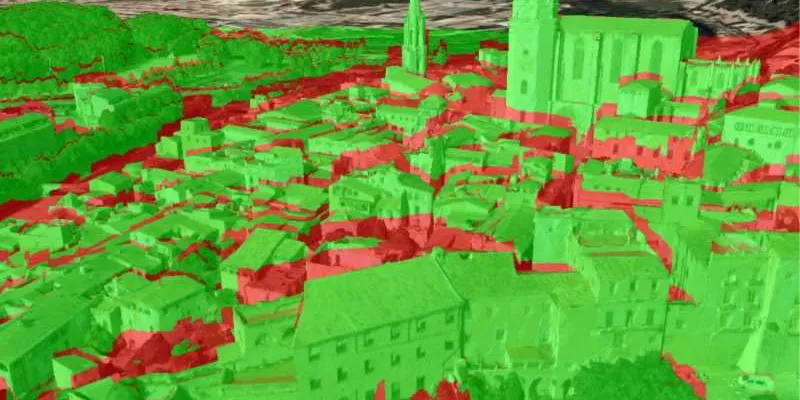
While spatial analysis is a broad term that encompasses a variety of operations available in ArcGIS Maps SDK for Swift, this chapter describes the high-performance analysis API, which provides classes and members to perform analysis tasks and quickly visualize and/or persist the results. Because the API is designed to leverage GPU processing power, it is ideal for providing a responsive and interactive user experience. It also provides a framework that allows you to chain together multiple analysis operations while maintaining high performance.

Examples of high-performance spatial analysis include:
- identifying gaps in security camera coverage to determine where to place additional cameras (viewshed analysis)
- confirming that tourists have a clear line of sight between an observation deck and several landmarks (line of sight analysis)
- performing calculations on bands of multispectral raster data to derive new datasets, such as vegetation indices (map algebra operations)
How it works
A variety of spatial analyses can be performed using the high-performance analysis API. Analysis results can be visualized interactively in a scene view or a map view and updated in near real-time as parameters change. Except for the exploratory analysis tools, which operate exclusively on the visible contents of a scene view, the spatial analysis APIs operate directly on the underlying data, independent of the current view display. This produces more accurate and consistent analysis results. These data-driven analysis results can also be exported to a new dataset for later use or further analysis.
Follow these basic steps to implement data driven (non-exploratory) spatial analysis in your application:
- Create input data for analysis: Create a continuous, discrete, or boolean field representing the input data for analysis. The input data will vary according to the type of analysis you want to perform. For example, viewshed and line of sight analyses require terrain (elevation) data, while a map algebra operation to calculate a vegetation index would require multiple spectral satellite imagery.
ContinuousField: floating-point values to represent measurements that change across a surface, such as elevation or temperature.DiscreteField: integer values to represent nominal categories, such as land cover or soil type.BooleanField: binary values to represent the presence or absence of a particular characteristic.
- Define analysis: For some analyses, you need to configure input parameters such as observer location, target height, and analysis extent using the appropriate parameter object, such as
ViewshedParametersorLineOfSightParameters. Other analyses, such as those that use map algebra, may require chaining multiple functions together with methods or operators to produce a result. - Create and evaluate an analysis function: Create an analysis function using the appropriate class for the analysis type, such as
ViewshedFunction,LineOfSightFunction,DiscreteFieldFunction, and so on. Evaluate the function to obtain the analysis result. - Export and visualize results: Analyses that return
ContinuousField,DiscreteField, orBooleanFieldcan be visualized in aFieldAnalysisfor immediate feedback. The visualization updates automatically when function parameters change. These types also allow you to export the result to a new raster dataset for later use or further analysis. When displaying results in a map or scene, apply an appropriate renderer to effectively visualize the data, such as aStretchRendererfor continuous data or aColormapRendererfor discrete or boolean data.
Analysis accuracy and results persistence
For high-precision analysis in 2D or 3D, use the functionality exposed by the following classes: ViewshedFunction, LineOfSightFunction, DiscreteFieldFunction, ContinuousFieldFunction, and BooleanFieldFunction. This API operates on the underlying data directly, independent of the current view display, and produces results that can be persisted for later use. The data used for these analyses comes from a ContinuousField, DiscreteField, or BooleanField, representing the set of values in an input dataset.
Conversely, the exploratory analysis functionality exposed by ExploratoryViewshed and ExploratoryLineOfSight operate on the 3D surface, layers, and objects currently visible in a scene view. The accuracy of their calculations is based on the current level of detail, which can vary based on the scene view's camera position and graphics hardware specifications. Because this analysis relies on the 3D display of objects in a scene view, it cannot be implemented in a map view. The results created by these classes cannot be persisted.
The following table summarizes the capabilities of the various spatial analysis tools available in the API.
| Interactive display in 2D | Interactive display in 3D | Can persist results | High accuracy | Considers all 3D objects in the view | Supports projected data | |
|---|---|---|---|---|---|---|
| Viewshed | 1 | |||||
| LineOfSight | 1 | |||||
| Map algebra operations | 2 | 3 | ||||
| ExploratoryViewshed | 4 | |||||
| ExploratoryLineOfSight | 4 |
- 1. Analysis is based on a single terrain dataset, rather than the contents of a map or scene view. The terrain dataset may include buildings and other 3D objects.
- 2. If results are calculated in WGS 84.
- 3. Uses any number of raster datasets required for the analysis.
- 4. Accuracy varies according to the scale at which the data are displayed.