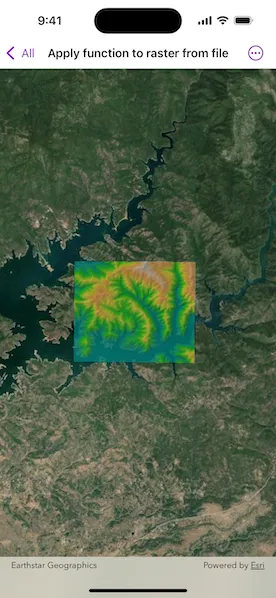
Apply a raster function to a local raster file and display the output with a raster layer.
Use case
Raster functions allow processing operations that can be applied to one or more rasters on the fly. A land survey agency may apply hillshade and aspect functions to rasters with elevation data in order to better determine the topography of a landscape and to make further planning decisions.
How to use the sample
Load the sample to see a raster function applied to a raster.
How it works
- Create a
RasterFunctionusing the path to a local raster function JSON file. - Set the raster function arguments as required by the function used.
- Use the raster function to create a new
Raster. - Set the raster to a
RasterLayerand display it in theMap.
Relevant API
- Raster
- RasterFunction
- RasterLayer
Offline data
This sample uses the Shasta Elevation Raster and Color Raster Function. Both are downloaded from ArcGIS Online automatically.
About the data
The raster function in the provided JSON file blends a color image with a greyscale image (in this case, a raster image containing elevation data), to add a hillshade effect to the input raster.
Additional information
Learn more about raster functions in the ArcGIS Pro documentation.
Tags
analysis, function, image, layer, processing, raster, raster function, transformation
Sample code
// Copyright 2025 Esri//// Licensed under the Apache License, Version 2.0 (the "License");// you may not use this file except in compliance with the License.// You may obtain a copy of the License at////   https://www.apache.org/licenses/LICENSE-2.0//// Unless required by applicable law or agreed to in writing, software// distributed under the License is distributed on an "AS IS" BASIS,// WITHOUT WARRANTIES OR CONDITIONS OF ANY KIND, either express or implied.// See the License for the specific language governing permissions and// limitations under the License.
import ArcGISimport SwiftUI
struct ApplyFunctionToRasterFromFileView: View {    /// A map with an imagery basemap style and raster layers.    @State private var map: Map = {        let map = Map(basemapStyle: .arcGISImageryStandard)        map.initialViewpoint = Viewpoint(            boundingGeometry: Envelope(                xRange: -13606233.44023646 ... -13591503.517810356,                yRange: 4971762.696708013...4982810.138527592,                spatialReference: .webMercator            )        )        // Creates a raster with the file URL.        let elevationRaster = Raster(fileURL: .shastaElevation)
        // Creates a raster function.        let rasterFunction = RasterFunction(fileURL: .colorRasterFunction)
        // Sets raster for raster function arguments.        if let arguments = rasterFunction.arguments {            for name in arguments.rasterNames {                arguments.setRaster(elevationRaster, forArgumentNamed: name)            }        }
        // Creates a raster from the raster function.        let raster = Raster(rasterFunction: rasterFunction)
        // Creates a raster layer from the raster.        let rasterLayer = RasterLayer(raster: raster)        rasterLayer.opacity = 0.5
        map.addOperationalLayer(rasterLayer)        return map    }()
    var body: some View {        MapView(map: map)    }}
private extension URL {    /// The URL to the Shasta elevation data.    static var shastaElevation: URL {        Bundle.main.url(forResource: "Shasta_Elevation", withExtension: "tif", subdirectory: "Shasta_Elevation")!    }
    /// The URL to the color raster function JSON.    static var colorRasterFunction: URL {        Bundle.main.url(forResource: "color", withExtension: "json")!    }}
#Preview {    ApplyFunctionToRasterFromFileView()}