Read a shapefile and display its metadata.
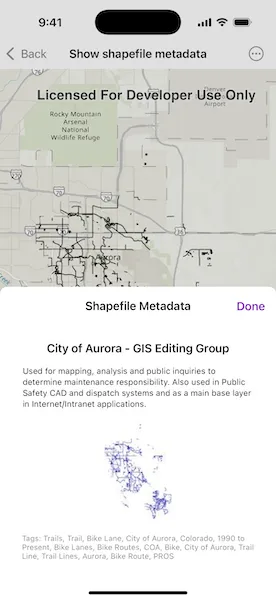
Use case
Display metadata for the shapefile currently being viewed—such as tags, credits, and a summary.
How to use the sample
Open the sample to automatically view the shapefile’s metadata.
How it works
- Load the shapefile using the
ShapefileFeatureTablewith the assets URL. - Access the shapefile metadata through the
infoproperty of the feature table. - Retrieve and display the thumbnail image from
fileInfo.thumbnail. - Display the shapefile’s
summary,credits, andtagsfrom the metadata.
Relevant API
- ShapefileFeatureTable
- ShapefileFeatureTable.info
- ShapefileInfo
- ShapefileInfo.credits
- ShapefileInfo.summary
- ShapefileInfo.tags
- ShapefileInfo.thumbnail
Offline data
Aurora Colorado Shapefiles is available as an item hosted on ArcGIS Online.
About the data
This sample uses a shapefile showing bike trails in Aurora, CO. The Aurora Colorado Shapefiles are available as an item on ArcGIS Online.
Tags
credits, description, metadata, package, shape file, shapefile, summary, symbology, tags, visualization
Sample code
ShowShapefileMetadataView.swift
// Copyright 2025 Esri//// Licensed under the Apache License, Version 2.0 (the "License");// you may not use this file except in compliance with the License.// You may obtain a copy of the License at////   https://www.apache.org/licenses/LICENSE-2.0//// Unless required by applicable law or agreed to in writing, software// distributed under the License is distributed on an "AS IS" BASIS,// WITHOUT WARRANTIES OR CONDITIONS OF ANY KIND, either express or implied.// See the License for the specific language governing permissions and// limitations under the License.
import ArcGISimport SwiftUI
struct ShowShapefileMetadataView: View {    /// Model which contains the logic for loading and setting the data.    @State private var model = Model()    /// The error that occurred, if any, when trying to load the shapefile or display its metadata.    @State private var error: (any Error)?    /// A Boolean value specifying whether the metadata view should be shown    @State private var showMetadata: Bool = false
    var body: some View {        MapViewReader { mapView in            MapView(map: model.map)                .onAppear {                    Task {                        do {                            // Attempt to asynchronously load the                            // feature layer from the model.                            try await model.loadShapefile()                            // If the feature layer has a full extent,                            // use it to set the map's viewpoint.                            if let fullExtent = model.featureLayer?.fullExtent {                                await mapView.setViewpointGeometry(                                    fullExtent,                                    padding: 50                                )                            }                        } catch {                            self.error = error                        }                    }                }                .toolbar {                    ToolbarItem(placement: .bottomBar) {                        Button("Show Shapefile Metadata") {                            showMetadata.toggle()                        }                        .popover(isPresented: $showMetadata) {                            metadataPopover                                .frame(idealWidth: 320, idealHeight: 380)                                .presentationCompactAdaptation(.popover)                        }                    }                }                .errorAlert(presentingError: $error)        }    }
    @ViewBuilder var metadataPopover: some View {        NavigationStack {            MetadataPanel(model: $model)                .navigationTitle("Shapefile Metadata")                .navigationBarTitleDisplayMode(.inline)                .toolbar {                    ToolbarItem(placement: .confirmationAction) {                        Button("Done") {                            showMetadata = false                        }                    }                }        }    }}
private extension ShowShapefileMetadataView {    @MainActor    @Observable    class Model {        /// Create a map with a topographic basemap.        @ObservationIgnored var map = Map(basemapStyle: .arcGISTopographic)
        /// Declare a FeatureLayer to display the shapefile features on the map.        @ObservationIgnored var featureLayer: FeatureLayer?
        /// Holds metadata information about the shapefile, such as name, description, etc.        var shapefileInfo: ShapefileInfo?
        /// Holds the thumbnail image associated with the shapefile, if available.        var thumbnailImage: UIImage?
        /// Asynchronous function to load the feature layer from the shapefile.        func loadShapefile() async throws {            let featureTable = ShapefileFeatureTable(fileURL: .auroraShapefile)            let layer = FeatureLayer(featureTable: featureTable)
            try await layer.featureTable?.load()
            map.addOperationalLayer(layer)            featureLayer = layer            shapefileInfo = featureTable.info            thumbnailImage = featureTable.info?.thumbnail        }    }
    struct MetadataPanel: View {        /// Binding to the model to reflect changes in the UI.        @Binding var model: ShowShapefileMetadataView.Model
        var body: some View {            VStack(alignment: .center, spacing: 16) {                if let info = model.shapefileInfo {                    Text(info.credits)                        .bold()                    Text(info.summary)                        .font(.caption)                        .multilineTextAlignment(.leading)                }                if let image = model.thumbnailImage {                    Image(uiImage: image)                        .resizable()                        .scaledToFit()                        .frame(maxHeight: 150)                }
                if let tags = model.shapefileInfo?.tags {                    Text("Tags: \(tags.joined(separator: ", "))")                        .font(.caption2)                        .foregroundColor(.secondary)                }            }            .padding()            .cornerRadius(8)            .padding(.horizontal)        }    }}
private extension URL {    static var auroraShapefile: URL {        Bundle.main.url(            forResource: "TrailBikeNetwork",            withExtension: "shp",            subdirectory: "Aurora_CO_shp"        )!    }}
#Preview {    ShowShapefileMetadataView()}