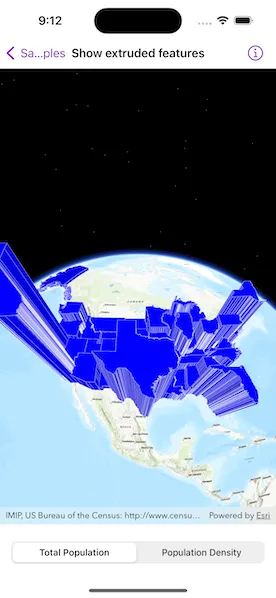
Extrude features based on their attributes.
Use case
Extrusion is the process of stretching a flat, 2D shape vertically to create a 3D object in a scene. For example, you can extrude building polygons by a height value to create three-dimensional building shapes.
How to use the sample
Tap the bottom buttons to switch between using population density and total population for extrusion. Higher extrusion directly corresponds to higher attribute values.
How it works
- Create a
ServiceFeatureTablefrom a URL. - Create a feature layer from the service feature table.
- Make sure to set the rendering mode to dynamic,
featureLayer.setRenderingMode = .dynamic.
- Make sure to set the rendering mode to dynamic,
- Apply a
SimpleRendererto the feature layer. - Set
ExtrusionModeof render,renderer.sceneProperties.extrusionMode = .absoluteHeight. - Set extrusion expression of renderer,
renderer.sceneProperties.extrusionExpression = "[POP2007] / 10".
Relevant API
- FeatureLayer
- RendererSceneProperties
- RendererSceneProperties.ExtrusionMode
- ServiceFeatureTable
- SimpleRenderer
Tags
3D, extrude, extrusion, extrusion expression, height, renderer, scene
Sample code
ShowExtrudedFeaturesView.swift
// Copyright 2023 Esri//// Licensed under the Apache License, Version 2.0 (the "License");// you may not use this file except in compliance with the License.// You may obtain a copy of the License at////   https://www.apache.org/licenses/LICENSE-2.0//// Unless required by applicable law or agreed to in writing, software// distributed under the License is distributed on an "AS IS" BASIS,// WITHOUT WARRANTIES OR CONDITIONS OF ANY KIND, either express or implied.// See the License for the specific language governing permissions and// limitations under the License.
import ArcGISimport SwiftUI
struct ShowExtrudedFeaturesView: View {    /// A scene with a topographic basemap centered on the US.    @State private var scene: ArcGIS.Scene = makeScene()
    /// The population statistic selection of the picker.    @State private var statisticSelection = Statistic.totalPopulation
    /// The feature layer on the scene.    private var featureLayer: FeatureLayer {        scene.operationalLayers.last as! FeatureLayer    }
    var body: some View {        VStack {            SceneView(scene: scene)
            // Unit system picker.            Picker("Statistic", selection: $statisticSelection) {                ForEach(Statistic.allCases, id: \.self) { stat in                    Text(stat.label)                }            }            .pickerStyle(.segmented)            .padding()            .onChange(of: statisticSelection) {                featureLayer.renderer?.sceneProperties.extrusionExpression = statisticSelection.extrusionExpression            }        }    }}
private extension ShowExtrudedFeaturesView {    /// Creates a scene with a feature layer.    /// - Returns: A new `ArcGIS.Scene` object.    private static func makeScene() -> ArcGIS.Scene {        let scene = Scene(basemapStyle: .arcGISTopographic)
        // Set the scene view's viewpoint specified by the camera position.        let point = Point(x: -99.659448, y: 20.513652, z: 12_940_924.0, spatialReference: .wgs84)        let camera = Camera(lookingAt: point, distance: 0, heading: 0, pitch: 15, roll: 0)        scene.initialViewpoint = Viewpoint(center: point, scale: .nan, camera: camera)
        // Add the extruded feature layer to the scene.        scene.addOperationalLayer(makeFeatureLayer())        return scene    }
    /// Creates a feature layer from the US census feature service.    /// - Returns: A new `FeatureLayer`    private static func makeFeatureLayer() -> FeatureLayer {        let featureTable = ServiceFeatureTable(url: .censusMapStates)        let featureLayer = FeatureLayer(featureTable: featureTable)
        // Feature layer must be rendered dynamically for extrusion to work.        featureLayer.renderingMode = .dynamic
        // Set the symbol used to display the features (US states) from the table.        let fillSymbol = SimpleFillSymbol(            style: .solid,            color: .blue,            outline: SimpleLineSymbol(color: .white.withAlphaComponent(0.5))        )        let renderer = SimpleRenderer(symbol: fillSymbol)
        // Set the renderer scene properties.        renderer.sceneProperties.extrusionMode = .baseHeight        renderer.sceneProperties.extrusionExpression = Statistic.totalPopulation.extrusionExpression
        // Set the renderer on the layer.        featureLayer.renderer = renderer        return featureLayer    }}
private extension ShowExtrudedFeaturesView {    /// A enum for the different population statistics.    enum Statistic: CaseIterable {        case totalPopulation        case populationDensity
        /// A human-readable label for the statistic.        var label: String {            switch self {            case .totalPopulation:                return "Total Population"            case .populationDensity:                return "Population Density"            }        }
        /// The extrusion expression for the statistic.        var extrusionExpression: String {            switch self {            case .totalPopulation:                return "[POP2007] / 10"            case .populationDensity:                // The offset makes the extrusion look better over Alaska.                let offset = 100_000                return "([POP07_SQMI] * 5000) + \(offset)"            }        }    }}
private extension URL {    /// The States layer of the Census Map Service.    static var censusMapStates: URL {        URL(string: "https://sampleserver6.arcgisonline.com/arcgis/rest/services/Census/MapServer/3")!    }}
#Preview {    ShowExtrudedFeaturesView()}