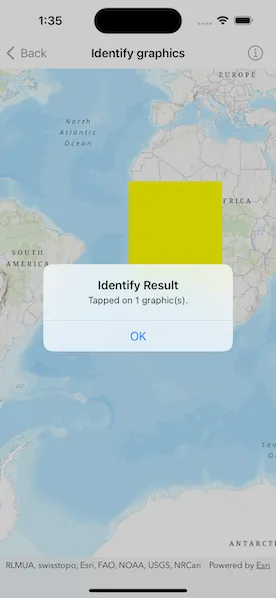
Display an alert message when a graphic is tapped.
Use case
A user may wish to select a graphic on a map to view relevant information about it.
How to use the sample
Tap on a graphic to identify it. You will see an alert message displayed.
How it works
- Create a
GraphicsOverlayand add it to theMapView. - Add a
Graphicalong with aSimpleFillSymbolto the graphics overlay. - Use the
MapView.onSingleTapGesture(perform:)to get the screen point where a user tapped. - Identify the graphic on the map view with
MapViewProxy.identify(on:screenPoint:tolerance:returnPopupsOnly:maximumResults:).
Relevant API
- Graphic
- GraphicsOverlay
- IdentifyGraphicsOverlayResult
- MapView
Tags
graphics, identify
Sample code
IdentifyGraphicsView.swift
// Copyright 2023 Esri//// Licensed under the Apache License, Version 2.0 (the "License");// you may not use this file except in compliance with the License.// You may obtain a copy of the License at////   https://www.apache.org/licenses/LICENSE-2.0//// Unless required by applicable law or agreed to in writing, software// distributed under the License is distributed on an "AS IS" BASIS,// WITHOUT WARRANTIES OR CONDITIONS OF ANY KIND, either express or implied.// See the License for the specific language governing permissions and// limitations under the License.
import ArcGISimport SwiftUI
struct IdentifyGraphicsView: View {    /// A map with a topographic basemap.    @State private var map = Map(basemapStyle: .arcGISTopographic)
    /// A graphics overlay containing a yellow polygon graphic.    @State private var graphicsOverlay = {        let graphicsOverlay = GraphicsOverlay()
        // Create a polygon from a list of points.        let polygon = Polygon(points: [            Point(x: -20e5, y: 20e5),            Point(x: 20e5, y: 20e5),            Point(x: 20e5, y: -20e5),            Point(x: -20e5, y: -20e5)        ])
        // Create a graphic of the polygon and add it to the overlay.        let polygonGraphic = Graphic(geometry: polygon)        graphicsOverlay.addGraphic(polygonGraphic)
        // Create a renderer using a simple fill symbol.        let polygonSymbol = SimpleFillSymbol(style: .solid, color: .yellow)        graphicsOverlay.renderer = SimpleRenderer(symbol: polygonSymbol)
        return graphicsOverlay    }()
    /// The tap location's screen point used in the identify operation.    @State private var tapScreenPoint: CGPoint?
    /// A Boolean value indicating whether to show identify result alert.    @State private var isShowingIdentifyResultAlert = false
    /// The message shown in the identify result alert.    @State private var identifyResultMessage = "" {        didSet { isShowingIdentifyResultAlert = identifyResultMessage.isNotEmpty }    }
    /// The error shown in the error alert.    @State private var error: (any Error)?
    var body: some View {        MapViewReader { mapViewProxy in            MapView(map: map, graphicsOverlays: [graphicsOverlay])                .onSingleTapGesture { screenPoint, _ in                    tapScreenPoint = screenPoint                }                .task(id: tapScreenPoint) {                    guard let tapScreenPoint else { return }
                    do {                        // Identify the screen point on the graphics overlay using the proxy.                        // Use `identifyGraphicsOverlays` instead if you need to identify on                        // all the graphics overlay present in the map view.                        let identifyResult = try await mapViewProxy.identify(                            on: graphicsOverlay,                            screenPoint: tapScreenPoint,                            tolerance: 12                        )
                        // Display an alert if any graphics were found at the screen point.                        if identifyResult.graphics.isNotEmpty {                            identifyResultMessage = "Tapped on \(identifyResult.graphics.count) graphic(s)."                        }                    } catch {                        // Show an error alert for an error thrown while identifying.                        self.error = error                    }
                    self.tapScreenPoint = nil                }                .alert(                    "Identify Result",                    isPresented: $isShowingIdentifyResultAlert,                    actions: {},                    message: { Text(identifyResultMessage) }                )                .errorAlert(presentingError: $error)        }    }}
private extension Collection {    /// A Boolean value indicating whether the collection is not empty.    var isNotEmpty: Bool {        !self.isEmpty    }}
#Preview {    IdentifyGraphicsView()}