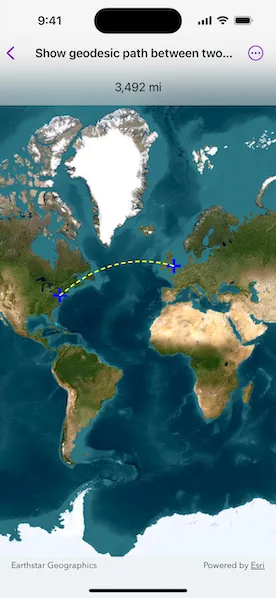
Calculate a geodesic path between two points and measure its distance.
Use case
A geodesic distance provides an accurate, real-world distance between two points. Visualizing flight paths between cities is a common example of a geodesic operation since the flight path between two airports takes into account the curvature of the earth, rather than following the planar path between those points, which appears as a straight line on a projected map.
How to use the sample
Click anywhere on the map. A line graphic will display the geodesic line between the two points. In addition, text that indicates the geodesic distance between the two points will be updated. Click elsewhere and a new line will be created.
How it works
- Create a
Pointand display it as aGraphicwhen theMapViewis tapped. - Obtain a new point when another tap occurs on the
MapViewand add this point as a graphic. - Create a
Polylinefrom the two points. - Execute
GeometryEngine.geodeticDensify(_:maxSegmentLength:lengthUnit:curveType:)by passing in the created polyline then create a graphic from the returnedGeometry. - Execute
GeometryEngine.geodeticDistance(from:to:distanceUnit:azimuthUnit:curveType:)by passing in the two points and display the returned length on the screen.
Relevant API
- GeometryEngine.geodeticDensify(_:maxSegmentLength:lengthUnit:curveType:)
- GeometryEngine.geodeticDistance(from:to:distanceUnit:azimuthUnit:curveType:)
- MapView.onSingleTapGesture(perform:)
About the data
The Imagery basemap provides the global context for the displayed geodesic line.
Tags
densify, distance, geodesic, geodetic
Sample code
// Copyright 2025 Esri//// Licensed under the Apache License, Version 2.0 (the "License");// you may not use this file except in compliance with the License.// You may obtain a copy of the License at////   https://www.apache.org/licenses/LICENSE-2.0//// Unless required by applicable law or agreed to in writing, software// distributed under the License is distributed on an "AS IS" BASIS,// WITHOUT WARRANTIES OR CONDITIONS OF ANY KIND, either express or implied.// See the License for the specific language governing permissions and// limitations under the License.
import ArcGISimport SwiftUI
struct ShowGeodesicPathBetweenTwoPointsView: View {    /// The map that will be displayed in the map view.    @State private var map = Map(basemapStyle: .arcGISImageryStandard)
    /// The graphics overlay that will be displayed on the map view.    /// This will hold the graphics that show the start point, end point,    /// and geodesic path.    @State private var overlay = GraphicsOverlay()
    /// The current measurement state.    @State private var state: MeasurementState = .notStarted
    /// The symbology for point graphics.    private let pointSymbol: Symbol = SimpleMarkerSymbol(style: .cross, color: .blue, size: 20)
    /// The symbology for the line graphic.    private let lineSymbol: Symbol = SimpleLineSymbol(style: .dash, color: .yellow, width: 2)
    var body: some View {        MapView(map: map, graphicsOverlays: [overlay])            .onSingleTapGesture { _, mapPoint in                state = switch state {                case .notStarted, .complete:                    // If the state is empty or complete, then start a new                    // path, adding the tap point as the first graphic.                    .startOnly(start: mapPoint)                case .startOnly(let start):                    // If the state was started, then add the end point                    // to complete it.                    .complete(start: start, end: mapPoint)                }            }            .overlay(alignment: .top) {                Group {                    switch state {                    case .notStarted, .startOnly:                        Text("Tap on the map to show a geodesic path")                    case .complete(_, _, _, let length):                        Text(length, format: .measurement(width: .abbreviated))                    }                }                .padding()                .frame(maxWidth: .infinity)                .background(.ultraThinMaterial)            }            .onChange(of: state) { updateGraphicsOverlay() }            .animation(.default, value: state)    }
    /// Update the graphics overlay for the current state.    private func updateGraphicsOverlay() {        overlay.removeAllGraphics()
        switch state {        case .notStarted:            break        case .startOnly(let start):            overlay.addGraphic(Graphic(geometry: start, symbol: pointSymbol))        case .complete(let start, let end, let line, _):            overlay.addGraphic(Graphic(geometry: start, symbol: pointSymbol))            overlay.addGraphic(Graphic(geometry: end, symbol: pointSymbol))            overlay.addGraphic(Graphic(geometry: line, symbol: lineSymbol))        }    }}
extension ShowGeodesicPathBetweenTwoPointsView {    /// A value that represents the measurement state of the view.    enum MeasurementState: Equatable {        /// No measurement started.        case notStarted        /// Only have a starting point.        case startOnly(start: Point)        /// Completed measurement.        case complete(start: Point, end: Point, line: Polyline, distance: Measurement<UnitLength>)
        /// Creates a `complete` measurement state with a start and end point,        /// calculating the line and length.        static func complete(start: Point, end: Point) -> Self {            // Create a geodesic line from the start, end points.            let geodesicLine = GeometryEngine.geodeticDensify(                Polyline(points: [start, end]),                maxSegmentLength: 1,                lengthUnit: .kilometers,                curveType: .geodesic            ) as! Polyline
            // Calculate the geodesic distance between the two points.            let geodesicDistance = GeometryEngine.geodeticDistance(                from: start,                to: end,                distanceUnit: .meters,                azimuthUnit: .degrees,                curveType: .geodesic            )!
            return complete(                start: start,                end: end,                line: geodesicLine,                distance: geodesicDistance.distance            )        }    }}
#Preview {    ShowGeodesicPathBetweenTwoPointsView()}