Clip a geometry with another geometry.
Use case
Create a new set of geometries for analysis (e.g. displaying buffer zones around abandoned coal mine shafts in an area of planned urban development) by clipping intersecting geometries.
How to use the sample
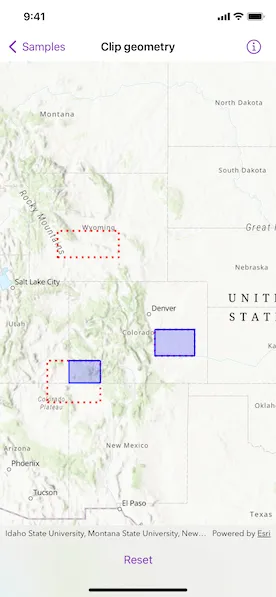
Tap the button to clip the blue graphic with the dotted red envelopes.
How it works
- Use the
static GeometryEngine.clip(_:to:)method to generate a clippedGeometry, specifying an existingGeometryand anEnvelopeas parameters. The existing geometry will be clipped where it intersects an envelope. - Create a
Graphicinstance from the clipped geometry and add it to aGraphicsOverlay.
Relevant API
- Envelope
- Geometry
- GeometryEngine
- Graphic
- GraphicsOverlay
- static GeometryEngine.clip(_:to:)
Additional information
Note: the resulting geometry may be null if the envelope does not intersect the geometry being clipped.
Tags
analysis, clip, geometry
Sample code
ClipGeometryView.swift
// Copyright 2022 Esri//// Licensed under the Apache License, Version 2.0 (the "License");// you may not use this file except in compliance with the License.// You may obtain a copy of the License at////   https://www.apache.org/licenses/LICENSE-2.0//// Unless required by applicable law or agreed to in writing, software// distributed under the License is distributed on an "AS IS" BASIS,// WITHOUT WARRANTIES OR CONDITIONS OF ANY KIND, either express or implied.// See the License for the specific language governing permissions and// limitations under the License.
import ArcGISimport SwiftUI
struct ClipGeometryView: View {    /// A Boolean value indicating whether the geometries are clipped.    @State private var geometriesAreClipped = false
    /// The view model for the sample.    @StateObject private var model = Model()
    var body: some View {        MapView(map: model.map, graphicsOverlays: model.graphicsOverlays)            .toolbar {                ToolbarItem(placement: .bottomBar) {                    Button(geometriesAreClipped ? "Reset" : "Clip") {                        if geometriesAreClipped {                            model.reset()                        } else {                            model.clipGeometries()                        }                        geometriesAreClipped.toggle()                    }                }            }    }}
private extension ClipGeometryView {    /// The model used to store the geo model and other expensive objects    /// used in this view.    class Model: ObservableObject {        /// A map with a topographic basemap style and an initial viewpoint of Colorado.        let map: Map = {            let map = Map(basemapStyle: .arcGISTopographic)            // Sets the initial viewpoint to Colorado and adds additional padding.            map.initialViewpoint = Viewpoint(boundingGeometry: .coloradoEnvelope.expanded(by: 2))            return map        }()
        /// The graphics overlay containing an unclipped graphic of Colorado.        private let coloradoGraphicsOverlay = GraphicsOverlay(            graphics: [                Graphic(geometry: .coloradoEnvelope, symbol: .coloradoFill)            ]        )
        /// The graphics overlay containing graphics of the other envelopes, outlined by a dotted red line.        private let envelopesGraphicsOverlay = GraphicsOverlay(            graphics: Geometry.envelopes.map {                Graphic(geometry: $0, symbol: SimpleLineSymbol(style: .dot, color: .red, width: 3))            }        )
        /// The graphics overlay containing clipped graphics.        private let clippedGraphicsOverlay = GraphicsOverlay()
        /// The unclipped graphic of Colorado.        private var coloradoGraphic: Graphic { coloradoGraphicsOverlay.graphics.first! }
        /// The graphics overlays used in this sample.        var graphicsOverlays: [GraphicsOverlay] {            return [coloradoGraphicsOverlay, envelopesGraphicsOverlay, clippedGraphicsOverlay]        }
        /// Clips the geometry of Colorado to the given envelope.        /// - Parameter envelope: The envelope to clip the geometry of Colorado to.        /// - Returns: The clipped graphic.        private func clipColoradoGeometry(to envelope: Envelope) -> Graphic {            // Uses the geometry engine to create a new geometry for the area of            // Colorado that overlaps the given envelope.            let clippedGeometry = GeometryEngine.clip(coloradoGraphic.geometry!, to: envelope)            // Creates and returns the clipped graphic from the clipped geometry if there is an overlap.            return Graphic(geometry: clippedGeometry, symbol: .coloradoFill)        }
        /// Clips geometries and adds resulting graphics.        func clipGeometries() {            // Hides the Colorado graphic.            coloradoGraphic.isVisible = false            // Clips Colorado's geometry to each envelope.            let clippedGraphics = envelopesGraphicsOverlay.graphics.map { clipColoradoGeometry(to: $0.geometry as! Envelope) }            // Adds the clipped graphics.            clippedGraphicsOverlay.addGraphics(clippedGraphics)        }
        /// Removes all clipped graphics.        func reset() {            clippedGraphicsOverlay.removeAllGraphics()            coloradoGraphic.isVisible = true        }    }}
private extension Symbol {    /// The simple fill symbol for Colorado graphics.    static var coloradoFill: SimpleFillSymbol {        SimpleFillSymbol(            color: .blue.withAlphaComponent(0.2),            outline: SimpleLineSymbol(                style: .solid,                color: .blue,                width: 2            )        )    }}
private extension Geometry {    /// An envelope approximating the boundary of Colorado.    static var coloradoEnvelope: Envelope {        Envelope(            xMin: -11362327.1283,            yMin: 5012861.2903,            xMax: -12138232.0184,            yMax: 4441198.7738,            spatialReference: .webMercator        )    }    /// An envelope inside the boundary of Colorado.    static var containedEnvelope: Envelope {        Envelope(            xMin: -11655182.5952,            yMin: 4741618.773,            xMax: -11431488.567,            yMax: 4593570.0683,            spatialReference: .webMercator        )    }    /// An envelope intersecting the boundary of Colorado.    static var intersectingEnvelope: Envelope {        Envelope(            xMin: -11962086.4793,            yMin: 4566553.8814,            xMax: -12260345.1836,            yMax: 4332053.3784,            spatialReference: .webMercator        )    }    /// An envelope outside the boundary of Colorado.    static var outsideEnvelope: Envelope {        Envelope(            xMin: -11858344.3213,            yMin: 5147942.2252,            xMax: -12201990.2197,            yMax: 5297071.5773,            spatialReference: .webMercator        )    }    /// The envelopes to clip the geometry of Colorado to.    static var envelopes: [Envelope] {        return [.containedEnvelope, .intersectingEnvelope, .outsideEnvelope]    }}
private extension Envelope {    /// Expands the envelope by a given factor.    func expanded(by factor: Double) -> Envelope {        let builder = EnvelopeBuilder(envelope: self)        builder.expand(by: factor)        return builder.toGeometry()    }}
#Preview {    NavigationStack {        ClipGeometryView()    }}