Format coordinates in a variety of common notations.
Use case
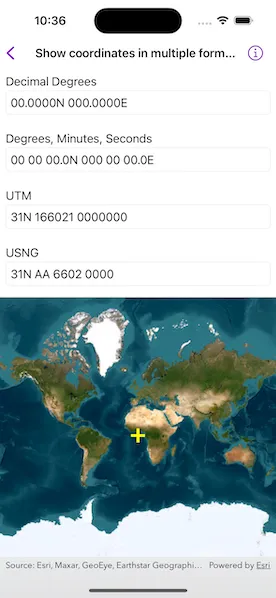
The coordinate formatter can format a map location in WGS84 in a number of common coordinate notations. Parsing one of these formats to a location is also supported. Formats include decimal degrees; degrees, minutes, seconds; Universal Transverse Mercator (UTM), and United States National Grid (USNG).
How to use the sample
Tap on the map to see the text fields update with the tapped location’s coordinates formatted in 4 different ways. You can also put a coordinate string in the corresponding text field. Tap return and the coordinate string will be parsed to a map location which will move the map point and update the other text fields’ coordinate strings.
How it works
- Get or create a map
Pointwith a spatial reference. - To get the formatted string, use one of the static methods below.
class CoordinateFormatter.latitudeLongitudeString(from:format:decimalPlaces:)class CoordinateFormatter.utmString(from:conversionMode:addSpaces:)class CoordinateFormatter.usngString(from:precision:addSpaces:)
- To get an
Pointfrom a formatted string, use one of the static methods below.class CoordinateFormatter.point(fromLatitudeLongitudeString:spatialReference:)class CoordinateFormatter.point(fromUTMString:spatialReference:conversionMode:)class CoordinateFormatter.point(fromUSNGString:spatialReference:)
Relevant API
- CoordinateFormatter
- CoordinateFormatter.LatitudeLongitudeFormat
- CoordinateFormatter.UTMConversionMode
Tags
convert, coordinate, decimal degrees, degree minutes seconds, format, latitude, longitude, USNG, UTM
Sample code
// Copyright 2023 Esri//// Licensed under the Apache License, Version 2.0 (the "License");// you may not use this file except in compliance with the License.// You may obtain a copy of the License at////   https://www.apache.org/licenses/LICENSE-2.0//// Unless required by applicable law or agreed to in writing, software// distributed under the License is distributed on an "AS IS" BASIS,// WITHOUT WARRANTIES OR CONDITIONS OF ANY KIND, either express or implied.// See the License for the specific language governing permissions and// limitations under the License.
import ArcGISimport SwiftUI
struct ShowCoordinatesInMultipleFormatsView: View {    /// The view model for the sample.    @StateObject private var model = Model()
    /// The tapped point on the map.    @State private var tappedPoint = Point(latitude: 0, longitude: 0)
    var body: some View {        // Input text fields.        VStack {            CoordinateTextField(                title: "Decimal Degrees",                text: $model.latLongDDString            )            .onSubmit {                if let point = CoordinateFormatter.point(                    fromLatitudeLongitudeString: model.latLongDDString,                    spatialReference: tappedPoint.spatialReference                ) {                    model.updateCoordinates(point: point)                } else {                    model.updateCoordinates(point: tappedPoint)                }            }            CoordinateTextField(                title: "Degrees, Minutes, Seconds",                text: $model.latLongDMSString            )            .onSubmit {                if let point = CoordinateFormatter.point(                    fromLatitudeLongitudeString: model.latLongDMSString,                    spatialReference: tappedPoint.spatialReference                ) {                    model.updateCoordinates(point: point)                } else {                    model.updateCoordinates(point: tappedPoint)                }            }            CoordinateTextField(                title: "UTM",                text: $model.utmString            )            .onSubmit {                if let point = CoordinateFormatter.point(                    fromUTMString: model.utmString,                    spatialReference: tappedPoint.spatialReference,                    conversionMode: .latitudeBandIndicators                ) {                    model.updateCoordinates(point: point)                } else {                    model.updateCoordinates(point: tappedPoint)                }            }            CoordinateTextField(                title: "USNG",                text: $model.usngString            )            .onSubmit {                if let point = CoordinateFormatter.point(                    fromUSNGString: model.usngString,                    spatialReference: tappedPoint.spatialReference                ) {                    model.updateCoordinates(point: point)                } else {                    model.updateCoordinates(point: tappedPoint)                }            }
            MapView(map: model.map, graphicsOverlays: [model.graphicsOverlay])                .onSingleTapGesture { _, mapPoint in                    // Updates the `mapPoint`, its graphic, and the corresponding coordinates.                    self.tappedPoint = mapPoint                    model.updateCoordinates(point: mapPoint)                }        }    }}
private struct CoordinateTextField: View {    /// The title of the text field.    var title: String
    /// The text in the text field.    @Binding var text: String
    var body: some View {        VStack(alignment: .leading) {            Text(title)                .padding([.leading, .top], 8)                .padding(.bottom, -5)            TextField("", text: $text)                .textInputAutocapitalization(.never)                .autocorrectionDisabled()                .textFieldStyle(.roundedBorder)                .padding([.leading, .trailing, .bottom], 8)        }    }}
private extension ShowCoordinatesInMultipleFormatsView {    // The view model for the sample.    class Model: ObservableObject {        /// A map with an imagery basemap.        let map = Map(basemapStyle: .arcGISImageryStandard)
        /// The graphics overlay for the point graphic.        let graphicsOverlay: GraphicsOverlay
        /// A yellow cross graphic for the map point.        private let pointGraphic = Graphic(symbol: SimpleMarkerSymbol(style: .cross, color: .yellow, size: 20))
        /// The decimal degrees text.        @Published var latLongDDString = ""
        /// The degree minute seconds text.        @Published var latLongDMSString = ""
        /// The UTM text.        @Published var utmString = ""
        /// The USNG text.        @Published var usngString = ""
        init() {            graphicsOverlay = GraphicsOverlay(graphics: [pointGraphic])            updateCoordinates(point: Point(latitude: 0, longitude: 0))        }
        /// Updates the map point graphic and the corresponding coordinates.        /// - Parameter point: A `Point` used to update.        func updateCoordinates(point: Point) {            pointGraphic.geometry = point            updateCoordinateFields(mapPoint: point)        }
        /// Generates and updates the coordinate strings using the coordinate formatter.        /// - Parameter mapPoint: A `Point` to get coordinates from.        private func updateCoordinateFields(mapPoint: Point) {            latLongDDString = CoordinateFormatter.latitudeLongitudeString(                from: mapPoint,                format: .decimalDegrees,                decimalPlaces: 4            )
            latLongDMSString = CoordinateFormatter.latitudeLongitudeString(                from: mapPoint,                format: .degreesMinutesSeconds,                decimalPlaces: 1            )
            utmString = CoordinateFormatter.utmString(                from: mapPoint,                conversionMode: .latitudeBandIndicators,                addSpaces: true            )
            usngString = CoordinateFormatter.usngString(                from: mapPoint,                precision: 4,                addSpaces: true            )        }    }}
#Preview {    ShowCoordinatesInMultipleFormatsView()}