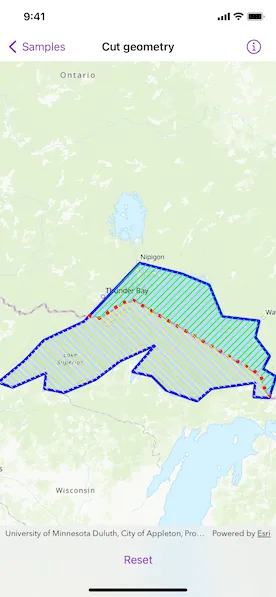
Cut a geometry along a polyline.
Use case
You might cut a polygon representing a large parcel to subdivide it into smaller parcels.
How to use the sample
Tap the button to cut the polygon with the polyline and see the resulting parts (shaded in different colors).
How it works
- Pass a
Geometryand aPolylineto thestatic GeometryEngine.cut(_:usingCutter:)method to cut the geometry along the given polyline. - Loop through the returned list of part geometries. Some geometries may be multi-part.
- Create a
Graphicinstance from the part and add it to aGraphicsOverlay.
Relevant API
- Geometry
- GeometryEngine
- Graphic
- GraphicsOverlay
- Polygon
- Polyline
- static GeometryEngine.cut(_:usingCutter:)
Tags
cut, geometry, split
Sample code
CutGeometryView.swift
// Copyright 2022 Esri//// Licensed under the Apache License, Version 2.0 (the "License");// you may not use this file except in compliance with the License.// You may obtain a copy of the License at////   https://www.apache.org/licenses/LICENSE-2.0//// Unless required by applicable law or agreed to in writing, software// distributed under the License is distributed on an "AS IS" BASIS,// WITHOUT WARRANTIES OR CONDITIONS OF ANY KIND, either express or implied.// See the License for the specific language governing permissions and// limitations under the License.
import ArcGISimport SwiftUI
struct CutGeometryView: View {    /// A Boolean value indicating whether the geometry is cut.    @State private var isGeometryCut = false
    /// The view model for the sample.    @StateObject private var model = Model()
    var body: some View {        MapView(map: model.map, graphicsOverlays: model.graphicsOverlays)            .toolbar {                ToolbarItem(placement: .bottomBar) {                    Button(isGeometryCut ? "Reset" : "Cut") {                        if isGeometryCut {                            model.removeAllGraphics()                        } else {                            model.cutGeometry()                        }                        isGeometryCut.toggle()                    }                }            }    }}
private extension CutGeometryView {    /// The model used to store the geo model and other expensive objects    /// used in this view.    class Model: ObservableObject {        /// A map with a topographic basemap style and an initial viewpoint of Lake Superior.        let map: Map = {            let map = Map(basemapStyle: .arcGISTopographic)            map.initialViewpoint = Viewpoint(boundingGeometry: Geometry.lakeSuperiorPolygon)            return map        }()
        /// A graphics overlay containing the Lake Superior polygon and a border line.        private let lakeGraphicsOverlay: GraphicsOverlay = {            let lakeSuperiorGraphic = Graphic(                geometry: .lakeSuperiorPolygon,                symbol: SimpleFillSymbol(                    color: .blue.withAlphaComponent(0.1),                    outline: SimpleLineSymbol(style: .solid, color: .blue, width: 4)                )            )            let borderGraphic = Graphic(                geometry: .borderPolyline,                symbol: SimpleLineSymbol(style: .dot, color: .red, width: 5)            )            return GraphicsOverlay(graphics: [lakeSuperiorGraphic, borderGraphic])        }()
        /// The graphics overlay containing cut graphics.        private let cutGraphicsOverlay = GraphicsOverlay()
        /// The graphics overlays used in this sample.        var graphicsOverlays: [GraphicsOverlay] {            return [lakeGraphicsOverlay, cutGraphicsOverlay]        }
        /// Cuts geometry and adds resulting graphics.        func cutGeometry() {            // Cuts the Lake Superior polygon using the border polyline.            let parts = GeometryEngine.cut(.lakeSuperiorPolygon, usingCutter: .borderPolyline)            guard parts.count == 2,                  let firstPart = parts.first,                  let secondPart = parts.last else {                return            }            // Creates the graphics for the Canadian and USA sides of Lake Superior.            let canadaSideGraphic = Graphic(geometry: firstPart, symbol: SimpleFillSymbol(style: .backwardDiagonal, color: .green))            let usaSideGraphic = Graphic(geometry: secondPart, symbol: SimpleFillSymbol(style: .forwardDiagonal, color: .yellow))            // Adds the graphics to the graphics overlay.            cutGraphicsOverlay.addGraphics([canadaSideGraphic, usaSideGraphic])        }
        /// Removes all cut graphics.        func removeAllGraphics() {            cutGraphicsOverlay.removeAllGraphics()        }    }}
private extension Geometry {    /// A polygon representing the area of Lake Superior.    static var lakeSuperiorPolygon: ArcGIS.Polygon {        Polygon(            points: [                Point(x: -10254374.668616, y: 5908345.076380),                Point(x: -10178382.525314, y: 5971402.386779),                Point(x: -10118558.923141, y: 6034459.697178),                Point(x: -9993252.729399, y: 6093474.872295),                Point(x: -9882498.222673, y: 6209888.368416),                Point(x: -9821057.766387, y: 6274562.532928),                Point(x: -9690092.583250, y: 6241417.023616),                Point(x: -9605207.742329, y: 6206654.660191),                Point(x: -9564786.389509, y: 6108834.986367),                Point(x: -9449989.747500, y: 6095091.726408),                Point(x: -9462116.153346, y: 6044160.821855),                Point(x: -9417652.665244, y: 5985145.646738),                Point(x: -9438671.768711, y: 5946341.148031),                Point(x: -9398250.415891, y: 5922088.336339),                Point(x: -9419269.519357, y: 5855797.317714),                Point(x: -9467775.142741, y: 5858222.598884),                Point(x: -9462924.580403, y: 5902686.086985),                Point(x: -9598740.325877, y: 5884092.264688),                Point(x: -9643203.813979, y: 5845287.765981),                Point(x: -9739406.633691, y: 5879241.702350),                Point(x: -9783061.694736, y: 5922896.763395),                Point(x: -9844502.151022, y: 5936640.023354),                Point(x: -9773360.570059, y: 6019099.583107),                Point(x: -9883306.649729, y: 5968977.105610),                Point(x: -9957681.938918, y: 5912387.211662),                Point(x: -10055501.612742, y: 5871965.858842),                Point(x: -10116942.069028, y: 5884092.264688),                Point(x: -10111283.079633, y: 5933406.315128),                Point(x: -10214761.742852, y: 5888134.399970),                Point(x: -10254374.668616, y: 5901877.659929)            ],            spatialReference: .webMercator        )    }    /// A polyline representing the Canada/USA border.    static var borderPolyline: Polyline {        Polyline(            points: [                Point(x: -9981328.687124, y: 6111053.281447),                Point(x: -9946518.044066, y: 6102350.620682),                Point(x: -9872545.427566, y: 6152390.920079),                Point(x: -9838822.617103, y: 6157830.083057),                Point(x: -9446115.050097, y: 5927209.572793),                Point(x: -9430885.393759, y: 5876081.440801),                Point(x: -9415655.737420, y: 5860851.784463)            ],            spatialReference: .webMercator        )    }}
#Preview {    NavigationStack {        CutGeometryView()    }}