Update related features in an online feature service.
Use case
Updating related features is a helpful workflow when you have two features with shared or dependent attributes. In a data collection scenario where origin tree features are related to destination inspection records, trees might undergo inspection on some regular interval to assess their size, health, and other characteristics. When logging a new inspection record that captures the latest trunk diameter and condition of a tree, updating these attributes on the origin tree feature would permit the tree point to be symbolized most accurately according to these latest observations.
How to use the sample
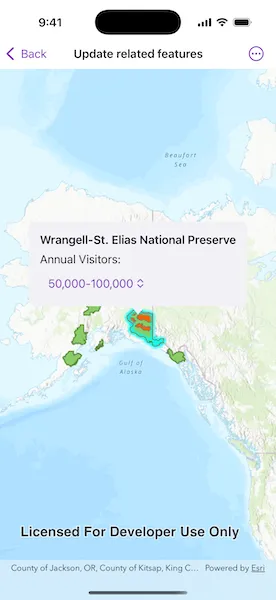
Once you launch the app, select a national park feature. The app will then identify it, perform a related table query, and will show you the annual visitors amount for the preserve. You can then update the visitor amount by tapping the drop-down in the Callout and selecting a different amount. This will apply the update on the server and update the Legend accordingly.
How it works
- Create two
ServiceFeatureTables from the Feature Service URLs. - Create two
FeatureLayers using the previously created service feature tables. - Add these feature layers to the map.
- When a
Featureis selected, identify and highlight the selected feature. - Retrieve related features by calling
ServiceFeatureTable.queryRelatedFeatures(to:using:)and passing in the selected feature. - Updates can be applied to the server using
ServiceFeatureTable.update(_:)andServiceFeatureTable.applyEdits().
Relevant API
- ArcGISFeature
- RelatedFeatureQueryResult
- RelatedQueryParameters
- ServiceFeatureTable
About the data
The map opens to a view of the State of Alaska. Two related feature layers are loaded to the map and display the Alaska National Parks and Preserves.
Additional information
All the tables participating in a relationship must be present in the data source. ArcGIS Maps SDK supports related tables in the following data sources:
- ArcGIS feature service
- ArcGIS map service
- Geodatabase downloaded from a feature service
- Geodatabase in a mobile map package
Tags
editing, features, service, updating
Sample code
// Copyright 2025 Esri//// Licensed under the Apache License, Version 2.0 (the "License");// you may not use this file except in compliance with the License.// You may obtain a copy of the License at////   https://www.apache.org/licenses/LICENSE-2.0//// Unless required by applicable law or agreed to in writing, software// distributed under the License is distributed on an "AS IS" BASIS,// WITHOUT WARRANTIES OR CONDITIONS OF ANY KIND, either express or implied.// See the License for the specific language governing permissions and// limitations under the License.
import ArcGISimport SwiftUI
struct UpdateRelatedFeaturesView: View {    /// The model that holds the data for displaying and updating the view.    @State private var model = Model()
    /// A Boolean value indicating whether the feature data is being loaded.    @State private var isLoading = false
    /// The last locations in the screen and map where a tap occurred.    @State private var lastSingleTap: (screenPoint: CGPoint, mapPoint: Point)?
    /// The error shown in the error alert.    @State private var error: (any Error)?
    var body: some View {        MapViewReader { mapView in            MapView(map: model.map)                .onSingleTapGesture { screenPoint, mapPoint in                    lastSingleTap = (screenPoint, mapPoint)                }                .callout(placement: $model.calloutPlacement) { _ in                    // Show a callout with editable content when a feature is selected.                    calloutContent                }                .task {                    // Load initial map and data when the view appears.                    isLoading = true                    defer { isLoading = false }                    do {                        try await model.loadFeatures()                        // Set initial viewpoint to Alaska.                        await mapView.setViewpoint(                            Viewpoint(                                latitude: 65.399121,                                longitude: -151.521682,                                scale: 50000000                            )                        )                    } catch {                        self.error = error                    }                }                .task(id: lastSingleTap?.mapPoint) {                    isLoading = true                    defer { isLoading = false }                    model.clearAll()                    // Ensure parks feature layer is available and clear it.                    guard let mapPoint = lastSingleTap?.mapPoint else { return }                    guard let parksLayer = model.parksFeatureLayer else { return }                    parksLayer.clearSelection()
                    do {                        let identifyResult = try await mapView.identify(                            on: parksLayer,                            screenPoint: lastSingleTap?.screenPoint ?? .zero,                            tolerance: 5                        )                        // If a feature is found, select and query related data.                        if let identifiedFeature = identifyResult.geoElements.first as? ArcGISFeature {                            parksLayer.selectFeature(identifiedFeature)                            model.selectedFeature = identifiedFeature                            // Query for related preserve data.                            try await model.queryRelatedFeatures(for: identifiedFeature)                            // Display a callout at the feature's location.                            model.calloutIsVisible = true                            model.calloutPlacement = .location(mapPoint)                            // Center the map on the tapped feature.                            await mapView.setViewpointCenter(mapPoint)                        }                    } catch {                        self.error = error                    }                }                .overlay(alignment: .center) {                    // Show a loading spinner when `isLoading` is true.                    if isLoading {                        loadingView                    }                }                .errorAlert(presentingError: $error)        }    }
    /// A view displaying callout content, including editable "Annual Visitors" values.    /// Includes a picker to allow updating the selected visitor range.    var calloutContent: some View {        VStack(alignment: .leading, spacing: 8) {            Text("\(model.parkName)")                .font(.headline)            if !model.attributeValue.isEmpty {                Text("Annual Visitors:")                // Picker to allow the user to update visitor range.                Picker("Annual Visitors", selection: $model.selectedVisitorValue) {                    ForEach(model.visitorOptions, id: \.self) { option in                        Text(option).tag(option)                    }                }                .pickerStyle(.menu)                .fixedSize()                .onChange(of: model.selectedVisitorValue) { _, newValue in                    Task {                        do {                            try await model.updateRelatedFeature(using: newValue)                        } catch {                            self.error = error                        }                    }                }            }        }        .padding()    }
    /// The loading indicator overlay shown during data fetches.    var loadingView: some View {        ProgressView(               """               Fetching               data               """        )        .padding()        .background(.ultraThinMaterial)        .clipShape(.rect(cornerRadius: 10))        .shadow(radius: 50)        .multilineTextAlignment(.center)    }}
extension UpdateRelatedFeaturesView {    @MainActor    @Observable    class Model {        /// A map with a topographic basemap style.        @ObservationIgnored var map = Map(basemapStyle: .arcGISTopographic)
        /// A Boolean value indicating whether the callout should be shown or not.        var calloutIsVisible = false
        /// The parks feature layer for querying.        var parksFeatureLayer: FeatureLayer?
        /// The parks feature table.        var parksFeatureTable: ServiceFeatureTable?
        /// The preserves feature table.        var preservesTable: ServiceFeatureTable?
        /// The feature currently selected by the user.        var selectedFeature: ArcGISFeature?
        /// The feature that is related to the selected feature.        var relatedSelectedFeature: ArcGISFeature?
        /// The location of the callout on the map.        var calloutPlacement: CalloutPlacement?
        /// The current visitor count attribute value.        var attributeValue = ""
        /// The name of the selected park.        var parkName = ""
        /// Visitor options for selection.        @ObservationIgnored var visitorOptions = ["0-1,000", "1,000–10,000", "10,000-50,000", "50,000-100,000", "100,000+"]
        /// The currently selected visitor option.        var selectedVisitorValue = "0-1,000"
        /// Clears selected data and callout.        func clearAll() {            relatedSelectedFeature = nil            attributeValue = ""            calloutPlacement = nil        }
        /// Loads feature tables from the Alaska parks feature service        /// and adds them as operational layers to the map.        ///        /// - Throws: An error if the service geodatabase or tables fail to load.        func loadFeatures() async throws {            let geodatabase = ServiceGeodatabase(url: .alaskaParksFeatureService)            try await geodatabase.load()            // Load parks layer.            parksFeatureTable = geodatabase.table(withLayerID: 1)            if let parksFeatureTable {                parksFeatureLayer = FeatureLayer(featureTable: parksFeatureTable)                map.addOperationalLayer(parksFeatureLayer!)            }            // Load preserves layer.            preservesTable = geodatabase.table(withLayerID: 0)            if let preservesTable {                let preservesLayer = FeatureLayer(featureTable: preservesTable)                map.addOperationalLayer(preservesLayer)            }        }
        /// Updates the related preserve feature with the new "Annual Visitors" value        /// and applies the changes to the service geodatabase.        ///        /// - Parameter value: The value to assign to the `ANNUAL_VISITORS` attribute.        /// - Throws: An error if the feature fails to load, update, or if apply edits fail.        func updateRelatedFeature(using value: String) async throws {            guard let relatedSelectedFeature else { return }            try await relatedSelectedFeature.load()            relatedSelectedFeature.setAttributeValue(value, forKey: .annualVisitorsKey)            attributeValue = value            try await preservesTable?.update(relatedSelectedFeature)            // Apply edits to the service geodatabase.            if let geodatabase = preservesTable?.serviceGeodatabase {                let editResults = try await geodatabase.applyEdits()                if let first = editResults.first,                   first.editResults[0].didCompleteWithErrors == false {                    parksFeatureLayer?.clearSelection()                }            }        }
        /// Queries related features (preserves) for a selected park feature        /// and stores the result to display and edit.        ///        /// - Parameter feature: The selected park feature to query related data for.        /// - Throws: An error if the related features query fails.        func queryRelatedFeatures(for feature: ArcGISFeature) async throws {            guard let parksTable = parksFeatureTable else { return }            let attributes = feature.attributes            // Default to park name from the selected park feature.            parkName = attributes[.parkNameKey] as? String ?? "Unknown"            // Reset attribute value in case there are no related feature results.            attributeValue = ""            let relatedResultsQuery = try await parksTable.queryRelatedFeatures(to: feature)            for relatedResult in relatedResultsQuery {                for relatedFeature in relatedResult.features() {                    if let relatedArcGISFeature = relatedFeature as? ArcGISFeature {                        let attributes = relatedArcGISFeature.attributes                        attributeValue = attributes[.annualVisitorsKey] as? String ?? ""                        parkName = attributes[.parkNameKey] as? String ?? "Unknown"                        selectedVisitorValue = attributeValue                        relatedSelectedFeature = relatedArcGISFeature                    }                }            }        }    }}
extension String {    /// The attribute key for the "Annual Visitors" field.    static var annualVisitorsKey: String {        "ANNUAL_VISITORS"    }
    /// The attribute key for the "Unit Name" (park name) field.    static var parkNameKey: String {        "UNIT_NAME"    }}
extension URL {    /// The URL of the Alaska Parks and Preserves feature service.    static var alaskaParksFeatureService: URL {        URL(string: "https://services2.arcgis.com/ZQgQTuoyBrtmoGdP/ArcGIS/rest/services/AlaskaNationalParksPreserves_Update/FeatureServer")!    }}