Project a point to another spatial reference.
Use case
Being able to project between spatial references is fundamental in GIS. An example of when you would need to re-project data is if you had data in two different spatial references, but wanted to perform an intersect analysis with the static GeometryEngine.intersection(_:_:) method. This method takes two geometries as parameters, and both geometries must be in the same spatial reference. If they are not, you could first use static GeometryEngine.project(_:into:) to convert the geometries so they match.
How to use the sample
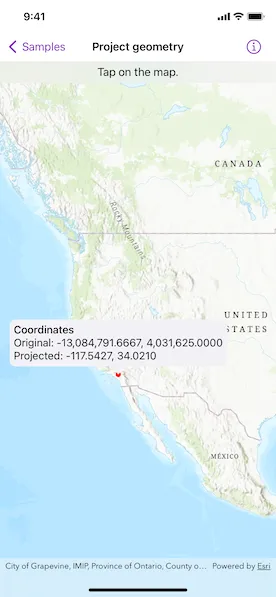
Tap anywhere on the map. A callout will display the tapped location’s coordinate in the original basemap’s spatial reference webMercator and in the projected spatial reference wgs84.
How it works
- Call the method,
static GeometryEngine.project(_:into:), passing in the original geometry and a spatial reference system to be projected to.
Relevant API
- GeometryEngine
- Point
- SpatialReference
- static GeometryEngine.project(_:into:)
Additional information
In cases where the output spatial reference uses a different geographic coordinate system than that of the input spatial reference, see the static GeometryEngine.project(_:into:datumTransformation:) method that additionally takes in a DatumTransformation parameter.
Tags
coordinate system, coordinates, latitude, longitude, projected, projection, spatial reference, Web Mercator, WGS 84
Sample code
// Copyright 2022 Esri//// Licensed under the Apache License, Version 2.0 (the "License");// you may not use this file except in compliance with the License.// You may obtain a copy of the License at////   https://www.apache.org/licenses/LICENSE-2.0//// Unless required by applicable law or agreed to in writing, software// distributed under the License is distributed on an "AS IS" BASIS,// WITHOUT WARRANTIES OR CONDITIONS OF ANY KIND, either express or implied.// See the License for the specific language governing permissions and// limitations under the License.
import ArcGISimport SwiftUI
struct ProjectGeometryView: View {    /// A location callout placement.    @State private var calloutPlacement: CalloutPlacement?
    /// The point where the map was tapped in its original spatial reference (Web Mercator).    @State private var originalPoint: Point!
    /// The projected location after normalization.    @State private var projectedPoint: Point!
    /// The view model for the sample.    @StateObject private var model = Model()
    var body: some View {        MapView(map: model.map, graphicsOverlays: [model.graphicsOverlay])            .onSingleTapGesture { _, mapPoint in                if calloutPlacement == nil {                    // Sets the original point to where the map was tapped.                    originalPoint = GeometryEngine.normalizeCentralMeridian(of: mapPoint) as? Point
                    // Projects the original point from Web Mercator to WGS 84.                    projectedPoint = GeometryEngine.project(originalPoint!, into: .wgs84)!
                    // Updates the geometry of the point graphic.                    model.pointGraphic.geometry = projectedPoint
                    // Updates the location callout placement.                    calloutPlacement = CalloutPlacement.location(projectedPoint)                } else {                    // Hides the callout and point graphic.                    calloutPlacement = nil                    model.pointGraphic.geometry = nil                }            }            .callout(placement: $calloutPlacement.animation(.default.speed(2))) { _ in                VStack(alignment: .leading) {                    Group {                        Text("Coordinates")                            .fontWeight(.medium)                        Text("Original: \(originalPoint.xyCoordinates)")                        Text("Projected: \(projectedPoint.xyCoordinates)")                    }                    .font(.callout)                }                .padding(6)            }            .overlay(alignment: .top) {                Text("Tap on the map.")                    .frame(maxWidth: .infinity)                    .padding(.vertical, 6)                    .background(.thinMaterial, ignoresSafeAreaEdges: .horizontal)            }    }}
private extension ProjectGeometryView {    /// The model used to store the geo model and other expensive objects    /// used in this view.    class Model: ObservableObject {        /// A map with a topographic basemap style and an initial viewpoint.        let map: Map = {            let map = Map(basemapStyle: .arcGISTopographic)            map.initialViewpoint = Viewpoint(                center: Point(x: -1.2e7, y: 5e6, spatialReference: .webMercator),                scale: 4e7            )            return map        }()
        /// A graphics overlay containing a graphic with a circular, red marker symbol.        let graphicsOverlay = GraphicsOverlay(graphics: [            Graphic(symbol: SimpleMarkerSymbol(color: .red, size: 8))        ])
        /// The graphic with a circular, red marker symbol.        var pointGraphic: Graphic { graphicsOverlay.graphics.first! }    }}
private extension FormatStyle where Self == FloatingPointFormatStyle<Double> {    /// Formats the double with four decimals places of precision.    static var decimal: Self {        Self.number.precision(.fractionLength(4))    }}
private extension Point {    /// The point's decimal-formatted x and y coordinates.    var xyCoordinates: Text {        Text("\(self.x, format: .decimal), \(self.y, format: .decimal)")    }}
#Preview {    ProjectGeometryView()}