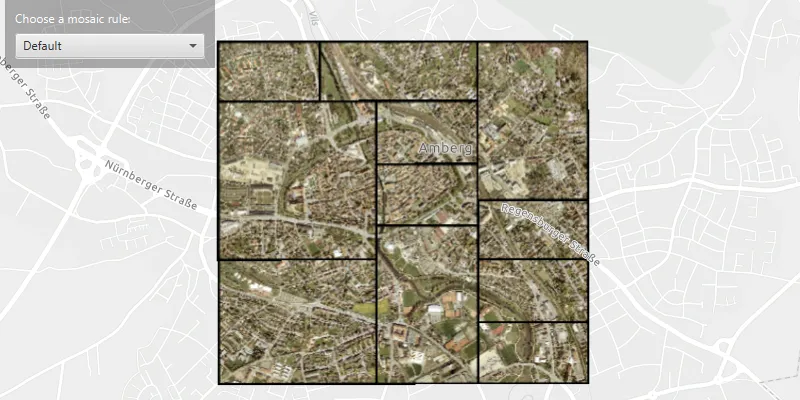
Apply mosaic rule to a mosaic dataset of rasters.
Use case
An image service can use a mosaic rule to mosaic multiple rasters on-the-fly. A mosaic rule can specify which rasters are selected, and how the selected rasters are z-ordered. It can also specify how overlapping pixels from different rasters at the same location are resolved.
For example, when using the “By Attribute” mosaic method, the values in an attribute field are used to sort the images, and when using the “Center” method, the image closest to the center of the display is positioned as the top image in the mosaic. Additionally, mosaic operation allows you to define how to resolve the overlapping cells, such as choosing a blending operation.
Specifying mosaic rules is useful for viewing overlapping rasters. For example, using the “By Attribute” mosaic method to sort the rasters based on their acquisition date allows the newest image to be on top. Using “mean” mosaic operation makes the overlapping areas contain the mean cell values from all the overlapping rasters.
How to use the sample
When the rasters are loaded, choose from a list of preset mosaic rules to apply to the rasters.
How it works
- Create an
ImageServiceRasterusing the service’s URL. - Create a
MosaicRuleobject and set it to the image service raster usingsetMosaicRule(mosaicRule), if it does not specify a mosaic rule. - Create a
RasterLayerfrom the image service raster and add it to the map. - Set the
mosaicMethod,mosaicOperationand other properties of the mosaic rule object accordingly to specify the rule on the raster dataset.
Relevant API
- ImageServiceRaster
- MosaicMethod
- MosaicOperation
- MosaicRule
About the data
This sample uses a raster image service hosted on ArcGIS Online that shows aerial images of Amberg, Germany.
Additional information
For more information, see Understanding the mosaicking rules from ArcGIS Desktop documentation. To learn more about how to define certain mosaic rules, see Mosaic rule objects from ArcGIS for Developers.
Tags
image service, mosaic method, mosaic rule, raster
Sample code
/* * Copyright 2021 Esri. * * Licensed under the Apache License, Version 2.0 (the "License"); you may not * use this file except in compliance with the License. You may obtain a copy of * the License at * * http://www.apache.org/licenses/LICENSE-2.0 * * Unless required by applicable law or agreed to in writing, software * distributed under the License is distributed on an "AS IS" BASIS, WITHOUT * WARRANTIES OR CONDITIONS OF ANY KIND, either express or implied. See the * License for the specific language governing permissions and limitations under * the License. */
package com.esri.samples.apply_mosaic_rule_to_rasters;
import java.util.Arrays;
import javafx.application.Application;import javafx.collections.FXCollections;import javafx.geometry.Insets;import javafx.geometry.Pos;import javafx.scene.Scene;import javafx.scene.control.Alert;import javafx.scene.control.ComboBox;import javafx.scene.control.ProgressIndicator;import javafx.scene.layout.Background;import javafx.scene.layout.BackgroundFill;import javafx.scene.layout.CornerRadii;import javafx.scene.layout.StackPane;import javafx.scene.layout.VBox;import javafx.stage.Stage;import javafx.scene.paint.Paint;import javafx.scene.control.Label;
import com.esri.arcgisruntime.ArcGISRuntimeEnvironment;import com.esri.arcgisruntime.layers.RasterLayer;import com.esri.arcgisruntime.loadable.LoadStatus;import com.esri.arcgisruntime.mapping.ArcGISMap;import com.esri.arcgisruntime.mapping.BasemapStyle;import com.esri.arcgisruntime.mapping.view.DrawStatus;import com.esri.arcgisruntime.mapping.Viewpoint;import com.esri.arcgisruntime.mapping.view.MapView;import com.esri.arcgisruntime.raster.ImageServiceRaster;import com.esri.arcgisruntime.raster.MosaicRule;import com.esri.arcgisruntime.raster.MosaicMethod;import com.esri.arcgisruntime.raster.MosaicOperation;
public class ApplyMosaicRuleToRastersSample extends Application {
  private ComboBox<String> mosaicRuleComboBox;  private MapView mapView;  private MosaicRule mosaicRule;  private VBox controlsVBox;
  @Override  public void start(Stage stage) {
    try {      // create stack pane and application scene      StackPane stackPane = new StackPane();      Scene scene = new Scene(stackPane);
      // set title, size, and add scene to stage      stage.setTitle("Apply Mosaic Rule To Rasters Sample");      stage.setWidth(800);      stage.setHeight(700);      stage.setScene(scene);      stage.show();
      // authentication with an API key or named user is required to access basemaps and other location services      String yourAPIKey = System.getProperty("apiKey");      ArcGISRuntimeEnvironment.setApiKey(yourAPIKey);
      // create a map with the light gray basemap style      ArcGISMap map = new ArcGISMap(BasemapStyle.ARCGIS_LIGHT_GRAY);
      // create a map view      mapView = new MapView();
      // show progress indicator while map view is drawing      var progressIndicator = new ProgressIndicator();      progressIndicator.visibleProperty().bind(mapView.drawStatusProperty().isEqualTo(DrawStatus.IN_PROGRESS));

      // set the map to the map view      mapView.setMap(map);
      // setup the UI      setupUI();
      // create a raster layer from the image service raster      ImageServiceRaster imageServiceRaster = new ImageServiceRaster(        "https://sampleserver7.arcgisonline.com/server/rest/services/amberg_germany/ImageServer");      RasterLayer rasterLayer = new RasterLayer(imageServiceRaster);
      // add a raster layer as an operational layer to the map      map.getOperationalLayers().add(rasterLayer);
      // wait for the raster layer to finish loading      rasterLayer.addDoneLoadingListener(() -> {        if (rasterLayer.getLoadStatus() == LoadStatus.LOADED) {          // when loaded, set the map view's viewpoint to the image service raster's center          mapView.setViewpoint(new Viewpoint(imageServiceRaster.getServiceInfo().getFullExtent().getCenter(), 25000.0));
          // enable UI interaction once the raster layer has loaded          controlsVBox.setVisible(true);
          // create a mosaic rule for the image service raster if one does not already exist          if (imageServiceRaster.getMosaicRule() == null) {            mosaicRule = new MosaicRule();            imageServiceRaster.setMosaicRule(mosaicRule);          }        } else {          // show alert if raster layer fails to load.          new Alert(Alert.AlertType.ERROR, "Error loading raster layer.").show();        }      });
      // set the mosaic rule of the image service raster based on rule chosen from the combo box      mosaicRuleComboBox.getSelectionModel().selectedItemProperty().addListener(e -> {        // create a new mosaic rule        mosaicRule = new MosaicRule();
        switch (mosaicRuleComboBox.getSelectionModel().getSelectedItem()) {          case "Default":            mosaicRule.setMosaicMethod(MosaicMethod.NONE);            break;          case "Northwest":            mosaicRule.setMosaicMethod(MosaicMethod.NORTHWEST);            mosaicRule.setMosaicOperation(MosaicOperation.FIRST);            break;          case "Center":            mosaicRule.setMosaicMethod(MosaicMethod.CENTER);            mosaicRule.setMosaicOperation(MosaicOperation.BLEND);            break;          case "By attribute":            mosaicRule.setMosaicMethod(MosaicMethod.ATTRIBUTE);            mosaicRule.setSortField("OBJECTID");            break;          case "Lock raster":            mosaicRule.setMosaicMethod(MosaicMethod.LOCK_RASTER);            mosaicRule.getLockRasterIds().clear();            // lock the display of multiple rasters based on the ObjectID            mosaicRule.getLockRasterIds().addAll(Arrays.asList(1L, 7L, 12L));            break;        }        // set the mosaic rule of the image service raster        imageServiceRaster.setMosaicRule(mosaicRule);      });
      // add the map view, control panel and progress indicator to the stack pane      stackPane.getChildren().addAll(mapView, controlsVBox, progressIndicator);      StackPane.setAlignment(controlsVBox, Pos.TOP_LEFT);      StackPane.setMargin(controlsVBox, new Insets(10, 0, 0, 10));    } catch (Exception e) {      // on any error, display the stack trace      e.printStackTrace();    }  }
  /**   * Creates a UI with a drop down box.   */  private void setupUI() {    // create a label    Label mosaicRuleLabel = new Label("Choose a mosaic rule: ");    mosaicRuleLabel.setStyle("-fx-text-fill: white");
    // create a combo box    mosaicRuleComboBox = new ComboBox<>(      FXCollections.observableArrayList("Default", "Northwest", "Center", "By attribute", "Lock raster"));    mosaicRuleComboBox.setMaxWidth(Double.MAX_VALUE);
    // set the default combo box value    mosaicRuleComboBox.getSelectionModel().select(0);
    // set up the control panel UI    controlsVBox = new VBox(6);    controlsVBox.setBackground(new Background(new BackgroundFill(Paint.valueOf("rgba(0, 0, 0, 0.3)"),      CornerRadii.EMPTY, Insets.EMPTY)));    controlsVBox.setPadding(new Insets(10.0));    controlsVBox.setMaxSize(210, 50);    controlsVBox.setVisible(false);    // add the label and combo box to the control panel    controlsVBox.getChildren().addAll(mosaicRuleLabel, mosaicRuleComboBox);  }
  /**   * Stops and releases all resources used in application.   */  @Override  public void stop() {
    if (mapView != null) {      mapView.dispose();    }  }
  /**   * Opens and runs application.   *   * @param args arguments passed to this application   */  public static void main(String[] args) {
    Application.launch(args);  }}