Apply a colormap renderer to a raster.
Use case
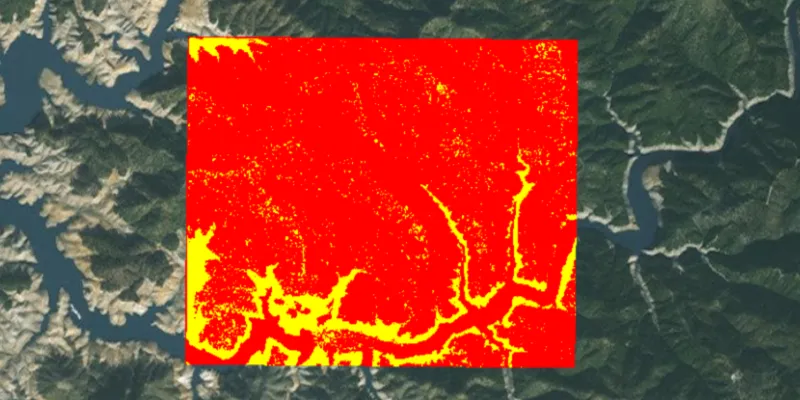
A colormap renderer transforms pixel values in a raster to display raster data based on specific colors, aiding in visual analysis of the data. For example, a forestry commission may want to quickly visualize areas above and below the tree-line line occurring at a known elevation on a raster containing elevation values. They could overlay a transparent colormap set to color those areas below the tree-line elevation green, and those above white.
How to use the sample
Pan and zoom to explore the effect of the colormap applied to the raster.
How it works
- Create a
Rasterfrom a raster file. - Create a
RasterLayerfrom the raster. - Create a
List<Color>representing colors. Colors at the beginning of the list replace the darkest values in the raster and colors at the end of the list replaced the brightest values of the raster. - Create a
ColormapRendererwith the color list:ColormapRenderer(colors), and apply it to the raster layer withrasterLayer.setRasterRenderer(colormapRenderer).
Relevant API
- ColormapRenderer
- Raster
- RasterLayer
About the data
The raster used in this sample shows an area in the south of the Shasta-Trinity National Forest, California.
Tags
colormap, data, raster, renderer, visualization
Sample code
ColormapRendererSample.java
/* * Copyright 2017 Esri. * * Licensed under the Apache License, Version 2.0 (the "License"); you may not * use this file except in compliance with the License. You may obtain a copy of * the License at * * http://www.apache.org/licenses/LICENSE-2.0 * * Unless required by applicable law or agreed to in writing, software * distributed under the License is distributed on an "AS IS" BASIS, WITHOUT * WARRANTIES OR CONDITIONS OF ANY KIND, either express or implied. See the * License for the specific language governing permissions and limitations under * the License. */
package com.esri.samples.colormap_renderer;
import java.io.File;import java.util.List;import java.util.stream.Collectors;import java.util.stream.IntStream;
import javafx.application.Application;import javafx.scene.Scene;import javafx.scene.control.Alert;import javafx.scene.layout.StackPane;import javafx.scene.paint.Color;import javafx.stage.Stage;
import com.esri.arcgisruntime.ArcGISRuntimeEnvironment;import com.esri.arcgisruntime.layers.RasterLayer;import com.esri.arcgisruntime.loadable.LoadStatus;import com.esri.arcgisruntime.mapping.ArcGISMap;import com.esri.arcgisruntime.mapping.BasemapStyle;import com.esri.arcgisruntime.mapping.view.MapView;import com.esri.arcgisruntime.raster.ColormapRenderer;import com.esri.arcgisruntime.raster.Raster;
public class ColormapRendererSample extends Application {
  private MapView mapView;
  @Override  public void start(Stage stage) {
    try {      // create stack pane and application scene      StackPane stackPane = new StackPane();      Scene scene = new Scene(stackPane);
      // set title, size, and add scene to stage      stage.setTitle("Colormap Renderer Sample");      stage.setWidth(800);      stage.setHeight(700);      stage.setScene(scene);      stage.show();
      // authentication with an API key or named user is required to access basemaps and other location services      String yourAPIKey = System.getProperty("apiKey");      ArcGISRuntimeEnvironment.setApiKey(yourAPIKey);
      // create a raster from a local raster file      Raster raster = new Raster(new File(System.getProperty("data.dir"), "./samples-data/raster/ShastaBW.tif").getAbsolutePath());
      // create a raster layer      RasterLayer rasterLayer = new RasterLayer(raster);
      // create a map with the standard imagery basemap style      ArcGISMap map = new ArcGISMap(BasemapStyle.ARCGIS_IMAGERY_STANDARD);
      // create a map view and set the map to it      mapView = new MapView();      mapView.setMap(map);
      // add the raster to the map's operational layers      map.getOperationalLayers().add(rasterLayer);
      // create a color map where values 0-149 are red and 150-250 are yellow      List<Color> colors = IntStream.range(0, 250)          .boxed()          .map(i -> i < 150 ? Color.RED : Color.YELLOW)          .collect(Collectors.toList());
      // create a colormap renderer      ColormapRenderer colormapRenderer = new ColormapRenderer(colors);
      // set the colormap renderer on the raster layer      rasterLayer.setRasterRenderer(colormapRenderer);
      // set viewpoint on the raster      rasterLayer.addDoneLoadingListener(() -> {        if (map.getLoadStatus() == LoadStatus.LOADED) {          mapView.setViewpointGeometryAsync(rasterLayer.getFullExtent(), 150);        } else {          Alert alert = new Alert(Alert.AlertType.ERROR, "Raster Layer Failed to Load!");          alert.show();        }      });
      // add the map view to stack pane      stackPane.getChildren().addAll(mapView);    } catch (Exception e) {      // on any error, display the stack trace.      e.printStackTrace();    }  }
  /**   * Stops and releases all resources used in application.   */  @Override  public void stop() {
    if (mapView != null) {      mapView.dispose();    }  }
  /**   * Opens and runs application.   *   * @param args arguments passed to this application   */  public static void main(String[] args) {
    Application.launch(args);  }
}