Display a raster contained in a GeoPackage.
Use case
GeoPackages are designed to simplify file management and transfer. They can store raster files (as well as other types of data). An end-user wishing to transfer rasters from ArcGIS Pro or between ArcGIS Maps SDKs for Native Apps might need to import raster files from GeoPackages into their map to view and analyze the data.
How to use the sample
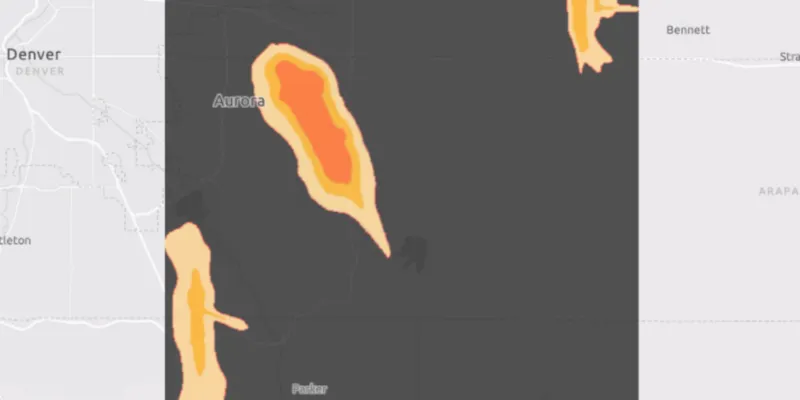
When the sample starts, a raster will be loaded from a GeoPackage and displayed in the map view.
How it works
- Create and load a
GeoPackage, specifying the path to the local .gpkg file. - When it is done loading, get the
GeoPackageRasters from the GeoPackage. - Construct a
RasterLayerwith the GeoPackage raster you want to use. - Add the raster layer to the map.
Relevant API
- GeoPackage
- GeoPackageRaster
- RasterLayer
About the data
The Aurora Colorado GeoPackage holds datasets that cover Aurora, Colorado. The raster that is opened and displayed shows airport noise levels.
Tags
container, data, image, import, layer, OGC, package, raster, visualization
Sample code
RasterLayerGeopackageSample.java
/* * Copyright 2018 Esri. * * Licensed under the Apache License, Version 2.0 (the "License"); you may not * use this file except in compliance with the License. You may obtain a copy of * the License at * * http://www.apache.org/licenses/LICENSE-2.0 * * Unless required by applicable law or agreed to in writing, software * distributed under the License is distributed on an "AS IS" BASIS, WITHOUT * WARRANTIES OR CONDITIONS OF ANY KIND, either express or implied. See the * License for the specific language governing permissions and limitations under * the License. */
package com.esri.samples.raster_layer_geopackage;
import java.io.File;
import javafx.application.Application;import javafx.scene.Scene;import javafx.scene.control.Alert;import javafx.scene.layout.StackPane;import javafx.stage.Stage;
import com.esri.arcgisruntime.ArcGISRuntimeEnvironment;import com.esri.arcgisruntime.data.GeoPackage;import com.esri.arcgisruntime.layers.RasterLayer;import com.esri.arcgisruntime.loadable.LoadStatus;import com.esri.arcgisruntime.mapping.ArcGISMap;import com.esri.arcgisruntime.mapping.BasemapStyle;import com.esri.arcgisruntime.mapping.view.MapView;import com.esri.arcgisruntime.raster.GeoPackageRaster;
public class RasterLayerGeopackageSample extends Application {
  private MapView mapView;  private GeoPackage geoPackage; // keep loadable in scope to avoid garbage collection
  @Override  public void start(Stage stage) {
    try {      // create stack pane and application scene      StackPane stackPane = new StackPane();      Scene scene = new Scene(stackPane);
      // set title, size, and add scene to stage      stage.setTitle("Raster Layer GeoPackage");      stage.setWidth(800);      stage.setHeight(700);      stage.setScene(scene);      stage.show();
      // authentication with an API key or named user is required to access basemaps and other location services      String yourAPIKey = System.getProperty("apiKey");      ArcGISRuntimeEnvironment.setApiKey(yourAPIKey);
      // create a map with the light gray basemap style      ArcGISMap map = new ArcGISMap(BasemapStyle.ARCGIS_LIGHT_GRAY);
      // create a map view and set the map to it      mapView = new MapView();      mapView.setMap(map);
      // create a geopackage from a local gpkg file      geoPackage = new GeoPackage(new File(System.getProperty("data.dir"), "./samples-data/auroraCO/AuroraCO.gpkg").getAbsolutePath());
      // load the geopackage      geoPackage.loadAsync();      geoPackage.addDoneLoadingListener(() -> {        if (geoPackage.getLoadStatus() == LoadStatus.LOADED && geoPackage.getGeoPackageRasters().size() > 0) {          // get the geopackage raster          GeoPackageRaster raster = geoPackage.getGeoPackageRasters().get(0);
          // create a raster layer and add it to the map          RasterLayer rasterLayer = new RasterLayer(raster);          rasterLayer.setOpacity(0.7f);          map.getOperationalLayers().add(rasterLayer);
          // set viewpoint on the raster layer          rasterLayer.addDoneLoadingListener(() -> {            if (rasterLayer.getLoadStatus() == LoadStatus.LOADED) {              mapView.setViewpointGeometryAsync(rasterLayer.getFullExtent(), 150);            } else {              Alert alert = new Alert(Alert.AlertType.ERROR, "Failed to load raster layer");              alert.show();            }          });
        } else {          Alert alert = new Alert(Alert.AlertType.ERROR, "Failed to load geopackage");          alert.show();        }      });
      // add the map view to stack pane      stackPane.getChildren().addAll(mapView);    } catch (Exception e) {      // on any error, display the stack trace.      e.printStackTrace();    }  }
  /**   * Stops and releases all resources used in application.   */  @Override  public void stop() {
    if (mapView != null) {      mapView.dispose();    }  }
  /**   * Opens and runs application.   *   * @param args arguments passed to this application   */  public static void main(String[] args) {
    Application.launch(args);  }
}