Create a raster layer from a raster image service.
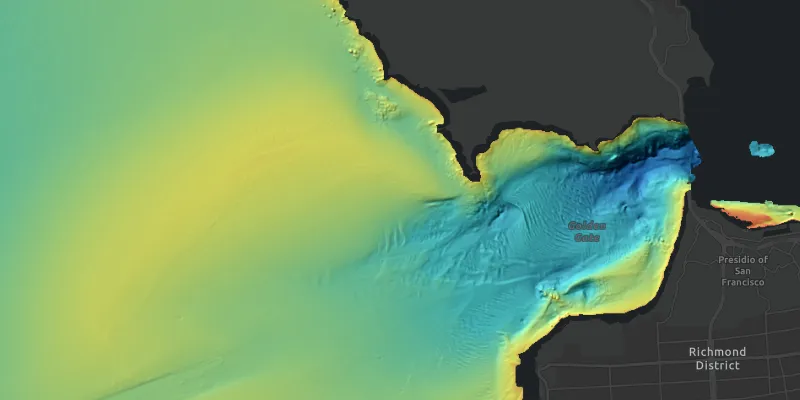
Use case
Accessing a raster image from an online service can be useful for analysing the most up-to-date data available for an area. For example, retrieving recent results of bathymetry surveys within a shipping channel monitored for its sediment build-up would allow planners to assess dredging needs.
How to use the sample
Simply launch the sample to see a raster from an image service being used on a map.
How it works
To add a RasterLayer as an operational layer from an ImageServiceRaster:
- Create an
ImageServiceRasterusing the service’s URL - Create a
RasterLayerfrom the raster - Add it as an operational layer with
map.getOperationalLayers().add(rasterLayer)
Relevant API
- ImageServiceRaster
- RasterLayer
About the data
This sample uses a NOAA raster image service. The service computes a hillshade image from the depth (in meters) of U.S. coastal waters.
Tags
image service, raster
Sample code
RasterLayerURLSample.java
/* * Copyright 2017 Esri. * * Licensed under the Apache License, Version 2.0 (the "License"); you may not * use this file except in compliance with the License. You may obtain a copy of * the License at * * http://www.apache.org/licenses/LICENSE-2.0 * * Unless required by applicable law or agreed to in writing, software * distributed under the License is distributed on an "AS IS" BASIS, WITHOUT * WARRANTIES OR CONDITIONS OF ANY KIND, either express or implied. See the * License for the specific language governing permissions and limitations under * the License. */
package com.esri.samples.raster_layer_url;
import javafx.application.Application;import javafx.scene.Scene;import javafx.scene.control.Alert;import javafx.scene.layout.StackPane;import javafx.stage.Stage;
import com.esri.arcgisruntime.ArcGISRuntimeEnvironment;import com.esri.arcgisruntime.geometry.Point;import com.esri.arcgisruntime.geometry.SpatialReferences;import com.esri.arcgisruntime.layers.RasterLayer;import com.esri.arcgisruntime.loadable.LoadStatus;import com.esri.arcgisruntime.mapping.ArcGISMap;import com.esri.arcgisruntime.mapping.BasemapStyle;import com.esri.arcgisruntime.mapping.view.MapView;import com.esri.arcgisruntime.raster.ImageServiceRaster;
public class RasterLayerURLSample extends Application {
  private MapView mapView;  private RasterLayer rasterLayer; // keep loadable in scope to avoid garbage collection
  @Override  public void start(Stage stage) {
    try {      // create stack pane and application scene      StackPane stackPane = new StackPane();      Scene scene = new Scene(stackPane);
      // set title, size, and add scene to stage      stage.setTitle("Raster Layer URL Sample");      stage.setWidth(800);      stage.setHeight(700);      stage.setScene(scene);      stage.show();
      // authentication with an API key or named user is required to access basemaps and other location services      String yourAPIKey = System.getProperty("apiKey");      ArcGISRuntimeEnvironment.setApiKey(yourAPIKey);
      // create an image service raster from an online raster service      ImageServiceRaster imageServiceRaster = new ImageServiceRaster("https://gis.ngdc.noaa.gov/arcgis/rest/services/bag_hillshades_subsets/ImageServer");
      // create a raster layer      rasterLayer = new RasterLayer(imageServiceRaster);
      rasterLayer.addDoneLoadingListener(() -> {        if (rasterLayer.getLoadStatus() != LoadStatus.LOADED) {          new Alert(Alert.AlertType.ERROR, "Raster layer failed to load").show();        }      });
      // create a map with the dark gray basemap style      ArcGISMap map = new ArcGISMap(BasemapStyle.ARCGIS_DARK_GRAY);
      // create a map view and set the map to it      mapView = new MapView();      mapView.setMap(map);
      // zoom in to the San Francisco Bay      mapView.setViewpointCenterAsync(new Point(-13643095.660131, 4550009.846004, SpatialReferences.getWebMercator()), 100000);
      // add the raster layer as an operational layer      map.getOperationalLayers().add(rasterLayer);
      // add the map view to stack pane      stackPane.getChildren().addAll(mapView);    } catch (Exception e) {      // on any error, display the stack trace.      e.printStackTrace();    }  }
  /**   * Stops and releases all resources used in application.   */  @Override  public void stop() {
    if (mapView != null) {      mapView.dispose();    }  }
  /**   * Opens and runs application.   *   * @param args arguments passed to this application   */  public static void main(String[] args) {
    Application.launch(args);  }
}