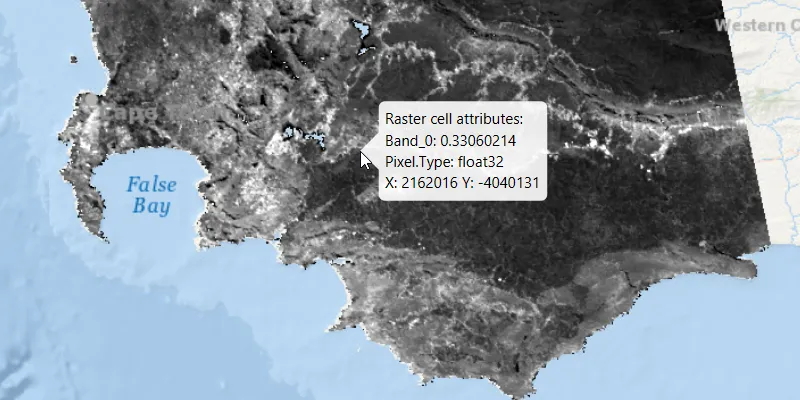
Get the cell value of a local raster and display the result in a callout.
Use case
You may want to identify a raster layer to get its exact cell value in the case the approximate value conveyed by its symbology is not sufficient. The information available for the raster cell depends on the type of raster layer being identified. For example, a 3-band satellite or aerial image might provide 8-bit RGB values, whereas a digital elevation model (DEM) would provide floating point z values. By identifying a raster cell of a DEM, you can retrieve the precise elevation of a location.
How to use the sample
Move the mouse pointer over an area of the raster to identify the raster cell at that location. The raster cell attribute information will display in a callout. You can click the primary mouse button to lock the callout in place, and click again to release the callout and resume identifying on-the-fly.
How it works
- Add a listener to the
MapViewto capture mouse clicks. - On click:
- Dismiss the
Callout, if one is showing. - Call
identifyLayerAsync(...)passing in the raster layer, screen point, tolerance, whether to return popups only, and maximum number of results. - Await the result of the identify and then get the
GeoElementfrom the layer result. - Create a callout at the calculated map point and populate the callout content with text from the
RasterCellattributes. - Show the callout.
Relevant API
- IdentifyLayerResult
- RasterCell
- RasterLayer
About the data
The data shown is an NDVI classification derived from MODIS imagery between 27 Apr 2020 and 4 May 2020. It comes from the NASA Worldview application. In a normalized difference vegetation index, or NDVI, values range between -1 and +1 with the positive end of the spectrum showing green vegetation.
Tags
band, cell, cell value, continuous, discrete, identify, pixel, pixel value, raster
Sample code
/* * Copyright 2020 Esri. * * Licensed under the Apache License, Version 2.0 (the "License"); you may not * use this file except in compliance with the License. You may obtain a copy of * the License at * * http://www.apache.org/licenses/LICENSE-2.0 * * Unless required by applicable law or agreed to in writing, software * distributed under the License is distributed on an "AS IS" BASIS, WITHOUT * WARRANTIES OR CONDITIONS OF ANY KIND, either express or implied. See the * License for the specific language governing permissions and limitations under * the License. */
package com.esri.samples.identify_raster_cell;
import java.io.File;import java.util.List;import java.util.concurrent.ExecutionException;
import javafx.application.Application;import javafx.geometry.Point2D;import javafx.scene.Scene;import javafx.scene.control.Alert;import javafx.scene.input.MouseButton;import javafx.scene.input.MouseEvent;import javafx.scene.layout.StackPane;import javafx.stage.Stage;
import com.esri.arcgisruntime.ArcGISRuntimeEnvironment;import com.esri.arcgisruntime.concurrent.ListenableFuture;import com.esri.arcgisruntime.geometry.Point;import com.esri.arcgisruntime.layers.RasterLayer;import com.esri.arcgisruntime.loadable.LoadStatus;import com.esri.arcgisruntime.mapping.ArcGISMap;import com.esri.arcgisruntime.mapping.BasemapStyle;import com.esri.arcgisruntime.mapping.GeoElement;import com.esri.arcgisruntime.mapping.view.Callout;import com.esri.arcgisruntime.mapping.view.IdentifyLayerResult;import com.esri.arcgisruntime.mapping.view.MapView;import com.esri.arcgisruntime.raster.Raster;import com.esri.arcgisruntime.raster.RasterCell;
public class IdentifyRasterCellSample extends Application {
  private boolean calloutLocked = false;  private Callout callout;  private MapView mapView;  private RasterLayer rasterLayer;
  @Override  public void start(Stage stage) {
    try {      // create stack pane and application scene      StackPane stackPane = new StackPane();      Scene scene = new Scene(stackPane);
      // set title, size, and add scene to stage      stage.setTitle("Identify Raster Cell Sample");      stage.setWidth(800);      stage.setHeight(700);      stage.setScene(scene);      stage.show();
      // authentication with an API key or named user is required to access basemaps and other location services      String yourAPIKey = System.getProperty("apiKey");      ArcGISRuntimeEnvironment.setApiKey(yourAPIKey);
      // create a map with the oceans basemap style      ArcGISMap map = new ArcGISMap(BasemapStyle.ARCGIS_OCEANS);
      // create a map view and set the map to it      mapView = new MapView();      mapView.setMap(map);
      // create a raster from a local raster file      Raster raster = new Raster(new File(System.getProperty("data.dir"), "./samples-data/SA_EVI_8Day_03May20/SA_EVI_8Day_03May20.tif").getAbsolutePath());
      // create a raster layer      rasterLayer = new RasterLayer(raster);
      // add the raster layer to the map's operational layers      map.getOperationalLayers().add(rasterLayer);
      // set viewpoint on the raster      rasterLayer.addDoneLoadingListener(() -> {        if (map.getLoadStatus() == LoadStatus.LOADED) {          mapView.setViewpointGeometryAsync(rasterLayer.getFullExtent(), 50);        } else {          Alert alert = new Alert(Alert.AlertType.ERROR, "Raster Layer Failed to Load!");          alert.show();        }      });
      // get a handle on the callout      callout = mapView.getCallout();      callout.setTitle("Raster cell attributes:");      // make the callout transparent to mouse interactions, so that we keep identifying raster cells behind it      callout.setMouseTransparent(true);
      // start identifying on-the-fly if the mouse enters the map view, and the callout is not locked      mapView.setOnMouseEntered(mouseEvent -> {        if (!calloutLocked) {          mapView.setOnMouseMoved(this::identifyRasterCell);        }      });
      // stop identifying on-the-fly when the mouse leaves the map view      mapView.setOnMouseExited(null);
      // on click, either lock the callout in place if raster cells are identified on-the-fly,      // or release the callout again and start identifying on-the-fly      mapView.setOnMouseClicked(mouseEvent -> {        if (mouseEvent.getButton() == MouseButton.PRIMARY && mouseEvent.isStillSincePress()) {
          if (!calloutLocked) {            // stop identifying on the fly            mapView.setOnMouseMoved(null);            // lock the callout in place            calloutLocked = true;
          } else {            // dismiss the callout            callout.dismiss();            // unlock the callout            calloutLocked = false;            // show a new callout at the clicked location            identifyRasterCell(mouseEvent);            // start identifying on-the-fly            mapView.setOnMouseMoved(this::identifyRasterCell);          }        }      });
      // add the map view to stack pane      stackPane.getChildren().addAll(mapView);
    } catch (Exception e) {      // on any error, display the stack trace      e.printStackTrace();    }  }
  /**   * Identifies the raster cell at the mouse event's location and displays a callout at that location.   *   * @param mouseEvent the mouse event used to identify the raster cell and show the callout   */  private void identifyRasterCell(MouseEvent mouseEvent) {
    // get the map point where the user clicked    Point2D point = new Point2D(mouseEvent.getX(), mouseEvent.getY());    Point mapPoint = mapView.screenToLocation(point);
    // identify the layers at the clicked location    ListenableFuture<IdentifyLayerResult> identifyLayerResultFuture      = mapView.identifyLayerAsync(rasterLayer, point, 10, false, 1);
    identifyLayerResultFuture.addDoneListener(() -> {      try {        // get the result of the query        IdentifyLayerResult identifyLayerResult = identifyLayerResultFuture.get();
        // get the read only list of geo-elements (they contain RasterCells)        List<GeoElement> geoElements = identifyLayerResult.getElements();
        // create a StringBuilder to display information to the user        StringBuilder stringBuilder = new StringBuilder();
        // loop through each RasterCell        for (GeoElement geoElement : geoElements) {
          if (geoElement instanceof RasterCell) {            RasterCell rasterCell = (RasterCell) geoElement;
            // loop through the attributes (key/value pairs)            rasterCell.getAttributes().forEach((key, value) ->              // add the key-value pair to the string builder              stringBuilder.append(key).append(": ").append(value).append("\n")            );
            // get and format the X and Y values for the cell            double x = rasterCell.getGeometry().getExtent().getXMin();            double y = rasterCell.getGeometry().getExtent().getYMin();            String string = "X: " + Math.round(x) + " Y: " + Math.round(y);
            // add the X & Y coordinates where the user clicked raster cell to the string builder            stringBuilder.append(string);
            // define a callout based on the string builder            callout.setDetail(stringBuilder.toString());            callout.showCalloutAt(mapPoint);          }        }      } catch (InterruptedException | ExecutionException e) {        new Alert(Alert.AlertType.ERROR, "Error identifying layer").show();      }    });
  }
  /**   * Stops and releases all resources used in application.   */  @Override  public void stop() {
    if (mapView != null) {      mapView.dispose();    }  }
  /**   * Opens and runs application.   *   * @param args arguments passed to this application   */  public static void main(String[] args) {
    Application.launch(args);  }
}