Use a stretch renderer to enhance the visual contrast of raster data for analysis.
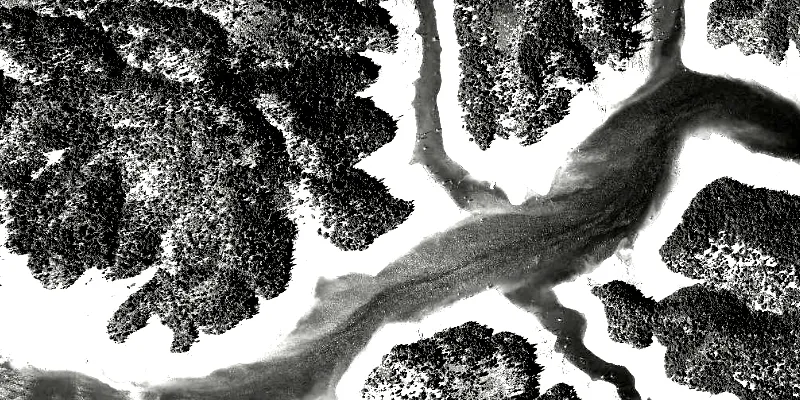
Use case
An appropriate stretch renderer can enhance the contrast of raster imagery, allowing the user to control how their data is displayed for efficient imagery analysis.
How to use the sample
Choose one of the stretch parameter types from the drop down menu:
- Std Deviation - a linear stretch defined by the standard deviation of the pixel values
- Min Max - a linear stretch based on minimum and maximum pixel values
- Percent Clip - a linear stretch between the defined percent clip minimum and percent clip maximum pixel values
Then configure the parameters and click ‘Update’.
How it works
- Create a
Rasterfrom a raster file. - Create a
RasterLayerfrom the raster. - Create a
Basemapfrom the raster layer withBasemap(rasterLayer)and set it to the map withArcGISMap(basemap). - Create a
StretchRenderer, specifying the stretch parameters and other properties. - Set the stretch renderer on the raster layer with
rasterLayer.setRasterRenderer(stretchRenderer).
Relevant API
- MinMaxStretchParameters
- PercentClipStretchParameters
- Raster
- RasterLayer
- StandardDeviationStretchParameters
- StretchParameters
- StretchRenderer
About the data
The raster used in this sample shows an area in the south of the Shasta-Trinity National Forest, California.
Additional information
See Stretch function in the ArcMap documentation for more information about the types of stretches that can be performed.
Tags
analysis, deviation, histogram, imagery, interpretation, min-max, percent clip, pixel, raster, stretch, symbology, visualization
Sample code
/* * Copyright 2017 Esri. * * Licensed under the Apache License, Version 2.0 (the "License"); you may not * use this file except in compliance with the License. You may obtain a copy of * the License at * * http://www.apache.org/licenses/LICENSE-2.0 * * Unless required by applicable law or agreed to in writing, software * distributed under the License is distributed on an "AS IS" BASIS, WITHOUT * WARRANTIES OR CONDITIONS OF ANY KIND, either express or implied. See the * License for the specific language governing permissions and limitations under * the License. */
package com.esri.samples.stretch_renderer;
import java.io.File;import java.util.Collections;
import javafx.fxml.FXML;import javafx.scene.control.ComboBox;import javafx.scene.control.Spinner;import javafx.scene.layout.GridPane;import javafx.scene.layout.HBox;import javafx.scene.layout.VBox;
import com.esri.arcgisruntime.layers.RasterLayer;import com.esri.arcgisruntime.mapping.ArcGISMap;import com.esri.arcgisruntime.mapping.Basemap;import com.esri.arcgisruntime.mapping.view.MapView;import com.esri.arcgisruntime.raster.MinMaxStretchParameters;import com.esri.arcgisruntime.raster.PercentClipStretchParameters;import com.esri.arcgisruntime.raster.Raster;import com.esri.arcgisruntime.raster.StandardDeviationStretchParameters;import com.esri.arcgisruntime.raster.StretchParameters;import com.esri.arcgisruntime.raster.StretchRenderer;
public class StretchRendererController {
  @FXML private HBox stdDeviationGroup;  @FXML private GridPane minMaxGroup;  @FXML private VBox percentClipGroup;  @FXML private MapView mapView;  @FXML private ComboBox<String> stretchTypeComboBox;  @FXML private Spinner<Integer> factorSpinner;  @FXML private Spinner<Integer> minPercentSpinner;  @FXML private Spinner<Integer> maxPercentSpinner;  @FXML private Spinner<Integer> minSpinner;  @FXML private Spinner<Integer> maxSpinner;
  private RasterLayer rasterLayer;
  public void initialize() {
    // create raster    Raster raster = new Raster(new File(System.getProperty("data.dir"), "./samples-data/raster/ShastaBW.tif").getAbsolutePath());
    // create a raster layer    rasterLayer = new RasterLayer(raster);
    // create a basemap from the raster layer    Basemap basemap = new Basemap(rasterLayer);    ArcGISMap map = new ArcGISMap(basemap);
    // set the map to the map view    mapView.setMap(map);
    // set stretch types    stretchTypeComboBox.getItems().addAll("Min Max", "Percent Clip", "Std Deviation");
    // hide options based on selected stretch type    stretchTypeComboBox.getSelectionModel().selectedItemProperty().addListener(e -> {      String type = stretchTypeComboBox.getSelectionModel().getSelectedItem();      minMaxGroup.setVisible("Min Max".equals(type));      percentClipGroup.setVisible("Percent Clip".equals(type));      stdDeviationGroup.setVisible("Std Deviation".equals(type));    });
    // set up sliders to match constraint min + max <= 100    minPercentSpinner.valueProperty().addListener(e -> {      if (minPercentSpinner.getValue() + maxPercentSpinner.getValue() > 100) {        maxPercentSpinner.getValueFactory().setValue(100 - minPercentSpinner.getValue());      }    });    maxPercentSpinner.valueProperty().addListener(e -> {      if (minPercentSpinner.getValue() + maxPercentSpinner.getValue() > 100) {        minPercentSpinner.getValueFactory().setValue(100 - maxPercentSpinner.getValue());      }    });
    stretchTypeComboBox.getSelectionModel().select(0);
    updateRenderer();  }
  /**   * Updates the raster layer renderer according to the chosen property values.   */  public void updateRenderer() {
    StretchParameters stretchParameters;    switch (stretchTypeComboBox.getSelectionModel().getSelectedItem()) {      case "Min Max":        stretchParameters = new MinMaxStretchParameters(Collections.singletonList(minSpinner.getValue().doubleValue()),            Collections.singletonList(maxSpinner.getValue().doubleValue()));        break;      case "Percent Clip":        stretchParameters = new PercentClipStretchParameters(minPercentSpinner.getValue(), maxPercentSpinner.getValue());        break;      default:        stretchParameters = new StandardDeviationStretchParameters(factorSpinner.getValue());    }
    // create blend renderer    StretchRenderer stretchRenderer = new StretchRenderer(stretchParameters, null, true, null);    rasterLayer.setRasterRenderer(stretchRenderer);  }
  /**   * Stops and releases all resources used in application.   */  void terminate() {
    if (mapView != null) {      mapView.dispose();    }  }
}
/* * Copyright 2017 Esri. * * Licensed under the Apache License, Version 2.0 (the "License"); you may not * use this file except in compliance with the License. You may obtain a copy of * the License at * * http://www.apache.org/licenses/LICENSE-2.0 * * Unless required by applicable law or agreed to in writing, software * distributed under the License is distributed on an "AS IS" BASIS, WITHOUT * WARRANTIES OR CONDITIONS OF ANY KIND, either express or implied. See the * License for the specific language governing permissions and limitations under * the License. */
package com.esri.samples.stretch_renderer;
import java.io.IOException;
import javafx.application.Application;import javafx.fxml.FXMLLoader;import javafx.scene.Parent;import javafx.scene.Scene;import javafx.stage.Stage;
public class StretchRendererSample extends Application {
private static StretchRendererController controller;
@Override public void start(Stage stage) throws IOException { // set up the scene FXMLLoader loader = new FXMLLoader(getClass().getResource("/stretch_renderer/main.fxml")); Parent root = loader.load(); controller = loader.getController(); Scene scene = new Scene(root);
// set up the stage stage.setTitle("Stretch Renderer Sample"); stage.setWidth(800); stage.setHeight(700); stage.setScene(scene); stage.show(); }
/** * Stops and releases all resources used in application. */ @Override public void stop() { controller.terminate(); }
/** * Opens and runs application. * * @param args arguments passed to this application */ public static void main(String[] args) {
Application.launch(args); }}