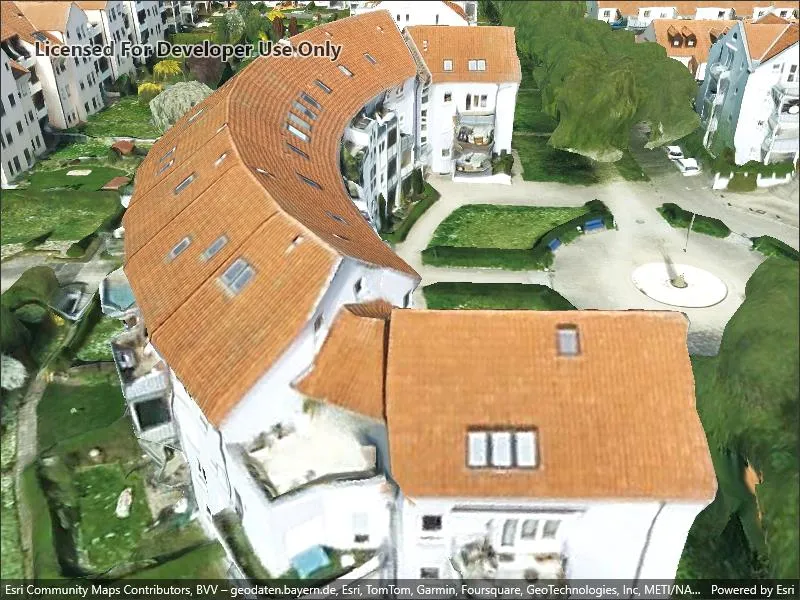
Add a layer to visualize 3D tiles data that conforms to the OGC 3D Tiles specification.
Use case
One use case for 3D tiles layer in a scene is assisting with visual analysis, such as an exploratory line of sight analysis. An exploratory line of sight analysis can be used to assess whether a view is obstructed between an observer and a target.
How to use the sample
When loaded, the sample will display a scene with an Ogc3DTilesLayer. Pan around and zoom in to observe the scene of the Ogc3DTilesLayer. Notice how the layer’s level of detail changes as you zoom in and out from the layer.
How it works
- Create a scene.
- Create an
Ogc3DTilesLayerwith the URL to a 3D tiles layer service. - Add the layer to the scene’s operational layers.
Relevant API
- Ogc3DTilesLayer
- SceneView
About the data
A layer to visualize 3D tiles data that conforms to the OGC 3D Tiles specification. As of 200.4, it supports analyses like exploratory viewshed and exploratory line of sight, but does not support other operations like individual feature identification.
The 3D Tiles Open Geospatial Consortium (OGC) specification defines a spatial data structure and a set of tile formats designed for streaming and rendering 3D geospatial content. A 3D Tiles data set, known as a tileset, defines one or more tile formats organized into a hierarchical spatial data structure. For more information, see the OGC 3D Tiles specification.
Tags
3d tiles, layers, OGC, OGC API, scene, service
Sample code
// Copyright 2024 Esri.//// Licensed under the Apache License, Version 2.0 (the "License"); you may not use this file except in compliance with the License.// You may obtain a copy of the License at: http://www.apache.org/licenses/LICENSE-2.0//// Unless required by applicable law or agreed to in writing, software distributed under the License is distributed on an// "AS IS" BASIS, WITHOUT WARRANTIES OR CONDITIONS OF ANY KIND, either express or implied. See the License for the specific// language governing permissions and limitations under the License.
using Esri.ArcGISRuntime.Mapping;
namespace ArcGIS.Samples.Add3dTilesLayer{    [ArcGIS.Samples.Shared.Attributes.Sample(        name: "Add 3d tiles layer",        category: "Layers",        description: "Add a layer to visualize 3D tiles data that conforms to the OGC 3D Tiles specification.",        instructions: "When loaded, the sample will display a scene with an `Ogc3DTilesLayer`. Pan around and zoom in to observe the scene of the `Ogc3DTilesLayer`. Notice how the layer's level of detail changes as you zoom in and out from the layer.",        tags: new[] { "3d tiles", "OGC", "OGC API", "layers", "scene", "service" })]    [ArcGIS.Samples.Shared.Attributes.OfflineData()]    public partial class Add3dTilesLayer    {        // Create Uris for the elevation source and 3D tiles layer.        private readonly Uri _elevationSourceUri = new Uri("https://elevation3d.arcgis.com/arcgis/rest/services/WorldElevation3D/Terrain3D/ImageServer");        private readonly Uri _3dTilesLayerUri = new Uri("https://tiles.arcgis.com/tiles/ZQgQTuoyBrtmoGdP/arcgis/rest/services/Stuttgart/3DTilesServer/tileset.json");
        public Add3dTilesLayer()        {            InitializeComponent();            _ = Initialize();        }
        private async Task Initialize()        {            // Create a new elevation source from Terrain3D REST service.            var elevationSource = new ArcGISTiledElevationSource(_elevationSourceUri);
            // Create a new 3D tiles layer from a REST endpoint.            var layer = new Ogc3DTilesLayer(_3dTilesLayerUri);
            // Create a new scene with a dark gray basemap.            var scene = new Scene(BasemapStyle.ArcGISDarkGray);
            // Add the elevation source to the scene.            scene.BaseSurface.ElevationSources.Add(elevationSource);
            // Add the 3D tiles layer to the scene.            scene.OperationalLayers.Add(layer);
            // Set the scene on the SceneView to visualize the 3D tiles layer.            MySceneView.Scene = scene;
            // Create a camera with an initial viewpoint.            // Camera constructor parameters: latitude, longitude, altitude, heading, pitch, and roll.            var sceneCamera = new Camera(48.8418, 9.1536, 1325.0, 48.35, 57.84, 0.0);
// Set the viewpoint with the camera. await MySceneView.SetViewpointCameraAsync(sceneCamera); } }}<?xml version="1.0" encoding="utf-8" ?><ContentPage x:Class="ArcGIS.Samples.Add3dTilesLayer.Add3dTilesLayer" xmlns="http://schemas.microsoft.com/dotnet/2021/maui" xmlns:x="http://schemas.microsoft.com/winfx/2009/xaml" xmlns:esriUI="clr-namespace:Esri.ArcGISRuntime.Maui;assembly=Esri.ArcGISRuntime.Maui"> <Grid> <esriUI:SceneView x:Name="MySceneView" /> </Grid></ContentPage>