Display KML from a URL, portal item, or local KML file.
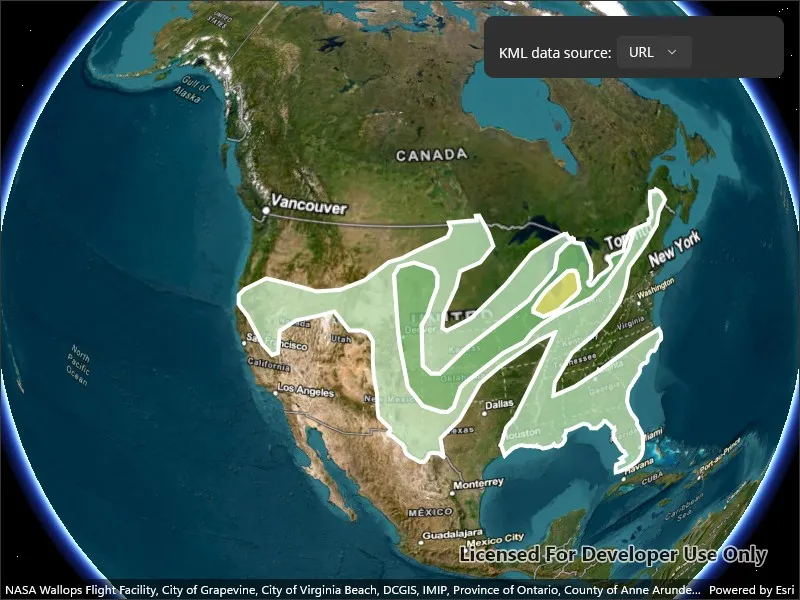
Use case
Keyhole Markup Language (KML) is a data format used by Google Earth. KML is popular as a transmission format for consumer use and for sharing geographic data between apps. You can use Runtime to display KML files, with full support for a variety of features, including network links, 3D models, screen overlays, and tours.
How to use the sample
Use the UI to select a source. A KML file from that source will be loaded and displayed in the scene.
How it works
- To create a KML layer from a URL, create a
KmlDatasetusing the URL to the KML file. Then pass the dataset to theKmlLayerconstructor. - To create a KML layer from a portal item, construct a
PortalItemwith aPortaland the KML portal item ID. Pass the portal item to theKmlLayerconstructor. - To create a KML layer from a local file, create a
KmlDatasetusing the absolute file path to the local KML file. Then pass the dataset to theKmlLayerconstructor. - Add the layer as an operational layer to the scene with
scene.OperationalLayers.Add(kmlLayer).
Relevant API
- KmlDataset
- KmlLayer
Offline data
| Link | Local Location |
|---|---|
| US State Capitals | <userhome>/ArcGIS/Runtime/Data/kml/US_State_Capitals.kml |
About the data
This sample displays three different KML files:
- From URL - this is a map of the convective outlook produced by NOAA/NWS Storm Prediction Center. It uses KML network links to always show the latest data.
- From local file - this is a map of U.S. state capitals. It doesn’t define an icon, so the default pushpin is used for the points.
- From portal item - this is a map of U.S. states.
Tags
keyhole, KML, KMZ, OGC
Sample code
// Copyright 2022 Esri.//// Licensed under the Apache License, Version 2.0 (the "License"); you may not use this file except in compliance with the License.// You may obtain a copy of the License at: http://www.apache.org/licenses/LICENSE-2.0//// Unless required by applicable law or agreed to in writing, software distributed under the License is distributed on an// "AS IS" BASIS, WITHOUT WARRANTIES OR CONDITIONS OF ANY KIND, either express or implied. See the License for the specific// language governing permissions and limitations under the License.
using ArcGIS.Samples.Managers;using Esri.ArcGISRuntime.Geometry;using Esri.ArcGISRuntime.Mapping;using Esri.ArcGISRuntime.Portal;
namespace ArcGIS.Samples.DisplayKml{    [ArcGIS.Samples.Shared.Attributes.Sample(        name: "Display KML",        category: "Layers",        description: "Display KML from a URL, portal item, or local KML file.",        instructions: "Use the UI to select a source. A KML file from that source will be loaded and displayed in the scene.",        tags: new[] { "KML", "KMZ", "OGC", "keyhole" })]    [ArcGIS.Samples.Shared.Attributes.OfflineData("324e4742820e46cfbe5029ff2c32cb1f")]    public partial class DisplayKml : ContentPage    {        private readonly Envelope _usEnvelope = new Envelope(-144.619561355187, 18.0328662832097, -66.0903762761083, 67.6390975806745, SpatialReferences.Wgs84);        private readonly string[] _sources = { "URL", "Local file", "Portal item" };
        public DisplayKml()        {            InitializeComponent();            Initialize();        }
        private void Initialize()        {            // Set up the basemap.            MySceneView.Scene = new Scene(BasemapStyle.ArcGISImagery);
            // Update the UI.            LayerPicker.IsEnabled = true;            LayerPicker.ItemsSource = _sources;            LayerPicker.SelectedIndexChanged += LayerPicker_SelectionChanged;            LayerPicker.SelectedIndex = 0;        }
        private async void LayerPicker_SelectionChanged(object sender, EventArgs e)        {            // Clear existing layers.            MySceneView.Scene.OperationalLayers.Clear();
            // Get the name of the selected layer.            string name = _sources[LayerPicker.SelectedIndex];
            try            {                // Create the layer using the chosen constructor.                KmlLayer layer;                switch (name)                {                    case "URL":                    default:                        layer = new KmlLayer(new Uri("https://www.spc.noaa.gov/products/outlook/SPC_outlooks.kml"));                        break;
                    case "Local file":                        string filePath = DataManager.GetDataFolder("324e4742820e46cfbe5029ff2c32cb1f", "US_State_Capitals.kml");                        layer = new KmlLayer(new Uri(filePath));                        break;
                    case "Portal item":                        ArcGISPortal portal = await ArcGISPortal.CreateAsync();                        PortalItem item = await PortalItem.CreateAsync(portal, "9fe0b1bfdcd64c83bd77ea0452c76253");                        layer = new KmlLayer(item);                        break;                }
                // Add the selected layer to the map.                MySceneView.Scene.OperationalLayers.Add(layer);
// Zoom to the extent of the United States. await MySceneView.SetViewpointAsync(new Viewpoint(_usEnvelope)); } catch (Exception ex) { await Application.Current.Windows[0].Page.DisplayAlertAsync("Error", ex.ToString(), "OK"); } } }}<?xml version="1.0" encoding="utf-8" ?>
<ContentPage x:Class="ArcGIS.Samples.DisplayKml.DisplayKml" xmlns="http://schemas.microsoft.com/dotnet/2021/maui" xmlns:x="http://schemas.microsoft.com/winfx/2009/xaml" xmlns:esriUI="clr-namespace:Esri.ArcGISRuntime.Maui;assembly=Esri.ArcGISRuntime.Maui"> <Grid Style="{DynamicResource EsriSampleContainer}"> <esriUI:SceneView x:Name="MySceneView" Style="{DynamicResource EsriSampleGeoView}" /> <Border Style="{DynamicResource EsriSampleControlPanel}"> <HorizontalStackLayout Padding="5" Spacing="5" VerticalOptions="Start"> <Label Text="KML data source:" VerticalTextAlignment="Center" /> <Picker x:Name="LayerPicker" VerticalOptions="Center" /> </HorizontalStackLayout> </Border> </Grid></ContentPage>