Implement a basemap gallery that automatically retrieves the latest customization options from the basemap styles service.
Use case
Multi-use and/or international applications benefit from the ability to change a basemap’s style or localize the basemap. For example, an application used for ecological surveys might include navigation functionality to guide an ecologist to a location and functionality for inputting data. When traveling, a user is likely to benefit from a map with a style that emphasizes the transport infrastructure (e.g., ArcGIS Navigation). However, during surveys a user is likely to benefit from a map with a style that highlights features in the terrain (e.g. ArcGIS Terrain). Implementing a basemap gallery with customization options in an application gives a user the freedom to select a basemap with a style and features (e.g., the language of labels) suitable for the task they are undertaking. Making the basemap gallery dynamic ensures the latest customization options are automatically included.
How to use the sample
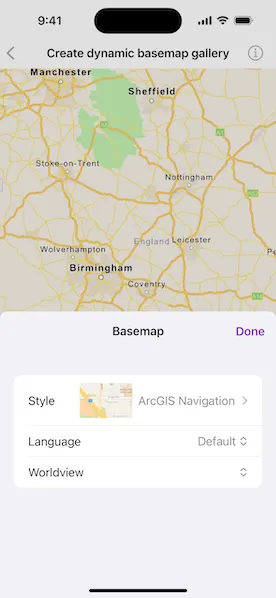
Press “Basemap” to display a gallery of all styles available in the basemap styles service. Select a style using the “Style” picker. Select a language or language strategy using the “Language” picker. Optionally selected a worldview using the “Worldview” picker. Disabled pickers indicate that the customization cannot be applied to the selected style.
How it works
- Create and load a
BasemapStylesServiceobject. - Get the
BasemapStylesServiceInfoobject fromBasemapStylesService.info. - Access the list of
BasemapStyleInfoobjects usingBasemapStylesServiceInfo.stylesInfo. TheseBasemapStyleInfoobjects contain up-to-date information about each of the styles supported by the Maps SDK, including:languageStrategies: A list ofBasemapStyleLanguageStrategyenumeration values that can be used with the style.languages: A list ofLocale.Languageobjects that can be used to customize labels on the style.styleName: The human-readable name of the style.style: TheBasemap.Styleenumeration value representing this style in the Maps SDK.thumbnail: An image that can be used to display a preview of the style.worldview: A list ofWorldviewobjects, which provide information about each representation of a disputed boundary that can be used to customize boundaries on the style.
- The information contained in the list of
BasemapStyleInfoobjects can be used as the data model for a basemap gallery UI component.
Relevant API
- BasemapStyleInfo
- BasemapStyleLanguageInfo
- BasemapStyleParameters
- BasemapStylesService
- BasemapStylesServiceInfo
- Worldview
Additional information
This sample demonstrates how to implement a basemap gallery using the Maps SDK. The styles and associated customization options used for the gallery are retrieved from the basemap styles service. A ready-made basemap gallery component is also available in the toolkits provided with each SDK. To see how the ready-made basemap gallery toolkit component can be integrated into a Maps SDK application, refer to the Set Basemap sample.
Tags
basemap, languages, service, style
Sample code
// Copyright 2024 Esri//// Licensed under the Apache License, Version 2.0 (the "License");// you may not use this file except in compliance with the License.// You may obtain a copy of the License at////   https://www.apache.org/licenses/LICENSE-2.0//// Unless required by applicable law or agreed to in writing, software// distributed under the License is distributed on an "AS IS" BASIS,// WITHOUT WARRANTIES OR CONDITIONS OF ANY KIND, either express or implied.// See the License for the specific language governing permissions and// limitations under the License.
import ArcGISimport SwiftUI
struct CreateDynamicBasemapGalleryView: View {    /// The view model for the sample.    @StateObject private var model = Model()
    /// A Boolean value indicating whether the basemap gallery is showing.    @State private var isShowingBasemapGallery = false
    /// The error shown in the error alert.    @State private var error: (any Error)?
    var body: some View {        MapView(map: model.map)            .toolbar {                ToolbarItemGroup(placement: .bottomBar) {                    Button("Basemap") {                        isShowingBasemapGallery.toggle()                    }                    .popover(isPresented: $isShowingBasemapGallery) {                        NavigationStack {                            BasemapGallery(model: model)                                .navigationTitle("Basemap")                                .navigationBarTitleDisplayMode(.inline)                                .toolbar {                                    ToolbarItem(placement: .confirmationAction) {                                        Button("Done") { isShowingBasemapGallery = false }                                    }                                }                        }                        .presentationDetents([.fraction(0.5)])                        .frame(idealWidth: 320, idealHeight: 380)                    }                }            }            .task {                do {                    try await model.loadStylesInfo()                } catch {                    self.error = error                }            }            .errorAlert(presentingError: $error)    }}
extension CreateDynamicBasemapGalleryView {    /// The view model for the sample.    @MainActor    final class Model: ObservableObject {        /// The map shown in the map view.        let map = Map()
        /// The basemap style of the map's basemap.        @Published var basemapStyle = Basemap.Style.arcGISNavigation {            didSet {                guard basemapStyle != oldValue else { return }
                basemapStyleLanguage = .strategic(.default)                worldviewCode = nil                basemapStyleInfo = stylesInfo.first { $0.style == basemapStyle }
                updateBasemap()            }        }
        /// The basemap style language of the map's basemap.        @Published var basemapStyleLanguage = BasemapStyleLanguage.strategic(.default) {            didSet {                guard basemapStyleLanguage != oldValue else { return }                updateBasemap()            }        }
        /// The worldview code of the map's basemap.        @Published var worldviewCode: String? {            didSet {                guard worldviewCode != oldValue else { return }                updateBasemap()            }        }
        /// The basemap styles info from the basemap styles service.        @Published private(set) var stylesInfo: [BasemapStyleInfo] = []
        /// The basemap style info for the basemap style.        @Published private(set) var basemapStyleInfo: BasemapStyleInfo?
        /// The basemap style language strategy options for the basemap style info.        var languageStrategies: [BasemapStyleLanguageStrategy] {            return [.default] + (basemapStyleInfo?.languageStrategies ?? [])        }
        /// The language options for the basemap style info.        var languages: [Locale.Language] {            basemapStyleInfo?.languages ?? []        }
        /// The worldview options for the basemap style info.        var worldviews: [Worldview?] {            return [nil] + (basemapStyleInfo?.worldviews ?? [])        }
        init() {            map.basemap = Basemap(style: basemapStyle)            map.initialViewpoint = Viewpoint(latitude: 52.3433, longitude: -1.5796, scale: 25e5)        }
        /// Loads the styles info from the basemap styles service.        func loadStylesInfo() async throws {            let service = BasemapStylesService()            try await service.load()
            guard let info = service.info else { return }            stylesInfo = info.stylesInfo            basemapStyleInfo = stylesInfo.first { $0.style == basemapStyle }
            // Loads the styles info thumbnails.            await stylesInfo.compactMap(\.thumbnail).load()        }
        /// Updates the map's basemap with the `basemapStyle`, `basemapStyleLanguage` and `worldviewCode`.        private func updateBasemap() {            let basemapStyleParameters = BasemapStyleParameters(language: basemapStyleLanguage)            basemapStyleParameters.worldview = if let worldviewCode {                Worldview(code: worldviewCode)            } else {                nil            }
            map.basemap = Basemap(style: basemapStyle, parameters: basemapStyleParameters)        }    }}
#Preview {    NavigationStack {        CreateDynamicBasemapGalleryView()    }}
// Copyright 2024 Esri//// Licensed under the Apache License, Version 2.0 (the "License");// you may not use this file except in compliance with the License.// You may obtain a copy of the License at//// https://www.apache.org/licenses/LICENSE-2.0//// Unless required by applicable law or agreed to in writing, software// distributed under the License is distributed on an "AS IS" BASIS,// WITHOUT WARRANTIES OR CONDITIONS OF ANY KIND, either express or implied.// See the License for the specific language governing permissions and// limitations under the License.
import ArcGISimport SwiftUI
extension CreateDynamicBasemapGalleryView { /// A view for selecting a basemap. struct BasemapGallery: View { /// The view model for the sample. @ObservedObject var model: Model
var body: some View { Form { Picker("Style", selection: $model.basemapStyle) { ForEach(model.stylesInfo, id: \.style) { styleInfo in HStack { if let image = styleInfo.thumbnail?.image { Image(uiImage: image) .resizable() .scaledToFit() .frame(height: 50) }
Text(styleInfo.styleName) } .tag(styleInfo.style) } } .pickerStyle(.navigationLink)
Picker("Language", selection: $model.basemapStyleLanguage) { Section("Strategy") { ForEach(model.languageStrategies, id: \.self) { strategy in Text(strategy.label) .tag(BasemapStyleLanguage.strategic(strategy)) } }
Section("Specific") { ForEach(model.languages, id: \.self) { language in Text(language.label ?? "Unknown") .tag(BasemapStyleLanguage.specific(language)) } } } .disabled(model.basemapStyleInfo?.languageStrategies.isEmpty ?? true)
Picker("Worldview", selection: $model.worldviewCode) { ForEach(model.worldviews, id: \.?.code) { worldview in Text(worldview?.displayName ?? "") .tag(worldview?.code) } } .disabled(model.basemapStyleInfo?.worldviews.isEmpty ?? true) } } }}
private extension BasemapStyleLanguageStrategy { /// A human-readable label for the basemap style language strategy. var label: String { switch self { case .default: "Default" case .global: "Global" case .local: "Local" case .applicationLocale: "System Locale" @unknown default: fatalError("Unknown basemap style language strategy.") } }}
private extension Locale.Language { /// A human-readable label for the language. var label: String? { Locale.current.localizedString(forIdentifier: self.maximalIdentifier) }}