Change a map’s basemap.
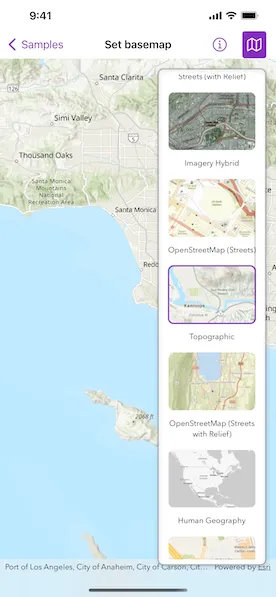
Use case
A basemap draws beneath all layers on a Map or Scene and is used to provide visual reference for the operational layers. Basemaps should be selected contextually. For example, in maritime applications, it would be more appropriate to use a basemap of the world’s oceans as opposed to a basemap of the world’s streets.
How to use the sample
Tap the map button in the toolbar to view a list of the available basemaps. Tap an item to set it as the map’s basemap.
How it works
- Create a
Mapobject with thearcGISImagerybasemap style. - Create a
MapViewinstance with the map. - Create a
BasemapGalleryusing the toolkit.
Relevant API
- Basemap.Style
- BasemapGallery
- Map
- MapView
Additional information
Organizational basemaps are a Portal feature allowing organizations to specify basemaps for use throughout the organization. Customers expect that they will have access to their organization’s standard basemap set when they connect to a Portal. Organizational basemaps are useful when certain basemaps are particularly relevant to the organization, or if the organization wants to make premium basemap content available to their workers.
This samples uses the BasemapGallery toolkit component, which requires the ArcGIS Maps SDK for Swift Toolkit. The BasemapGallery toolkit component supports selecting 2D and 3D basemaps from ArcGIS Online, a user-defined portal, or an array of Basemaps.
See Customize basemaps in the Portal for ArcGIS documentation to learn about customizing the organization’s basemap list in a portal.
Tags
basemap, map
Sample code
// Copyright 2022 Esri//// Licensed under the Apache License, Version 2.0 (the "License");// you may not use this file except in compliance with the License.// You may obtain a copy of the License at////   https://www.apache.org/licenses/LICENSE-2.0//// Unless required by applicable law or agreed to in writing, software// distributed under the License is distributed on an "AS IS" BASIS,// WITHOUT WARRANTIES OR CONDITIONS OF ANY KIND, either express or implied.// See the License for the specific language governing permissions and// limitations under the License.
import ArcGISimport ArcGISToolkitimport SwiftUI
struct SetBasemapView: View {    /// A Boolean value that indicates whether to show the basemap gallery.    @State private var isShowingBasemapGallery = false
    /// A map with imagery basemap.    @State private var map: Map = {        let map = Map(basemapStyle: .arcGISImagery)        // The initial viewpoint of the map.        map.initialViewpoint = Viewpoint(            center: Point(x: -118.4, y: 33.7, spatialReference: .wgs84),            scale: 1e6        )        return map    }()
    var body: some View {        GeometryReader { geometryProxy in            MapView(map: map)                .overlay(alignment: .topTrailing) {                    if isShowingBasemapGallery {                        BasemapGallery(geoModel: map)                            .style(.automatic())                            .frame(maxWidth: geometryProxy.size.width / 3)                            .esriBorder()                            .padding()                    }                }                .toolbar {                    ToolbarItem(placement: .primaryAction) {                        Toggle(isOn: $isShowingBasemapGallery) {                            Label("Basemap Gallery", systemImage: "map")                        }                    }                }        }    }}
#Preview {    NavigationStack {        SetBasemapView()    }}