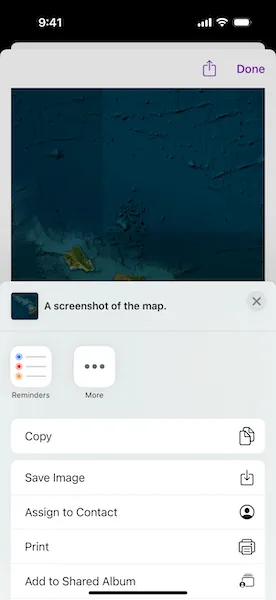
Take a screenshot of the map.
Use case
GIS users may want to export a screenshot of a map to enable sharing as an image or printing.
How to use the sample
Pan and zoom to find an interesting location, then use the button to take a screenshot. The screenshot will be displayed. You can share the screenshot by tapping the share button.
How it works
- Wait for the
MapViewto finish drawing. - Call
exportImage()to get aUIImage.
Relevant API
- DrawStatus
- GeoViewProxy.exportImage()
Tags
capture, export, image, print, screen capture, screenshot, share, shot
Sample code
TakeScreenshotView.swift
// Copyright 2025 Esri//// Licensed under the Apache License, Version 2.0 (the "License");// you may not use this file except in compliance with the License.// You may obtain a copy of the License at////   https://www.apache.org/licenses/LICENSE-2.0//// Unless required by applicable law or agreed to in writing, software// distributed under the License is distributed on an "AS IS" BASIS,// WITHOUT WARRANTIES OR CONDITIONS OF ANY KIND, either express or implied.// See the License for the specific language governing permissions and// limitations under the License.
import ArcGISimport SwiftUI
struct TakeScreenshotView: View {    /// The current draw status of the map.    @State private var currentDrawStatus: DrawStatus = .inProgress    /// The screenshot to export.    @State private var screenshot: Screenshot?    /// The error thrown while exporting a screenshot of the map, or `nil` if no error occurred.    @State private var screenshotExportError: (any Error)?    /// The map with an imagery basemap centered on Hawaii.    @State private var map: Map = {        let map = Map(basemapStyle: .arcGISImageryStandard)        map.initialViewpoint = Viewpoint(            latitude: 20.78,            longitude: -156.84,            scale: 5_000_000        )        return map    }()
    var body: some View {        MapViewReader { mapViewProxy in            MapView(map: map)                .onDrawStatusChanged { drawStatus in                    withAnimation {                        currentDrawStatus = drawStatus                    }                }                .sheet(item: $screenshot) { screenshot in                    NavigationStack {                        ShareScreenshotView(screenshot: screenshot)                    }                }                .toolbar {                    ToolbarItem(placement: .bottomBar) {                        Button {                            Task {                                do {                                    // The map view proxy is used to export a                                    // screenshot of the map view.                                    let image = try await mapViewProxy.exportImage()                                    screenshot = Screenshot(                                        image: Image(uiImage: image),                                        caption: "A screenshot of the map."                                    )                                } catch {                                    screenshotExportError = error                                }                            }                        } label: {                            if currentDrawStatus != .completed {                                ProgressView()                                    .progressViewStyle(.circular)                            }                            Text("Take Screenshot")                        }                        .disabled(currentDrawStatus != .completed)                    }                }        }        .errorAlert(presentingError: $screenshotExportError)    }}
private extension TakeScreenshotView {    /// A struct that represents a screenshot with a caption to be shared.    struct Screenshot: Transferable, Identifiable {        static var transferRepresentation: some TransferRepresentation {            ProxyRepresentation(exporting: \.image)        }
        let id = UUID()        let image: Image        let caption: String    }
    /// A view that displays an image to be shared.    struct ShareScreenshotView: View {        /// The action to dismiss the sheet.        @Environment(\.dismiss) private var dismiss: DismissAction        /// The screenshot to display.        let screenshot: Screenshot
        var body: some View {            screenshot.image                .resizable()                .scaledToFit()                .toolbar {                    ToolbarItem(placement: .confirmationAction) {                        Button("Done") {                            dismiss()                        }                    }
                    ToolbarItem(placement: .navigationBarTrailing) {                        // A share link to share the screenshot image.                        ShareLink(                            item: screenshot,                            preview: SharePreview(                                screenshot.caption,                                image: screenshot.image                            )                        )                    }                }        }    }}
#Preview {    TakeScreenshotView()}