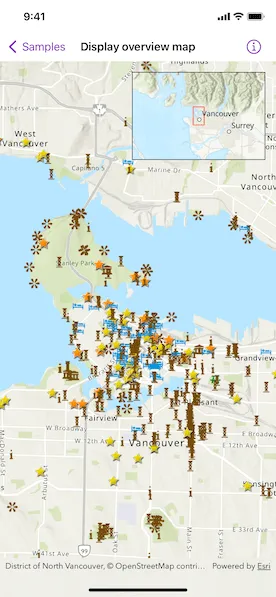
Include an overview or inset map as an additional map view to show the wider context of the primary view.
Use case
An overview map provides a useful, smaller-scale overview of the current map view’s location. For example, when you need to inspect a layer with many features while remaining aware of the wider context of the view, use an overview map to help show the extent of the main map view.
How to use the sample
Pan or zoom across the map view to browse through the tourist attractions feature layer and watch the viewpoint or scale of the linked overview map update automatically.
How it works
- Create a
Mapwith thearcGISTopographicbasemap style. - Create a
MapViewinstance with the map. - Instantiate a
FeatureLayerand add it to the map’s operational layers. - Create an
OverviewMapobject using the toolkit. - Add the
OverviewMapto the map view as an overlay.
Relevant API
- MapView
- OverviewMap
About the data
The data used in this sample is the OpenStreetMap Tourist Attractions for North America feature layer, which is scale-dependent and displays at scales larger than 1:160,000.
Additional information
This sample uses the overview map toolkit component, which requires the ArcGIS Maps SDK for Swift Toolkit.
Tags
context, inset, map, minimap, overview, preview, small scale, toolkit, view
Sample code
// Copyright 2022 Esri//// Licensed under the Apache License, Version 2.0 (the "License");// you may not use this file except in compliance with the License.// You may obtain a copy of the License at////   https://www.apache.org/licenses/LICENSE-2.0//// Unless required by applicable law or agreed to in writing, software// distributed under the License is distributed on an "AS IS" BASIS,// WITHOUT WARRANTIES OR CONDITIONS OF ANY KIND, either express or implied.// See the License for the specific language governing permissions and// limitations under the License.
import ArcGISimport ArcGISToolkitimport SwiftUI
struct DisplayOverviewMapView: View {    /// A map with imagery basemap and a tourist attraction feature layer.    @State private var map: Map = {        let featureLayer = FeatureLayer(            item: PortalItem(                portal: .arcGISOnline(connection: .anonymous),                id: .northAmericaTouristAttractions            )        )        let map = Map(basemapStyle: .arcGISTopographic)        map.addOperationalLayer(featureLayer)        return map    }()
    /// The current viewpoint of the map view.    @State private var viewpoint = Viewpoint(        center: Point(x: -123.12052, y: 49.28299, spatialReference: .wgs84),        scale: 5e4    )
    /// The visible area marked with a red rectangle on the overview map.    @State private var visibleArea: ArcGIS.Polygon?
    var body: some View {        MapView(map: map, viewpoint: viewpoint)            .onViewpointChanged(kind: .centerAndScale) { viewpoint = $0 }            .onVisibleAreaChanged { visibleArea = $0 }            .overlay(alignment: .topTrailing) {                OverviewMap.forMapView(                    with: viewpoint,                    visibleArea: visibleArea                )                .frame(width: 200, height: 132)                .padding()            }    }}
private extension PortalItem.ID {    static var northAmericaTouristAttractions: Self { Self("addaa517dde346d1898c614fa91fd032")! }}
#Preview {    DisplayOverviewMapView()}