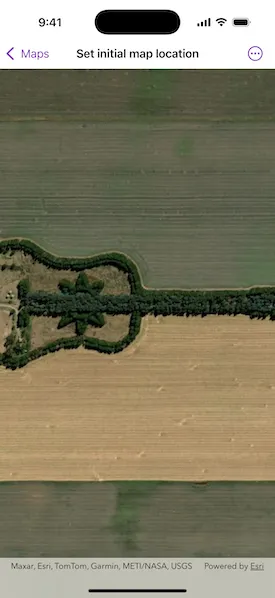
Display a basemap centered at an initial location and scale.
Use case
You can set a map’s initial location when you want to highlight a particular feature or area to establish the context.
How to use the sample
When the map loads, note the specific location and scale of the initial map view.
How it works
- Create a
Map, specifying a basemap type. - Set the starting location of the map with
map.initialViewpoint = Viewpoint(latitude:longitude:scale:). - Display the map in a map view.
Relevant API
- Basemap.Style
- Map
- MapView
About the data
The map opens with satellite imagery of a guitar-shaped field in the Pampas region of north central Argentina.
Tags
basemap, center, envelope, extent, initial, lat, latitude, level of detail, location, LOD, long, longitude, scale, zoom level
Sample code
SetInitialMapLocationView.swift
// Copyright 2025 Esri//// Licensed under the Apache License, Version 2.0 (the "License");// you may not use this file except in compliance with the License.// You may obtain a copy of the License at////   https://www.apache.org/licenses/LICENSE-2.0//// Unless required by applicable law or agreed to in writing, software// distributed under the License is distributed on an "AS IS" BASIS,// WITHOUT WARRANTIES OR CONDITIONS OF ANY KIND, either express or implied.// See the License for the specific language governing permissions and// limitations under the License.
import ArcGISimport SwiftUI
struct SetInitialMapLocationView: View {    /// A map with a basemap and an initial viewpoint location.    @State private var map: Map = {        // Creates a map with an ESRI imagery basemap.        let map = Map(basemapStyle: .arcGISImagery)
        // Centers the map on a latitude and longitude, zoomed to a specific scale.        map.initialViewpoint = Viewpoint(latitude: -33.867886, longitude: -63.985, scale: 10000)
        return map    }()
    var body: some View {        MapView(map: map)    }}
#Preview {    SetInitialMapLocationView()}