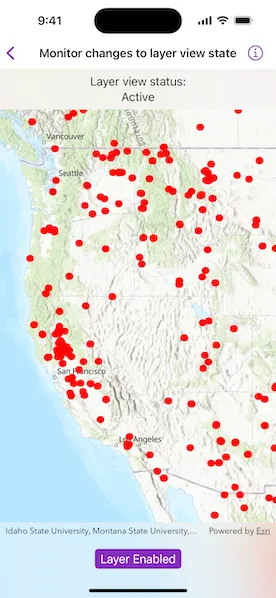
Determine whether a layer is currently visible.
Use case
The view status includes information on the loading state of layers and whether layers are visible at a given scale. You might change how a layer is displayed in a layer list to communicate whether it is being viewed on the map. For example, you could show a loading spinner next to its name when the view status is loading, gray out the name when notVisible or outOfScale, show the name normally when active, or with a warning or error icon when the status is warning or error.
How to use the sample
When the feature layer is loaded, pan and zoom around the map. Note how the LayerViewState flags change. For example, outOfScale becomes true when the map is scaled outside the layer’s min and max scale range. Tap the toggle to hide the layer and observe the view state change to notVisible. Disconnect from the network and pan around the map to see the warning status when the layer cannot fetch online data. Reconnect to the network to see the warning disappear.
How it works
- Create a
Mapwith an operational layer. - Create a
MapViewinstance with the map. - Use the
onLayerViewStateChanged(perform:)modifier on the map view to get updates to the layers’ view states. - Get the
Layerand the current viewstatusof theLayerViewStatedefining the new state.
Relevant API
- Layer
- LayerViewState
- Map
- MapView
About the data
The Satellite (MODIS) Thermal Hotspots and Fire Activity layer presents detectable thermal activity from MODIS satellites for the last 48 hours. MODIS Global Fires is a product of NASA’s Earth Observing System Data and Information System (EOSDIS), part of NASA’s Earth Science Data. EOSDIS integrates remote sensing and GIS technologies to deliver global MODIS hotspot/fire locations to natural resource managers and other stakeholders around the World.
Additional information
The following are the LayerViewState.Status options:
active: The layer in the view is active.notVisible: The layer in the view is not visible.outOfScale: The layer in the view is out of scale. A status ofoutOfScaleindicates that the view is zoomed outside of the scale range of the layer. If the view is zoomed too far in (e.g., to a street level), it is beyond the max scale defined for the layer. If the view has zoomed too far out (e.g., to global scale), it is beyond the min scale defined for the layer.loading: The layer in the view is loading. Once loading has completed, the layer will be available for display in the view. If there was a problem loading the layer, the status will be set toerror.error: The layer in the view has an unrecoverable error. When the status iserror, the layer cannot be rendered in the view. For example, it may have failed to load, be an unsupported layer type, or contain invalid data.warning: The layer in the view has a non-breaking problem with its display, such as incomplete information (e.g., by requesting more features than the max feature count of a service) or a network request failure.
Tags
layer, load, map, status, view, visibility
Sample code
// Copyright 2024 Esri//// Licensed under the Apache License, Version 2.0 (the "License");// you may not use this file except in compliance with the License.// You may obtain a copy of the License at////   https://www.apache.org/licenses/LICENSE-2.0//// Unless required by applicable law or agreed to in writing, software// distributed under the License is distributed on an "AS IS" BASIS,// WITHOUT WARRANTIES OR CONDITIONS OF ANY KIND, either express or implied.// See the License for the specific language governing permissions and// limitations under the License.
import ArcGISimport SwiftUI
struct MonitorChangesToLayerViewStateView: View {    /// A map with a topographic basemap.    @State private var map: Map = {        let map = Map(basemapStyle: .arcGISTopographic)        map.initialViewpoint = Viewpoint(            center: Point(x: -13e6, y: 51e5, spatialReference: .webMercator),            scale: 2e7        )        return map    }()
    /// The Satellite (MODIS) Thermal Hotspots and Fire Activity feature layer.    @State private var featureLayer: FeatureLayer = {        let portalItem = PortalItem(url: .thermalHotspotsAndFireActivity)!        let featureLayer = FeatureLayer(item: portalItem)
        featureLayer.minScale = 1e8        featureLayer.maxScale = 6e6
        return featureLayer    }()
    /// A Boolean value indicating whether the feature layer is visible.    @State private var layerIsVisible = true
    /// The current `LayerViewState.Status` for the view.    @State private var layerStatus: LayerViewState.Status = []
    var body: some View {        MapView(map: map)            .onLayerViewStateChanged { layer, layerViewState in                // Only checks the view state of the feature layer.                guard layer.id == featureLayer.id else { return }                layerStatus = layerViewState.status            }            .overlay(alignment: .top) {                Text(                    """                    Layer view status:                    \(layerStatus.labels, format: .list(type: .and, width: .narrow))                    """                )                .multilineTextAlignment(.center)                .frame(maxWidth: .infinity, alignment: .center)                .padding(8)                .background(.regularMaterial, ignoresSafeAreaEdges: .horizontal)            }            .toolbar {                ToolbarItem(placement: .bottomBar) {                    Toggle(                        layerIsVisible ? "Layer Visible" : "Layer Hidden",                        isOn: $layerIsVisible                    )                    .onChange(of: layerIsVisible) {                        featureLayer.isVisible = layerIsVisible                    }                }            }            .onAppear {                // Adds the feature layer to the map.                map.addOperationalLayer(featureLayer)            }    }}
private extension LayerViewState.Status {    /// A human-readable array of labels for the statuses.    var labels: [String] {        var statuses: [String] = []        if contains(.active) {            statuses.append("Active")        }        if contains(.notVisible) {            statuses.append("Not Visible")        }        if contains(.outOfScale) {            statuses.append("Out of Scale")        }        if contains(.loading) {            statuses.append("Loading")        }        if contains(.error) {            statuses.append("Error")        }        if contains(.warning) {            statuses.append("Warning")        }        return if !statuses.isEmpty { statuses } else { ["Unknown"] }    }}
private extension URL {    /// The URL for the Satellite (MODIS) Thermal Hotspots and Fire Activity portal item.    static var thermalHotspotsAndFireActivity: URL {        URL(string: "https://www.arcgis.com/home/item.html?id=b8f4033069f141729ffb298b7418b653")!    }}
#Preview {    NavigationStack {        MonitorChangesToLayerViewStateView()    }}