A camera follows a graphic while the graphic’s position and rotation are animated.
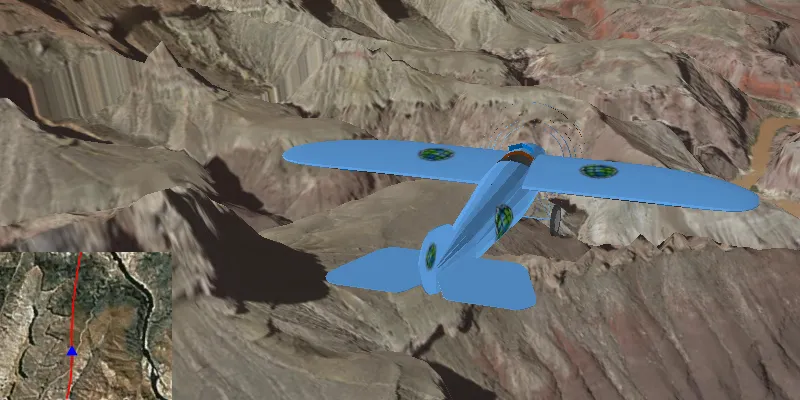
How to use the sample
Animation Controls (Top Left Corner):
- Select a mission — selects a location with a route for plane to fly.
- Mission progress — shows how far along the route the plane is. Slide to change keyframe in animation.
- Play/Stop — toggles playing and stopping the animation.
- Follow/Free Cam — toggles camera following plane.
Speed Slider (Top Right Corner):
- Controls speed of animation.
2D Map Controls (Bottom Left Corner):
- Plus and Minus — controls distance of 2D view from ground level.
How it works
- Create a
ModelSceneSymbolobject. - Create a
Graphicobject and set its geometry to aPoint. - Set the
ModelSceneSymbolobject to the graphic. - Add heading, pitch, and roll attributes to the graphic. Get the attributes from the graphic with
Graphic.getAttributes(). - Create a
SimpleRendererobject and set its expression properties. - Add graphic and a renderer to the graphics overlay.
- Create a
OrbitGeoElementCameraControllerwhich is set to target the graphic. - Assign the camera controller to the
SceneView. - Update the graphic’s location, heading, pitch, and roll.
Relevant API
- ArcGISScene
- Camera
- GlobeCameraController
- Graphic
- GraphicsOverlay
- ModelSceneSymbol
- OrbitGeoElementCameraController
- Renderer
- SceneProperties
- SceneView
- SurfacePlacement
Tags
animation, camera, heading, pitch, roll, rotation, visualize
Sample code
/* * Copyright 2017 Esri. * * Licensed under the Apache License, Version 2.0 (the "License"); you may not * use this file except in compliance with the License. You may obtain a copy of * the License at * * http://www.apache.org/licenses/LICENSE-2.0 * * Unless required by applicable law or agreed to in writing, software * distributed under the License is distributed on an "AS IS" BASIS, WITHOUT * WARRANTIES OR CONDITIONS OF ANY KIND, either express or implied. See the * License for the specific language governing permissions and limitations under * the License. */
package com.esri.samples.animate_3d_graphic;
import java.io.BufferedReader;import java.io.File;import java.io.IOException;import java.io.InputStreamReader;import java.util.ArrayList;import java.util.HashMap;import java.util.List;import java.util.Map;import java.util.stream.Collectors;
import javafx.animation.KeyFrame;import javafx.animation.Timeline;import javafx.application.Platform;import javafx.beans.binding.Bindings;import javafx.fxml.FXML;import javafx.scene.control.ComboBox;import javafx.scene.control.Label;import javafx.scene.control.ToggleButton;import javafx.scene.paint.Color;import javafx.util.Duration;
import com.esri.arcgisruntime.ArcGISRuntimeEnvironment;import com.esri.arcgisruntime.geometry.Point;import com.esri.arcgisruntime.geometry.PointCollection;import com.esri.arcgisruntime.geometry.Polyline;import com.esri.arcgisruntime.geometry.SpatialReference;import com.esri.arcgisruntime.geometry.SpatialReferences;import com.esri.arcgisruntime.mapping.ArcGISMap;import com.esri.arcgisruntime.mapping.ArcGISScene;import com.esri.arcgisruntime.mapping.ArcGISTiledElevationSource;import com.esri.arcgisruntime.mapping.BasemapStyle;import com.esri.arcgisruntime.mapping.Surface;import com.esri.arcgisruntime.mapping.Viewpoint;import com.esri.arcgisruntime.mapping.view.GlobeCameraController;import com.esri.arcgisruntime.mapping.view.Graphic;import com.esri.arcgisruntime.mapping.view.GraphicsOverlay;import com.esri.arcgisruntime.mapping.view.LayerSceneProperties;import com.esri.arcgisruntime.mapping.view.MapView;import com.esri.arcgisruntime.mapping.view.OrbitGeoElementCameraController;import com.esri.arcgisruntime.mapping.view.SceneView;import com.esri.arcgisruntime.symbology.ModelSceneSymbol;import com.esri.arcgisruntime.symbology.Renderer;import com.esri.arcgisruntime.symbology.SimpleLineSymbol;import com.esri.arcgisruntime.symbology.SimpleMarkerSymbol;import com.esri.arcgisruntime.symbology.SimpleRenderer;
public class Animate3dGraphicController {
  // injected elements from fxml  @FXML private AnimationModel animationModel;  @FXML private SceneView sceneView;  @FXML private MapView mapView;  @FXML private ComboBox<String> missionSelector;  @FXML private ToggleButton playButton;  @FXML private ToggleButton followButton;  @FXML private Timeline animation;  @FXML private Label altitudeLabel;  @FXML private Label headingLabel;  @FXML private Label pitchLabel;  @FXML private Label rollLabel;
  private OrbitGeoElementCameraController orbitCameraController;  private List<Map<String, Object>> missionData;  private Graphic plane3D;  private Graphic plane2D;  private Graphic routeGraphic;
  private static final SpatialReference WGS84 = SpatialReferences.getWgs84();  private static final String ELEVATION_IMAGE_SERVICE =      "https://elevation3d.arcgis.com/arcgis/rest/services/WorldElevation3D/Terrain3D/ImageServer";
  /**   * Called after FXML loads. Sets up scene and map and configures property bindings.   */  public void initialize() {
    try {
      // authentication with an API key or named user is required to access basemaps and other location services      String yourAPIKey = System.getProperty("apiKey");      ArcGISRuntimeEnvironment.setApiKey(yourAPIKey);
      // create a scene      ArcGISScene scene = new ArcGISScene(BasemapStyle.ARCGIS_IMAGERY);      sceneView.setArcGISScene(scene);
      // add elevation data      Surface surface = new Surface();      surface.getElevationSources().add(new ArcGISTiledElevationSource(ELEVATION_IMAGE_SERVICE));      scene.setBaseSurface(surface);
      // create a graphics overlay for the scene      GraphicsOverlay sceneOverlay = new GraphicsOverlay();      sceneOverlay.getSceneProperties().setSurfacePlacement(LayerSceneProperties.SurfacePlacement.ABSOLUTE);      sceneView.getGraphicsOverlays().add(sceneOverlay);
      // create renderer to handle updating plane's orientation      SimpleRenderer renderer3D = new SimpleRenderer();      Renderer.SceneProperties renderProperties = renderer3D.getSceneProperties();      renderProperties.setHeadingExpression("[HEADING]");      renderProperties.setPitchExpression("[PITCH]");      renderProperties.setRollExpression("[ROLL]");      sceneOverlay.setRenderer(renderer3D);
      // set up mini map      ArcGISMap map = new ArcGISMap(BasemapStyle.ARCGIS_IMAGERY);      mapView.setMap(map);
      // create a graphics overlay for the mini map      GraphicsOverlay mapOverlay = new GraphicsOverlay();      mapView.getGraphicsOverlays().add(mapOverlay);
      // create renderer to rotate the plane graphic in the mini map      SimpleRenderer renderer2D = new SimpleRenderer();      SimpleMarkerSymbol plane2DSymbol = new SimpleMarkerSymbol(SimpleMarkerSymbol.Style.TRIANGLE, Color.BLUE, 10);      renderer2D.setSymbol(plane2DSymbol);      renderer2D.setRotationExpression("[ANGLE]");      mapOverlay.setRenderer(renderer2D);
      // create a placeholder graphic for showing the mission route in mini map      SimpleLineSymbol routeSymbol = new SimpleLineSymbol(SimpleLineSymbol.Style.SOLID, Color.RED, 2);      routeGraphic = new Graphic();      routeGraphic.setSymbol(routeSymbol);      mapOverlay.getGraphics().add(routeGraphic);
      // create a graphic with a blue triangle symbol to represent the plane on the mini map      Map<String, Object> attributes = new HashMap<>();      attributes.put("ANGLE", 0f);      plane2D = new Graphic(new Point(0, 0, WGS84), attributes);      mapOverlay.getGraphics().add(plane2D);
      // create a graphic with a ModelSceneSymbol of a plane to add to the scene      String modelURI = new File(System.getProperty("data.dir"), "./samples-data/bristol/Collada/Bristol.dae").getAbsolutePath();      ModelSceneSymbol plane3DSymbol = new ModelSceneSymbol(modelURI, 1.0);      plane3DSymbol.loadAsync();      plane3D = new Graphic(new Point(0, 0, 0, WGS84), plane3DSymbol);      sceneOverlay.getGraphics().add(plane3D);
      // create an orbit camera controller to follow the plane      orbitCameraController = new OrbitGeoElementCameraController(plane3D, 20.0);      orbitCameraController.setCameraPitchOffset(75.0);      sceneView.setCameraController(orbitCameraController);
      // setup animation to render a new frame every 20 ms by default      animation.getKeyFrames().add(new KeyFrame(Duration.millis(20), e -> animate(animationModel.nextKeyframe())));
      // bind button properties      followButton.textProperty().bind(Bindings.createStringBinding(() -> followButton.isSelected()          ? "Free cam" : "Follow", followButton.selectedProperty()));      playButton.textProperty().bind(Bindings.createStringBinding(() -> playButton.isSelected()          ? "Stop" : "Play", playButton.selectedProperty()));
      // open default mission selection      changeMission();
    } catch (Exception e) {      // on any exception, print the stack trace      e.printStackTrace();    }  }
  /**   * Change the mission data and reset the animation.   */  @FXML  private void changeMission() {
    // clear previous mission data    missionData = new ArrayList<>();
    // get mission data    String mission = missionSelector.getSelectionModel().getSelectedItem();    missionData = getMissionData(mission);    animationModel.setFrames(missionData.size());    animationModel.setKeyframe(0);
    // draw mission route on mini map    PointCollection points = new PointCollection(WGS84);    points.addAll(missionData.stream().map(m -> (Point) m.get("POSITION")).collect(Collectors.toList()));    Polyline route = new Polyline(points);    routeGraphic.setGeometry(route);
    // refresh mini map zoom and show initial keyframe    mapView.setViewpointScaleAsync(100000).addDoneListener(() -> Platform.runLater(() -> animate(0)));  }
  /**   * Loads the mission data from a .csv file into memory.   *   * @param mission .csv file name containing the mission data   * @return ordered list of mapped key value pairs representing coordinates and rotation parameters for each step of   * the mission   */  private List<Map<String, Object>> getMissionData(String mission) {
    // open a file reader to the mission file that automatically closes after read    try (BufferedReader missionFile = new BufferedReader(        new InputStreamReader(getClass().getResourceAsStream("/animate_3d_graphic/csv/" + mission)))) {      return missionFile.lines()          //ex: -156.3666517,20.6255059,999.999908,83.77659,1.05E-09,-47.766567          .map(l -> l.split(","))          .map(l -> {            // create a map of parameters (ordinates) to values            Map<String, Object> ordinates = new HashMap<>();            ordinates.put("POSITION", new Point(Float.valueOf(l[0]), Float.valueOf(l[1]), Float.valueOf(l[2]),                WGS84));            ordinates.put("HEADING", Float.valueOf(l[3]));            ordinates.put("PITCH", Float.valueOf(l[4]));            ordinates.put("ROLL", Float.valueOf(l[5]));            return ordinates;          })          .collect(Collectors.toList());    } catch (IOException e) {      e.printStackTrace();    }    throw new RuntimeException("Error reading mission file: " + mission);  }
  /**   * Animates a single keyframe corresponding to the index in the mission data profile. Updates the position and   * rotation of the 2D/3D plane graphic and sets the camera viewpoint.   *   * @param keyframe index in mission data to show   */  private void animate(int keyframe) {
    // get the next position from the mission data    Map<String, Object> datum = missionData.get(keyframe);    Point position = (Point) datum.get("POSITION");
    // update the position parameters pane    altitudeLabel.setText(String.format("%.2f", position.getZ()));    headingLabel.setText(String.format("%.2f", (float) datum.get("HEADING")));    pitchLabel.setText(String.format("%.2f", (float) datum.get("PITCH")));    rollLabel.setText(String.format("%.2f", (float) datum.get("ROLL")));
    // update plane's position and orientation    plane3D.setGeometry(position);    plane3D.getAttributes().put("HEADING", datum.get("HEADING"));    plane3D.getAttributes().put("PITCH", datum.get("PITCH"));    plane3D.getAttributes().put("ROLL", datum.get("ROLL"));
    // update mini map plane's position and rotation    plane2D.setGeometry(position);    if (followButton.isSelected()) {      // rotate the map view in the direction of motion to make graphic always point up      mapView.setViewpoint(new Viewpoint(position, mapView.getMapScale(), 360 + (float) datum.get("HEADING")));    } else {      plane2D.getAttributes().put("ANGLE", 360 + (float) datum.get("HEADING") - mapView.getMapRotation());    }  }
  /**   * Switches the animation on or off.   */  @FXML  private void togglePlay() {
    if (playButton.isSelected()) {      animation.play();    } else {      animation.stop();    }  }
  /**   * Switches between the orbiting camera controller and default globe camera controller.   */  @FXML  private void toggleFollow() {
    if (followButton.isSelected()) {      // reset mini-map plane's rotation to point up      plane2D.getAttributes().put("ANGLE", 0f);      // set orbit camera controller      sceneView.setCameraController(orbitCameraController);    } else {      // set camera controller back to default      sceneView.setCameraController(new GlobeCameraController());    }  }
  /**   * Zoom in mini-map scale.   */  @FXML  private void zoomInMap() {    mapView.setViewpoint(new Viewpoint((Point) plane2D.getGeometry(), mapView.getMapScale() / 5));  }
  /**   * Zoom out mini-map scale.   */  @FXML  private void zoomOutMap() {    mapView.setViewpoint(new Viewpoint((Point) plane2D.getGeometry(), mapView.getMapScale() * 5));  }
  /**   * Stops the animation and disposes of application resources.   */  void terminate() {
    animation.stop();    if (sceneView != null) {      sceneView.dispose();    }    if (mapView != null) {      mapView.dispose();    }  }}
/* * Copyright 2017 Esri. * * Licensed under the Apache License, Version 2.0 (the "License"); you may not * use this file except in compliance with the License. You may obtain a copy of * the License at * * http://www.apache.org/licenses/LICENSE-2.0 * * Unless required by applicable law or agreed to in writing, software * distributed under the License is distributed on an "AS IS" BASIS, WITHOUT * WARRANTIES OR CONDITIONS OF ANY KIND, either express or implied. See the * License for the specific language governing permissions and limitations under * the License. */
package com.esri.samples.animate_3d_graphic;
import java.io.IOException;
import javafx.application.Application;import javafx.fxml.FXMLLoader;import javafx.scene.Parent;import javafx.scene.Scene;import javafx.stage.Stage;
public class Animate3dGraphicSample extends Application {
private static Animate3dGraphicController controller;
@Override public void start(Stage stage) throws IOException { // set up the scene FXMLLoader loader = new FXMLLoader(getClass().getResource("/animate_3d_graphic/main.fxml")); Parent root = loader.load(); controller = loader.getController(); Scene scene = new Scene(root);
// set up the stage stage.setTitle("Animate 3d Graphic Sample"); stage.setWidth(800); stage.setHeight(700); stage.setScene(scene); stage.show(); }
/** * Stops and releases all resources used in application. */ @Override public void stop() { controller.terminate(); }
/** * Opens and runs application. * * @param args arguments passed to this application */ public static void main(String[] args) {
Application.launch(args); }}/* * Copyright 2016 Esri. * * Licensed under the Apache License, Version 2.0 (the "License"); you may not * use this file except in compliance with the License. You may obtain a copy of * the License at * * http://www.apache.org/licenses/LICENSE-2.0 * * Unless required by applicable law or agreed to in writing, software * distributed under the License is distributed on an "AS IS" BASIS, WITHOUT * WARRANTIES OR CONDITIONS OF ANY KIND, either express or implied. See the * License for the specific language governing permissions and limitations under * the License. */
package com.esri.samples.animate_3d_graphic;
import javafx.beans.property.IntegerProperty;import javafx.beans.property.SimpleIntegerProperty;
/** * Model bean to bind to animation properties. */public class AnimationModel {
private final IntegerProperty frames; private final IntegerProperty keyframe;
/** * Default constructor (needed for FXML injection). */ public AnimationModel() { this.frames = new SimpleIntegerProperty(1); this.keyframe = new SimpleIntegerProperty(0); }
/** * Constructs the animation model with the specified keyframe. * * @param keyframe starting animation frame */ public AnimationModel(int keyframe) { this(); this.setKeyframe(keyframe); }
/** * Gets the total number of frames in the animation * * @return total frames in animation */ public int getFrames() { return frames.get(); }
/** * Property tracking the number of frames in an animation. * * @return frames property */ public IntegerProperty framesProperty() { return frames; }
/** * Sets the total number of frames in the animation. * * @param frames total frames in animation */ public void setFrames(int frames) { this.frames.set(frames); }
/** * Gets the current keyframe in the animation. * * @return current keyframe */ public int getKeyframe() { return keyframe.get(); }
/** * Increments and gets the next keyframe. * * @return next keyframe */ int nextKeyframe() { setKeyframe(getKeyframe() + 1); return getKeyframe(); }
/** * Property tracking the current frame of an animation. * * @return keyframe property */ public IntegerProperty keyframeProperty() { return keyframe; }
/** * Sets the current keyframe. * * @param keyframe index corresponding to animation keyframe */ public void setKeyframe(int keyframe) { this.keyframe.set(keyframe % getFrames()); }}