Keep the view points of two views (e.g. MapView and SceneView) synchronized with each other.
Use case
You might need to synchronize GeoView viewpoints if you had two map views in one application - a main map and an inset. An inset map view could display all the layers at their full extent and contain a hollow rectangular graphic that represents the visible extent of the main map view. As you zoom or pan in the main map view, the extent graphic in the inset map would adjust accordingly.
How to use the sample
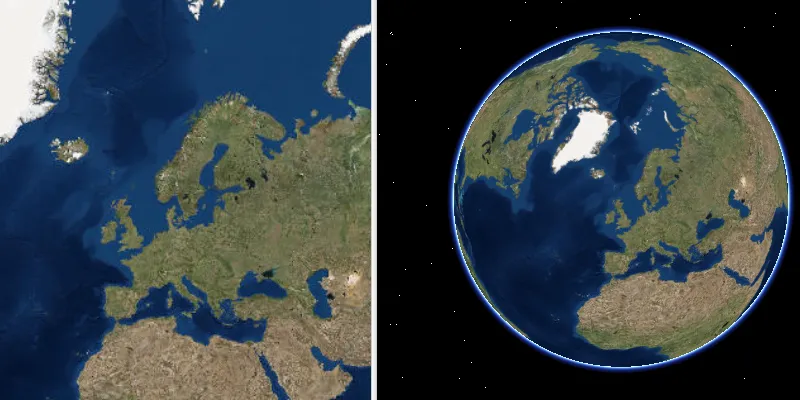
Interact with the map view or scene view by zooming or panning. The other geoview will automatically focus on the same viewpoint.
How it works
- Wire up the
ViewpointChangedevent handler for both geo views. - In each event handler, get the current viewpoint from the geo view that is being interacted with and then set the viewpoint of the other geo view to the same value.
Relevant API
- GeoView
- MapView
- SceneView
About the data
This application provides two different perspectives of the Imagery basemap. A 2D MapView as well as a 3D SceneView, displayed side by side.
Tags
3D, automatic refresh, event, event handler, events, extent, interaction, interactions, pan, sync, synchronize, zoom
Sample code
/* * Copyright 2018 Esri. * * Licensed under the Apache License, Version 2.0 (the "License"); you may not * use this file except in compliance with the License. You may obtain a copy of * the License at * * http://www.apache.org/licenses/LICENSE-2.0 * * Unless required by applicable law or agreed to in writing, software * distributed under the License is distributed on an "AS IS" BASIS, WITHOUT * WARRANTIES OR CONDITIONS OF ANY KIND, either express or implied. See the * License for the specific language governing permissions and limitations under * the License. */

package com.esri.samples.sync_map_and_scene_viewpoints;
import java.util.ArrayList;
import javafx.application.Application;import javafx.geometry.Orientation;import javafx.scene.Scene;import javafx.scene.control.SplitPane;import javafx.stage.Stage;
import com.esri.arcgisruntime.ArcGISRuntimeEnvironment;import com.esri.arcgisruntime.mapping.ArcGISMap;import com.esri.arcgisruntime.mapping.ArcGISScene;import com.esri.arcgisruntime.mapping.BasemapStyle;import com.esri.arcgisruntime.mapping.Viewpoint;import com.esri.arcgisruntime.mapping.view.GeoView;import com.esri.arcgisruntime.mapping.view.MapView;import com.esri.arcgisruntime.mapping.view.SceneView;
public class SyncMapAndSceneViewpointsSample extends Application {
  private MapView mapView;  private SceneView sceneView;  private ArrayList<GeoView> geoViewList;
  @Override  public void start(Stage stage) {
    try {
      // authentication with an API key or named user is required to access basemaps and other location services      String yourAPIKey = System.getProperty("apiKey");      ArcGISRuntimeEnvironment.setApiKey(yourAPIKey);
      // create split pane and JavaFX app scene      SplitPane splitPane = new SplitPane();      splitPane.setOrientation(Orientation.HORIZONTAL);      Scene fxScene = new Scene(splitPane);
      // set title, size, and add JavaFX scene to stage      stage.setTitle("Sync Map and Scene Viewpoints");      stage.setWidth(1000);      stage.setHeight(700);      stage.setScene(fxScene);      stage.show();
      // create a map with a basemap style      ArcGISMap map = new ArcGISMap(BasemapStyle.ARCGIS_IMAGERY);
      // create a scene with a basemap style      ArcGISScene scene = new ArcGISScene(BasemapStyle.ARCGIS_IMAGERY);
      // set the map to a map view      mapView = new MapView();      mapView.setMap(map);
      // set the scene to a scene view      sceneView = new SceneView();      sceneView.setArcGISScene(scene);
      // add the map view and scene view to the split plane      splitPane.getItems().addAll(mapView, sceneView);
      // add a viewpoint changed listener to the map view. Access the GeoView class using the event's getSource method      mapView.addViewpointChangedListener(viewpointChangedEvent -> synchronizeViewpoints(viewpointChangedEvent.getSource()));
      // add a viewpoint changed listener to the scene view. Access the GeoView class using the event's getSource method      sceneView.addViewpointChangedListener(viewpointChangedEvent -> synchronizeViewpoints(viewpointChangedEvent.getSource()));
      // create a list of GeoViews being navigated      geoViewList = new ArrayList<>();      geoViewList.add(mapView);      geoViewList.add(sceneView);
    } catch (Exception e) {      // on any error, display the stack trace      e.printStackTrace();    }  }
  /**   * Synchronizes the viewpoint across Geoviews when the user is navigating.   */  private void synchronizeViewpoints(GeoView geoView) {
    if (geoView.isNavigating()) {
      Viewpoint geoViewPoint = geoView.getCurrentViewpoint(Viewpoint.Type.CENTER_AND_SCALE);
      // loop through the available GeoViews. If it doesn't match the given GeoView, then set the GeoView to the other's viewpoint      for (GeoView anyGeoView : geoViewList) {        if (anyGeoView != geoView) {          anyGeoView.setViewpoint(geoViewPoint);        }      }    }  }
  /**   * Stops and releases all resources used in application.   */  @Override  public void stop() {
    if (mapView != null && sceneView != null) {      mapView.dispose();      sceneView.dispose();    }  }
  /**   * Opens and runs application.   *   * @param args arguments passed to this application   */  public static void main(String[] args) {
    Application.launch(args);  }}