Show realistic lighting and shadows for the time of day.
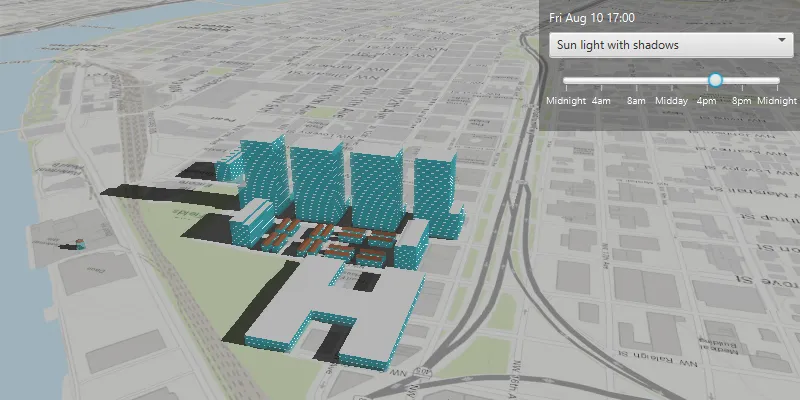
Use case
You can use realistic lighting to evaluate the shadow impact of buildings and utility infrastructure on the surrounding community. This could be useful for civil engineers and urban planners, or for events management assessing the impact of building shadows during an outdoor event.
How to use the sample
Select one of the three available lighting options to display that lighting effect. Adjust the slider to show the lighting effect for a particular time of day. The 3D buildings will display shadows when “Sun light with shadows” is selected.
How it works
- Create an
ArcGISSceneand display it in aSceneView. - Create a
Calendarto define the time of day. - Set the sun time to that calendar with
sceneView.setSunTime(calendar). - Set the
LightingModeof the scene view toNO_LIGHT,LIGHT, orLIGHT_AND_SHADOWSwithsceneView.setSunLighting(LightingMode).
Relevant API
- ArcGISScene
- LightingMode
- SceneView.setSunLighting
- SceneView.setSunTime
Tags
3D, lighting, realism, realistic, rendering, shadows, sun, time
Sample code
/* * Copyright 2020 Esri. * * Licensed under the Apache License, Version 2.0 (the "License"); you may not * use this file except in compliance with the License. You may obtain a copy of * the License at * * http://www.apache.org/licenses/LICENSE-2.0 * * Unless required by applicable law or agreed to in writing, software * distributed under the License is distributed on an "AS IS" BASIS, WITHOUT * WARRANTIES OR CONDITIONS OF ANY KIND, either express or implied. See the * License for the specific language governing permissions and limitations under * the License. */
package com.esri.samples.realistic_lighting_and_shadows;
import java.text.SimpleDateFormat;import java.util.Calendar;import java.util.GregorianCalendar;import java.util.TimeZone;
import javafx.beans.binding.Bindings;import javafx.fxml.FXML;import javafx.scene.control.ComboBox;import javafx.scene.control.Label;import javafx.scene.control.ListCell;import javafx.scene.control.Slider;import javafx.util.StringConverter;
import com.esri.arcgisruntime.ArcGISRuntimeEnvironment;import com.esri.arcgisruntime.layers.ArcGISSceneLayer;import com.esri.arcgisruntime.mapping.ArcGISScene;import com.esri.arcgisruntime.mapping.ArcGISTiledElevationSource;import com.esri.arcgisruntime.mapping.BasemapStyle;import com.esri.arcgisruntime.mapping.Surface;import com.esri.arcgisruntime.mapping.view.AtmosphereEffect;import com.esri.arcgisruntime.mapping.view.Camera;import com.esri.arcgisruntime.mapping.view.LightingMode;import com.esri.arcgisruntime.mapping.view.SceneView;
public class RealisticLightingAndShadowsController {
  @FXML private SceneView sceneView;  @FXML private Label timeLabel;  @FXML private Slider timeSlider;  @FXML private ComboBox<LightingMode> comboBox;  private SimpleDateFormat dateFormat;
  public void initialize() {    try {
      // authentication with an API key or named user is required to access basemaps and other location services      String yourAPIKey = System.getProperty("apiKey");      ArcGISRuntimeEnvironment.setApiKey(yourAPIKey);
      // create a scene with a basemap style      ArcGISScene scene = new ArcGISScene(BasemapStyle.ARCGIS_TOPOGRAPHIC);
      // add the scene to the scene view      sceneView.setArcGISScene(scene);
      // add a base surface with an elevation source to the scene      Surface surface = new Surface();      ArcGISTiledElevationSource elevationSource = new ArcGISTiledElevationSource("http://elevation3d.arcgis.com/arcgis/rest/services/WorldElevation3D/Terrain3D/ImageServer");      surface.getElevationSources().add(elevationSource);      scene.setBaseSurface(surface);
      // add 3D building shells with a scene layer      ArcGISSceneLayer sceneLayer = new ArcGISSceneLayer("http://tiles.arcgis.com/tiles/P3ePLMYs2RVChkJx/arcgis/rest/services/DevA_BuildingShells/SceneServer/layers/0");      scene.getOperationalLayers().add(sceneLayer);
      // add a camera and set the scene view's viewpoint to it      Camera camera = new Camera(45.54605153789073, -122.69033380511073, 941.0002111233771, 162.58544227544266, 60.0,0.0);      sceneView.setViewpointCamera(camera);
      // set atmosphere effect to realistic      sceneView.setAtmosphereEffect(AtmosphereEffect.REALISTIC);
      // set a calendar with a date and time      var calendar = new GregorianCalendar(2018, Calendar.AUGUST, 10, 12, 0, 0);      calendar.setTimeZone(TimeZone.getTimeZone("PST"));
      // format the string to just return the date and time (hours and minutes)      dateFormat = new SimpleDateFormat("EEE MMM dd HH:mm");      dateFormat.setTimeZone(TimeZone.getTimeZone("PST"));
      // set a label to display the formatted date and time      timeLabel.textProperty().bind(Bindings.createStringBinding(() -> {        return dateFormat.format(sceneView.sunTimeProperty().getValue().getTime());      }, sceneView.sunTimeProperty()));
      // set the slider to display tick labels as time strings      timeSlider.setLabelFormatter(new SliderStringConverter());
      // update the sun position based on the time slider value      sceneView.sunTimeProperty().bind(Bindings.createObjectBinding(() -> {        return updateCalendar(timeSlider.valueProperty().getValue().intValue());      }, timeSlider.valueProperty()));
      // add the lighting modes to the combo box      comboBox.getItems().addAll(LightingMode.NO_LIGHT, LightingMode.LIGHT, LightingMode.LIGHT_AND_SHADOWS);
      // show the name of the lighting modes in the combo box      comboBox.setConverter(new ComboBoxStringConverter());      comboBox.setCellFactory(comboBox -> new LightingModeListCell());
      // bind the sun lighting to the lighting mode chosen from the combo box      comboBox.valueProperty().bindBidirectional(sceneView.sunLightingProperty());
      // launch the app with lighting mode set to LIGHT_AND_SHADOWS      comboBox.getSelectionModel().select(2);
    } catch (Exception e) {      // on any error, display the stack trace.      e.printStackTrace();    }  }
  /**   * Creates and returns a calendar from the value of the time slider.   */  private Calendar updateCalendar(int sliderValue) {
    // get the hour from the slider    int hours = sliderValue / 60;
    // get the minutes from the slider    int minutes = sliderValue % 60;
    // create and set a calendar with the hour and minute values from the slider    var newCalendar = new GregorianCalendar(2018, Calendar.AUGUST, 10, hours, minutes, 0);    newCalendar.setTimeZone(TimeZone.getTimeZone("PST"));
    return newCalendar;  }
  /**   * Converts the LightingMode values to strings to display in the open ComboBox.   */  private class LightingModeListCell extends ListCell<LightingMode> {
    @Override    protected void updateItem(LightingMode lightingMode, boolean empty) {
      super.updateItem(lightingMode, empty);      if (lightingMode != null) {        if (lightingMode == LightingMode.LIGHT) setText("Light");        else if (lightingMode == LightingMode.LIGHT_AND_SHADOWS) setText("Light and shadows");        else if (lightingMode == LightingMode.NO_LIGHT) setText("No light");      }    }  }
  /**   * Converts the LightingMode values to strings to display in the ComboBox.   */  private class ComboBoxStringConverter extends StringConverter<LightingMode> {
    @Override    public String toString(LightingMode lightingMode) {      if (lightingMode != null) {        if (lightingMode == LightingMode.LIGHT) return "Light";        else if (lightingMode == LightingMode.LIGHT_AND_SHADOWS) return "Light and shadows";        else if (lightingMode == LightingMode.NO_LIGHT) return "No light";      }      return "";    }
    @Override    public LightingMode fromString(String string) {      return null;    }  }
  /**   * Converts time values to strings to display on the slider.   */  private class SliderStringConverter extends StringConverter<Double> {
    @Override    public String toString(Double hour) {      if (hour == 240) return "4am";      if (hour == 480) return "8am";      if (hour == 720) return "Midday";      if (hour == 960) return "4pm";      if (hour == 1200) return "8pm";
      return "Midnight";    }
    @Override    public Double fromString(String string) {      return null;    }  }
  /**   * Disposes of application resources.   */  void terminate() {    if (sceneView != null) {      sceneView.dispose();    }  }}
/* * Copyright 2020 Esri. * * Licensed under the Apache License, Version 2.0 (the "License"); you may not * use this file except in compliance with the License. You may obtain a copy of * the License at * * http://www.apache.org/licenses/LICENSE-2.0 * * Unless required by applicable law or agreed to in writing, software * distributed under the License is distributed on an "AS IS" BASIS, WITHOUT * WARRANTIES OR CONDITIONS OF ANY KIND, either express or implied. See the * License for the specific language governing permissions and limitations under * the License. */
package com.esri.samples.realistic_lighting_and_shadows;
import java.io.IOException;
import javafx.application.Application;import javafx.fxml.FXMLLoader;import javafx.scene.Parent;import javafx.scene.Scene;import javafx.stage.Stage;
public class RealisticLightingAndShadowsSample extends Application {
private static RealisticLightingAndShadowsController controller;
@Override public void start(Stage stage) throws IOException {
// set up the scene FXMLLoader loader = new FXMLLoader(getClass().getResource("/realistic_lighting_and_shadows/main.fxml")); Parent root = loader.load(); controller = loader.getController(); Scene scene = new Scene(root);
// set title, size, and add JavaFX scene to stage stage.setTitle("Realistic Lighting and Shadows Sample"); stage.setWidth(800); stage.setHeight(700); stage.setScene(scene); stage.show(); }
/** * Stops and releases all resources used in application. */ @Override public void stop() { controller.terminate(); }
/** * Opens and runs application. * * @param args arguments passed to this application */ public static void main(String[] args) {
Application.launch(args); }}