Fix the camera to point at and rotate around a target object.
Use case
The orbit geoelement camera controller provides control over the following camera behaviors:
- automatically track the target
- stay near the target by setting a minimum and maximum distance offset
- restrict where you can rotate around the target
- automatically rotate the camera when the target’s heading and pitch changes
- disable user interactions for rotating the camera
- animate camera movement over a specified duration
- control the vertical positioning of the target on the screen
- set a target offset (e.g.to orbit around the tail of the plane) instead of defaulting to orbiting the center of the object
How to use the sample
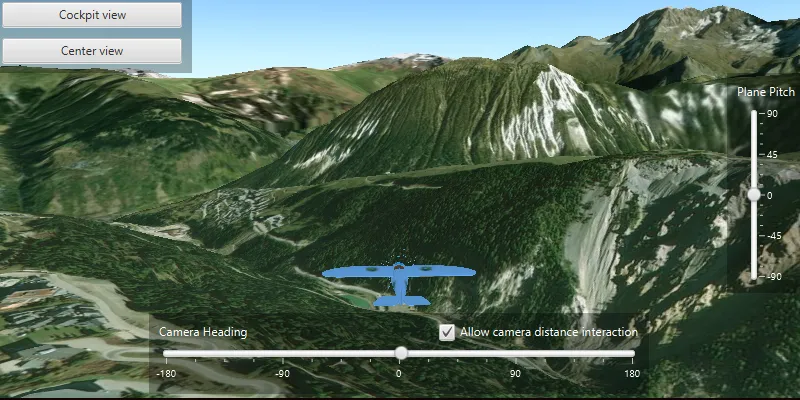
The sample loads with the camera orbiting an aeroplane model. The camera is preset with a restricted camera heading and pitch, and a limited minimum and maximum camera distance set from the plane. The position of the plane on the screen is also set just below center.
Use the “Camera Heading” slider to adjust the camera heading. Select the “Allow camera distance interaction” checkbox to allow zooming in and out with the mouse/keyboard: when the checkbox is deselected the user will be unable to adjust with the camera distance.
Use the “Plane Pitch” slider to adjust the plane’s pitch. When not in Cockpit view, the plane’s pitch will change independently to that of the camera pitch.
Use the “Cockpit view” button to offset and fix the camera into the cockpit of the aeroplane. Use the “Plane pitch” slider to control the pitch of aeroplane: the camera will follow the pitch of the plane in this mode. In this view adjusting the camera distance is disabled. Hit the “Center view” button to exit cockpit view mode and fix the camera controller on the center of the plane.
How it works
- Instantiate an
OrbitGeoElementCameraController, withGeoElementand camera distance as parameters. - Use
sceneView.setCameraController(OrbitCameraController)to set the camera to the scene view. - Set the heading, pitch and distance camera properties with:
orbitCameraController.setCameraHeadingOffset(double)orbitCameraController.setCameraPitchOffset(double)orbitCameraController.setCameraDistance(double)
- Set the minimum and maximum angle of heading and pitch, and minimum and maximum distance for the camera with:
orbitCameraController.setMinorsetMaxCameraHeadingOffset(double).orbitCameraController.setMinorsetMaxCameraPitchOffset(double).orbitCameraController.setMinorsetMaxCameraDistance(double).
- Set the distance from which the camera is offset from the plane with:
orbitCameraController.setTargetOffsetsAsync(x, y, z, duration)orbitCameraController.setTargetOffsetX(double)orbitCameraController.setTargetOffsetY(double)orbitCameraController.setTargetOffsetZ(double)
- Set the vertical screen factor to determine where the plane appears in the scene:
orbitCameraController.setTargetVerticalScreenFactor(float)
- Animate the camera to the cockpit using
orbitCameraController.setTargetOffsetsAsync(x, y, z, duration) - Set if the camera distance will adjust when zooming or panning using mouse or keyboard (default is true):
orbitCameraController.setCameraDistanceInteractive(boolean)
- Set if the camera will follow the pitch of the plane (default is true):
orbitCameraController.setAutoPitchEnabled(boolean)
Relevant API
- OrbitGeoElementCameraController
Tags
3D, camera, object, orbit, rotate, scene
Sample code
/* * Copyright 2019 Esri. * * Licensed under the Apache License, Version 2.0 (the "License"); you may not * use this file except in compliance with the License. You may obtain a copy of * the License at * * http://www.apache.org/licenses/LICENSE-2.0 * * Unless required by applicable law or agreed to in writing, software * distributed under the License is distributed on an "AS IS" BASIS, WITHOUT * WARRANTIES OR CONDITIONS OF ANY KIND, either express or implied. See the * License for the specific language governing permissions and limitations under * the License. */
package com.esri.samples.orbit_the_camera_around_an_object;
import java.io.File;
import javafx.beans.value.ChangeListener;import javafx.beans.value.ObservableValue;import javafx.fxml.FXML;import javafx.scene.control.CheckBox;import javafx.scene.control.Slider;
import com.esri.arcgisruntime.ArcGISRuntimeEnvironment;import com.esri.arcgisruntime.geometry.Point;import com.esri.arcgisruntime.geometry.SpatialReferences;import com.esri.arcgisruntime.mapping.ArcGISScene;import com.esri.arcgisruntime.mapping.ArcGISTiledElevationSource;import com.esri.arcgisruntime.mapping.BasemapStyle;import com.esri.arcgisruntime.mapping.Surface;import com.esri.arcgisruntime.mapping.view.DrawStatus;import com.esri.arcgisruntime.mapping.view.Graphic;import com.esri.arcgisruntime.mapping.view.GraphicsOverlay;import com.esri.arcgisruntime.mapping.view.LayerSceneProperties;import com.esri.arcgisruntime.mapping.view.OrbitGeoElementCameraController;import com.esri.arcgisruntime.mapping.view.SceneView;import com.esri.arcgisruntime.symbology.ModelSceneSymbol;import com.esri.arcgisruntime.symbology.SimpleRenderer;
public class OrbitTheCameraAroundAnObjectController {
  @FXML  private SceneView sceneView;  @FXML  private CheckBox allowDistanceInteractionCheckBox;  @FXML  private Slider cameraHeadingSlider;  @FXML  private Slider planePitchSlider;
  private OrbitGeoElementCameraController orbitCameraController;
  public void initialize() {
    try {
      // authentication with an API key or named user is required to access basemaps and other location services      String yourAPIKey = System.getProperty("apiKey");      ArcGISRuntimeEnvironment.setApiKey(yourAPIKey);
      // create a scene with a basemap style and set it to the scene view      ArcGISScene scene = new ArcGISScene(BasemapStyle.ARCGIS_IMAGERY);      sceneView.setArcGISScene(scene);
      // add a base surface with elevation data      Surface surface = new Surface();      ArcGISTiledElevationSource elevationSource = new ArcGISTiledElevationSource("https://elevation3d.arcgis.com/arcgis/rest/services/WorldElevation3D/Terrain3D/ImageServer");      surface.getElevationSources().add(elevationSource);      scene.setBaseSurface(surface);
      // create a graphics overlay for the scene      GraphicsOverlay sceneGraphicsOverlay = new GraphicsOverlay();      sceneGraphicsOverlay.getSceneProperties().setSurfacePlacement(LayerSceneProperties.SurfacePlacement.RELATIVE);      sceneView.getGraphicsOverlays().add(sceneGraphicsOverlay);
      // create a renderer to control the plane's orientation by its attributes      SimpleRenderer renderer = new SimpleRenderer();      renderer.getSceneProperties().setHeadingExpression("[HEADING]");      renderer.getSceneProperties().setPitchExpression("[PITCH]");      sceneGraphicsOverlay.setRenderer(renderer);
      // create a graphic of a plane model      String modelURI = new File(System.getProperty("data.dir"), "./samples-data/bristol/Collada/Bristol.dae").getAbsolutePath();      ModelSceneSymbol plane3DSymbol = new ModelSceneSymbol(modelURI, 1.0);      plane3DSymbol.loadAsync();      // position the plane over a runway      Graphic plane = new Graphic(new Point(6.637, 45.399, 100, SpatialReferences.getWgs84()), plane3DSymbol);      // initialize the plane's heading to line up with the runway      plane.getAttributes().put("HEADING", 45.0);      sceneGraphicsOverlay.getGraphics().add(plane);
      // control the plane's pitch with a slider      planePitchSlider.valueProperty().addListener(o -> plane.getAttributes().put("PITCH", planePitchSlider.getValue()));
      // define a change listener for changes to the draw status property on the mapview      ChangeListener<DrawStatus> drawStatusPropertyChangedListener = new ChangeListener<>() {        @Override        public void changed(ObservableValue<? extends DrawStatus> observable, DrawStatus oldValue, DrawStatus newValue) {          if (newValue == DrawStatus.COMPLETED) {            // create an orbit geoelement camera controller with the plane as the target            orbitCameraController = new OrbitGeoElementCameraController(plane, 50.0);
            // restrict the camera's heading to stay behind the plane            orbitCameraController.setMinCameraHeadingOffset(-45);            orbitCameraController.setMaxCameraHeadingOffset(45);
            // restrict the camera's pitch so it doesn't go completely vertical or collide with the ground            orbitCameraController.setMinCameraPitchOffset(10);            orbitCameraController.setMaxCameraPitchOffset(100);
            // restrict the camera to stay between 10 and 1000 meters from the plane            orbitCameraController.setMinCameraDistance(10);            orbitCameraController.setMaxCameraDistance(100);
            // position the plane a third from the bottom of the screen            orbitCameraController.setTargetVerticalScreenFactor(0.33f);
            // don't pitch the camera when the plane pitches            orbitCameraController.setAutoPitchEnabled(false);
            // set the orbit camera controller to the scene view            sceneView.setCameraController(orbitCameraController);
            // set the camera's heading using a slider            cameraHeadingSlider.valueProperty().addListener(o -> orbitCameraController.setCameraHeadingOffset(cameraHeadingSlider.getValue()));
            // update camera heading slider position whilst interacting with the camera heading            sceneView.addViewpointChangedListener( event -> cameraHeadingSlider.setValue(orbitCameraController.getCameraHeadingOffset()));
            // stop listening for the view to load            sceneView.drawStatusProperty().removeListener(this);          }        }      };
      sceneView.drawStatusProperty().addListener(drawStatusPropertyChangedListener);
    } catch (Exception e) {      // on any exception, print the stack trace      e.printStackTrace();    }  }
  /**   * Animates the camera to a cockpit view. The camera's target is offset to the cockpit (instead of the plane's   * center). The camera is moved onto the target position to create a swivelling camera effect. Auto pitch is   * enabled so the camera pitches when the plane pitches.   */  @FXML  private void handleCockpitViewButtonClicked() {    // disable camera distance interaction checkbox    allowDistanceInteractionCheckBox.setDisable(true);
    // allow the camera to get closer to the target    orbitCameraController.setMinCameraDistance(0);
    // pitch the camera when the plane pitches    orbitCameraController.setAutoPitchEnabled(true);
    // animate the camera target to the cockpit instead of the center of the plane    orbitCameraController.setTargetOffsetsAsync(0, -2, 1.1, 1);
    // animate the camera so that it is 0.01m from the target (cockpit), facing forward (0 deg heading), and aligned    // with the horizon (90 deg pitch)    orbitCameraController.moveCameraAsync(0 - orbitCameraController.getCameraDistance(),      0 - orbitCameraController.getCameraHeadingOffset(), 90 - orbitCameraController.getCameraPitchOffset(), 1).addDoneListener(() -> {      // once the camera is in the cockpit, only allow the camera's heading to change      orbitCameraController.setMinCameraPitchOffset(90);      orbitCameraController.setMaxCameraPitchOffset(90);    });  }
  /**   * Configures the camera controller for a "follow" view. The camera targets the center of the plane with a default   * position directly behind and slightly above the plane. Auto pitch is disabled so the camera does not pitch when   * the plane pitches.   */  @FXML  private void handleCenterViewButtonClicked() {    allowDistanceInteractionCheckBox.setDisable(false);
    orbitCameraController.setAutoPitchEnabled(false);    orbitCameraController.setTargetOffsetX(0);    orbitCameraController.setTargetOffsetY(0);    orbitCameraController.setTargetOffsetZ(0);    orbitCameraController.setCameraHeadingOffset(0);    orbitCameraController.setCameraPitchOffset(45);    orbitCameraController.setMinCameraPitchOffset(10);    orbitCameraController.setMaxCameraPitchOffset(100);    orbitCameraController.setMinCameraDistance(10.0);    orbitCameraController.setCameraDistance(50.0);  }
  /**   * Toggle interactive distance. When distance interaction is disabled, the user cannot zoom in with the mouse.   */  @FXML  private void handleDistanceInteractionCheckBoxToggle() {    orbitCameraController.setCameraDistanceInteractive(allowDistanceInteractionCheckBox.isSelected());  }
  /**   * Disposes of application resources.   */  void terminate() {
    // release resources when the application closes    if (sceneView != null) {      sceneView.dispose();    }  }
}
/* * Copyright 2019 Esri. * * Licensed under the Apache License, Version 2.0 (the "License"); you may not * use this file except in compliance with the License. You may obtain a copy of * the License at * * http://www.apache.org/licenses/LICENSE-2.0 * * Unless required by applicable law or agreed to in writing, software * distributed under the License is distributed on an "AS IS" BASIS, WITHOUT * WARRANTIES OR CONDITIONS OF ANY KIND, either express or implied. See the * License for the specific language governing permissions and limitations under * the License. */
package com.esri.samples.orbit_the_camera_around_an_object;
import javafx.application.Application;import javafx.fxml.FXMLLoader;import javafx.scene.Parent;import javafx.scene.Scene;import javafx.stage.Stage;
import java.io.IOException;
public class OrbitTheCameraAroundAnObjectSample extends Application {
private static OrbitTheCameraAroundAnObjectController controller;
@Override public void start(Stage stage) throws IOException {
// set up the scene FXMLLoader loader = new FXMLLoader(getClass().getResource("/orbit_the_camera_around_an_object/main.fxml")); Parent root = loader.load(); controller = loader.getController(); Scene scene = new Scene(root);
// set up the stage stage.setTitle("Orbit the Camera Around an Object Sample"); stage.setWidth(800); stage.setHeight(700); stage.setScene(scene); stage.show(); }
/** * Stops and releases all resources used in application. */ @Override public void stop() { controller.terminate(); }
/** * Opens and runs application. * * @param args arguments passed to this application */ public static void main(String[] args) {
Application.launch(args); }}