Set the terrain surface with elevation described by a raster file.
Use case
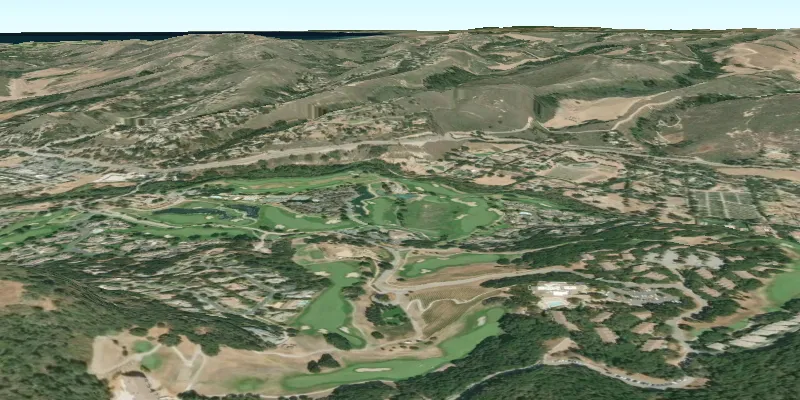
In a scene view, the terrain surface is what the basemap, operational layers, and graphics are draped onto. For example, when viewing a scene in a mountainous region, applying a terrain surface to the scene will help in recognizing the slopes, valleys, and elevated areas.
How to use the sample
When loaded, the sample will show a scene with a terrain surface applied. Pan and zoom to explore the scene and observe how the terrain surface allows visualizing elevation differences.
How it works
- Create an
ArcGISSceneand add it to aSceneView. - Create a
RasterElevationSourcewith a list of raster file paths. - Add this source to the scene’s base surface:
ArcGISScene.getBaseSurface().getElevationSources().add(RasterElevationSource).
Relevant API
- RasterElevationSource
- Surface
Additional information
Supported raster formats include:
- ASRP/USRP
- CIB1, 5, 10
- DTED0, 1, 2
- GeoTIFF
- HFA
- HRE
- IMG
- JPEG
- JPEG 2000
- NITF
- PNG
- RPF
- SRTM1, 2
Tags
3D, elevation, raster, surface, terrain
Sample code
CreateTerrainSurfaceFromLocalRasterSample.java
/* * Copyright 2018 Esri. * * Licensed under the Apache License, Version 2.0 (the "License"); you may not * use this file except in compliance with the License. You may obtain a copy of * the License at * * http://www.apache.org/licenses/LICENSE-2.0 * * Unless required by applicable law or agreed to in writing, software * distributed under the License is distributed on an "AS IS" BASIS, WITHOUT * WARRANTIES OR CONDITIONS OF ANY KIND, either express or implied. See the * License for the specific language governing permissions and limitations under * the License. */
package com.esri.samples.create_terrain_surface_from_local_raster;
import java.io.File;import java.util.Collections;import java.util.List;
import javafx.application.Application;import javafx.scene.Scene;import javafx.scene.layout.StackPane;import javafx.stage.Stage;
import com.esri.arcgisruntime.ArcGISRuntimeEnvironment;import com.esri.arcgisruntime.mapping.ArcGISScene;import com.esri.arcgisruntime.mapping.BasemapStyle;import com.esri.arcgisruntime.mapping.ElevationSource;import com.esri.arcgisruntime.mapping.RasterElevationSource;import com.esri.arcgisruntime.mapping.Surface;import com.esri.arcgisruntime.mapping.view.Camera;import com.esri.arcgisruntime.mapping.view.SceneView;
public class CreateTerrainSurfaceFromLocalRasterSample extends Application {
  private SceneView sceneView;
  @Override  public void start(Stage stage) {
    try {      // create stack pane and JavaFX app scene      StackPane stackPane = new StackPane();      Scene fxScene = new Scene(stackPane);
      // set title, size, and add JavaFX scene to stage      stage.setTitle("Create Terrain Surface from Local Raster Sample");      stage.setWidth(800);      stage.setHeight(700);      stage.setScene(fxScene);      stage.show();
      // authentication with an API key or named user is required to access basemaps and other location services      String yourAPIKey = System.getProperty("apiKey");      ArcGISRuntimeEnvironment.setApiKey(yourAPIKey);
      // create a scene with a basemap style      ArcGISScene scene = new ArcGISScene(BasemapStyle.ARCGIS_IMAGERY);
      // add the SceneView to the stack pane      sceneView = new SceneView();      sceneView.setArcGISScene(scene);      stackPane.getChildren().add(sceneView);
      // list paths to local raster(s)      List<String> localDataFilePaths = Collections.singletonList(          new File(System.getProperty("data.dir"), "./samples-data/monterey_elevation/MontereyElevation.dt2").getAbsolutePath()      );
      // create an elevation source from the raster collection      ElevationSource elevationSource = new RasterElevationSource(localDataFilePaths);
      // create a surface, adding the elevation source      Surface surface = new Surface();      surface.getElevationSources().add(elevationSource);      // set the surface to the scene      scene.setBaseSurface(surface);
      // specify the initial camera position      Camera camera = new Camera(36.51, -121.80 , 300.0, 0, 70.0, 0.0);      sceneView.setViewpointCamera(camera);    } catch (Exception e) {      // on any error, display the stack trace.      e.printStackTrace();    }  }
  /**   * Stops and releases all resources used in application.   */  @Override  public void stop() {
    if (sceneView != null) {      sceneView.dispose();    }  }
  /**   * Opens and runs application.   *   * @param args arguments passed to this application   */  public static void main(String[] args) {
    Application.launch(args);  }
}