Add a scene layer to a scene.
Use case
Each scene layer added to a scene can assist in performing helpful visual analysis. For example, if presenting the results of a shadow analysis of a major metropolitan downtown area in 3D, adding a scene layer of 3D buildings to the scene that could be toggled on/off would help to better contextualize the source of the shadows.
How to use the sample
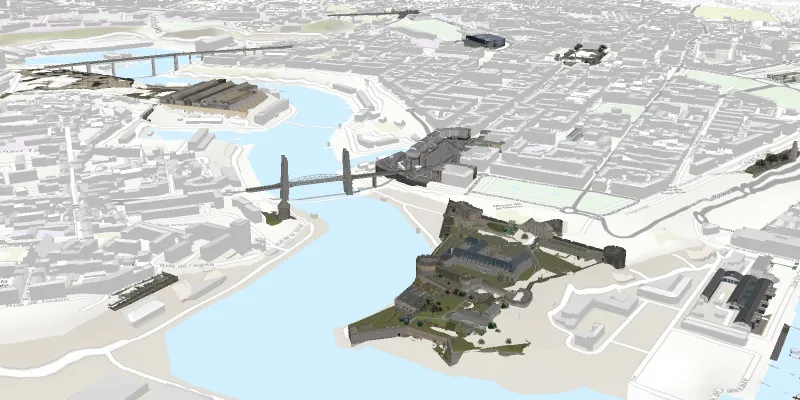
When launched, this sample displays a scene service with an ArcGISSceneLayer. Pan and zoom to explore the scene.
How it works
- Create an
ArcGISSceneand set itsBasemapwithArcGISScene.setBasemap(). - Create a
SceneViewand set the scene to the view withsceneView.setScene(scene). - Create an
ArcGISSceneLayerusing a data source URI:new ArcGISSceneLayer(Uri). - Add the new scene layer to the scene as an operational layer with
ArcGISScene.getOperationalLayers().add(sceneLayer).
About the data
The scene shows a buildings layer in Brest, France hosted on ArcGIS Online.
Relevant API
- ArcGISScene
- ArcGISSceneLayer
- SceneView
Tags
3D, layer, scene
Sample code
SceneLayerSample.java
/* * Copyright 2017 Esri. * * Licensed under the Apache License, Version 2.0 (the "License"); you may not * use this file except in compliance with the License. You may obtain a copy of * the License at * * http://www.apache.org/licenses/LICENSE-2.0 * * Unless required by applicable law or agreed to in writing, software * distributed under the License is distributed on an "AS IS" BASIS, WITHOUT * WARRANTIES OR CONDITIONS OF ANY KIND, either express or implied. See the * License for the specific language governing permissions and limitations under * the License. */
package com.esri.samples.scene_layer;
import javafx.application.Application;import javafx.scene.Scene;import javafx.scene.layout.StackPane;import javafx.stage.Stage;
import com.esri.arcgisruntime.ArcGISRuntimeEnvironment;import com.esri.arcgisruntime.layers.ArcGISSceneLayer;import com.esri.arcgisruntime.mapping.ArcGISScene;import com.esri.arcgisruntime.mapping.ArcGISTiledElevationSource;import com.esri.arcgisruntime.mapping.BasemapStyle;import com.esri.arcgisruntime.mapping.Surface;import com.esri.arcgisruntime.mapping.view.Camera;import com.esri.arcgisruntime.mapping.view.SceneView;
public class SceneLayerSample extends Application {
  private SceneView sceneView;
  @Override  public void start(Stage stage) {
    try {
      // create stack pane and JavaFX app scene      StackPane stackPane = new StackPane();      Scene fxScene = new Scene(stackPane);
      // set title, size, and add JavaFX scene to stage      stage.setTitle("Scene Layer Sample");      stage.setWidth(800);      stage.setHeight(700);      stage.setScene(fxScene);      stage.show();
      // authentication with an API key or named user is required to access basemaps and other location services      String yourAPIKey = System.getProperty("apiKey");      ArcGISRuntimeEnvironment.setApiKey(yourAPIKey);
      // create a scene with a basemap style      ArcGISScene scene = new ArcGISScene(BasemapStyle.ARCGIS_STREETS_RELIEF);
      // set the scene to the scene view, and add the scene view to the stack pane      sceneView = new SceneView();      sceneView.setArcGISScene(scene);      stackPane.getChildren().addAll(sceneView);
      // add base surface for elevation data      Surface surface = new Surface();      final String elevationImageService = "https://elevation3d.arcgis.com" +        "/arcgis/rest/services/WorldElevation3D/Terrain3D/ImageServer";      surface.getElevationSources().add(new ArcGISTiledElevationSource(elevationImageService));      scene.setBaseSurface(surface);
      // add a scene layer      final String buildings = "https://tiles.arcgis.com/tiles/P3ePLMYs2RVChkJx/arcgis/rest/services/Buildings_Brest/SceneServer/layers/0";      ArcGISSceneLayer sceneLayer = new ArcGISSceneLayer(buildings);      scene.getOperationalLayers().add(sceneLayer);
      // add a camera and initial camera position (Brest, France)      Camera camera = new Camera(48.37, -4.50, 1000.0, 10.0, 70, 0.0);      sceneView.setViewpointCamera(camera);
    } catch (Exception e) {      // on any error, display the stack trace.      e.printStackTrace();    }  }
  /**   * Stops and releases all resources used in application.   */  @Override  public void stop() {
    if (sceneView != null) {      sceneView.dispose();    }  }
  /**   * Opens and runs application.   *   * @param args arguments passed to this application   */  public static void main(String[] args) {
    Application.launch(args);  }
}