Display custom labels in a 3D scene.
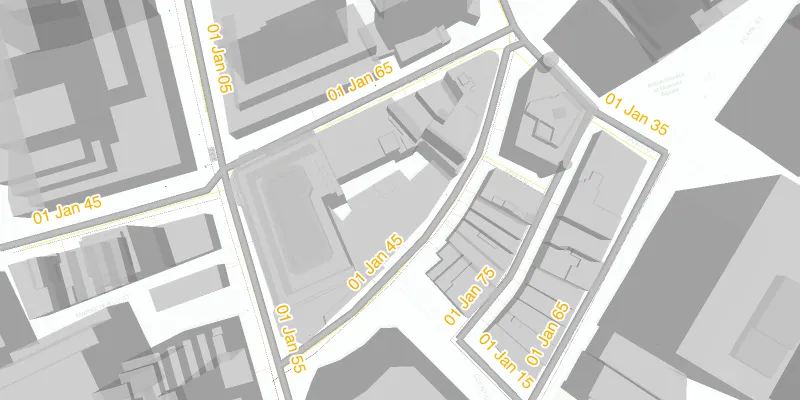
Use case
Labeling features is useful to visually display information or attributes on a scene. For example, city officials or maintenance crews may want to show installation dates of features of a gas network.
How to use the sample
Pan and zoom to explore the scene. Notice the labels showing installation dates of features in the 3D gas network.
How it works
- Create an
ArcGISSceneusing aPortalItem. - Add the scene to a
SceneViewand load it. - After loading is complete, obtain the
FeatureLayerfrom the scene’s operational layers. - Set the feature layer’s
setLabelsEnabledproperty totrue. - Create a
TextSymbolto use for displaying the label text. - Create a
LabelDefinitionusing anArcadeLabelExpressionand the text symbol. - Add the definition to the feature layer’s
labelDefinitionslist.
Relevant API
- ArcadeLabelExpression
- ArcGISScene
- FeatureLayer
- LabelDefinition
- SceneView
- TextSymbol
About the data
This sample shows a New York City infrastructure scene hosted on ArcGIS Online.
Tags
3D, arcade, attribute, buildings, label, model, scene, symbol, text, visualization
Sample code
ShowLabelsOnLayerIn3dSample.java
/* * Copyright 2021 Esri. * * Licensed under the Apache License, Version 2.0 (the "License"); you may not * use this file except in compliance with the License. You may obtain a copy of * the License at * * http://www.apache.org/licenses/LICENSE-2.0 * * Unless required by applicable law or agreed to in writing, software * distributed under the License is distributed on an "AS IS" BASIS, WITHOUT * WARRANTIES OR CONDITIONS OF ANY KIND, either express or implied. See the * License for the specific language governing permissions and limitations under * the License. */

package com.esri.samples.show_labels_on_layer_in_3d;
import javafx.application.Application;import javafx.scene.Scene;import javafx.scene.control.Alert;import javafx.scene.control.ProgressIndicator;import javafx.scene.layout.StackPane;import javafx.scene.paint.Color;import javafx.stage.Stage;
import com.esri.arcgisruntime.arcgisservices.LabelingPlacement;import com.esri.arcgisruntime.arcgisservices.LabelDefinition;import com.esri.arcgisruntime.layers.FeatureLayer;import com.esri.arcgisruntime.loadable.LoadStatus;import com.esri.arcgisruntime.mapping.ArcGISScene;import com.esri.arcgisruntime.mapping.labeling.ArcadeLabelExpression;import com.esri.arcgisruntime.mapping.view.SceneView;import com.esri.arcgisruntime.portal.Portal;import com.esri.arcgisruntime.portal.PortalItem;import com.esri.arcgisruntime.symbology.TextSymbol;
public class ShowLabelsOnLayerIn3dSample extends Application {
  private SceneView sceneView;
  @Override  public void start(Stage stage) {
    try {
      // create stack pane and JavaFX app scene      StackPane stackPane = new StackPane();      Scene fxScene = new Scene(stackPane);
      // set title, size, and add the JavaFX scene to stage      stage.setTitle("Show Labels on Layer in 3D");      stage.setWidth(800);      stage.setHeight(700);      stage.setScene(fxScene);      stage.show();
      // create a scene from an ArcGIS Online portal item      var portalItem = new PortalItem(        new Portal("https://www.arcgis.com", false), "850dfee7d30f4d9da0ebca34a533c169");      ArcGISScene scene = new ArcGISScene(portalItem);
      // set the scene to the sceneview, and add the sceneview to the JavaFX stack pane      sceneView = new SceneView();      sceneView.setArcGISScene(scene);      // create a progress indicator and display it to indicate loading is in progress      var progressIndicator = new ProgressIndicator();      progressIndicator.setVisible(true);      stackPane.getChildren().addAll(sceneView, progressIndicator);
      scene.addDoneLoadingListener(() -> {        if (scene.getLoadStatus() == LoadStatus.LOADED) {          // remove the progress indicator when the scene loads          progressIndicator.setVisible(false);
          // filter through the scene's operational layers to find the layer named "Gas",          // and find the "Gas Main" sublayer to apply the label definition to          scene.getOperationalLayers().stream()            .filter(layer -> layer.getName().equals("Gas"))            .flatMap(gasLayer -> gasLayer.getSubLayerContents().stream())            .filter(subLayer -> subLayer.getName().equals("Gas Main"))            .findFirst()            .ifPresent(gasMainSubLayer -> {                FeatureLayer featureLayer = (FeatureLayer) gasMainSubLayer;                // enable the labelling for the feature layer                featureLayer.setLabelsEnabled(true);                // clear any existing label definitions on the layer                featureLayer.getLabelDefinitions().clear();
                // create a text symbol to set to the label definition                var textSymbol = new TextSymbol();                textSymbol.setColor(Color.ORANGE);                textSymbol.setHaloColor(Color.WHITE);                textSymbol.setHaloWidth(2);                textSymbol.setSize(16);
                // create a label definition with an Arcade expression script                var arcadeLabelExpression = new ArcadeLabelExpression("Text($feature.INSTALLATIONDATE, `DD MMM YY`)");
                var labelDefinition = new LabelDefinition(arcadeLabelExpression, textSymbol);                labelDefinition.setPlacement(LabelingPlacement.LINE_ABOVE_ALONG);                labelDefinition.setUseCodedValues(true);
                // add the label definition to the feature layer                featureLayer.getLabelDefinitions().add(labelDefinition);            });        } else {          new Alert(Alert.AlertType.ERROR, "Scene failed to load " + scene.getLoadError().getCause()).show();        }      });    } catch (Exception e) {      // on any error, display the stack trace.      e.printStackTrace();    }  }
  /**   * Stops and releases all resources used in application.   */  @Override  public void stop() {
    if (sceneView != null) {      sceneView.dispose();    }  }
  /**   * Opens and runs application.   *   * @param args arguments passed to this application   */  public static void main(String[] args) {
    Application.launch(args);  }
}