Clip a geometry with another geometry.
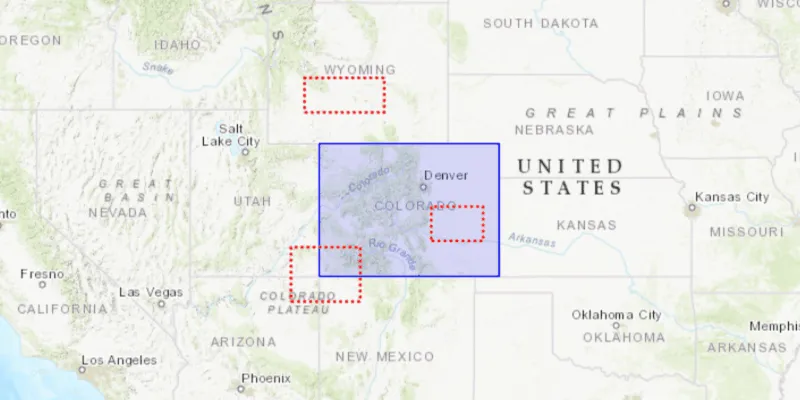
Use case
Create a new set of geometries for analysis (e.g. displaying buffer zones around abandoned coal mine shafts in an area of planned urban development) by clipping intersecting geometries.
How to use the sample
Click the “Clip” button to clip the blue graphic with the red dashed envelopes. Click the “Reset” button to remove the clipped graphics and restore the original blue graphic.
How it works
- Use the static method
GeometryEngine.clip()to generate a clippedGeometry, passing in an existingGeometryand anEnvelopeas parameters. The existing geometry will be clipped where it intersects an envelope. - Create a new
Graphicfrom the clipped geometry and add it to aGraphicsOverlayon theMapView.
Relevant API
- Envelope
- Geometry
- GeometryEngine
- Graphic
- GraphicsOverlay
Additional information
Note: the resulting geometry may be null if the envelope does not intersect the geometry being clipped.
Tags
analysis, clip, geometry
Sample code
ClipGeometrySample.java
/* * Copyright 2018 Esri. * * Licensed under the Apache License, Version 2.0 (the "License"); you may not * use this file except in compliance with the License. You may obtain a copy of * the License at * * http://www.apache.org/licenses/LICENSE-2.0 * * Unless required by applicable law or agreed to in writing, software * distributed under the License is distributed on an "AS IS" BASIS, WITHOUT * WARRANTIES OR CONDITIONS OF ANY KIND, either express or implied. See the * License for the specific language governing permissions and limitations under * the License. */
package com.esri.samples.clip_geometry;
import javafx.application.Application;import javafx.geometry.Insets;import javafx.geometry.Pos;import javafx.scene.Scene;import javafx.scene.control.Button;import javafx.scene.layout.StackPane;import javafx.scene.paint.Color;import javafx.stage.Stage;
import com.esri.arcgisruntime.ArcGISRuntimeEnvironment;import com.esri.arcgisruntime.geometry.Envelope;import com.esri.arcgisruntime.geometry.Geometry;import com.esri.arcgisruntime.geometry.GeometryEngine;import com.esri.arcgisruntime.geometry.Point;import com.esri.arcgisruntime.mapping.ArcGISMap;import com.esri.arcgisruntime.mapping.BasemapStyle;import com.esri.arcgisruntime.mapping.view.Graphic;import com.esri.arcgisruntime.mapping.view.GraphicsOverlay;import com.esri.arcgisruntime.mapping.view.MapView;import com.esri.arcgisruntime.symbology.SimpleFillSymbol;import com.esri.arcgisruntime.symbology.SimpleLineSymbol;
public class ClipGeometrySample extends Application {
  private MapView mapView;
  @Override  public void start(Stage stage) {
    try {      // create stack pane and application scene      StackPane stackPane = new StackPane();      Scene scene = new Scene(stackPane);
      // set title, size, and add scene to stage      stage.setTitle("Clip Geometry Sample");      stage.setWidth(800);      stage.setHeight(700);      stage.setScene(scene);      stage.show();
      // authentication with an API key or named user is required to access basemaps and other location services      String yourAPIKey = System.getProperty("apiKey");      ArcGISRuntimeEnvironment.setApiKey(yourAPIKey);
      // create a map with the topographic basemap style      ArcGISMap map = new ArcGISMap(BasemapStyle.ARCGIS_TOPOGRAPHIC);
      // create a map view and set the map to it      mapView = new MapView();      mapView.setMap(map);
      // create a graphics overlay to contain the geometry to clip      GraphicsOverlay graphicsOverlay = new GraphicsOverlay();      mapView.getGraphicsOverlays().add(graphicsOverlay);
      // create a blue graphic of Colorado      Envelope colorado = new Envelope(new Point(-11362327.128340, 5012861.290274),          new Point(-12138232.018408, 4441198.773776));      SimpleFillSymbol fillSymbol = new SimpleFillSymbol(SimpleFillSymbol.Style.SOLID, Color.web("blue", 0.2),          new SimpleLineSymbol(SimpleLineSymbol.Style.SOLID, Color.BLUE, 2));      Graphic coloradoGraphic = new Graphic(colorado, fillSymbol);      graphicsOverlay.getGraphics().add(coloradoGraphic);
      // create a graphics overlay to contain the clipping envelopes      GraphicsOverlay envelopesOverlay = new GraphicsOverlay();      mapView.getGraphicsOverlays().add(envelopesOverlay);
      // create a dotted red outline symbol      SimpleLineSymbol redOutline = new SimpleLineSymbol(SimpleLineSymbol.Style.DOT, Color.RED, 3);
      // create a envelope outside Colorado      Envelope outsideEnvelope =          new Envelope(new Point(-11858344.321294, 5147942.225174), new Point(-12201990.219681, 5297071.577304));      Graphic outside = new Graphic(outsideEnvelope, redOutline);      envelopesOverlay.getGraphics().add(outside);
      // create a envelope intersecting Colorado      Envelope intersectingEnvelope =          new Envelope(new Point(-11962086.479298, 4566553.881363), new Point(-12260345.183558, 4332053.378376));      Graphic intersecting = new Graphic(intersectingEnvelope, redOutline);      envelopesOverlay.getGraphics().add(intersecting);
      // create a envelope inside Colorado      Envelope containedEnvelope =          new Envelope(new Point(-11655182.595204, 4741618.772994), new Point(-11431488.567009, 4593570.068343));      Graphic contained = new Graphic(containedEnvelope, redOutline);      envelopesOverlay.getGraphics().add(contained);
      // zoom to show the polygon graphic      mapView.setViewpointGeometryAsync(coloradoGraphic.getGeometry(), 200);
      // create a graphics overlay to contain the clipped areas      GraphicsOverlay clipAreasOverlay = new GraphicsOverlay();      mapView.getGraphicsOverlays().add(clipAreasOverlay);
      // create a button to perform the clip and reset operation      var button = new Button("Clip");      button.setOnAction(e -> {        if (clipAreasOverlay.getGraphics().isEmpty()){          // for each envelope, clip the Colorado geometry and show the result, replacing the original Colorado graphic          coloradoGraphic.setVisible(false);          envelopesOverlay.getGraphics().forEach(graphic -> {            Geometry geometry = GeometryEngine.clip(coloradoGraphic.getGeometry(), (Envelope) graphic.getGeometry());            if (geometry != null) {              Graphic clippedGraphic = new Graphic(geometry, fillSymbol);              clipAreasOverlay.getGraphics().add(clippedGraphic);}          });
          // update the button text          button.setText("Reset");        } else {          // remove clipped graphics and re-enable the original Colorado graphic          clipAreasOverlay.getGraphics().clear();          coloradoGraphic.setVisible(true);
          // update the button text          button.setText("Clip");        }});
      // add the map view to the stack pane      stackPane.getChildren().addAll(mapView, button);      StackPane.setAlignment(button, Pos.TOP_LEFT);      StackPane.setMargin(button, new Insets(10, 0, 0, 10));    } catch (Exception e) {      // on any error, display the stack trace.      e.printStackTrace();    }  }
  /**   * Stops and releases all resources used in application.   */  @Override  public void stop() {
    if (mapView != null) {      mapView.dispose();    }  }
  /**   * Opens and runs application.   *   * @param args arguments passed to this application   */  public static void main(String[] args) {
    Application.launch(args);  }
}