Project a point from one spatial reference to another.
Use case
Being able to project between spatial references is fundamental to a GIS. An example of when you would need to re-project data is if you had data in two different spatial references, but wanted to perform an intersect analysis with the GeometryEngine.intersect function. This function takes two geometries as parameters, and both geometries must be in the same spatial reference. If they are not, you could first use GeometryEngine.project to convert the geometries so they match.
How to use the sample
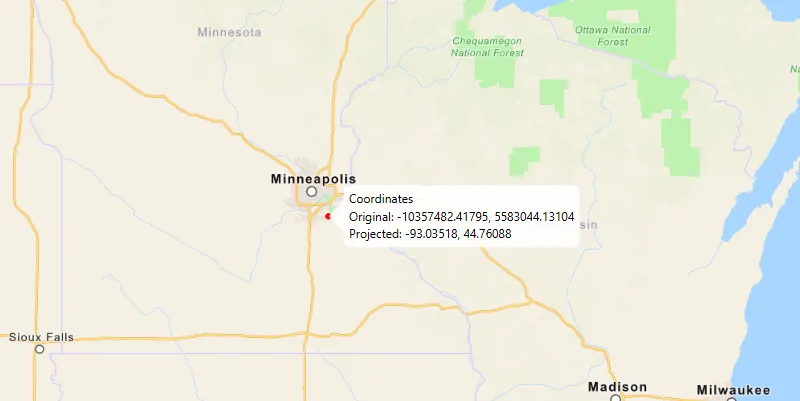
Click anywhere on the map. A callout will display the clicked location’s coordinate in the original (basemap’s) spatial reference and in the projected spatial reference.
How it works
- Call the static method,
GeometryEngine.project, passing in the originalGeometryand aSpatialReferenceto which it should be projected.
Relevant API
- GeometryEngine
- Point
- SpatialReference
Additional information
In cases where the the output spatial reference uses a different geographic coordinate system than that of the input spatial reference, see the GeometryEngine.project method that additionally takes in a DatumTransformation parameter.
Tags
coordinate system, coordinates, latitude, longitude, projected, projection, spatial reference, Web Mercator, WGS 84
Sample code
/* * Copyright 2018 Esri. * * Licensed under the Apache License, Version 2.0 (the "License"); you may not * use this file except in compliance with the License. You may obtain a copy of * the License at * * http://www.apache.org/licenses/LICENSE-2.0 * * Unless required by applicable law or agreed to in writing, software * distributed under the License is distributed on an "AS IS" BASIS, WITHOUT * WARRANTIES OR CONDITIONS OF ANY KIND, either express or implied. See the * License for the specific language governing permissions and limitations under * the License. */
package com.esri.samples.project;
import java.text.DecimalFormat;
import javafx.application.Application;import javafx.geometry.Point2D;import javafx.scene.Scene;import javafx.scene.input.MouseButton;import javafx.scene.layout.StackPane;import javafx.scene.paint.Color;import javafx.stage.Stage;
import com.esri.arcgisruntime.ArcGISRuntimeEnvironment;import com.esri.arcgisruntime.geometry.Envelope;import com.esri.arcgisruntime.geometry.Geometry;import com.esri.arcgisruntime.geometry.GeometryEngine;import com.esri.arcgisruntime.geometry.Point;import com.esri.arcgisruntime.geometry.SpatialReference;import com.esri.arcgisruntime.geometry.SpatialReferences;import com.esri.arcgisruntime.mapping.ArcGISMap;import com.esri.arcgisruntime.mapping.BasemapStyle;import com.esri.arcgisruntime.mapping.view.Callout;import com.esri.arcgisruntime.mapping.view.Graphic;import com.esri.arcgisruntime.mapping.view.GraphicsOverlay;import com.esri.arcgisruntime.mapping.view.MapView;import com.esri.arcgisruntime.symbology.SimpleMarkerSymbol;
public class ProjectSample extends Application {
  private MapView mapView;
  @Override  public void start(Stage stage) {
    try {      // create stack pane and application scene      StackPane stackPane = new StackPane();      Scene scene = new Scene(stackPane);
      // set title, size, and add scene to stage      stage.setTitle("Project Sample");      stage.setWidth(800);      stage.setHeight(700);      stage.setScene(scene);      stage.show();
      // authentication with an API key or named user is required to access basemaps and other location services      String yourAPIKey = System.getProperty("apiKey");      ArcGISRuntimeEnvironment.setApiKey(yourAPIKey);
      // create a map with the navigation basemap style      ArcGISMap map = new ArcGISMap(BasemapStyle.ARCGIS_NAVIGATION);
      // create a map view and set the map to it      mapView = new MapView();      mapView.setMap(map);
      // zoom to Minneapolis      Geometry startingEnvelope = new Envelope(-10995912.335747, 5267868.874421, -9880363.974046, 5960699.183877,          SpatialReferences.getWebMercator());      mapView.setViewpointGeometryAsync(startingEnvelope);
      // create a graphics to show the input location      GraphicsOverlay graphicsOverlay = new GraphicsOverlay();      mapView.getGraphicsOverlays().add(graphicsOverlay);
      // create a red marker symbol for the input point      final SimpleMarkerSymbol markerSymbol = new SimpleMarkerSymbol(SimpleMarkerSymbol.Style.CIRCLE, Color.RED, 5);      Graphic inputPointGraphic = new Graphic();      inputPointGraphic.setSymbol(markerSymbol);      graphicsOverlay.getGraphics().add(inputPointGraphic);
      DecimalFormat decimalFormat = new DecimalFormat("#.00000");
      // show the input location where the user clicks on the map      mapView.setOnMouseClicked(e -> {        if (e.isStillSincePress() && e.getButton() == MouseButton.PRIMARY) {          Point2D point2D = new Point2D(e.getX(), e.getY());          // show the clicked location on the map with a graphic          Point originalPoint = mapView.screenToLocation(point2D);          inputPointGraphic.setGeometry(originalPoint);          // project the web mercator point to WGS84 (WKID 4326)          Point projectedPoint = (Point) GeometryEngine.project(originalPoint, SpatialReference.create(4236));          // show the original and projected point coordinates in a callout from the graphic          Callout callout = mapView.getCallout();          callout.setTitle("Coordinates");          String ox = decimalFormat.format(originalPoint.getX());          String oy = decimalFormat.format(originalPoint.getY());          String px = decimalFormat.format(projectedPoint.getX());          String py = decimalFormat.format(projectedPoint.getY());          callout.setDetail("Original: " + ox + ", " + oy + "\n" + "Projected: " + px + ", " + py);          callout.showCalloutAt(inputPointGraphic, originalPoint);        }      });
      // add the map view to the stack pane      stackPane.getChildren().add(mapView);    } catch (Exception e) {      // on any error, display the stack trace.      e.printStackTrace();    }  }
  /**   * Stops and releases all resources used in application.   */  @Override  public void stop() {
    if (mapView != null) {      mapView.dispose();    }  }
  /**   * Opens and runs application.   *   * @param args arguments passed to this application   */  public static void main(String[] args) {
    Application.launch(args);  }
}