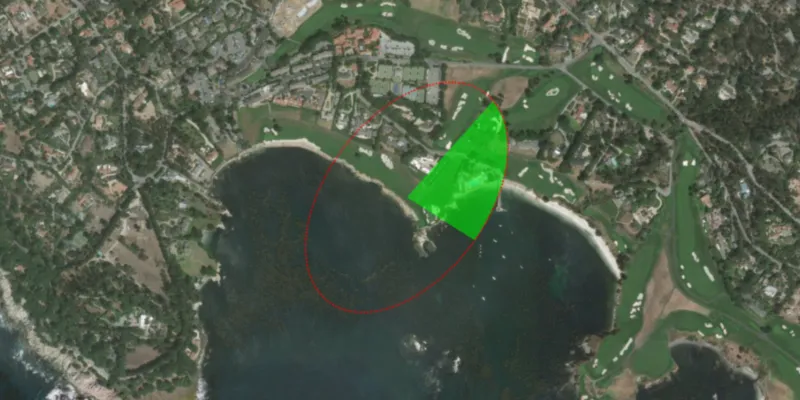
Create and display geodesic sectors and ellipses.
Use case
Geodesic sectors and ellipses can be used in a wide range of analyses ranging from projectile landing zones to antenna coverage. For example, given the strength and direction of a cellular tower’s signal, you could generate cell coverage geometries to identify areas without sufficient connectivity.
How to use the sample
The geodesic sector and ellipse will display with default parameters at the start. Click anywhere on the map to change the center of the geometries. Adjust any of the controls to see how they affect the sector and ellipse on the fly.
How it works
- Create
GeodesicSectorParametersandGeodesicEllipseParametersusing one of the constructors with default values or using each setter individually. - Set the
center,axisDirection,semiAxis1Length, and thesemiAxis2Lengthproperties to change the general ellipse position, shape, and orientation. - Set the
sectorAngleandstartDirectionangles to change the sector’s shape and orientation. - Set the
maxPointCountandmaxSegmentLengthproperties to control the complexity of the geometries and the approximation of the ellipse curve. - Specify the
geometryTypeto eitherPOLYGON,POLYLINE, orMULTIPOINTto change the result geometry type. - Pass the parameters to the related static methods:
GeometryEngine.ellipseGeodesic(geodesicEllipseParameters)andGeometryEngine.sectorGeodesic(geodesicSectorParameters). The returned value will be aGeometryof the type specified by thegeometryTypeparameter.
Relevant API
- GeodesicEllipseParameters
- GeodesicSectorParameters
- GeometryEngine
- GeometryType
Additional information
To create a circle instead of an ellipse, simply set semiAxis2Length to 0.0 and semiAxis1Length to the desired radius of the circle. This eliminates the need to update both parameters to the same value.
Tags
ellipse, geodesic, geometry, sector
Sample code
/* * Copyright 2018 Esri. * * Licensed under the Apache License, Version 2.0 (the "License"); you may not * use this file except in compliance with the License. You may obtain a copy of * the License at * * http://www.apache.org/licenses/LICENSE-2.0 * * Unless required by applicable law or agreed to in writing, software * distributed under the License is distributed on an "AS IS" BASIS, WITHOUT * WARRANTIES OR CONDITIONS OF ANY KIND, either express or implied. See the * License for the specific language governing permissions and limitations under * the License. */
package com.esri.samples.geodesic_sector_and_ellipse;
import javafx.fxml.FXML;import javafx.geometry.Point2D;import javafx.scene.control.ComboBox;import javafx.scene.control.Slider;import javafx.scene.control.Spinner;import javafx.scene.input.MouseButton;import javafx.scene.paint.Color;
import com.esri.arcgisruntime.ArcGISRuntimeEnvironment;import com.esri.arcgisruntime.geometry.GeodesicEllipseParameters;import com.esri.arcgisruntime.geometry.GeodesicSectorParameters;import com.esri.arcgisruntime.geometry.Geometry;import com.esri.arcgisruntime.geometry.GeometryEngine;import com.esri.arcgisruntime.geometry.GeometryType;import com.esri.arcgisruntime.geometry.Point;import com.esri.arcgisruntime.geometry.SpatialReferences;import com.esri.arcgisruntime.mapping.ArcGISMap;import com.esri.arcgisruntime.mapping.BasemapStyle;import com.esri.arcgisruntime.mapping.Viewpoint;import com.esri.arcgisruntime.mapping.view.Graphic;import com.esri.arcgisruntime.mapping.view.GraphicsOverlay;import com.esri.arcgisruntime.mapping.view.MapView;import com.esri.arcgisruntime.symbology.FillSymbol;import com.esri.arcgisruntime.symbology.LineSymbol;import com.esri.arcgisruntime.symbology.MarkerSymbol;import com.esri.arcgisruntime.symbology.SimpleFillSymbol;import com.esri.arcgisruntime.symbology.SimpleLineSymbol;import com.esri.arcgisruntime.symbology.SimpleMarkerSymbol;
public class GeodesicSectorAndEllipseController {
  @FXML private MapView mapView;  @FXML private Slider axisDirectionSlider;  @FXML private Spinner<Integer> maxPointCountSpinner;  @FXML private Slider maxSegmentLengthSlider;  @FXML private ComboBox<GeometryType> geometryTypeComboBox;  @FXML private Slider sectorAngleSlider;  @FXML private Slider semiAxis1LengthSlider;  @FXML private Slider semiAxis2LengthSlider;  @FXML private Slider startDirectionSlider;
  private Point center;  private Graphic sectorGraphic;  private Graphic ellipseGraphic;  private FillSymbol sectorFillSymbol;  private LineSymbol sectorLineSymbol;  private MarkerSymbol sectorMarkerSymbol;
  public void initialize() {    // authentication with an API key or named user is required to access basemaps and other location services    String yourAPIKey = System.getProperty("apiKey");    ArcGISRuntimeEnvironment.setApiKey(yourAPIKey);
    // create a map with the standard imagery basemap style    ArcGISMap map = new ArcGISMap(BasemapStyle.ARCGIS_IMAGERY_STANDARD);
    // set the map to the map view    mapView.setMap(map);
    // set a viewpoint on the map view    center = new Point(-13574921.207495, 4378809.903179, SpatialReferences.getWebMercator());    mapView.setViewpoint(new Viewpoint(center, 10000));
    // create a graphics overlay for showing the geometries as graphics    GraphicsOverlay graphicsOverlay = new GraphicsOverlay();    mapView.getGraphicsOverlays().add(graphicsOverlay);
    // create a graphic to show the geodesic sector geometry    sectorGraphic = new Graphic();    graphicsOverlay.getGraphics().add(sectorGraphic);
    // create green symbols for each sector output geometry type    Color transparentLime = Color.web("lime", 0.5);    sectorFillSymbol = new SimpleFillSymbol(SimpleFillSymbol.Style.SOLID, transparentLime, null);    sectorLineSymbol = new SimpleLineSymbol(SimpleLineSymbol.Style.SOLID, transparentLime, 3);    sectorMarkerSymbol = new SimpleMarkerSymbol(SimpleMarkerSymbol.Style.CIRCLE, transparentLime, 3);
    // create a red dotted outline graphic for showing the geodesic ellipse geometry    SimpleLineSymbol ellipseLineSymbol = new SimpleLineSymbol(SimpleLineSymbol.Style.DOT, Color.RED, 2);    ellipseGraphic = new Graphic();    ellipseGraphic.setSymbol(ellipseLineSymbol);    graphicsOverlay.getGraphics().add(ellipseGraphic);
    // set the center of the sector and ellipse where the user clicks on the map    mapView.setOnMouseClicked(e -> {      if (e.isStillSincePress() && e.getButton() == MouseButton.PRIMARY) {        Point2D point2D = new Point2D(e.getX(), e.getY());        center = mapView.screenToLocation(point2D);        updateSector();      }    });
    // set up the controls with some default parameters    GeodesicSectorParameters defaultParameters = new GeodesicSectorParameters(center, 100.0, 100.0, 15.0, 0.0);    axisDirectionSlider.setValue(defaultParameters.getAxisDirection());    maxPointCountSpinner.getValueFactory().setValue(Long.valueOf(defaultParameters.getMaxPointCount()).intValue());    maxSegmentLengthSlider.setValue(defaultParameters.getMaxSegmentLength());    geometryTypeComboBox.getItems().addAll(GeometryType.POLYGON, GeometryType.POLYLINE, GeometryType.MULTIPOINT);    geometryTypeComboBox.getSelectionModel().select(GeometryType.POLYGON);    sectorAngleSlider.setValue(defaultParameters.getSectorAngle());    semiAxis1LengthSlider.setValue(defaultParameters.getSemiAxis1Length());    semiAxis2LengthSlider.setValue(defaultParameters.getSemiAxis2Length());    startDirectionSlider.setValue(defaultParameters.getStartDirection());
    // call updateSector when any of the controls change their value    axisDirectionSlider.valueProperty().addListener(e -> updateSector());    maxPointCountSpinner.valueProperty().addListener(e -> updateSector());    maxSegmentLengthSlider.valueProperty().addListener(e -> updateSector());    geometryTypeComboBox.valueProperty().addListener(e -> updateSector());    sectorAngleSlider.valueProperty().addListener(e -> updateSector());    semiAxis1LengthSlider.valueProperty().addListener(e -> updateSector());    semiAxis2LengthSlider.valueProperty().addListener(e -> updateSector());    startDirectionSlider.valueProperty().addListener(e -> updateSector());
    // update the sector with the default parameters    updateSector();  }
  /**   * Updates the sector and ellipse graphics using the controls' values.   */  private void updateSector() {
    // create geodesic sector parameters    GeodesicSectorParameters geodesicSectorParameters = new GeodesicSectorParameters();    geodesicSectorParameters.setCenter(center);    geodesicSectorParameters.setAxisDirection(axisDirectionSlider.getValue());    geodesicSectorParameters.setMaxPointCount(maxPointCountSpinner.getValue());    geodesicSectorParameters.setMaxSegmentLength(maxSegmentLengthSlider.getValue());    geodesicSectorParameters.setGeometryType(geometryTypeComboBox.getSelectionModel().getSelectedItem());    geodesicSectorParameters.setSectorAngle(sectorAngleSlider.getValue());    geodesicSectorParameters.setSemiAxis1Length(semiAxis1LengthSlider.getValue());    geodesicSectorParameters.setSemiAxis2Length(semiAxis2LengthSlider.getValue());    geodesicSectorParameters.setStartDirection(startDirectionSlider.getValue());
    // create the geodesic sector parameter    Geometry sectorGeometry = GeometryEngine.sectorGeodesic(geodesicSectorParameters);    // set the sector graphic's geometry to the sector    sectorGraphic.setGeometry(sectorGeometry);    // update the graphic's symbol depending on the chosen output geometry type    switch (sectorGeometry.getGeometryType()) {      case MULTIPOINT:        sectorGraphic.setSymbol(sectorMarkerSymbol);        break;      case POLYGON:        sectorGraphic.setSymbol(sectorFillSymbol);        break;      case POLYLINE:        sectorGraphic.setSymbol(sectorLineSymbol);        break;    }
    // create geodesic ellipse parameters using the same values from the geodesic sector parameters    // use one of the constructors that sets some defaults for you    GeodesicEllipseParameters geodesicEllipseParameters = new GeodesicEllipseParameters(center, semiAxis1LengthSlider        .getValue(), semiAxis2LengthSlider.getValue());    geodesicEllipseParameters.setAxisDirection(axisDirectionSlider.getValue());    // show the geodesic ellipse that the sector is in    Geometry ellipseGeometry = GeometryEngine.ellipseGeodesic(geodesicEllipseParameters);    ellipseGraphic.setGeometry(ellipseGeometry);  }
  /**   * Disposes of application resources.   */  void terminate() {
    if (mapView != null) {      mapView.dispose();    }  }
}
/* * Copyright 2018 Esri. * * Licensed under the Apache License, Version 2.0 (the "License"); you may not * use this file except in compliance with the License. You may obtain a copy of * the License at * * http://www.apache.org/licenses/LICENSE-2.0 * * Unless required by applicable law or agreed to in writing, software * distributed under the License is distributed on an "AS IS" BASIS, WITHOUT * WARRANTIES OR CONDITIONS OF ANY KIND, either express or implied. See the * License for the specific language governing permissions and limitations under * the License. */
package com.esri.samples.geodesic_sector_and_ellipse;
import java.io.IOException;
import javafx.application.Application;import javafx.fxml.FXMLLoader;import javafx.scene.Parent;import javafx.scene.Scene;import javafx.stage.Stage;
public class GeodesicSectorAndEllipseSample extends Application {
private static GeodesicSectorAndEllipseController controller;
@Override public void start(Stage stage) throws IOException { // set up the scene FXMLLoader loader = new FXMLLoader(getClass().getResource("/geodesic_sector_and_ellipse/main.fxml")); Parent root = loader.load(); controller = loader.getController(); Scene scene = new Scene(root);
// set up the stage stage.setTitle("Geodesic Sector And Ellipse Sample"); stage.setWidth(800); stage.setHeight(700); stage.setScene(scene); stage.show(); }
/** * Stops and releases all resources used in application. */ @Override public void stop() { controller.terminate(); }
/** * Opens and runs application. * * @param args arguments passed to this application */ public static void main(String[] args) {
Application.launch(args); }}