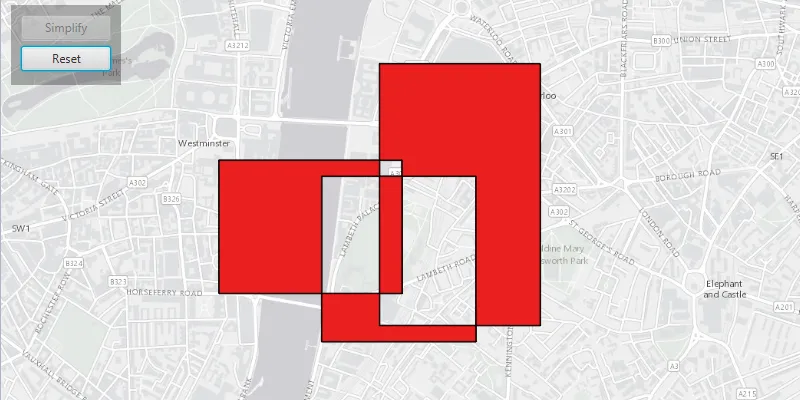
Simplify a polygon with a self-intersecting geometry.
Use case
A user may draw a polygon which is self-intersecting or contains incorrect ring orientations. The geometry must be simplified before it can be saved to a geodatabase.
How to use the sample
Click the ‘Simplify’ button to simplify the geometry. Click ‘Reset’ to reset to the original geometry.
How it works
- Check if the polygon geometry needs to be simplified using
GeometryEngine.isSimple(Geometry). - Simplify the polygon’s geometry using
GeometryEngine.simplify(Geometry).
Relevant API
- Geometry
- GeometryEngine
Additional information
The concept of topological simplicity is different than geometry generalization, where points are removed from polygons or lines to create a more generalized result while preserving overall shape. See the ‘Densify and Generalize’ sample for comparison.
Tags
geometry, polygon, simplify, spatial operations, topology
Sample code
GeometryEngineSimplifySample.java
/* * Copyright 2017 Esri. * * Licensed under the Apache License, Version 2.0 (the "License"); you may not * use this file except in compliance with the License. You may obtain a copy of * the License at * * http://www.apache.org/licenses/LICENSE-2.0 * * Unless required by applicable law or agreed to in writing, software * distributed under the License is distributed on an "AS IS" BASIS, WITHOUT * WARRANTIES OR CONDITIONS OF ANY KIND, either express or implied. See the * License for the specific language governing permissions and limitations under * the License. */
package com.esri.samples.geometry_engine_simplify;
import javafx.application.Application;import javafx.geometry.Insets;import javafx.geometry.Pos;import javafx.scene.Scene;import javafx.scene.control.Alert;import javafx.scene.control.Button;import javafx.scene.layout.Background;import javafx.scene.layout.BackgroundFill;import javafx.scene.layout.CornerRadii;import javafx.scene.layout.StackPane;import javafx.scene.layout.VBox;import javafx.scene.paint.Color;import javafx.scene.paint.Paint;import javafx.stage.Stage;
import com.esri.arcgisruntime.ArcGISRuntimeEnvironment;import com.esri.arcgisruntime.geometry.Geometry;import com.esri.arcgisruntime.geometry.GeometryEngine;import com.esri.arcgisruntime.geometry.Part;import com.esri.arcgisruntime.geometry.PartCollection;import com.esri.arcgisruntime.geometry.Point;import com.esri.arcgisruntime.geometry.PointCollection;import com.esri.arcgisruntime.geometry.Polygon;import com.esri.arcgisruntime.geometry.SpatialReferences;import com.esri.arcgisruntime.loadable.LoadStatus;import com.esri.arcgisruntime.mapping.ArcGISMap;import com.esri.arcgisruntime.mapping.BasemapStyle;import com.esri.arcgisruntime.mapping.view.Graphic;import com.esri.arcgisruntime.mapping.view.GraphicsOverlay;import com.esri.arcgisruntime.mapping.view.MapView;import com.esri.arcgisruntime.symbology.SimpleFillSymbol;import com.esri.arcgisruntime.symbology.SimpleLineSymbol;
public class GeometryEngineSimplifySample extends Application {
  private ArcGISMap map; // keep loadable in scope to avoid garbage collection  private GraphicsOverlay resultGeomOverlay;  private Graphic polygon;  private MapView mapView;
  // simple black line symbol  private final SimpleLineSymbol line = new SimpleLineSymbol(SimpleLineSymbol.Style.SOLID, Color.BLACK, 1);
  @Override  public void start(Stage stage) {
    try {      // create stack pane and application scene      StackPane stackPane = new StackPane();      Scene scene = new Scene(stackPane);      scene.getStylesheets().add(getClass().getResource("/geometry_engine_simplify/style.css").toExternalForm());
      // set title, size, and add scene to stage      stage.setTitle("Geometry Engine Simplify Sample");      stage.setWidth(800);      stage.setHeight(700);      stage.setScene(scene);      stage.show();
      // authentication with an API key or named user is required to access basemaps and other location services      String yourAPIKey = System.getProperty("apiKey");      ArcGISRuntimeEnvironment.setApiKey(yourAPIKey);
      // create a control panel      VBox controlsVBox = new VBox(6);      controlsVBox.setBackground(new Background(new BackgroundFill(Paint.valueOf("rgba(0,0,0,0.3)"), CornerRadii.EMPTY,          Insets.EMPTY)));      controlsVBox.setPadding(new Insets(10.0));      controlsVBox.setMaxSize(110, 80);      controlsVBox.getStyleClass().add("panel-region");
      // create simplify button      Button simplifyButton = new Button("Simplify");      simplifyButton.setMaxWidth(Double.MAX_VALUE);      simplifyButton.setDisable(true);
      // create reset button      Button resetButton = new Button("Reset");      resetButton.setMaxWidth(Double.MAX_VALUE);      resetButton.setDisable(true);
      // perform the simplify geometry operation      simplifyButton.setOnAction(e -> {
        // check if the geometry needs to be simplified        if (!GeometryEngine.isSimple(polygon.getGeometry())) {
          // simplify the geometry          Geometry resultPolygon = GeometryEngine.simplify(polygon.getGeometry());
          // update result as a red graphic          SimpleFillSymbol redSymbol = new SimpleFillSymbol(SimpleFillSymbol.Style.SOLID, Color.RED, line);          resultGeomOverlay.getGraphics().add(new Graphic(resultPolygon, redSymbol));
          resetButton.setDisable(false);          simplifyButton.setDisable(true);        }      });
      // clear result layer      resetButton.setOnAction(e -> {        resultGeomOverlay.getGraphics().clear();        simplifyButton.setDisable(false);        resetButton.setDisable(true);      });
      // add buttons to the control panel      controlsVBox.getChildren().addAll(simplifyButton, resetButton);
      // create a map with the light gray basemap style      map = new ArcGISMap(BasemapStyle.ARCGIS_LIGHT_GRAY);
      // enable geometry operations when the map is done loading      map.addDoneLoadingListener(() -> {        if (map.getLoadStatus() == LoadStatus.LOADED) {          simplifyButton.setDisable(false);        } else {          Alert alert = new Alert(Alert.AlertType.ERROR, "Map Failed to Load!");          alert.show();        }      });
      // create a map view and set the map to it      mapView = new MapView();      mapView.setMap(map);
      // set a viewpoint on the map view, centered on London      mapView.setViewpointCenterAsync(new Point(-13500, 6710327, SpatialReferences.getWebMercator()), 25000);
      // create geometry layers      GraphicsOverlay geomOverlay = new GraphicsOverlay();      mapView.getGraphicsOverlays().add(geomOverlay);
      resultGeomOverlay = new GraphicsOverlay();      mapView.getGraphicsOverlays().add(resultGeomOverlay);
      // create sample polygon      createPolygon();      geomOverlay.getGraphics().add(polygon);
      // add the map view and control panel to stack pane      stackPane.getChildren().addAll(mapView, controlsVBox);      StackPane.setAlignment(controlsVBox, Pos.TOP_LEFT);      StackPane.setMargin(controlsVBox, new Insets(10, 0, 0, 10));
    } catch (Exception e) {      // on any error, display the stack trace      e.printStackTrace();    }  }
  /**   * Creates the polygon.   */  private void createPolygon() {
    // part one    PointCollection partSegmentCollectionOne = new PointCollection(SpatialReferences.getWebMercator());    partSegmentCollectionOne.add(new Point(-13020, 6710130));    partSegmentCollectionOne.add(new Point(-14160, 6710130));    partSegmentCollectionOne.add(new Point(-14160, 6709300));    partSegmentCollectionOne.add(new Point(-13020, 6709300));    partSegmentCollectionOne.add(new Point(-13020, 6710130));    Part partOne = new Part(partSegmentCollectionOne);
    // part two    PointCollection partSegmentCollectionTwo = new PointCollection(SpatialReferences.getWebMercator());    partSegmentCollectionTwo.add(new Point(-12160, 6710730));    partSegmentCollectionTwo.add(new Point(-13160, 6710730));    partSegmentCollectionTwo.add(new Point(-13160, 6709100));    partSegmentCollectionTwo.add(new Point(-12160, 6709100));    partSegmentCollectionTwo.add(new Point(-12160, 6710730));    Part partTwo = new Part(partSegmentCollectionTwo);
    // part three    PointCollection partSegmentCollectionThree = new PointCollection(SpatialReferences.getWebMercator());    partSegmentCollectionThree.add(new Point(-12560, 6710030));    partSegmentCollectionThree.add(new Point(-13520, 6710030));    partSegmentCollectionThree.add(new Point(-13520, 6709000));    partSegmentCollectionThree.add(new Point(-12560, 6709000));    partSegmentCollectionThree.add(new Point(-12560, 6710030));    Part partThree = new Part(partSegmentCollectionThree);
    PartCollection polygonParts = new PartCollection(partOne);    polygonParts.add(partTwo);    polygonParts.add(partThree);
    // transparent fill    SimpleFillSymbol fillSymbol = new SimpleFillSymbol(SimpleFillSymbol.Style.SOLID, Color.TRANSPARENT, line);    polygon = new Graphic(new Polygon(polygonParts), fillSymbol);
  }
  /**   * Stops and releases all resources used in application.   */  @Override  public void stop() {
    if (mapView != null) {      mapView.dispose();    }  }
  /**   * Opens and runs application.   *   * @param args arguments passed to this application   */  public static void main(String[] args) {
    Application.launch(args);  }}